Leaderboard



Popular Content
Showing content with the highest reputation on 08/17/2026 in Files
-
Version 1.1.1
39 downloads
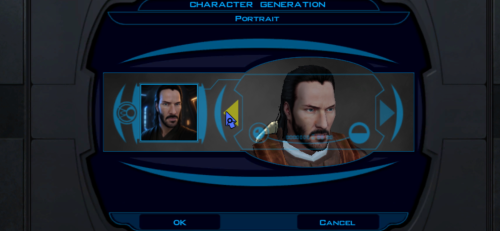
This mod adds a fully selectable male player head inspired by Keanu Reeves to Star Wars: Knights of the Old Republic. FEATURES • Custom high-detail head model with corrected in-game UVs and opaque 2048x2048 textures. • Neutral, light-side, and progressive dark-side head textures that change with alignment. • Matching alignment-aware cinematic portraits for character creation, the party interface, and the HUD. • KOTOR I-native facial animation support: blinking, eye movement, lip sync/phonemes, and expressions. • Rebuilt mouth articulation that opens through the natural upper/lower lip gap. • Repositioned teeth and a fully enclosed, dark oral cavity that prevents see-through gaps from frontal, oblique, side, and reclined camera angles. • Corrected neck and jaw shading across the welded source-model boundary. • Long hair configured for KOTOR I's native danglymesh simulation. • Merge-safe TSLPatcher installation for heads.2da, appearance.2da, and portraits.2da, including the installer info document. • No executable patch is required. INSTALLATION 1. Extract the archive outside your game folder. 2. Close KOTOR I. 3. Run TSLPatcher.exe and select the folder containing swkotor.exe if asked. 4. Start a new game and select the new portrait during male character creation. Install after major restoration or community-patch packages. Do not copy the tslpatchdata folder directly into Override. See the included README for complete compatibility and uninstall information. COMPATIBILITY This release is for KOTOR I only. It uses TSLPatcher and unique resource names, and is designed to coexist with K1R and other merge-safe mods. Install this mod after K1R or other large content packages. CREDITS • ShaolinGhost — concept, source asset, direction, testing, and release. • Ghost Studio — KOTOR head conversion, facial rigging, native-hair setup, packaging, and verification workflow. • BioWare and LucasArts — KOTOR I and its original PMHA04 animation/rig foundation. • Stoffe — TSLPatcher. PERMISSIONS You may make personal edits. Do not re-upload, redistribute, or include this mod in another public release without ShaolinGhost's permission. DeadlyStream staff retain the maintenance rights described in the site's upload terms. DISCLAIMER This is a non-commercial fan modification. It is not affiliated with or endorsed by Keanu Reeves, Lucasfilm, Disney, Electronic Arts, BioWare, or any other rights holder. Use at your own risk and keep backups of modded files. Version: 1.1.1 Game: Knights of the Old Republic Contains ported content from another game: No1 point -
Version 1.1.0
50 downloads
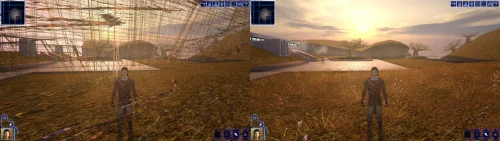
Turn off grass. For years that has been the first answer to almost any KOTOR problem, and it was good advice, because on a modern PC the grass really does tear itself across the sky. This patch fixes that, and quite a lot else. KOTOR decides how to light the world once, when it starts, choosing between two methods built for graphics cards of 2003. On most machines today neither is on offer, so the game quietly falls back to a path that was never finished: no proper lighting on walls and floors, no reflections on metal or armour, no fog, no soft shadows, and none of the screen effects. It still runs. It just looks wrong, and a lot of people have never seen it look right. This rebuilds that lighting using something every modern card does support, and puts the game back on the paths the developers actually finished. The grass is one of them. If you play on an NVIDIA card, the lighting has been working for you all along. Those drivers still carry register combiners, one of the two original methods, and it does the job properly. It is also an extension from 2001 that no other vendor implements, surviving on one company's willingness to keep shipping it. This moves every card onto a method that is still current, so there is one path everyone is exercising rather than one propped up by goodwill. What you get back Grass that stays on the ground Lighting on walls and floors, the baked lighting that makes interiors look lit rather than flat Reflections on metal, armour and polished surfaces Fog, in the places the game meant to have it Soft shadows, and the screen effects: bloom, blur, film grain, the distortion around force powers, and the colour wash on some cutscenes Requirements KOTOR 1, version 1.0.3. GOG, Steam and the CD release all work. Install it with the KotOR Patch Manager. Your game files are not modified; the manager applies the patch while the game runs. It replaces the separate cube map fix and soft shadows fix. Both are folded in, so disable those if you have them enabled in the patch manager. Source, releases and issues: https://codeberg.org/Synchro/kotor-modern-driver-compatibility Settings, if you ever need them You do not need any of this to play. The first time you run it, a file called `K1DriverCompat.ini` appears next to `swkotor.exe` with every option listed, explained, and switched off. Open it and delete the `#` in front of anything you want to change. The one worth knowing about is `look`, which chooses between the two ways cards of 2003 drew bright light. `look = nvidia` is the default and the calmer of the two. `look = ati` lets strong lights bleach out what they land on, the way a Radeon did. Neither is a bug, and neither is more correct than the other. Replacement shaders You can drop your own shader files into override/shaders/, you can create it if it isn't there. The patch will use shaders in there instead of the ones it generates, with no rebuilding and no tools. They are plain text in ARB fragment program assembly, which is what the patch compiles its own into. It sits under override so a replacement can ship as an ordinary TSLPatcher mod rather than needing its own packaging, and in a subdirectory because these are not game resources. The game ignores them completely: it only looks in override for the file extensions it knows, and has no idea what an .arb file is. Reading them is this patch's job. For more information on naming, shader inputs, and all of the mode types, take a look at this section of the README: https://codeberg.org/Synchro/kotor-modern-driver-compatibility#replacement-shaders Tested on AMD, Intel and NVIDIA hardware, on Windows and on Linux through Proton, across the GOG, Steam and CD releases. If something looks wrong `logs/K1DriverCompat.log` in your game folder holds one session and is overwritten each run, so there is only ever one file to send. Setting `log = debug` in the ini before reproducing the problem makes it far more useful. Thanks @Lane and @J tested this on cards and I don't own. Nearly everything here is based on how some particular drivers behave, and that is worth nothing until somebody with that hardware runs it and reports back. The faults that turned up that way are ones I had no way of finding on my own. @Lane also wrote the KotOR Patch Manager, which is what this ships for. LLM Disclosure This project made use of an LLM during development, in the following capacities: Brainstorming: exploring possible approaches and design directions Decompilation assistance: help interpreting and structuring reverse-engineered code Code comments: refining and clarifying existing comments Skeletons and fixes: generating initial code scaffolding and minor fixes All LLM-assisted output was modified and reviewed by a human before being committed.1 point -
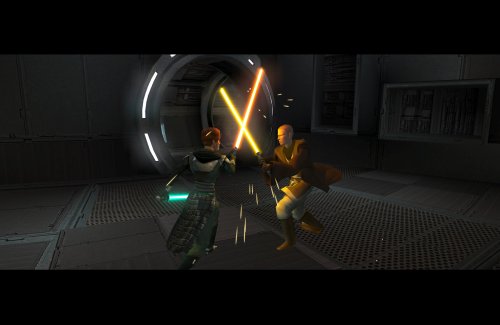
Version 1.0.1
52 downloads
Expands the mechanics of training your Jedi companions in TSLRCM. SUMMARY TSLRCM adds the ability to teach your Jedi party members a select few powers, feats, and forms. It’s a cool concept that adds to the feeling of training your companions, but it was never very fleshed out. As is, there’s a very limited pool of abilities to teach, no real player choice in what to teach, and no depiction of the training aside from a fade to black. This isn’t a fault of the TSLRCM team, there just wasn’t much to restore. The mod aims to expand the whole training mechanic to make it more interesting and immersive. Summary of the main changes of this mod: - You can now choose which abilities to teach your companions. - The pool of teachable powers, feats and forms has been significantly expanded. - Every teachable ability now includes a brief cutscene depicting the training. - Party members can learn 1 power or feat and 1 form at a time and must level up before learning more. - Different prestige classes can teach different abilities. JM/SL can teach a wider selection of powers, JWM/SM can teach more combat feats, and JW/SA can teach a mix of both. - Handmaiden and Disciple can now be trained like other Jedi companions. DETAILS INSTALLATION TSLRCM required. Ensure TSLRCM is installed first before installing this mod. To install, run HoloPatcher.exe. Select the main install option and run. Unaltered copies of any modified files will be placed inside the "backup" folder in the location of HoloPatcher.exe. If you have PartySwap installed, run the included compatibility patch. Ensure both PartySwap and the main mod have been installed first before installing this patch. UNINSTALLATION Remove the following files from override: If any files were created inside the backup folder, move them to override. COMPATIBILITY Incompatible with any mods that hard overwrite the dlg files for Atton, Bao-Dur, Disciple, Handmaiden, Mira, or Visas. Compatible with PartySwap by Darth Tyren & Leilukin using the included compatibility patch. Compatible with Visas Marr and Female Exile Romance by Leilukin. The following mods appear compatible but have not been extensively tested: Handmaiden and Female Exile - Disciple and Male Exile Romance by Leilukin Atton Rand and Male Exile Romance by Leilukin Not compatible with Mira Romance Mod by JediArchivist. Soft conflict with Train the Handmaiden by jc2 as this mod also allows training Handmaiden. BUGS Minor bug where Handmaiden doesn’t restart her idle animation after learning Burst of Speed, for some reason. Talking to her fixes it. No other bugs that I’m aware of. Please report any. PERMISSIONS You are free to use and edit this mod’s dlg files if needed to make a compatibility patch for another mod. However, please ask permission before reuploading or modifying the files for any other reason. Do not reupload any files from the PartySwap patch without permission from the author. CREDITS offthegridmorty zbyl2, DarthStoney, Hassat Hunter, VarsityPuppet & contributors - TSLRCM dlg files DarthTyren, Leilukin - PartySwap dlg files HoloPatcher - Cortisol, th3w1zard1 TSLPatcher - stoffe, Fair Strides KOTOR Tool - Fred Tetra K-GFF - tk102 AniCam - JdNoa Reone Toolkit Lip Composer - seedhartha Holocron Toolset - Cortisol, th3w1zard11 point -
Version 1.0.0
17 downloads
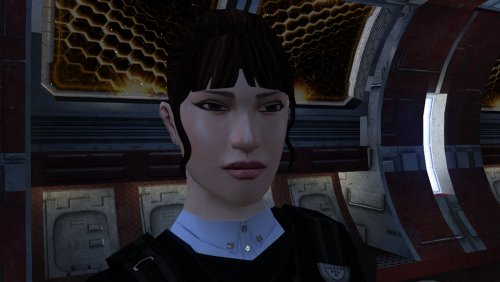
The mod replaces the PFHA04 model and textures. Thanks to DarthParametric, without him this mod would not have seen the light of day. To Install 1. Download: PFHA04 2. Copy all files to the Knights of the Old republic's Override folder. (Example location - C:\Program Files (x86)\Steam\steamapps\common\swkotor\Override) 3. When/if prompted to overwrite files, press okay. 4. If you like the mod; leave a comment or endorse! (It would be much appreciated) Made with love.1 point -
![More information about "Icons: Feats, Skills and Force Powers [TSL] - Open Beta"](https://deadlystream.com/downloads/screens/monthly_2026_05/FeatsPrimaryThumbnail4.thumb.png.758a6cf42d6e348fa9c2589cbcafea04.png)
Version 1.1
62 downloads
AUTHOR: Sith Holocron OPEN BETA: 27 MAY 2026 GAMES: Star Wars Knights of the Old Republic II Description: This time, I’m doing this a little differently. This mod collection is being released as an open beta! But first, what is it? I’ve been tinkering with making icons for TSL (and also for K1 but that’s a whole separate story) for quite some time now. I’ve shown off a few of them on the Discords for the KotOR community but I never had a real plan to actually release them in a public way. It’s more of a fun thing that I didn’t need to share. The original icon interest came about from a thread on Deadly Stream from a (now retired) modder named Nomnisang. They made a post about making a collection of icons called the KotOR II High-Res Icon Suite. (link: https://deadlystream.com/topic/3563-kotor-ii-high-res-icon-suite/) They got a promotion in RL, lost a lot of the material, and went on to different things. I had the idea of salvaging what was posted. There were not many icons posted in the thread themselves but enough pieces were there that I could start to do some work. Some of the work came about with me testing out what Topaz Gigapixel could do – both with clean up and with creativity prompts. Some of the icons were my own takes on the vanilla icons. As can be seen in the many pictures posted on the download page, there’s a bit of range from Nomnisang’s style and my own versions of the vanilla icons. The icons as presented here cover Feats, Force Powers, and Skills for TSL. The text included on the icons as shown on the Download page is not included on the icons in the game – it is merely for illustrative purposes. The Open Beta: The feedback I’m looking for. 1) The sizes of the textures here vary. They vary from 128 x 128 to 512 x 512. I do know the general consensus amongst modders about what sizes should be the most effective, but I’d rather hear from the actual end user that would be actually be using this mod. If the feedback left in this open beta suggest I may need to resize the larger of the textures, so be it. But I’d rather not just doing on the whim of folks that will never use the mod in the first place. 2) I like to think that I’m thorough and have found all of the icons that should be in this set. However – despite the rumors – I am actually human. If I’ve missed any, Id like to know which ones. And not just the name of the powers, feats, etc. I’d also need to know the actual file name of the file I’ve missed! 3) Rotting out any bugs. Is everything appearing in the game the way it’s supposed to be? There’s nothing anything showing up upside down, right? If so, that’s something I’d need to remedy! The Open Beta: The feedback I’m NOT looking for. By this time, you’ve seen the icons. You have opinions on them. You might even have suggestions on how you think I could improve them. What they look like now is basically how they’re going to stay. If any of the icons in particular don’t appeal to you, I don’t particularly need to hear about that. So please keep that in mind before posting. Installation: Copy all TGA files to the Override folder on Knights of the Old Republic II. (Example location - C:\Program Files (x86)\Steam\steamapps\common\swkotor\Override) When/if prompted to overwrite files, press okay. If a TPC file is present with the same name, move it to another location outside the game folder. If you like the mod; please leave a comment and/or give me 5 stars! Uninstall: Remove the files you’ve added in Installation instructions. If you’ve moved TPC files as referenced in the Installation instructions, you can move those back into the Override folder after you’ve deleted my TGA files of the same name. If you do decide to move any of the TPC files back, that's completely optional and up to your discretion. Changelog: Update 1: From feedback provided by Lily of Deadly Stream, discovered that the Force Barrier line of power icons were upside down. The icons have been now replaced. Special Thanks: Nomnisang: Thanks for the inspiration for doing this and the icons you did post in your original thread. Dark Hope: Thanks for his open permissions, which allowed me to grab high quality grenades for those relevant feat icons. Sithspecter: Thanks for granting permissions, which allowed me to grab pictures of his weapons from his example pictures for those relevant feat icons. Lily: For reporting the (now corrected) upside down Force barrier icons. The KotOR Discord: For previously rendered feedback on the icons.1 point -
Version 1.0.1
5 downloads
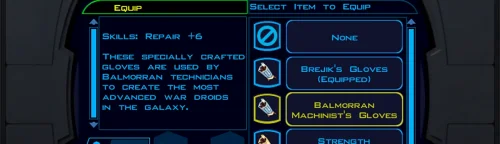
Repair Gloves Game: KOTOR 1 Author: Dodrari Kaan GitHub: https://github.com/danielstegink/Kotor.RepairGloves HK-47's quest line requires an extremely high Repair rank to complete, and must be completed before you start the Leviathan arc. With the worst possible build (Soldier/Guardian, minimal Intelligence, no Force Valor or Gearhead feats), it's impossible to get a high enough Repair rank before level 15, which I consider the ideal level for doing Leviathan. To fix this, Karal Kaar on Dantooine now sells a pair of gloves that provide the necessary bonus to Repair. Instructions Use the TSLPatcher Permissions Use this mod however you want. Just make sure to credit me. Compatibility This mod uses TSLPatcher to modify Karal Kaar's inventory on Dantooine. Any mods that modify the same may not be compatible. This mod is compatible with K1R and K1CP. Special Thanks Fred Tetra - Kotor Tool Stoffe - TSLPatcher Disclaimer THIS MODIFICATION IS NOT MADE, DISTRIBUTED, OR SUPPORTED BY BIOWARE, OR LUCASARTS ENTERTAINMENT COMPANY LLC. ELEMENTS TM & © LUCASARTS ENTERTAINMENT COMPANY LLC AND/OR ITS LICENSORS.1 point -
Version 1.0.0
99 downloads
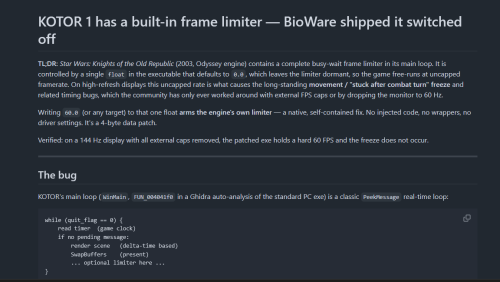
KOTOR 1 engine fixes — grass rendering, two crashes, and game speed Hey all. I've been poking at swkotor.exe for a while and ended up finding a handful of engine bugs worth sharing. The patches are now merged into the KotOR Patch Manager, so they're available to anyone. Quick note on me: I'm not a reverse engineering person by trade, I'm a student. Most of this came from trial and error — build a patched exe, play it, watch it break, go back and try again. All the function names I was working from come from Lane's KOTOR 1 reverse engineering project, and without those this would have been impossible. The grass one If you've ever turned Grass off in the graphics options because it looked like this — long streaks and beams flying across the sky, especially on Dantooine — that was a bug, not your hardware. RenderGrassPolys draws grass through one of three code paths depending on what your graphics driver supports. Two of those three hand OpenGL the wrong pointer: instead of the buffer holding the grass blade positions, they pass the address of a field that's never filled in. So the game reads whatever happens to be sitting in memory there and treats it as the coordinates of the grass. Hence the streaks. The third path — the one used when your driver reports GL_ATI_fragment_shader — does it correctly. That's why this was never widely reported: plenty of setups take the good path and never see a problem. If your machine takes one of the others, grass has been broken for you this whole time. In at least one case it was because KOTOR 1 was running on integrated graphics rather than the dedicated GPU. Lane confirmed this independently by forcing his own game down the broken path and reproducing it exactly. There were two more issues in the same function: a memory leak of OpenGL state that broke lighting on things drawn after grass, and a double free of the grass buffer that was corrupting the heap. Both fixed. The crashes Two 0xC0000005 crashes, both from the same underlying problem. The renderer keeps three lists sized for exactly 5000 textures and looks things up in them using the ID number the graphics driver assigns. Those numbers keep climbing as you change areas — the driver doesn't reuse them — so after enough loading the game indexes past the end of the list and writes into memory that isn't its own. More likely on heavily modded installs. Both spots are now bounds-checked. Worth being clear: this stops the crash, it doesn't raise the 5000 limit. Textures past that point are skipped instead of drawn. A proper fix is possible but needs more work. Game speed KOTOR ties simulation speed to framerate, so on a modern machine it runs fast. The engine already contains a frame limiter, but the value that switches it on defaults to zero, so it never runs. Setting it makes the game pace itself using its own code — no driver cap or 60Hz monitor mode needed. This is also why the post-combat movement freeze gets rarer with a cap. The direct fix for that is J's Post-Combat Movement Fix, separately available in KPM. How to get it Through the KotOR Patch Manager (recommended) — three patches, now merged upstream: Texture Bucket Memory Safety — the two crash fixes Grass Buffer Double Free Grass Rendering Fix KPM injects at runtime, so your executable isn't modified and you can turn individual fixes on and off. Or a standalone script if you'd rather patch the exe directly — it also includes the frame cap and the 4GB flag, writes a backup first, and has a --revert that restores the original bytes exactly. Link in my signature. Either way: this needs the KOTOR Editable Executable from here on DeadlyStream if you're on Steam, since the shipped exe is encrypted. GOG's is usually fine already. The script checks and refuses anything it doesn't recognise. Turn Grass back on once it's applied. That's the point. Compatibility No game content is touched, only the executable — so Community Patch, mod builds, texture packs and so on are all unaffected. Widescreen (UniWS) and the HR menu patch are fine too; apply those first and this last. Tested on the standard PC v1.03 / editable-exe layout with a ~180 mod build (the Spoiler-Free build from the neocities guide) on AMD hardware. Should apply to GOG as well — that build is the same apart from a signature — but I haven't tested it there myself. Credits Lane's KOTOR 1 (GoG) reverse engineering work supplied every function name I used. Finding a bug in RenderGrassPolys is only possible once something tells you that's what the function is called. He also reviewed the patches and caught two real mistakes in my first attempt — one of which was silently breaking shadows. Synchro is working on a much broader fix in the same area, porting the old ATI-specific shader paths to modern ARB equivalents, which fixes cubemaps, bump maps and more besides. Worth watching — it addresses the root of why so much of this game renders oddly on current hardware. Thanks also to J, Vriff and JC in the OpenKotOR Discord for the testing and the sanity checks. Happy to answer questions. If you've had grass turned off for years, give it a try. kotor_patch.py1 point -

Version 1.2.1
33,660 downloads
If you update from version 1.0.x to 1.1 make sure to read the special instructions in the read-me! In order to update to 1.1.1 from any previous version, delete all 306nara.wok, 306narb.wok and 306nard.wok from your Override folder. If you had version 1.1 installed there is no need for anything else, otherwise follow the instructions in the read-me. ABOUT: This mod replaces every skybox and every planetary backdrop in the game with a new high resolution version made from scratch. This includes a replacement of every skybox model to fix all the glaring issues with the original. There are also some additional minor changes that either fix issues with the vanilla environments or serve to better blend ingame terrain and skybox. Other than that I recommend you just check out the screenshots as pictures say more than a thousand words or check the video to see the animated skyboxes. Click the following image to see additional interactive screenshot comparisons: There are also add-ons with new skyboxes for the following mods: M4-78 Enhancement Project Coruscant - Jedi Temple If you find any issues or have any other comments, please let me know and I'll see what can be done. INSTALLATION: For installation instructions check the read-me files of the individual downloads. You either have to run an installer or just drop files into your Override folder. For the mod to take full effect you need a savegame where you have not yet left Citadel Station. If you update from version 1.0.x to 1.1 make sure to read the special instructions. I also highly recommend to install the fog fix if you are using the latest Steam patch. COMPABILITY: This mod is not compatible with any mod that edits skyboxes in any way. This includes mods that only edit their models. There might also be rare incompabilities with mods that edit non-skybox area models if those models are also edited by this mod. PERMISSIONS: You may NOT redistribute any textures included in this archive without my explicit permission. You may however use all the models as long as you give me credit. CREDITS: This mod was created by Kexikus using mainly Terragen 4, Photoshop CS6 and 3ds Max. Additional tools used: KotOR Tool by Fred Tetra K-GFF by TK102 MDL edit by bead-v MDLOps by ndix UR KOTORmax by bead-v tga2tpc by ndix UR Additional resources by: Andy Welder: Dantooine tree model Animum: Dxun/Onderon tree model Bioware: Nar Shaddaa traffic models, Coruscant traffic texture, M4-78 buildings creativepack: Additional Nar Shaddaa textures dandelO: grass shader Dantooine and Telos, snow shader Dantooine Flo: Dxun bush model Jorak Uln: Taris window texture Martin Frank: Dxun bush model mhaze: Telos rock/mountain shader Misha Winkler: Grass model Dantooine Obsidian: Telos tree model, Nar Shaddaa textures, Onderon buildings, M4-78 buildings PCWallArt.com: Onderon gold texture proper33: Malachor lightning texture SCIFI3D.com: Coruscant buildings svenniemannie: Additional Coruscant texture Texturify: Additional Nar Shaddaa texture TheBlackHole: M4-78 lava shader Veronica Bush: Dxun bush model VIS-Games: M4-78 excavator model THIS MOD IS NOT SUPPORTED BY LUCASARTS OR OBSIDIAN. USE THIS FILE AT YOUR OWN RISK. NEITHER THE AUTHOR OF THIS MOD NOR THE COMPANIES MENTIONED ABOVE ARE RESPONSIBLE FOR ANY DAMAGE TO YOUR COMPUTER WHEN USING THIS FILE.1 point -
![More information about "[KotOR] Dialogue Fixes"](https://deadlystream.com/downloads/screens/monthly_2018_07/images.thumb.jpg.c19371df3c91f00aba389a76a8b84c77.jpg)
Version 5.4
81,689 downloads
In an attempt to salvage some material from the now defunct SW:KotOR Upgrade project, I have decided to share this modification with the community. This file is meant to replace the original dialog.tlk that comes with the original game. It is meant to be used exclusively with the English version of the game. It is technically compatible with every other modification that alter this same file by patching it, provided this is installed first. Two versions are offered: one that includes only corrections and a revised one that includes most of the changes found in the PC Response Moderation modification by Kainzorus Prime. Enjoy!1 point