
Jump to content

11 Screenshots

About This File

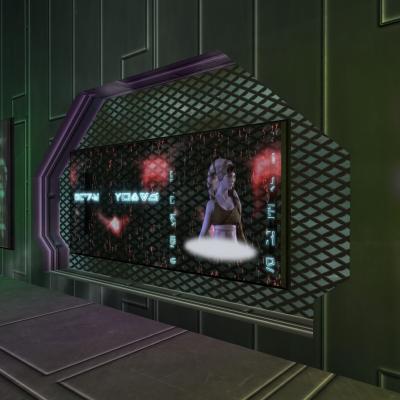
Unlike its predecessor, the Complete Overhaul for K1, the purpose of this texture mod is to preserve the original look of the game,
while using different texturing techniques to give the old game engine a modern look, emulating shine & vector based animations from the Mass Effect series.


Im sorry guys that i cant provide screenshots at the moment, my graphics card is malfunctioning.


Installation:


Download the file, extract its contents with an archive extraction tool such as 7zip or WinRAR, and move the contents to the override folder for your game.


Enjoy!


What's New in Version 1.1.2   See changelog

Released

  • 1.1. Emergency update. fixed missing files.
  • 1.1.1 added Screenshots
  • 1.1.2 File Consolidation, and some Aurebesh fixes on two textures by TychoOrdo
  • 1.2 Further File Consolidation, removing XnView requirement for installation
  • Like 5
  • Thanks 2

User Feedback

Recommended Comments


Haveayap

Posted

Damn, these are some of the best Telos textures I have seen, great job

  • Like 3
TheSarcasticCanadian

Posted

I'm curious about the new boards and ads, are the ones contained here an improvement on the ones you made for your TELOS Boards Overhaul Animated mod? 

Jorak Uln

Posted

Yes, absolutely. I did the Telos Board Overhaul when i started modding, and this mod series benefits also from things i learned when doing the K1 Complete Overhaul.

  • Like 3
cecengineerisaac

Posted

Yes, absolutely. I did the Telos Board Overhaul when i started modding, and this mod series benefits also from things i learned when doing the K1 Complete Overhaul.

K1 Complete Overhaul whats that?

Squall Lionhart

Posted

I seem to have an issue with some textures being see through, is this normal or did I install it incorrectly (I imagine I did)

Jorak Uln

Posted

I seem to have an issue with some textures being see through, is this normal or did I install it incorrectly (I imagine I did)

That shouldnt been happening. Can you PM me the pics and i'll fix it asap. 


K1 Complete Overhaul whats that?

Thats my Kotor 1 Complete Overhaul. Currently the modules Manaan, Sith Base and Endar Spire are released.

Squall Lionhart

Posted

:quote:That shouldnt been happening. Can you PM me the pics and i'll fix it asap.:/quote:


I can't seem to PM you 

GNihilus2

Posted

just checked the vids .... LOVED what i saw ...    ;)

P.S. Telos banners ARE something ... unbelievable ... 

  • Like 2
Guest

Posted

I'm in love, can't wait for the complete overhaul. 

pukechanslife

Posted

I might be dumb but I have no idea how to install this


"click on file-> Viewer"


There is no "viewer" on file, I assume you're talking about XnView? I'm completely lost after that I can't understand what you mean, I assume english isn't your first language


"select all Strg+A then left click batch processing"


What is Strg+A? Left click batch processing? You mean simply click batch processing? But where is that? Are we still talking about XnView?


Can't I just drop all tgas in the overdrive folder? Why do I need XnView?


THIS IS CONFUSING

TheSarcasticCanadian

Posted

I might be dumb but I have no idea how to install this


"click on file-> Viewer"


There is no "viewer" on file, I assume you're talking about XnView? I'm completely lost after that I can't understand what you mean, I assume english isn't your first language


"select all Strg+A then left click batch processing"


What is Strg+A? Left click batch processing? You mean simply click batch processing? But where is that? Are we still talking about XnView?


Can't I just drop all tgas in the overdrive folder? Why do I need XnView?


THIS IS CONFUSING

Strg is the Ctrl key on a German keyboard.


Place the files from the two manual folders directly into your override folder.

Put all the files from folders 2-9+11 into one folder.

Open Xnview.

Scroll through the folder tab until you find the one you put your files in.

Press Ctrl+A.

Right click on any file then click batch processing.

Select TGA under format.

Choose your override folder under directory.

Overwrite should be set to replace.

Click Go.

  • Like 1
pukechanslife

Posted

Strg is the Ctrl key on a German keyboard.


Place the files from the two manual folders directly into your override folder.

Put all the files from folders 2-9+11 into one folder.

Open Xnview.

Scroll through the folder tab until you find the one you put your files in.

Press Ctrl+A.

Right click on any file then click batch processing.

Select TGA under format.

Choose your override folder under directory.

Overwrite should be set to replace.

Click Go.


Perfect! thank you

Nathan_hale53

Posted

The wall textures are mostly transparent.

As in a lot of them are partially see through.

djnugent

Posted

Man - Jorak Uln, another fine fine mod. I am playing through Telos now, and I have yet to see animated textures with this kind of attention to detail. Beautiful.


One small request - is it possible to convert some of the TGA files to DDS? The files are so huge that it takes a little while to load and TSL seems to process DDS files much better. though I have run into issues where the DDS files don't perform the same way on some mods.


Not a big deal, it's not unbearable by any means. In fact, this mod is so pretty I actually stopped my game to show somebody how awesome this mod is who has no interest in it whatsoever, and even THEY said "Oooohhh, pretty!"


I'm becoming a big fan of your work!

  • Like 3
Jorak Uln

Posted

Man - Jorak Uln, another fine fine mod. I am playing through Telos now, and I have yet to see animated textures with this kind of attention to detail. Beautiful.


One small request - is it possible to convert some of the TGA files to DDS? The files are so huge that it takes a little while to load and TSL seems to process DDS files much better. though I have run into issues where the DDS files don't perform the same way on some mods.


Not a big deal, it's not unbearable by any means. In fact, this mod is so pretty I actually stopped my game to show somebody how awesome this mod is who has no interest in it whatsoever, and even THEY said "Oooohhh, pretty!"


I'm becoming a big fan of your work!

Hey thanks! Ive thought about dds converting, i also have some fixes/improvements in mind, but spare time is  short these days...

  • Like 1
UltraRobert

Posted

Just got to Telos in my latest TSL playthrough, and WOW! Looks amazing! Awesome work and thank you very much for the hard work you put into this!

Makashi

Posted

Part 2-9 and 11 via Xnview, part 10 manually, what about part 1? Directly to override I presume, can't convert it by Xnview.

Makashi

Posted

Ok I got it, everything works fine. 

Lord Falcon

Posted

I really want this mod, but I cannot get XnView to work. It won't read the .rar files

danil-ch

Posted

It won't read the .rar files

Use WinRAR to open .rar files.

revan21

Posted

If you are using Peragus OTE, install it before you install this mod. You get glitching texures on computer panels/consoles (The kind that is around the rock formation in the middle of the Peragus Administration level) otherwise. Alternatively you can just search the 3 conflicting files and delete the ones from Peragus OTE.

Guest Leerox

Posted

There is no part 10 :/


Join the conversation

You can post now and register later. If you have an account, sign in now to post with your account.

Guest
Add a comment...

×   Pasted as rich text.   Paste as plain text instead

  Only 75 emoji are allowed.

×   Your link has been automatically embedded.   Display as a link instead

×   Your previous content has been restored.   Clear editor

×   You cannot paste images directly. Upload or insert images from URL.

×
×
  • Create New...

Important Information

By using this site, you agree to our Guidelines.
