


About This File
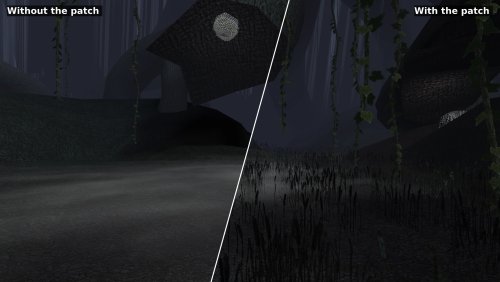
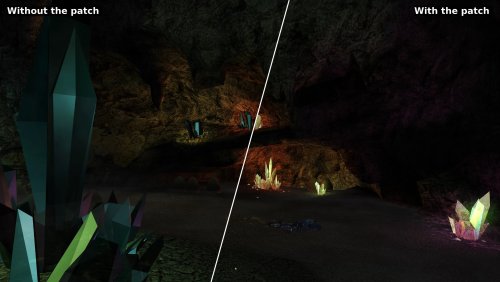
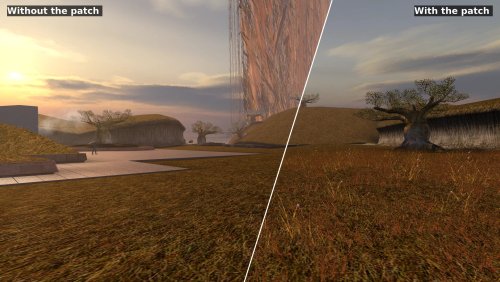
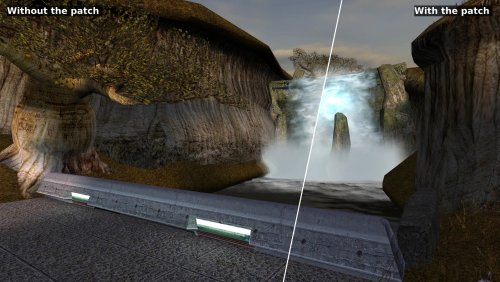
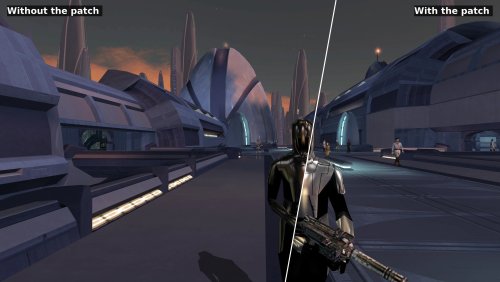
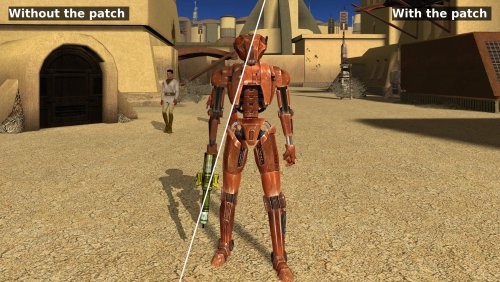
Restores Knights of the Old Republic's full lighting on current graphics drivers, and stops the grass from stretching into the sky.
See every fix side by side: https://synchro.codeberg.page/kotor-modern-driver-compatibility/what-it-fixes.html
Why the game looks wrong
KOTOR lights its world with one of two methods from 2003, one from ATI and one from NVIDIA. AMD's and Intel's Windows drivers offer neither, so the game falls back to a path meant for cards with no per-pixel lighting, which is also where the grass bug comes from. The patch rebuilds the game's lighting on a method every current driver supports, and puts every card on it.
What it restores
- Grass that stays on the ground
- Light from the room on lightmapped walls and floors
- Reflections on metal, armour and water, including cube map reflections on Intel cards
- Fog, where the game meant to have it
- Soft shadows, glow, motion blur, film grain and Force power distortion
- Bump lighting on creatures, which the game only ever drew on NVIDIA cards
What it also fixes
- The glow around lights and the edges of soft shadows no longer shimmer as the camera moves. The game did this on the hardware of its day too.
- The brightness slider works, cutscenes included, on drivers that refuse the game's request to change brightness, NVIDIA's on Windows among them.
- For modders: normal maps, bump lighting on lightmapped surfaces, and reflective skins with a flat reflection map never drew on any card. They do now.
The Cube Map Fix and Soft Shadows Fix are part of this patch. Don't install them alongside it.
Requirements
- KotOR version 1.03: GOG, Steam, or a CD copy with the common 1.03 no-CD executable
- KotOR Patch Manager 0.7.2 or later: https://github.com/LaneDibello/Kotor-Patch-Manager
Install guide: https://synchro.codeberg.page/kotor-modern-driver-compatibility/installing.html
If the Patch Manager won't accept your swkotor.exe because another tool has modified it, use the standalone download instead: https://synchro.codeberg.page/kotor-modern-driver-compatibility/installing-standalone.html
Settings
You don't need to change anything to play. K1DriverCompat.ini, beside the game, lists every setting with an explanation, and with the Mod Options patch installed the game's options screen has menus for them.
By default the patch draws the game as a GeForce card of the time did. Set look to ati to see it as an ATI Radeon did. In the game's own content the two differ only a little.
Settings: https://synchro.codeberg.page/kotor-modern-driver-compatibility/settings.html
The two looks: https://synchro.codeberg.page/kotor-modern-driver-compatibility/looks.html
Replacement Shaders
Modders can replace any of the patch's shading programs with their own, with nothing to rebuild. Put a plain text ARB fragment program in override/shaders/, named after the program it replaces, and the patch uses it in place of its own. The log records each replacement it loads, and warns about any file that matches no program.
Guide: https://synchro.codeberg.page/kotor-modern-driver-compatibility/replacement-shaders.html
Reporting issues
Open an issue at https://codeberg.org/Synchro/kotor-modern-driver-compatibility/issues or post in the comments here, and attach logs/K1DriverCompat.log from your game folder.
Thanks
@Lane and @J, who tested this on cards and installs I do not own. Nearly everything here is a claim about how some particular driver behaves, and a claim like that is worth nothing until somebody with that hardware runs it and reports back. This would not have been finishable without them.
Lane also wrote the KotOR Patch Manager, which this patch is built for.
@Vriff, Who took reference screenshots on period-correct hardware. They show what the game looked like on the cards it was written for, which is what the patch strives to match.
Full documentation: https://synchro.codeberg.page/kotor-modern-driver-compatibility/
Source: https://codeberg.org/Synchro/kotor-modern-driver-compatibility
LLM Disclosure
This project made use of an LLM during development, in the following capacities:
- Brainstorming: exploring possible approaches and design directions
- Decompilation assistance: help interpreting and structuring reverse-engineered code
- Code comments: refining and clarifying existing comments
- Skeletons and fixes: generating initial code scaffolding and minor fixes
All LLM-assisted output was modified and reviewed by a human before being committed.
Edited by Synchro
Fix up some of the sections a bit.
What's New in Version 1.3.0 See changelog
Released
This release fixes a long standing issue with the brightness slider for some systems
as well as a shimmering effect seen on glowing lights.
The brightness slider in the options menu did nothing on many machines. The game
asks your display to apply it, and a modern driver is allowed to refuse; NVIDIA's
on Windows does. The patch now applies it to the picture itself, cutscenes
included.
The other is the shimmer. The glow around lights and the edges of soft shadows
crawled and flickered whenever the camera moved, and the bigger your screen the
worse it was. The game builds both by shrinking the whole screen into a small
image, reading only a scattering of its pixels, and at modern resolutions most of
the screen was never read at all. So a small light's glow switched on and off as
you walked past it. The patch shrinks the screen properly instead, and small
lights keep their glow rather than shimmering.
This one is not a modern-driver fault. The game did it on the hardware of the
day too, just less visibly on a smaller screen.
Added
- The brightness slider applies to the picture, including cutscenes
-
Soft shadows and the screen effects are switched on the first time you run
the patch, since a fresh install ships with soft shadows off - `downsample.arb` joins the shaders you can replace with your own
Fixed
-
The glow around lights and the edges of soft shadows no longer shimmer while
the camera moves - Small bright lights keep their glow at high resolutions
- Soft shadows keep their shading rather than flattening to a single darkness
Changed
-
The offscreen images the glow and soft shadows are built in hold sixteen
bits per channel rather than eight, so rounding no longer shows as flicker
Requires
The KotOR Patch Manager 0.6.2 or newer. Earlier versions did not always install
sqlite3.dll, and without that file the game crashes on load.
The standalone download needs nothing but the game.
 With version 1.3.0:
- Download

