


About This File
Description
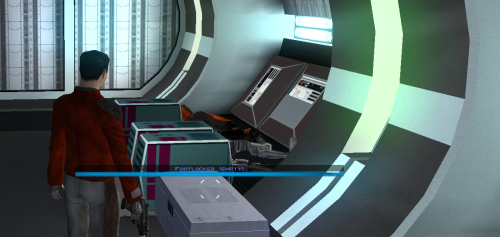
Appends " (empty)" to the floating hover name of any container or lootable corpse that currently holds nothing. Now you can tell an empty footlocker from a full one at a glance without stopping to open it.
- Shows the moment you first see an initially-empty container.
- Updates live the instant you loot one empty, while you're still hovering over it.
- Covers lootable corpses too (KOTOR stores them as "Remains" containers)
Installation instructions
1. Copy these three files into your KOTOR folder, next to `swkotor.exe` (typically `C:\Program Files (x86)\Steam\steamapps\common\swkotor\`):
- MarkEmptyContainers.exe
- Apply Container Patch.bat
- Revert Container Patch.bat
2. Double-click `Apply Container Patch.bat`. It prints `SUCCESS` and makes a backup. Launch the game and enjoy.
Uninstallation instructions
1. Double-click `Revert Container Patch.bat`. This restores `swkotor.exe` exactly as it was (from the backup it made: `swkotor.exe.MarkEmpty.bak`).
Requirements
Requires the KOTOR Editable Executable mod to allow the patcher to work. https://deadlystream.com/files/file/1320-kotor-editable-executable/
What's New in Version 1.0.1 See changelog
Released
Fixed a glitch with the install order of my other mods so order no longer affects anything


