


About This File
Description
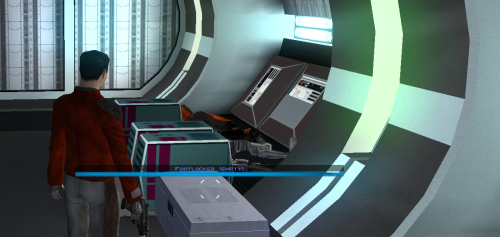
Appends " (empty)" to the floating hover name of any container or lootable corpse that currently holds nothing. Now you can tell an empty footlocker from a full one at a glance without stopping to open it.
- Shows the moment you first see an initially-empty container.
- Updates live the instant you loot one empty, while you're still hovering over it.
- Covers lootable corpses too (KOTOR stores them as "Remains" containers)
Installation instructions
1. Copy these three files into your KOTOR folder, next to `swkotor.exe` (typically `C:\Program Files (x86)\Steam\steamapps\common\swkotor\`):
- MarkEmptyContainers.exe
- Apply Container Patch.bat
- Revert Container Patch.bat
2. Double-click `Apply Container Patch.bat`. It prints `SUCCESS` and makes a backup. Launch the game and enjoy.
Uninstallation instructions
1. Double-click `Revert Container Patch.bat`. This restores `swkotor.exe` exactly as it was (from the backup it made: `swkotor.exe.MarkEmpty.bak`).
Requirements
Requires the KOTOR Editable Executable mod to allow the patcher to work. https://deadlystream.com/files/file/1320-kotor-editable-executable/
What's New in Version 1.0.1 See changelog
Released
Fixed a glitch with the install order of my other mods so order no longer affects anything



Recommended Comments
Join the conversation
You can post now and register later. If you have an account, sign in now to post with your account.