



ShaeMyName
-
Posts
9 -
Joined
-
Last visited
-
Days Won
1
Content Type
Profiles
Forums
Blogs
Forum & Tracker Requests
Downloads
Gallery
Store
Events
Files posted by ShaeMyName
-
K1 Marked Empty Containers
By ShaeMyName in Mods
Description
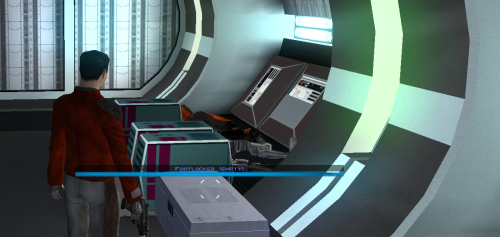
Appends " (empty)" to the floating hover name of any container or lootable corpse that currently holds nothing. Now you can tell an empty footlocker from a full one at a glance without stopping to open it.
Shows the moment you first see an initially-empty container. Updates live the instant you loot one empty, while you're still hovering over it. Covers lootable corpses too (KOTOR stores them as "Remains" containers)
Installation instructions
1. Copy these three files into your KOTOR folder, next to `swkotor.exe` (typically `C:\Program Files (x86)\Steam\steamapps\common\swkotor\`):
- MarkEmptyContainers.exe
- Apply Container Patch.bat
- Revert Container Patch.bat
2. Double-click `Apply Container Patch.bat`. It prints `SUCCESS` and makes a backup. Launch the game and enjoy.
Uninstallation instructions
1. Double-click `Revert Container Patch.bat`. This restores `swkotor.exe` exactly as it was (from the backup it made: `swkotor.exe.MarkEmpty.bak`).
Requirements
Requires the KOTOR Editable Executable mod to allow the patcher to work. https://deadlystream.com/files/file/1320-kotor-editable-executable/
322 downloads
-
Fair Pazaak Turn Order
By ShaeMyName in Mods
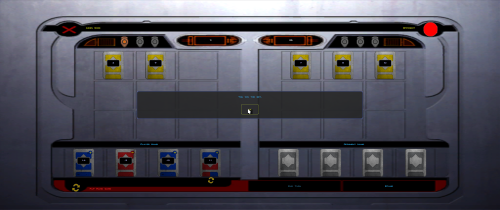
In the vanilla game, the player always goes first. This means you're more likely to bust, since you'll always have one more bust-possible draw than the AI at any given time. It also means the AI can look at your hand and Stand, where you have to Stand before you see their next draw.
How to install:
Unzip and put the following in the game dire (beside swkotor.exe): FairPazaak.exe, Apply Fair Pazaak Patch.bat, and Revert Fair Pazaak Patch.bat Double click Apply Fair Pazaak Patch.bat If switching between versions, make sure that you use the Revert bat BEFORE using the Apply bat of the other version!
Requirements
Only requires KOTOR Editable Executable (https://deadlystream.com/files/file/1320-kotor-editable-executable/). This mod is entirely compatible with any and all Pazaak deck mods like Easy Pazaak or Balanced Pazaak.
readme.txt
134 downloads
(1 review)0 comments
Updated
-
K1 Ultrawide Letterbox Fix
By ShaeMyName in Mods
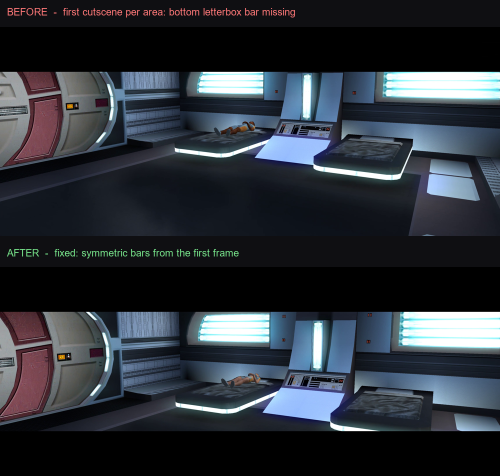
The function that enables letterbox mode for cutscenes has a fork whether the segment was the first in the scene or came later. The very first letterbox after an area loads (first branch) skipped a specific call that sets up the bottom bar's draw state, while every later letterbox made that call. That's why only the first one of each area was ever broken. This patch adds back in the skipped call while making sure not to interfere with dialogue or being able to skip it. Subtitles that were included in the bottom letterbox that was missing are now also visible again.
This Patcher doesn't need to be installed in your game folder, although it doesn't hurt anything if you want it there. You can use it easily by unzipping the archive and double-clicking Apply Fix.bat. Alternatively, if you'd rather not trust an executable, you can run the patch yourself using Python by following the instructions in the README. You can also easily uninstall the patch by using Revert Fix.bat if there are any issues.
Required setup (install these first):
1. KOTOR Editable Executable: provides a patchable exe (https://deadlystream.com/files/file/1320-kotor-editable-executable/)
2. UniWS: to run the game at your widescreen resolution (https://www.wsgf.org/article/star-wars-knights-old-republic)
3. KotOR High Resolution Menus (the "hires"/k1hrm patcher): for correct widescreen
menus and, crucially, the _widescreen dialog-letterbox proportion_ this fix builds on. (https://deadlystream.com/files/file/1159-kotor-high-resolution-menus/)
4. Then this fix, last.
Please email me if you have any questions or issues!
README.md
94 downloads
- widescreen
- fix
- (and 2 more)
(0 reviews)0 comments
Updated