Leaderboard




Popular Content
Showing content with the highest reputation on 10/13/2026 in Files
-
Version 1.0.0
19 downloads
170+ portraits to replace party and player portraits. 5 stage lightside/darkside transitions. Install - extract the .TPC files to the game's override folder How Were These Made Kotor Blender and ImageMagick. I will be releasing the scripts to easily generate matching portraits. Blender and KotorBlender plugin will need to be install but the portrait generation process does not require blender knowledge.2 points -
Version 1.0.0
6 downloads
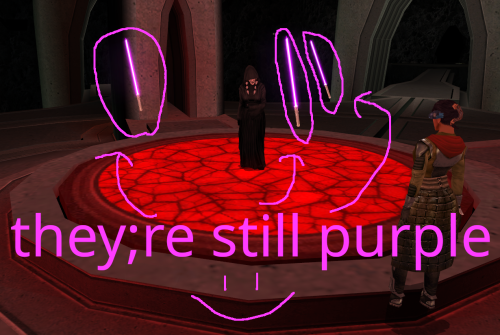
One day in 2025, @Crimson Knight, famed creator of Ixgil the Bith, rocked the KOTOR community when he released a mod changing the color of Darth Traya's floating lightsabers to red, and also doing some other stuff to them. Today, I similarly rock the community by changing them back to purple, and doing even more stuff to them. *technically speaking I used the vanilla .utc files as a base, so they were never purple to begin with. It was all a dream What Crimson Knight did: Gave all three lightsabers immunity to fear, paralysis and stun Changed all three lightsaber colors to red What I did: Gave all three lightsabers immunity to fear, paralysis and stun Gave all three lightsabers Force Jump before Crimson Knight got the chance to (haha i'm faster) Removed redundant feats for armor and weapons that the lightsabers don't use Looked at the purple lightsabers and thought "yeah that seems about right" What could still be done to these damn lightsabers: At first, I wanted to do a little bit more to the lightsabers than just add Force Jump, but missing animations screwed me over. Force Jump is technically missing its animations, but I think it looks good enough to ship. The other two things I wanted to do was, first, give one of each lightsaber master level Power Attack, Flurry, and Critical Strike, but the animations don't exist for them on the floating lightsabers. Similarly, I wanted to make a variant where instead of three purple lightsabers, its the three council members' lightsabers, but the floating lightsaber NPCs also don't have animations for dual wielding or saberstaff. If those issues could be ameliorated, then I think we'd finally be able to put this floating lightsaber saga behind us. I'm not doing that though lmao Installation: slam dunk the provided utc files into your override folder Credits: If it wasn't clear enough already, credit goes to Crimson Knight for being the first to give the lightsabers their immunities in Red Floating Lightsabers. Credit goes to @Snigaroo for suggesting to give the lightsabers Force Jump. Special thanks to @SAO1138 for pushing me to actually get into modding, even if this first one is tiny and derivative.1 point -
Version 1.0.0
60 downloads
200+ portraits to replace party and player portraits. 5 stage lightside/darkside transition restored. Install - extract the .TPC files to the game's override folder - the optional portraits.2da file enables 5 stage lightside/darkside transitions, copy it to override. How Were These Made Kotor Blender and ImageMagick. I will be releasing the scripts to easily generate matching portraits. Blender and KotorBlender plugin will need to be install but the portrait generation process does not require blender knowledge.1 point -

Version 2.1
396 downloads
Description Vanilla Weapons HD Upscales all weapon textures in kotor 2 using topaz gigapixel X4 The mod is split into 5 separate files: Melee Weapons HD Blasters HD Lightsabers HD Grenades HD (includes mines and detonators) Bronze Lightsaber (Download if using tsl restored content mod) Glitched lightsaber hilt fix tsl aspyr is recommended if you're using the lightsabers file. They are separated in case you already use another lightsaber mod, high quality blaster mod, or other weapon texture replacement. Installation Place the override folder into your main KOTOR 2 directory. Replace files if prompted.1 point -

Version 1.1
1,472 downloads
A Mod for Star Wars Knights of The Old Republic Author: Darth Vhail Release Date: 11.11.2016 ->Description: This mod changes the appearance of the Sith Mask found in Uthar's chambers in the Sith Academy on Korriban to resemble Kylo Ren's mask from Star Wars: The Force Awakens. It also contains a new item icon. ->Important: For this to work you need to have Xander2077's "Vanilla Masks Overhaul 0.9" mod installed. Not a difficult proposition seeing as that mod is awesome. You can download it here: http://deadlystream.com/forum/files/file/867-vanilla-masks-overhaul/ ->Installation: To install you simply need to copy these files into your KotOR override folder and replace the "I_Sithmask.tga" and "ii_mask_013.tga" files from Xander2077's mod. ->Thanks: I would like to thank Xander2077 for his "Vanilla Masks Overhaul 0.9" mod. Without it my reskin would not be possible. ->Legal: THIS MODIFICATION IS NOT SUPPORTED BY BIOWARE/OBSIDIAN ENTERTAINMENT, LUCASARTS, DISNEY OR ANY LICENSERS/SPONSORS OF THE MENTIONED COMPANIES. USE OF THIS FILE IS AT YOUR OWN RISK AND THE ABOVE MENTIONED COMPANIES OR THE AUTHOR IS NOT RESPONSIBLE FOR ANY DAMAGE CAUSED TO YOUR COMPUTER FOR THE USAGE OF THIS FILE.1 point -

Version 1.1.0
985 downloads
Chodo Habat and pals were strong-armed out of their control of the Restoration Project before they could complete their work. This means that some key components for a healthy ecosystem were never imported from Dxun, such as water and physics, leading to some funky model errors. There are streams with invisible water, floating leaves, floating rocks, illusory rocks, UV errors, and one hole in the ground exposing Telos to the great void. Let's give our Ithorian friends a hand. Installation: There are two versions of the mod available to download, one of which has been made for compatibility for users with High Quality Skyboxes installed. Download the 7z file for the version of your choice, and extract to your game's override folder. For Steam installations, this would be "Steam\steamapps\common\Knights of the Old Republic II\override". 7z files can be extracted with Archive Utility on macOS, or with programs like PeaZip on Windows and Linux. If you are upgrading from a previous version of the mod, be sure to remove that "Telos_Model_Repairs" folder from your override after installing the new version. If you are using the High Quality Skyboxes compatible version of the mod, make sure to remove 231teld.mdl and 231teld.mdx from your installation of High Quality Skyboxes in the override folder to ensure you see all changes made. Kexikus has generously allowed me to incorporate the necessary model changes from High Quality Skyboxes into the compatibility version, so that these mods may be compatible. If you installed High Quality Skyboxes via Steam, you can find the relevant mod files at "Steam\steamapps\workshop\208580\2312186259\override". Uninstallation: Remove "Telos_Model_Repairs" from your override folder. Included Files: Compatibility: Users should expect full compatibility with any other mods, so long as they do not modify/replace the above models and walkmeshes. High Quality Skyboxes works alongside the compatibility version of this mod. Texture mods that do not alter the above models are fully compatible with either version. Some other great, compatible mods for Telos to check out are Telos surface 4k Retexture by coremar, TSL ORIGINS - Telos Overhaul by Jorak Uln, and Kotor 2 Unlimited World Texture Mod by facemeltingsolo. Acknowledgments: I would like to thank Symmetric, Purifier, Ndix UR, and seedhartha for making importing to Blender simple using KotORBlender, and Cortisol and Fred Tetra for making file extraction easy with the Holocron Toolset and KotOR Tool, respectively. I would also like to thank Kexikus for allowing me to merge the necessary changes to makes this mod compatible with High Quality Skyboxes. This modification is not supported by Obsidian Entertainment, Lucasarts, Disney or any licensers/sponsors thereof. Use of this modification is at your own risk and neither the aforementioned companies nor the author may be held responsible for any damages caused to your computer via this modification's usage.1 point -

Version 1.0.0
8,740 downloads
This mod removes what is intended to be snow covering the forcefield in the Telos Academy's hangar and adds a skybox for the now visible exterior. Installation: Simply copy the model files across to your Override folder Acknowledgements: Thanks to @bead-v for KOTORMax and MDLEdit1 point -

Version 1.0.0
1,406 downloads
Darth Nihilus Animation Fix Update A long time ago, Ӄhrizby released Darth Nihilus Animation Fix 2.0. It was good, but had some problems - like saber swing sound were not playing, clipping in his running/walking animations, etc... I decided to try to fix it, and Ӄhrizby allowed me to release this as new mod. Features: Fixed sound issues Fixed clipping in walking and running animations Restored his unique walk and run animations for single saber Fixed some other problems (like his lower jaw was terribly deformed in some animations) Added camerahook, so your screen will not shake in combat BONUS: reverted model structure back to original. It means, that if you have old Avol's Darth Vader mod installed - Vader will have fixed animations too! I hope I fixed everything, but if I've missed something - let me know in support thread. Installation. Just drop all files to your Override folder. Permissions and credits. Huge thanks to Ӄhrizby for making original mod and allowing me to release this update. If you want to use it in your mods - ask permission from Ӄhrizby. If you get one - no need to ask me, use it like you want.1 point -

Version 1.1
333 downloads
Revan's robes in various colors with a pvc lighting effect. Current version is 1.1.1 point -
Version 1.1.0
323 downloads
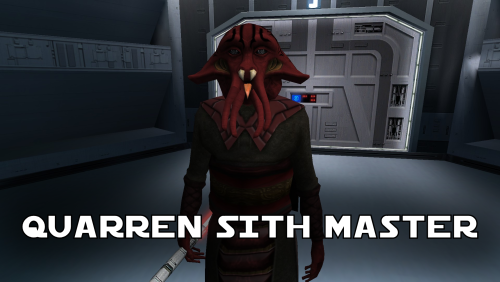
A Mod for Star Wars Knights of The Old Republic Author: N-DReW25 1.1.0 Release Date: 05.02.2026 Installation: Simply click on the HoloPatcher.exe, select your swkotor directory, click install and sit back and watch the HoloPatcher do its magic. Description: In the 19th Century, European Colonizers would use non-European collaborators to help pacify and/or assimilate non-European cultures into their Empires. The European Colonizers and the non-European target for colonization might have major linguistic and cultural differences making dialogue between the two groups almost impossible, but by taking a non-European collaborator of the Europeans and using them as an intermediary between the two groups the non-European group might become more suspectable to the Europeans through the use of the non-European collaborator who is closer to the non-European group than they are to the Europeans. A random example of this might be the Italians using the Arabs to help them colonize the Somalis. The Italians want to colonize Somalia but they do not speak Somali and aren't at all culturally similar, whereas the Somalis would more than likely know Arabic and would be more culturally similar to Arabs so using Arabs to help Italians colonize the Somalis would be a viable tactic. This concept of wanting to colonize a group that is different from you so you instead use a culturally similar group to make it easier for you to colonize the original group is central to this mod. On Manaan, the Sith Empire is secretly training Selkath youths into becoming Dark Jedi and Sith Agents to one day stage a coup against the Manaan government to take over their planet and exploit their precious resources. Similar to the real life example above the same hurdles that applied to Europeans and non-Europeans still apply to the Sith in this scenario. The Sith Empire is predominantly human and are shown to be quite racist to non-human species throughout the game. The Selkath are an aquatic alien species so not only is there a differing alien culture the Sith have to deal with but the Selkath primarily live underwater. The leader behind this Sith plot to train Selkath youth is a human Sith Master who appears as a generic Sith Master in-game. This mod changes this NPC so that the Sith Master is now an alien Quarren, another aquatic alien species. With this mod installed, it makes much more sense as to why the Sith are trying to train and convert Selkath youth to the Sith when the mastermind behind this plot is a fellow aquatic alien who would be much more culturally similar to his Selkath students and would be a much easier leader for the Selkath to blindly follow despite this master serving an empire that would be racist towards them all. Known Bugs: This mod shouldn't have any bugs but if you find any please feel free to report them on Deadlystream.com. A third install was planned but could not be implemented due to a bizarre bug. The third option was a version of the vanilla dialogue which had an AI filter over it to make it sound like the Quarren from Kotor II (this same method was used in the ROR mod for the Quarren Jedi Master). This could not be added as the VO in-game would be sped up with the pitch increased for reasons unknown to me. This install has been included in the mod but cannot currently be installed, when this bug can be fixed I will add the ability to install it. Incompatibilities: Please report any incompatibilities! Permissions: Do NOT claim credit for this mod and do not use assets from this mod without my permission. The textures for this mod comes from Quanon's Big Sellout, a modder's resource that was published on LucasForums back in the day. These are the same textures that are used in Quanon's Sith Quarren PC mod found on NexusMods. As these textures came from Quanon's Big Sellout, they can be used in your mod though I strongly advise you credit Quanon as the original artist and acknowledge Quanon's Big Sellout to avoid people thinking you stole it from the Sith Quarren PC mod. Thanks to: Quanon: For making the original textures and including it in your Big Sellout modder's resource! Marius Fett: For fixing the Death Field animation bug which projected the lightning from his feet instead of his hands! ElevenLabs Website: For the custom AI VO service! Bioware: For such an amazing game! Obsidian Entertainment: For creating the original Quarren models, textures, and VO! Fred Tetra: For Kotor Tool! th3w1zard1: For HoloPatcher! Everyone who downloads the mod! Legal: THIS MODIFICATION IS NOT SUPPORTED BY BIOWARE/OBSIDIAN ENTERTAINMENT, LUCASARTS, DISNEY OR ANY LICENSERS/SPONSORS OF THE MENTIONED COMPANIES. USE OF THIS FILE IS AT YOUR OWN RISK AND THE ABOVE-MENTIONED COMPANIES OR THE AUTHOR IS NOT RESPONSIBLE FOR ANY DAMAGE CAUSED TO YOUR COMPUTER FOR THE USAGE OF THIS FILE.0 points