

Leaderboard




Popular Content
Showing content with the highest reputation on 12/24/2025 in all areas
-
Please see the official GitHub repo to get support and find updates: https://github.com/OpenKotOR/DeNCS DeNCS - Turn Your Compiled KOTOR Scripts Back Into Readable Code! Ever wanted to see what's inside those compiled .ncs script files from KOTOR? Or maybe you found a mod with scripts you want to understand or modify? DeNCS can take those compiled script files and turn them back into readable source code that you can actually understand and edit! What does it do? Simply put, DeNCS converts compiled KOTOR scripts (.ncs files) back into source code (.nss files). It's like having a translator that converts the game's internal script format back into human-readable code. Works with both KOTOR 1 and KOTOR 2! How to use: There are two ways to use DeNCS - a simple graphical program (GUI) or command-line tools. Most users will want the GUI version! Option 1: The Easy Way (GUI - Recommended!) 1. Download the DeNCS folder 2. Double-click DeNCS.exe (Windows) or DeNCS.app (Mac) 3. That's it! No Java installation needed - everything is included! Once it opens: Drag and drop any .ncs file onto the window to decompile it Or use File → Open to browse for files The decompiled code will appear with syntax highlighting (color-coded keywords, functions, etc.) You can edit the code right there if you want Press Ctrl+S (or Cmd+S on Mac) to save your changes Open multiple files at once - each gets its own tab The program supports both KOTOR 1 and 2 (configurable in the settings) and attempts to unify most nwnnsscomp.exe variants, but has mainly been tested with kotorscript and ktool's variants. Option 2: Command Line (For Advanced Users) If you prefer using the command line or want to automate tasks: Windows: .\DeNCSCLI.exe -i "script.ncs" -o "script.nss" --k2 Mac/Linux: ./DeNCSCLI -i "script.ncs" -o "script.nss" --k2 This reads script.ncs and creates script.nss with the decompiled code. Use --k1 for KOTOR 1 scripts, or --k2 for KOTOR 2 scripts. Decompile an entire folder: .\DeNCSCli.exe -i "scripts_folder" -r --k2 -O "output_folder" This processes all .ncs files in the folder (including subfolders) and saves the results to your output folder. Features: Works with both KOTOR 1 and KOTOR 2/TSL scripts Beautiful graphical interface with syntax highlighting Edit decompiled scripts and compile them back Round-trip verification - see if your edited code compiles correctly Batch process entire folders of scripts at once View bytecode if you're curious about the low-level details Self-contained - no Java installation needed! Cross-platform - works on Windows, Mac, and Linux What can you do with it? Decompile .ncs files to see the original source code Understand how game scripts work Edit scripts and recompile them for mods Analyze scripts from your favorite mods Batch process entire script folders quickly Troubleshooting: "Error: nwscript file not found" Make sure you haven't deleted or moved the tools folder that came with the download The program should find everything automatically, but if you get this error, check that the tools folder is in the same directory as the executable "Program won't start" (Windows) Windows might be blocking it. Right-click DeNCS.exe → Properties → Check "Unblock" → Apply Try running as Administrator if you get permission errors "Program won't start" (Mac) You may need to allow the app in System Preferences → Security & Privacy Right-click the app and select "Open" the first time "Program won't start" (Linux) Make sure the executable has permission to run: Make sure the executable has permission to run: chmod +x DeNCSCli/DeNCSCli For more help: Run .\DeNCSCLI.exe --help (Windows) or ./DeNCSCLI --help (Mac/Linux) to see all available options Check the included README files for detailed documentation Source code and more info: https://github.com/OpenKotOR/DeNCS Credits: Original Developers (The Foundation): JdNoa - Created the original script decompiler engine Dashus - Created the original GUI These developers did the hard foundational work that made this tool possible. The original DeNCS was an internal tool used by TSLRP (The Sith Lords Restoration Project) and was released to the public "as is" with no warranty. Current Maintainer: th3w1zard1 - Complete rewrite and modernization You! if you like! just head to https://github.com/OpenKotOR/DeNCS and start contributing. This version represents a near-complete rewrite and modernization of the original DeNCS tool. While based on the original developers' foundational work, the current version has been extensively revamped with a new GUI, modernized codebase, cross-platform support, and many new features. The core decompilation concepts from the original work remain, but the implementation has been significantly rewritten for modern development practices. License: This software is provided under the Business Source License 1.1 (BSL 1.1). See LICENSE.txt in the download for full license information. Enjoy decompiling! 🎮✨ NCSDecomp-v1.0.2-Windows.zip1 point
-
Version 1.0.2
233 downloads
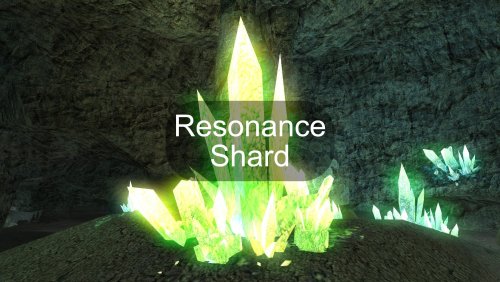
This mod introduces a unique item: the Resonance Shard, a slived fragment of the Exile's personal crystal. This shard can be discovered in the same crystal formation within the Dantooine Crystal Cave where the original crystal is found. The shard is designed to be used as an implant (requiring Wisdom 14+) by any organic companion. When equipped, it forges a powerful Force bond, allowing the chosen companion to join and share the existing Force Chain between the Exile and Kreia (when she is in the party). Once bonded, most beneficial Force powers used on the Exile, Kreia, or the chosen companion will automatically resonate through the connection, extending their positive influence to all others within the chain. Note: Due to how the game works, the shard will only appear if this is your first time entering the Crystal Cave. If you have already visited the cave, you can add the item with the following console command: giveitem e_imp1_axc01 Credits: Fred Tetra, for KOTOR Tool TK102, for DLGEditor Torlack, stoffe & TK102, for NWNSSCOMP JdNoa & Dashus, for DeNCS Cortisol, for Holocron Toolset1 point -
View File Visas Marr and Female Exile Romance =Visas Marr and Female Exile Romance= A KNIGHTS OF THE OLD REPUBLIC II: THE SITH LORDS MODIFICATION AUTHOR: Leilukin FILE NAME: Vsas Marr and Female Exile Romance.7z LATEST VERSION: 1.4.1 CONTACT: E-mail to contact@leilukin.com, or message to Leilukin on Deadly Stream PLEASE READ THROUGH THE MOD INFO ON THIS PAGE AND THE FAQ ARTICLE FOR MY KOTOR SAME-GENDER ROMANCE MODS BEFORE ASKING QUESTIONS! 1. DESCRIPTION: In KotOR II: TSL, certain party members can develop romantic feelings for the Exile, even though none of the romances in TSL were given much development, especially if compared to the first KotOR game. Among the possible romance options, only male Exiles can romance Visas Marr, with her romance scene (or at least, the closest thing the game has to one) occurs near the endgame (see below for details, though beware of possible spoilers). What this mod do is to make the Visas romance scene available for female Exiles as well. In vanilla TSL, after the Rebuilt Jedi Enclave sequence and you return to the Ebon Hawk, you will be approached by Visas if your Exile is male, or the Disciple if your Exile is female. In Visas' case, she can confess her love for the male Exile, and the male Exile can agree to her to "look upon" each other through the Force. This mod gets rid of the gender check for the Visas conversation post-Rebuilt Jedi Enclave, so Visas will always be the one who talks to the Exile regardless of the Exile's gender, even if the Disciple joins your party. Therefore, with this mod, female Exiles are also able to enjoy the same Visas scene as male Exiles do, including the romance. Originally, Visas mentions the Handmaiden when she confesses her feelings for the Exile. This mod also checks if the Handmaiden joins your party to that particular dialogue, so with this mod, if you never recruited Handmaiden, Visas will not mention her. This mod also provides an additional component to make Kreia reference the Exile’s interest in Visas, regardless of the Exile’s gender, during the player’s conversation with Kreia. 2. INSTALLATION: First and foremost, make sure you have The Sith Lords Restored Content Mod (TSLRCM) installed since TSLRCM is REQUIRED for this mod to work. !! ATTENTION!! STEAM USERS: If you play KotOR 2 on Steam, DO NOT USE THE STEAM WORKSHOP VERSION OF TSLRCM if you want to use this mod! Instead, use the installer (.exe) version of TSLRCM, which can be downloaded from Deadly Stream here. I recommend reading this Deadly Stream post on why Steam Workshop is NOT recommended for modding KotOR 2. Extract the Visas Marr and Female Exile Romance.7z archive you downloaded to anywhere you like, as long as it is not within the KotOR 2 directory. Run Install.exe. You will notice that this mod provides two installation options: Visas Romance Scene: This component will make Visas’ romance scene after the Rebuilt Jedi Enclave available for both male and female Exiles. Kreia’s Reference to Visas Romance: This component will make Kreia reference the Exile’s interest in Visas, regardless of the Exile’s gender, during the player’s conversation with Kreia. You may choose to install both options, or only one of them. Once you have chosen the installation option(s) you want, point the installer to your KotOR 2 directory and let the installer do its job. If you also have installed N-DReW25's Extended Enclave Tweaks, an add-on to Extended Enclave, go to the "Extended Enclave Tweaks Compatibility" folder, run Install.exe and point the installer to your KotOR 2 directory, where swkotor2.exe is located, and let the installer do its job. When you install this mod, a new folder named "backup" will be created by the installer. Do not delete the folder or any of the files within the folder if you are planning on uninstalling this mod. The "Source" folder includes the source of the scripts used by this mod for modders' reference. Ignore the "Source" folder if you only want to install and play this mod. 3. UNINSTALLATION: If you installed the “Visas Romance Scene” component, go to the "backup" folder, cut and paste 006EBO.mod into the Modules folder in your KotOR 2 directory. If you installed the “Kreia’s Reference to Visas Romance” component, go to the "backup" folder, cut and paste kreia.dlg into the Override folder in your KotOR 2 directory. If you want to uninstall the compatibility patch for Extended Enclave Tweaks, go to the "backup" folder created by the TSLPatcher from this mod, cut and paste visasend.dlg into the Override folder in your KotOR 2 directory. Note that this step does not uninstall Extended Enclave Tweaks itself. 4. KNOWN ISSUES: None currently known. If you find any other bugs or problems, please let me know. 5. MOD COMPATIBILITY: Any other mod that modifies Visas' dialogue after the Rebuilt Jedi Enclave sequence will likely conflict with this mod, especially for the following files: k_attonend.ncs a_load006end.ncs visasend.dlg The above files are used for Visas' dialogue after the Rebuilt Jedi Enclave sequence, and script that triggers Atton, Disciple or Visas' dialogue with the PC after the Rebuilt Jedi Enclave sequence. The “Kreia’s Reference to Visas Romance” component of this mod modifies the kreia.dlg file, which is for Kreia’s global dialogue. Specifically, this mod removes the gender check to Visas’ romance in Kreia’s dialogue about Visas. In order to improve compatibility with other mods that also modify kreia.dlg, I have set up TSLPatcher to patch the DLG file instead of hard replacing it in the Override folder. If you are using any other mod that involves putting the kreia.dlg file in the Override folder, you must install my mod after the other mod. This mod is fully compatible with danil-ch and Darth Hayze’s Extended Enclave. If you use N-DReW25's Extended Enclave Tweaks, an add-on to Extended Enclave, I have provided a compatibility patch, as noted in the “INSTALLATION” section above. If you want to use DarthTyren's PartySwap mod, you need to install PartySwap first before installing this mod. My Handmaiden and Female Exile - Disciple and Male Exile Romance mod also makes the Visas romance scene available for female Exiles, though Disciple will replace Visas in said scene if you play a male Exile. Unless you want the Visas romance scene available for both male and female Exiles, you do not need to install the “Visas Romance Scene” component of this mod if you want to use my Handmaiden and Female Exile - Disciple and Male Exile Romance mod. The “Kreia’s Reference to Visas Romance” component of this mod is compatible with Handmaiden and Female Exile - Disciple and Male Exile Romance. 6. PERMISSION: You may modify this mod for personal use or show this mod in screenshots. However, do not release your mods containing assets from my mod without my permission. I do not use nor support Steam Workshop, so I do not wish any of my mods to be uploaded to Steam Workshop. 7. CREDITS: Fair Strides and DarthTyren for helping with my issues with triggering the scene of Disciple reporting to Carth/Cede after Visas’ romance scene N-DReW25 for giving me permission to make my mod compatible with his Extended Enclave Patch Fred Tetra for the KotOR Tool KobaltBlu for KotOR Scripting Tool tk102 for DLG Editor Stoffe for TSLPatcher; Fair Strides for the updated version THIS MODIFICATION IS NOT SUPPORTED BY BIOWARE/OBSIDIAN ENTERTAINMENT OR LUCASARTS OR ANY LICENSERS/SPONSORS OF THE MENTIONED COMPANIES. USE THIS FILE AT YOUR OWN RISK AND NEITHER THE ABOVE MENTIONED COMPANIES NOR THE AUTHOR IS RESPONSIBLE FOR ANY DAMAGE CAUSED TO YOUR COMPUTER FOR THE USAGE OF THIS FILE. Submitter Leilukin Submitted 12/15/2016 Category Mods TSLRCM Compatible Yes1 point
-
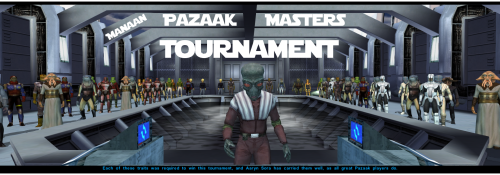 This is fixed. You can now download the newest version of the mod's Gonto option and the recording will play fine. It was apparently a matter of placeables list. Although, you have to do it in a precise order : SMRE ---> Thor's missing room ---> Gonto option. Good day !1 point