


Jump to content

13 Screenshots

About This File

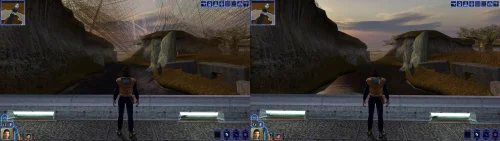
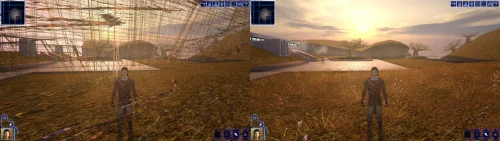
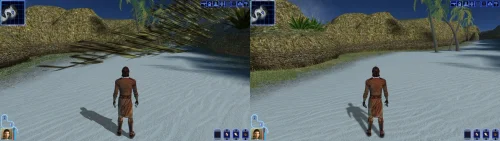
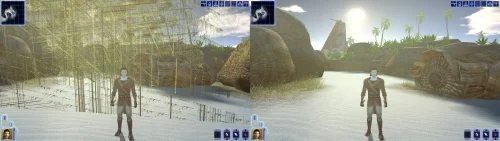
Turn off grass.

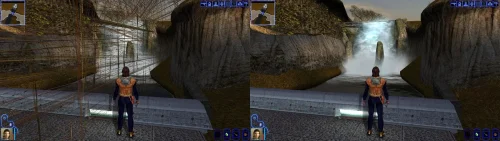
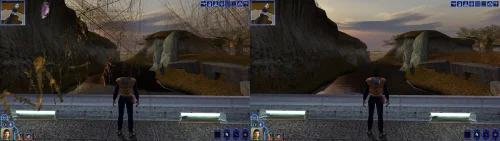
For years that has been the first answer to almost any KOTOR problem, and it was good advice, because on a modern PC the grass really does tear itself across the sky.

This patch fixes that, and quite a lot else.

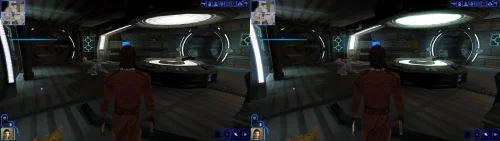
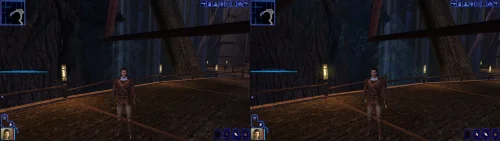
KOTOR decides how to light the world once, when it starts, choosing between two methods built for graphics cards of 2003. On most machines today neither is on offer, so the game quietly falls back to a path that was never finished: no proper lighting on walls and floors, no reflections on metal or armour, no fog, no soft shadows, and none of the screen effects. It still runs. It just looks wrong, and a lot of people have never seen it look right.

This rebuilds that lighting using something every modern card does support, and puts the game back on the paths the developers actually finished. The grass is one of them.

If you play on an NVIDIA card, the lighting has been working for you all along. Those drivers still carry register combiners, one of the two original methods, and it does the job properly. It is also an extension from 2001 that no other vendor implements, surviving on one company's willingness to keep shipping it. This moves every card onto a method that is still current, so there is one path everyone is exercising rather than one propped up by goodwill.

What you get back

  • Grass that stays on the ground
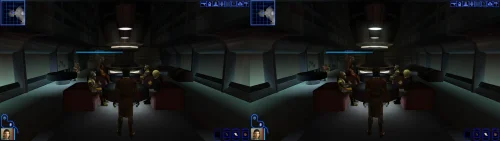
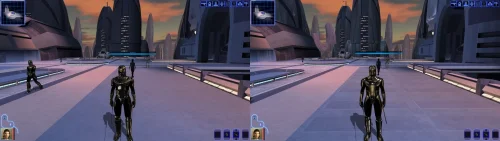
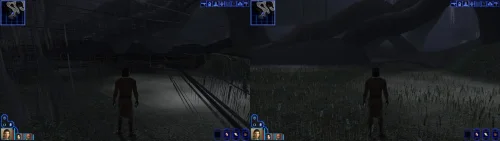
  • Lighting on walls and floors, the baked lighting that makes interiors look lit rather than flat
  • Reflections on metal, armour and polished surfaces
  • Fog, in the places the game meant to have it
  • Soft shadows, and the screen effects: bloom, blur, film grain, the distortion around force powers, and the colour wash on some cutscenes
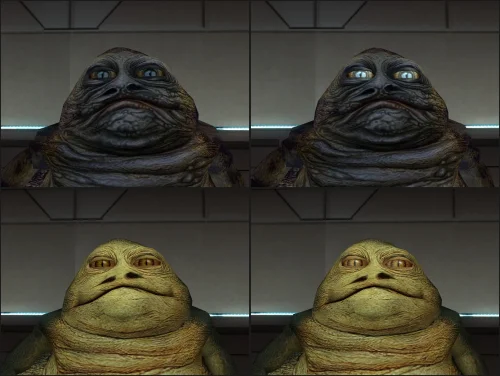
  • Bump lighting on creatures, which the game only ever drew on an NVIDIA card. The wet highlight in a Hutt's eyes is the easiest place to notice it.

Requirements

KOTOR 1, version 1.0.3. GOG, Steam and the CD release all work. Install it with the KotOR Patch Manager. Your game files are not modified; the manager applies the patch while the game runs.

It replaces the separate cube map fix and soft shadows fix. Both are folded in, so disable those if you have them enabled in the patch manager.

If you are using the NeoCities modbuilds or the Patch Manager will not accept your swkotor.exe, there is a second standalone version that installs without it. Some mods and tools change the executable itself, a widescreen patch being the common one, and once that has happened the manager stops recognising the file.

The standalone download does not mind. You copy two files into your game folder and start the game however you like. On Linux it needs one extra setting, which the guide inside the download explains. New in 1.2.0, so it has had far less mileage than the managed install: use that one if it works for you.

Source, releases and issues: https://codeberg.org/Synchro/kotor-modern-driver-compatibility


Settings, if you ever need them

You do not need any of this to play. The first time you run it, a file called `K1DriverCompat.ini` appears next to `swkotor.exe` with every option listed, explained, and switched off. Open it and delete the `#` in front of anything you want to change.

The one worth knowing about is `look`, which chooses between the two ways cards of 2003 drew bright light. `look = nvidia` is the default and the calmer of the two. `look = ati` lets strong lights bleach out what they land on, the way a Radeon did. Neither is a bug, and neither is more correct than the other.

Replacement shaders

You can drop your own shader files into override/shaders/, you can create it if it isn't there. The patch will use shaders in there instead of the ones it generates, with no rebuilding and no tools. They are plain text in ARB fragment program assembly, which is what the patch compiles its own into.
 

It sits under override so a replacement can ship as an ordinary TSLPatcher mod rather than needing its own packaging, and in a subdirectory because these are not game resources. The game ignores them completely: it only looks in override for the file extensions it knows, and has no idea what an .arb file is. Reading them is this patch's job.

For more information on naming, shader inputs, and all of the mode types, take a look at this section of the README: https://codeberg.org/Synchro/kotor-modern-driver-compatibility#replacement-shaders 

Tested on

AMD, Intel and NVIDIA hardware, on Windows and on Linux through Proton, across the GOG, Steam and CD releases.

If something looks wrong

`logs/K1DriverCompat.log` in your game folder holds one session and is overwritten each run, so there is only ever one file to send. Setting `log = debug` in the ini before reproducing the problem makes it far more useful.

Thanks

@Lane and @J tested this on cards and I don't own. Nearly everything here is based on how some particular drivers behave, and that is worth nothing until somebody with that hardware runs it and reports back. The faults that turned up that way are ones I had no way of finding on my own. @Lane also wrote the KotOR Patch Manager, which is what this ships for.

LLM Disclosure

This project made use of an LLM during development, in the following capacities:

  • Brainstorming: exploring possible approaches and design directions
  • Decompilation assistance: help interpreting and structuring reverse-engineered code
  • Code comments: refining and clarifying existing comments
  • Skeletons and fixes: generating initial code scaffolding and minor fixes

All LLM-assisted output was modified and reviewed by a human before being committed.

Edited by Synchro
Added mention of the modbuilds.


What's New in Version 1.2.0   See changelog

Released

Nothing new to see in this one. What is new is a second way to install it.

Some mods and tools change swkotor.exe itself, a widescreen patch being the common one. Once that has happened the Patch Manager no longer recognises the
file and will not patch it. There is now a download for exactly that case, which installs without the manager and only looks at the parts it needs to change.

You copy two files into your game folder and that is it. The patch is then there whether you start the game from Steam, a shortcut, or anything else. On Linux there is one extra setting, and the guide in the download explains it.

If the Patch Manager works for you, keep using it. It leaves your game files alone and lets you turn the patch off again from a list.

Added

  • A second download that installs without the Patch Manager

Changed

  • Both downloads now put the file you need to move into a clearly named folder


Requires

The new standalone download needs nothing but the game.

The ordinary one still needs the KotOR Patch Manager 0.6.2 or newer. Earlier versions did not always install sqlite3.dll, and without that file the game crashes on load.

  • Like 4
  • Influence Gained 3

User Feedback

Recommended Comments

The_Chaser_One

Posted (edited)

If this works whenever I try it, I'll come back and throw in a 5 stars because DAMN this is great.

However, you say "the manager applies the patch while the game runs." Does that mean we have to redo the process every time we want to play ?

Edited by The_Chaser_One
Synchro

Posted

5 hours ago, The_Chaser_One said:

If this works whenever I try it, I'll come back and throw in a 5 stars because DAMN this is great.

However, you say "the manager applies the patch while the game runs." Does that mean we have to redo the process every time we want to play ?

Thanks for the comment! In this case I mean that you need to launch the game with the patch manager as opposed to applying the patch and then launching the game as normal afterwards, you only need to apply the patch once :)

The patch manager on Windows currently handles injection only through the manager, so it injects everything when the game is launched through it. On Linux there is a separate mode that installs a proxy dll that handles that for you (When I get the chance I intend to send some patches for KPM to enable that mode on Windows too)

  • Thanks 1
PoopaPapaPalpatine

Posted

I'm getting "Kotor Unknown" error messages when I apply patches. I know these exe files are the editable executable versions because they're required for any mods. What's going on? Am I just stupid?

Greedyspree

Posted

11 hours ago, PoopaPapaPalpatine said:

I'm getting "Kotor Unknown" error messages when I apply patches. I know these exe files are the editable executable versions because they're required for any mods. What's going on? Am I just stupid?

I have this same issue, after some basic testing I found using uniws to fix the resolution makes the kotor executable into an unknown so the patches dont work.

  • Like 1
Synchro

Posted

16 hours ago, PoopaPapaPalpatine said:

I'm getting "Kotor Unknown" error messages when I apply patches. I know these exe files are the editable executable versions because they're required for any mods. What's going on? Am I just stupid?


4 hours ago, Greedyspree said:

I have this same issue, after some basic testing I found using uniws to fix the resolution makes the kotor executable into an unknown so the patches dont work.


Yeah, unfortunately the Kotor Patch Manager needs a clean executable (you can use a gog one or the editable exe, both work), the best way to get widescreen support back in that scenario is to use @J's  https://github.com/J0-o/KotorUniResPatch patches.

They work quite well, but depending on what you already have installed you may need to undo existing overrides in order for everything to look right. (e.g. the high resolution menu mods) They've properly scaled pretty much every interface in the game to look right (and even unlocked the in game resolution menu)

This does have me thinking that it might be a good idea to have a standalone version of this mod that can be dropped in to existing modbuild installs or installs with other pre-patched executables. Stay tuned for something on that, I'll see if I can take a look at what is needed on the weekend.

  • Like 4
PoopaPapaPalpatine

Posted

On 8/21/2026 at 4:41 PM, Synchro said:


Yeah, unfortunately the Kotor Patch Manager needs a clean executable (you can use a gog one or the editable exe, both work), the best way to get widescreen support back in that scenario is to use @J's  https://github.com/J0-o/KotorUniResPatch patches.
 

I've done this but none of the files can be read through the KPM. I don't mean to be rude, but as great as these mods are, getting round to installing these things is a bit of a pain.

  • Like 1
Synchro

Posted (edited)

On 8/24/2026 at 1:03 AM, PoopaPapaPalpatine said:

I've done this but none of the files can be read through the KPM. I don't mean to be rude, but as great as these mods are, getting round to installing these things is a bit of a pain.

Not rude at all, you're right that it takes more effort than it should.

Good news: I have a solution ready for the next version of the patch! The next release has a standalone install that's two files dragged into your game folder, nothing else. No patch manager, and it doesn't care what's already been done to your executable, so it should go straight onto the install you already have with no issues.

Both the KPM and standalone versions will continue to be supported equally. Ideally we will be making some improvements to KPM soon to help make the install process less of a pain.

Thanks for sticking with it, and sorry for the runaround.

EDIT: @PoopaPapaPalpatine @Greedyspree v1.2.0 has a standalone version you can download, which should sidestep any issues with KPM you where having

Edited by Synchro
  • Like 1
  • Thanks 1
diegodb

Posted

Amazing job with these files by the way. You've solved an issue that has been a pain for a very long time.

One question.

If I use, for example, the increased level cap mod, the marked empty containers, the movie patch, the post-combat movement fix, etc. from the Kotor Patch Launcher, If I want to increase the resolution of the game, I just need to use these two files that you added in the download section or I still need to use the Patch Launcher, without the Widescreen resolution?


Synchro

Posted (edited)

1 hour ago, diegodb said:

Amazing job with these files by the way. You've solved an issue that has been a pain for a very long time.

One question.

If I use, for example, the increased level cap mod, the marked empty containers, the movie patch, the post-combat movement fix, etc. from the Kotor Patch Launcher, If I want to increase the resolution of the game, I just need to use these two files that you added in the download section or I still need to use the Patch Launcher, without the Widescreen resolution?


Thanks!

In terms of increasing the resolution of the game, this patch only handles the world shading, framebuffer, and shadow rendering aspects of the graphics pipeline.

What you're looking for if you are already using the Kotor Patch Manager is the standard download (not standalone). You'd need to place the kpatch that is in the standard zip into the same directory as your other patches (where the levelcap, marked empty containers, etc. are), once you refresh the interface in the patch manager it will be on the list and all you need to do is check it's checkbox, it'll be properly deployed and activated when you launch the game. 

J's https://github.com/J0-o/KotorUniResPatch has some additional patches that will give you things like extended resolution selection and proper GUI scaling, which is what you're looking for. (same idea, place the kpatches in his releases into your patches folder and select them in KPM)

The standalone version is designed for an install where you went through patching with uniws, and k1hrm. At the moment; KPM won't detect your game when it is patched in that manner, so applying patches with it is off the table. In theory though, It *should* be able to co-exist with KPM also active but I haven't tested for that, so YMMV. If it works let me know, I can stick that in the README for people who want to try the same thing :)

Edited by Synchro
  • Like 1
diegodb

Posted

2 hours ago, Synchro said:

Thanks!

In terms of increasing the resolution of the game, this patch only handles the world shading, framebuffer, and shadow rendering aspects of the graphics pipeline.

What you're looking for if you are already using the Kotor Patch Manager is the standard download (not standalone). You'd need to place the kpatch that is in the standard zip into the same directory as your other patches (where the levelcap, marked empty containers, etc. are), once you refresh the interface in the patch manager it will be on the list and all you need to do is check it's checkbox, it'll be properly deployed and activated when you launch the game. 

J's https://github.com/J0-o/KotorUniResPatch has some additional patches that will give you things like extended resolution selection and proper GUI scaling, which is what you're looking for. (same idea, place the kpatches in his releases into your patches folder and select them in KPM)

The standalone version is designed for an install where you went through patching with uniws, and k1hrm. At the moment; KPM won't detect your game when it is patched in that manner, so applying patches with it is off the table. In theory though, It *should* be able to co-exist with KPM also active but I haven't tested for that, so YMMV. If it works let me know, I can stick that in the README for people who want to try the same thing :)


Hello, thanks for your attention and, once more, thanks for all that you've done.

I tried many things but what truly worked for me was, if I remember correctly:

1 - I used the Kotor editable executable

2 - I used the Js' KotorUniResPatch as you indicated, apply the textures and patches included, but still didn't worked perfectly.

3 - Then, I downloaded the k1hrm-1.5 and applied, for a test, the 1024x768 resolution, and used the gui included there.

Until this moment it worked well, only with some little problems in the save files (I can't use the mouse, have to use the keyboard to navigate there) but apart from that it's working 90,0 % okay


Hope this help a bit


Synchro

Posted (edited)

33 minutes ago, diegodb said:


Hello, thanks for your attention and, once more, thanks for all that you've done.

I tried many things but what truly worked for me was, if I remember correctly:

1 - I used the Kotor editable executable

2 - I used the Js' KotorUniResPatch as you indicated, apply the textures and patches included, but still didn't worked perfectly.

3 - Then, I downloaded the k1hrm-1.5 and applied, for a test, the 1024x768 resolution, and used the gui included there.

Until this moment it worked well, only with some little problems in the save files (I can't use the mouse, have to use the keyboard to navigate there) but apart from that it's working 90,0 % okay


Hope this help a bit

Glad it works! Worst case you can always use the standalone version if you prefer using k1-hrm over KPM and KotorUniResPatch

Edited by Synchro
  • Light Side Points 1
diegodb

Posted

26 minutes ago, Synchro said:

Glad it works! Worst case you can always use the standalone version if you prefer using k1-hrm over KPM and KotorUniResPatch

I would never stop using the KPM and the KotorUniResPatch because you have solved something that is extremely important. The Soft Shadow and Frame Buffer Effects are usable again!!!

And for that I can't thank you enough Synchro, and I'm sure that many others that, as me, use the AMD cards. 

I even stopped played KOTOR for a while, thinking that Aspyr would never release an Updated version to solve this like they have done it for TSL, and all the KOTOR remake thing, let me hopeless that It would ever be a solution, you know. But you solved, and this is incredible, along with other patches that make the game even more good to play than before.


May The Force Be With You and your family, Synchro

Join the conversation

You can post now and register later. If you have an account, sign in now to post with your account.

Guest
Add a comment...

×   Pasted as rich text.   Paste as plain text instead

  Only 75 emoji are allowed.

×   Your link has been automatically embedded.   Display as a link instead

×   Your previous content has been restored.   Clear editor

×   You cannot paste images directly. Upload or insert images from URL.

×
×
  • Create New...

Important Information

By using this site, you agree to our Guidelines.