

Jump to content

8 Screenshots

About This File

This mod adjusts the wearable Mandalorian armor items to make their appearances consistent with that of other Mandalorians in the game and to fix various other oddities associated with them.

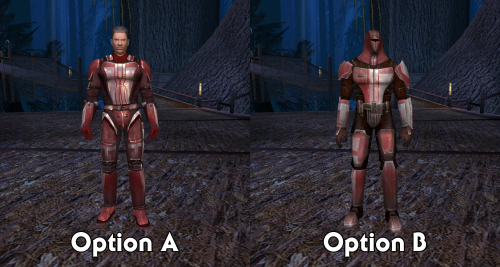
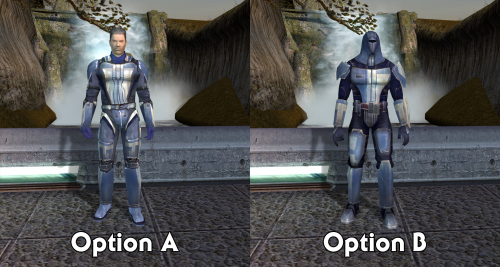
The main part of the mod concerns the Class 9 Mandalorian armors (Mandalorian Battle Armor, Mandalorian Heavy Armor, and Mandalorian Assault Armor). These items will now follow the usual blue/red/gold ranking system. There are two options for this:

  • With Option A: Unmasked, the armors use the Class 9 model. Mandalorian Heavy Armor and Mandalorian Assault Armor are given new textures, recolored red and gold variants of the Mandalorian Battle Armor.
  • With Option B: Masked, the armors act as disguise items, giving the wearer one of the NPC Mandalorian appearances.

Both options also include the following:

  • Class 9 Mandalorian armors have new icons to match their appearance with each option
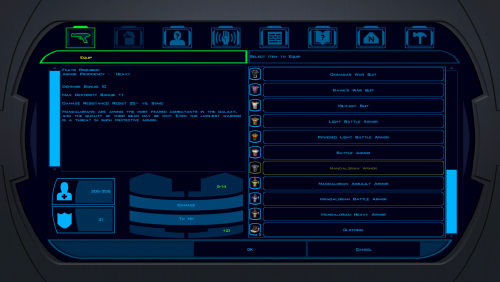
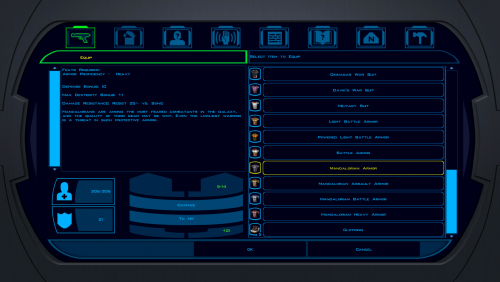
  • Class 8 Mandalorian Armor has a new icon with the correct appearance (previously it looked purple)
  • The Mandalorian helmet plot items have new icons to match their appearances (previously they were both blue, even though neither was dropped by a blue Mandalorian)
  • The Mandalorian Commander on Kashyyyk drops Mandalorian Heavy Armor to match his red appearance (previously not found anywhere in the game)

Finally, there is a third Extra Textures option with texture overrides for the NPC Mandalorians (and disguise appearances). They tone down the shaders a bit, matching what I did with my Shader Fixes for K2. They can be installed alongside Option A or B.

Installation

You must start a new game to experience the full effects of this mod.

  1. Extract files from the downloaded archive.
  2. Run INSTALL.exe.
  3. Select which option you want to install (A or B).
  4. Click "Install Mod" and select your game directory.

If you would like to install the Extra Textures, run the installer again and choose that option.

Uninstallation

During installation, TSLPatcher generates a backup folder and a log recording which files were affected.

  1. Copy kas_m25aa.mod from the backup folder to replace the one in your game's Modules folder if a backup was created, otherwise delete the file from your game's Modules folder.
  2. Delete all other files installed by this mod from your game's Override folder.

Compatibility

This mod replaces the unused PFBH07/PMBH07 texture variations and uses plot usable item variation 111.

Some users have experienced side effects after prolonged exposure to disguise items. It may result in a character's appearance being permanently changed. There is no confirmed prevention method at this time, but it can be treated via editing the save game file.

Credits

KOTOR Tool – Fred Tetra
TSLPatcher – stoffe & Fair Strides
ERFEdit– stoffe & Fair Strides
K-GFF – tk102
KOTORmax – bead-v
NWmax – Joco
tga2tpc – ndix UR

License

This work is licensed under a Creative Commons Attribution-NonCommercial 4.0 International License.

CCBY-NC 4.0

Donations

If you enjoy my mods and would like to show your support in a monetary manner, you may do so via PayPal at https://www.paypal.me/carterunited.


What's New in Version 2.0.0   See changelog

Released

Fixed

  • Fix a compatibility issue with Mandalorian Assault Armor when using Option B and the KOTOR 1 Community Patch; K1CP made this item not a disguise.

Changed

  • Rewrite installer instructions to adhere to better mod compatibility standards.
  • Convert textures to TPC. This will also help reduce compatibility problems (e.g. with Pretty Good! Icons).


 

  • Like 6
  • Thanks 1

User Feedback

Recommended Comments

Tycho Ordo

Posted

Do you have a Version of this for K2?

JCarter426

Posted

Not at the moment, but the Option A textures would probably work in K2 (copy over the TGA files except for ip_pltuseitm_011.tga and ip_pltuseitm_111.tga).

  • Like 1
Tycho Ordo

Posted

Yeah, I already tried that option A works fine thanks!

todevuch

Posted

Can you please tell me where to find the blue version of the armor?  Judging by the screenshots, it should have been on Dantooine, and perhaps one of the Mandalorians with a double-edged vibrating sword, but neither he nor the other Mandalorians, including their leader, have one.  What could be causing this?

JCarter426

Posted

There isn't any on Dantooine. The blue Mandalorian Battle Armor can be found in the Tomb of Tulak Hord on Korriban and in one of the Rakatan settlements on the Unknown World. See here.

The only change to the item drops that this mod makes is to replace one of the Mandalorian Battle Armor drops with the unused Mandalorian Heavy Armor.

  • Like 1
todevuch

Posted

8 hours ago, JCarter426 said:

There isn't any on Dantooine. The blue Mandalorian Battle Armor can be found in the Tomb of Tulak Hord on Korriban and in one of the Rakatan settlements on the Unknown World. See here.

The only change to the item drops that this mod makes is to replace one of the Mandalorian Battle Armor drops with the unused Mandalorian Heavy Armor.

Oh, exactly!  I'm sorry.  I just now remember that the original Mandalorian armor was in the tomb of the best lightsaber duelist among the Sith and where there was a mad sadist and former head of the academy!  And also in the homeland of Rakata.  your side was the right decision to leave the armor in the original places.  Plus, that in the first half of the game, in order to avoid imbalance, it is better not to endow the NPC with armor that gives advantages (although at this time heavy armor is available on Dantooine, which is worn by mercenaries in 2 parts and the armor of Kasus Fett).

todevuch

Posted

@JCarter426, By the way, your modification can be supplemented with a wonderful addition - the addition of a script that would be implemented when you put on Canderous one of your Mandalorian armor, while you need to have two versions of the Canderous voice at once - one, original, without a helmet and armor, and the second - muffled, when he's in armor.
You can also craft a dark version of the Mandalorian armor crafted from beskar that Canderous can wear. At the same time, it is necessary to prohibit the wearing of this armor (blue, red, yellow and black) to other party members, incl. Map. After all, they are not Mandalorians (well, Revan can be - he is a dark lord of the Sith, ahaha) After all, it's easier to create several alternative replicas of Revan when we transfer to managing him (what? No problem? Done! And so on, there are not so many of them, because in during dialogues he is silent).

JCarter426

Posted

There's a mod to give Canderous helmet filter here, but I think it replaces all his lines. I'm not sure if it's something that can be turned on and off without editing every dialogue file that involves Canderous.

MaîtreBunsen

Posted

@JCarter426 Hey I've downloaded your mod but option B doesn't work properly. The icon show the full mandalorian armor but when Canderous equip it it still has the old skin. I've the Ultimate Character Overhaul mod but even with the compatibility patch it's doesn't change anything. Maybe it doesn't change the skin if I already looted it ?

JCarter426

Posted

Yes, any changes to UTI files will not affect items that are already in your inventory.

  • Like 1
MaîtreBunsen

Posted

@JCarter426 Okay I used cheats to get the armor again and now it works. But I cant equip the yellow one (i can equip it if i choose option A though !). Do you know why ?

JCarter426

Posted

I'm not sure. It shouldn't do that, so I'll have to take a look when I have access to the files again.

Unnam8D

Posted

Good day to JCarter426 :) After installing your mod version B, I, like the user MaîtreBunsen, had the same problem with the Mandalorian assault armor, the armor is equipped, but the texture of the appearance is from another armor, there is also no helmet. The Mandalorian assault armor looks like in the screenshot of the modification from darthbdaman's Mandalorian Armor Fixes 1.0.0


MaîtreBunsen

Posted

Hey ! 3 years later I finally found the solution.

Like @Unnam8D, my mandalorian assault armor looked like in the screenshot from @darthbdaman's Mandalorian Armor Fixes mod. So I downloaded the mod to see the files and check if they were already in my override folder. And they were ! I think this mod was installed through the community patch or another mod. So first you will need to delete the files from this mod in the override folder. It will bring back the vanilla icons for the class 8 mandalorian armor and the class 9 mandalorian battle armor, along with bringing back the vanilla model for the mandalorian assault armor (the vanilla model being the classic mandalorian armor disguise).

Then you will need to delete the files from @JCarter426's mod. What I did was copy-pasting the option A files to the override folder and deleting them, then doing the same operation with the option B files. This way you can be sure that you've deleted all the files. Finally you can re-install the mod properly USING THE INSTALLER (this is very important, it didn't work properly for me when I simply copy-pasted the files into the override folder). Also if you want to change from option A to option B or vice-versa, keep in mind that you need to delete the files again in the override folder before running the installer again.

  • Light Side Points 1
BendakZero

Posted (edited)

Hey @JCarter426, I know that this mod is old, but I downloaded it and the option B dosn't work properly, the icons show the full armor but when I equip them they look like the armors of the option A. 

Could you check it out? I downloaded an alternative that works just fine, but your mod is more complete.

Edited by BendakZero
JCarter426

Posted

22 hours ago, BendakZero said:

Hey @JCarter426, I know that this mod is old, but I downloaded it and the option B dosn't work properly, the icons show the full armor but when I equip them they look like the armors of the option A. 

Could you check it out? I downloaded an alternative that works just fine, but your mod is more complete.

I'm seeing that issue but only for the Mandalorian Assault Armor. It looks like the file for that from Option A got misplaced.

I'll see about updating the mod, but this can easily be fixed on your end if you uninstall the mod, put the attached file in tslpatchdata/option_b, replacing the one that's there, and then reinstall the mod. It won't affect items already in your inventory, though.

g_a_class9010.uti

  • Light Side Points 1
BendakZero

Posted

2 hours ago, JCarter426 said:

I'm seeing that issue but only for the Mandalorian Assault Armor. It looks like the file for that from Option A got misplaced.

I'll see about updating the mod, but this can easily be fixed on your end if you uninstall the mod, put the attached file in tslpatchdata/option_b, replacing the one that's there, and then reinstall the mod. It won't affect items already in your inventory, though.

g_a_class9010.uti 1.44 kB · 1 download

Thank you!

Join the conversation

You can post now and register later. If you have an account, sign in now to post with your account.

Guest
Add a comment...

×   Pasted as rich text.   Paste as plain text instead

  Only 75 emoji are allowed.

×   Your link has been automatically embedded.   Display as a link instead

×   Your previous content has been restored.   Clear editor

×   You cannot paste images directly. Upload or insert images from URL.

×
×
  • Create New...

Important Information

By using this site, you agree to our Guidelines.