





About This File
This mod adjusts the wearable Mandalorian armor items to make their appearances consistent with that of other Mandalorians in the game and to fix various other oddities associated with them.
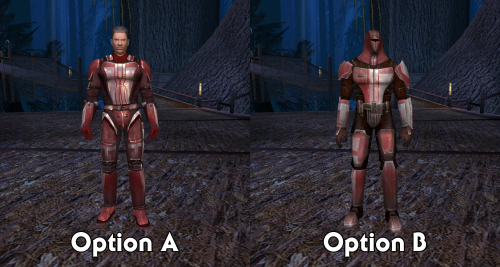
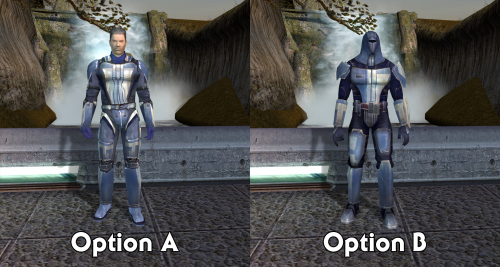
The main part of the mod concerns the Class 9 Mandalorian armors (Mandalorian Battle Armor, Mandalorian Heavy Armor, and Mandalorian Assault Armor). These items will now follow the usual blue/red/gold ranking system. There are two options for this:
- With Option A: Unmasked, the armors use the Class 9 model. Mandalorian Heavy Armor and Mandalorian Assault Armor are given new textures, recolored red and gold variants of the Mandalorian Battle Armor.
- With Option B: Masked, the armors act as disguise items, giving the wearer one of the NPC Mandalorian appearances.
Both options also include the following:
- Class 9 Mandalorian armors have new icons to match their appearance with each option
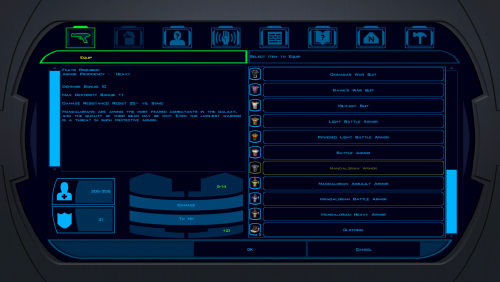
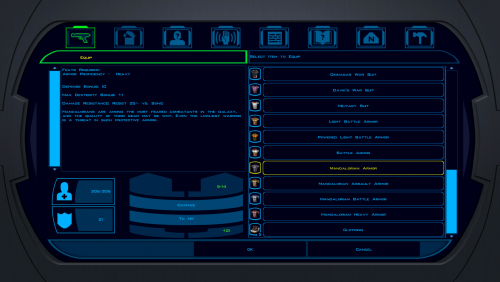
- Class 8 Mandalorian Armor has a new icon with the correct appearance (previously it looked purple)
- The Mandalorian helmet plot items have new icons to match their appearances (previously they were both blue, even though neither was dropped by a blue Mandalorian)
- The Mandalorian Commander on Kashyyyk drops Mandalorian Heavy Armor to match his red appearance (previously not found anywhere in the game)
Finally, there is a third Extra Textures option with texture overrides for the NPC Mandalorians (and disguise appearances). They tone down the shaders a bit, matching what I did with my Shader Fixes for K2. They can be installed alongside Option A or B.
Installation
You must start a new game to experience the full effects of this mod.
- Extract files from the downloaded archive.
- Run INSTALL.exe.
- Select which option you want to install (A or B).
- Click "Install Mod" and select your game directory.
If you would like to install the Extra Textures, run the installer again and choose that option.
Uninstallation
During installation, TSLPatcher generates a backup folder and a log recording which files were affected.
- Copy kas_m25aa.mod from the backup folder to replace the one in your game's Modules folder if a backup was created, otherwise delete the file from your game's Modules folder.
- Delete all other files installed by this mod from your game's Override folder.
Compatibility
This mod replaces the unused PFBH07/PMBH07 texture variations and uses plot usable item variation 111.
Some users have experienced side effects after prolonged exposure to disguise items. It may result in a character's appearance being permanently changed. There is no confirmed prevention method at this time, but it can be treated via editing the save game file.
Credits
KOTOR Tool – Fred Tetra
TSLPatcher – stoffe & Fair Strides
ERFEdit– stoffe & Fair Strides
K-GFF – tk102
KOTORmax – bead-v
NWmax – Joco
tga2tpc – ndix UR
License
This work is licensed under a Creative Commons Attribution-NonCommercial 4.0 International License.

Donations
If you enjoy my mods and would like to show your support in a monetary manner, you may do so via PayPal at https://www.paypal.me/carterunited.
What's New in Version 1.2 See changelog
Released
- Fixed a minor issue that made the installer flag a nonexistent problem.
 With version 1.2:
- Download

