
Jump to content

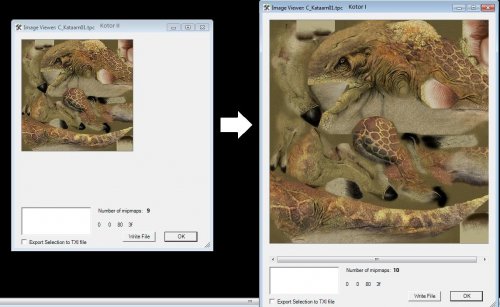
1 Screenshot

About This File

A friend suggested that I upload these here since finding these darn things is quite a chore, and because the difference is honestly quite dramatic.

It really is what it says on the tin. I took a bunch of Kotor 1 files and collected those that were downgraded for Kotor 2 (Obsidian literally saved them at a smaller resolution for no adequately explained reason other than perhaps to save resources for console release or because the engine was lagging) 

So, it's a quick texture swap. 


I've included a far more in-depth explanation for installing in the readme, but the gist is, you drop these in your override to install them and remove them from your override to uninstall them.


I obviously take no credit for these nor do I claim any rights/give permissions in their usage.


If you wish, I can provide a TXT document listing all of the textures for using your own Kotor 1 files instead of these.


  • Like 6
  • Thanks 1

User Feedback

Recommended Comments

orange

Posted (edited)

Vogga's coming  up as transparent for me.

I'm running the Steam version of the game. 

Screenshot (39).png

Edited by orange
DarthParametric

Posted

You have converted them to TGA with no TXIs. You would have been better off leaving them as TPCs.

Malkior

Posted

Perhaps. However, in the Hutt's case, the bumpmap info is in the TXI and if I keep it within the TPC, it will cause problems; since this is just a texture replacement and doesn't actually change the models (I believe TSL removed the bumpmap capability of the hutts).

DarthParametric

Posted

It's easy enough to remove from the TPC. It can simply be deleted with a hex editor, since it's just a text string appended to the end of the file.

orange

Posted

I'll see what I can do with Kotor tool. Thanks!

Obi Wan Pere

Posted

I have the same problem that @orange

The MOD have 4 files related with hutt (C_Hutt01.tga to 04) and no ".txi's". In my Override folder I've found a "C_Hutt03.txi". Removing the ".txi" file doesn't help (leaving the 4 ".tga" from this MOD). Searching in the folders of the MODs I have installed I've found it in "KOTOR 2 Community Patch-v1.4" (with its ".tga" file, both 03.tga and the 03.txi).

Removing from the Override folder all the "hutt" files helps. Without these files, restoring the files from the Community Patch "C_Hutt03.tga" and "C_Hutt03.txi" helps too but there are transparencies in the mouth and in the tail.

Thor110

Posted

I noticed another texture that is higher resolution in the original game.

LKO_blast01 in KotOR1 is 512x512

where-as

KOR_blast01 in KotOR2 is 128x128

I suspect there's a bundle more textures in there with different names to work out, just came across this while comparing the textures in both versions of the Sith Academy.

  • Like 1

Join the conversation

You can post now and register later. If you have an account, sign in now to post with your account.

Guest
Add a comment...

×   Pasted as rich text.   Paste as plain text instead

  Only 75 emoji are allowed.

×   Your link has been automatically embedded.   Display as a link instead

×   Your previous content has been restored.   Clear editor

×   You cannot paste images directly. Upload or insert images from URL.

×
×
  • Create New...

Important Information

By using this site, you agree to our Guidelines.