Search the Community
Showing results for tags 'transition'.
Found 6 results
-
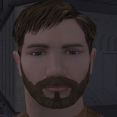
View File PHMC06 Beard and new Dark side Transition I'm going to explain a bit about the mod. I added a beard and darkened the hair of the blonde guy PC head for KOTOR 2. I also created a full darkside transition from scratch that I believe will add a new touch to darkside play-throughs. --INSTALLATION-- Installation is simple, just extract the files in the zip folder to your override folder in the game directory. If you're replacing another mod that alters the same PC head as mine, it'll ask you if you want to overwrite existing files, hit yes to all. -These are the only files you need to extract. I will include a read-me with these instructions in case you miss them. PMHC06.tga PMHC06D1.tga PMHC06D2.tga PO_PMHC06.tga PO_PMHC06D1.tga PO_PMHC06D2.tga --COMPATIBILITY-- - There shouldn't be any compatibility issues unless another mod directly alters the PMHC06 head. Submitter Trailblazer444 Submitted 12/29/2019 Category Skins TSLRCM Compatible Yes
-

Version 3.0
622 downloads
K1 Movie-Style Dark Side Transitions 3.0 Background: This is a part of a larger upscale project for a set of mods that was released in the early days of KOTOR modding by the iconic ShemL. Here in 2023, with the abundance of upscale work being done on many of the game's textures, I found some of my favorite mods to be left behind with it's original textures which did not seem to mesh well with modern wide-screen play. I decided to upscale this mod along with some others that I do plan on releasing for public use. All files have been 4x'ed in size with the goal of increasing the quality and pixel density of the images to be more in line with the upscaled texture mods we see today. (Think Ultimate Character Overhaul by ShiningRedHD.) All credit goes to Shem, the previous author for all of the hard work and originality. I will note, I have included two of my own personal edits to one of the male heads. Included in a separate folder. I hope the community enjoys this revival as much as I have. With Shem authorizing the use of his assets in other creations, be on the lookout for other upscaling projects from me in the future. For others that want to use Shem's assets, or question whether or not this should be done, please visit this reddit comment detailing his permission regarding the use of his work in other releases. https://www.reddit.com/r/kotor/comments/11p0me0/looking_to_contact_shem_an_inactive_mod_author/ Installation Instructions: Drag and drop .tga files into override. Overwrite when prompted. CREDITS: ShemL - For the original files and inspiration. Source Files: -
View File K1 Movie-Style Dark Side Transitions K1 Movie-Style Dark Side Transitions 3.0 Background: This is a part of a larger upscale project for a set of mods that was released in the early days of KOTOR modding by the iconic ShemL. Here in 2023, with the abundance of upscale work being done on many of the game's textures, I found some of my favorite mods to be left behind with it's original textures which did not seem to mesh well with modern wide-screen play. I decided to upscale this mod along with some others that I do plan on releasing for public use. All files have been 4x'ed in size with the goal of increasing the quality and pixel density of the images to be more in line with the upscaled texture mods we see today. (Think Ultimate Character Overhaul by ShiningRedHD.) All credit goes to Shem, the previous author for all of the hard work and originality. I will note, I have included two of my own personal edits to one of the male heads. Included in a separate folder. I hope the community enjoys this revival as much as I have. With Shem authorizing the use of his assets in other creations, be on the lookout for other upscaling projects from me in the future. For others that want to use Shem's assets, or question whether or not this should be done, please visit this reddit comment detailing his permission regarding the use of his work in other releases. https://www.reddit.com/r/kotor/comments/11p0me0/looking_to_contact_shem_an_inactive_mod_author/ Installation Instructions: Drag and drop .tga files into override. Overwrite when prompted. CREDITS: ShemL - For the original files and inspiration. Source Files: Submitter Coventon Submitted 03/12/2023 Category Mods K1R Compatible Yes
-
Is there any tutorial on how to make a new transition area to a new module? I haven't found any such tutorial here or on lucasforums on archive.org... All i know so far is that i must record the XYZ coordinates of where i want the new transition area using the whereami console command, but i have no idea how to implement the transition area to the module. I want to insert the new transition area here on Lehon: Many thanks in advance!
-

Version 1.0.0
736 downloads
I'm going to explain a bit about the mod. I added a beard and darkened the hair of the blonde guy PC head for KOTOR 2. I also created a full darkside transition from scratch that I believe will add a new touch to darkside play-throughs. --INSTALLATION-- Installation is simple, just extract the files in the zip folder to your override folder in the game directory. If you're replacing another mod that alters the same PC head as mine, it'll ask you if you want to overwrite existing files, hit yes to all. -These are the only files you need to extract. I will include a read-me with these instructions in case you miss them. PMHC06.tga PMHC06D1.tga PMHC06D2.tga PO_PMHC06.tga PO_PMHC06D1.tga PO_PMHC06D2.tga --COMPATIBILITY-- - There shouldn't be any compatibility issues unless another mod directly alters the PMHC06 head.-
- 2
-

-
- beard
- transition
- (and 5 more)
-
So I was looking in the heads.2da and was looking at the head textures, and I noticed that the last two bars at the end were "headtexg" and "headtexvg" and were not being used. Does the "g" and "vg" mean good, and very good? I would like someone to clarify this please.