Search the Community
Showing results for tags 'addon'.
Found 11 results
-
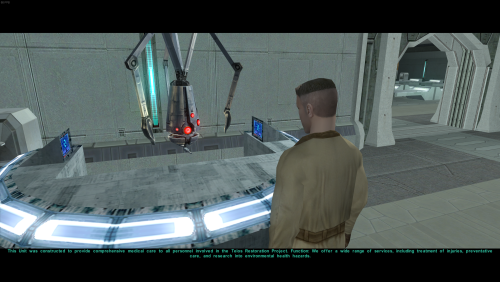
View File Telos: Citadel Station Medical Unit Quest Install TSLRCM before installing this mod, as it relies on some of its content Enhance your Citadel Station experience with this Medical Unit Quest Mod, which adds a specialized medical droid to the Citadel Station Medical Unit, along with a brand new quest line and additional environments on the map to explore. Mod Features: New NPC: Medical Droid: Adds a unique medical droid to the Medical Unit on Citadel Station. The droid serves as a central point for the mod's new questline. New Questline: Introduces a branching questline centered around the Medical Unit. Offers distinct light and dark side choices, impacting the quest's outcome. Explores and adds lore to the Medical Unit, Czerka Corporation, and Citadel Station. NPC Appearance Changes: Adds new visual appearances for commoner NPCs around the different areas of the Station. This will try to add a more unique feel to each area. Enhanced NPC Dialogue: Implements new dialogue options for commoner and Ithorian NPCs throughout Citadel Station. These new dialogue lines attempt to add more ambient information and world building to the station. Dialogue's may also reflect the players actions. About This Mod: The goal of this mod is to make Citadel Station feel a little less empty than it originally does. It attempts to tie in some lore to the Medical Unit, Czerka, and Citadel Station. It also opens up three previously inaccessible areas and adds new environments. In addition, this mod aims to change up some of the NPC's on Citadel Station by giving them more varied appearances and dialogue options, attempting to remove some of the cloning effect found in the original game. It adds a few alien commoners around the station with new dialogue, and changes the appearances of a few of the human commoners. In addition, some of Ithorians in the compound have been changed so that they're not all blue. There are new lines of dialogue given to each of the Ithorian's as well so that all five of them don't repeat the same three lines. This mod also features an alternate version of Kreia's Assorted Robe Collection 1.1, by modder: ChAiNz.2da. It acts as sort of a compatibility patch for this mod, removing the questline, while keeping most of the same charm that the original mod offers. Instead of crafting the shroud armor for Kreia, you can now find it located in the Secret Tomb. Disclaimer: Requires TSLRCM to be installed first, as it relies on some of its content. It is also recommended to install any mods that make changes to the appearance.2da file BEFORE installing this. Examples include mods like M4-78, Expanded Galaxy Mod, Calathan improvement project etc.... Your mod installation order should look something like this: 1.) TSLRCM,2.) M4-78, 3.) Expanded Galaxy/Coruscant, 4.) Calathan, 5.) This mod. If you already have Kreia's Assorted Robes Collection installed, just remove (kds_204_medcomm.utp) from the override folder, then install the alternate version/patch to make them compatible 3/09/2026 - The sealed module door can now be opened in the entertainment module, but due to the way the walkmeshes work between the two models that connect these specific areas, you can only go into/through the sealed module door, and not back. This means that you may get stuck if you get too close to the door without being able to open it. It requires 10 security to open, so I would advise to keep a save before approaching that door, or when entering the entertainment module. If you don't have 10 security and you get too close to the sealed module door, you will be stuck. I have included a transition back to the residential module as a work around for when the area is unlocked. 4/17/2026 - The unused doors in Residential Module 082 East are now actual doors/rooms. Room 5 in the main area is now its own room, and all six unused apartment doors are now their own storage rooms as well. I also want to apologize for any issues and or conflicts from earlier versions, and if anyone's mod install was nuked at some point. This is my first time creating a mod for this game, so please bear with me. It should be compatible with most other mods now after making some much needed TSLPatcher changes. Please message me here or leave a comment regarding any issues you may have so that I can assist you. These things are usually simple fixes. ---------------------------------------------------------------------------------------------------------------------------------------------------------------------------------------------------------------------------------------------------------- For future reference, I may try to make more quest content and new models/modules. If I can get voices to work in game, I plan to add new voices for the droid and possibly human voices for the commoners to have more dialogue. A goal of mine is to also port this mod over to the original Xbox version, if possible. I wanted to give a big shout out to modders SAO1138, N-DReW25, and JC, for helping me through this process, and for teaching me the basics of KOTOR modding. This wouldn't have been possible without them. Also huge shout out to ChAiNz.2da, for making such a cool mod that I had no idea existed until recently. My inspiration for this mod came down to the fact that I couldn't find any other mods that used this area. I didn't expect a Kreia mod of all things to do so! Installation: 1.) Place the files from the Override folder, into the games override folder. 2,) Run TSLPatcher.exe from the TSLPatcher folder to install the modules. You must copy/install the override files BEFORE installing the modules with TSlPatcher. IGNORE THE WARNINGS DURING INSTALLATION. IT IS JUST OVERWRITING THE MODULES. If you plan to use the alternate version of Kreia’s Robe Collection, install it after. I also highly recommend using this mod below, if you want to get rid of some of the cloning effect even further in other areas of the game. Use it in conjunction with this mod if you want even more NPC variety on the station. Submitter Doodmane444 Submitted 03/09/2025 Category Mods TSLRCM Compatible Yes
-
Version 1.0.6
908 downloads
Install TSLRCM before installing this mod, as it relies on some of its content Enhance your Citadel Station experience with this Medical Unit Quest Mod, which adds a specialized medical droid to the Citadel Station Medical Unit, along with a brand new quest line and additional environments on the map to explore. Mod Features: New NPC: Medical Droid: Adds a unique medical droid to the Medical Unit on Citadel Station. The droid serves as a central point for the mod's new questline. New Questline: Introduces a branching questline centered around the Medical Unit. Offers distinct light and dark side choices, impacting the quest's outcome. Explores and adds lore to the Medical Unit, Czerka Corporation, and Citadel Station. NPC Appearance Changes: Adds new visual appearances for commoner NPCs around the different areas of the Station. This will try to add a more unique feel to each area. Enhanced NPC Dialogue: Implements new dialogue options for commoner and Ithorian NPCs throughout Citadel Station. These new dialogue lines attempt to add more ambient information and world building to the station. Dialogue's may also reflect the players actions. About This Mod: The goal of this mod is to make Citadel Station feel a little less empty than it originally does. It attempts to tie in some lore to the Medical Unit, Czerka, and Citadel Station. It also opens up three previously inaccessible areas and adds new environments. In addition, this mod aims to change up some of the NPC's on Citadel Station by giving them more varied appearances and dialogue options, attempting to remove some of the cloning effect found in the original game. It adds a few alien commoners around the station with new dialogue, and changes the appearances of a few of the human commoners. In addition, some of Ithorians in the compound have been changed so that they're not all blue. There are new lines of dialogue given to each of the Ithorian's as well so that all five of them don't repeat the same three lines. This mod also features an alternate version of Kreia's Assorted Robe Collection 1.1, by modder: ChAiNz.2da. It acts as sort of a compatibility patch for this mod, removing the questline, while keeping most of the same charm that the original mod offers. Instead of crafting the shroud armor for Kreia, you can now find it located in the Secret Tomb. Disclaimer: Requires TSLRCM to be installed first, as it relies on some of its content. It is also recommended to install any mods that make changes to the appearance.2da file BEFORE installing this. Examples include mods like M4-78, Expanded Galaxy Mod, Calathan improvement project etc.... Your mod installation order should look something like this: 1.) TSLRCM,2.) M4-78, 3.) Expanded Galaxy/Coruscant, 4.) Calathan, 5.) This mod. If you already have Kreia's Assorted Robes Collection installed, just remove (kds_204_medcomm.utp) from the override folder, then install the alternate version/patch to make them compatible 3/09/2026 - The sealed module door can now be opened in the entertainment module, but due to the way the walkmeshes work between the two models that connect these specific areas, you can only go into/through the sealed module door, and not back. This means that you may get stuck if you get too close to the door without being able to open it. It requires 10 security to open, so I would advise to keep a save before approaching that door, or when entering the entertainment module. If you don't have 10 security and you get too close to the sealed module door, you will be stuck. I have included a transition back to the residential module as a work around for when the area is unlocked. 4/17/2026 - The unused doors in Residential Module 082 East are now actual doors/rooms. Room 5 in the main area is now its own room, and all six unused apartment doors are now their own storage rooms as well. I also want to apologize for any issues and or conflicts from earlier versions, and if anyone's mod install was nuked at some point. This is my first time creating a mod for this game, so please bear with me. It should be compatible with most other mods now after making some much needed TSLPatcher changes. Please message me here or leave a comment regarding any issues you may have so that I can assist you. These things are usually simple fixes. ---------------------------------------------------------------------------------------------------------------------------------------------------------------------------------------------------------------------------------------------------------- For future reference, I may try to make more quest content and new models/modules. If I can get voices to work in game, I plan to add new voices for the droid and possibly human voices for the commoners to have more dialogue. A goal of mine is to also port this mod over to the original Xbox version, if possible. I wanted to give a big shout out to modders SAO1138, N-DReW25, and JC, for helping me through this process, and for teaching me the basics of KOTOR modding. This wouldn't have been possible without them. Also huge shout out to ChAiNz.2da, for making such a cool mod that I had no idea existed until recently. My inspiration for this mod came down to the fact that I couldn't find any other mods that used this area. I didn't expect a Kreia mod of all things to do so! Installation: 1.) Place the files from the Override folder, into the games override folder. 2,) Run TSLPatcher.exe from the TSLPatcher folder to install the modules. You must copy/install the override files BEFORE installing the modules with TSlPatcher. IGNORE THE WARNINGS DURING INSTALLATION. IT IS JUST OVERWRITING THE MODULES. If you plan to use the alternate version of Kreia’s Robe Collection, install it after. I also highly recommend using this mod below, if you want to get rid of some of the cloning effect even further in other areas of the game. Use it in conjunction with this mod if you want even more NPC variety on the station. -

Version 1.0
8,287 downloads
Author: Kainzorus Prime Mod Name: Sion's Arrival at Peragus - High Resolution Movies ************************* Under NO circumstances is this, or any of my other, mod(s) to be posted on ANY site other than by myself. ************************* 1. Info =========== This mod replaces the low-res pre-rendered scenes of Harbinger arriving at Peragus found in Zbyl2's 'Sion's arrival at Peragus Fix' mod and TSLRCM. The new scenes were made using Obsidian's High Quality Movie Patch files. 2. Installation: ========= Place the two files in the Movies folder, in the game's directory. 3. Credits: =========== Special thanks to: Holowan Laboratories - For all the great resources. 4. DISCLAIMER: =============== This Mod is not supported by LucasArts, Bioware or Obsidian. Please do not contact them for support of this mod. Copyright: Star Wars: Knights of the Old Republic, characters, items, etc. are trademarks and copyrights owned by their respective trademark and copyright holders. Star Wars: Knights of the Old Republic: The Sith Lords, characters, items, etc. are trademarks and copyrights owned by their respective trademark and copyright holders. Bioware and the Odyssey Engine are trademarks of Bioware Corp. Obsidian are trademarks of Obsidian Entertainment. All trademarks and copyrights contained in this document are owned by their respective trademark and copyright holders. -

Version 1.5
1,617 downloads
Hey there everyone! First off, thanks for downloading my mod! I really appreciate every fan that I have out there, so thanks again! This is TSLRCM compatible. Alright, who cares about introductions right? Let's get right down to what this mod is. So, I added 51 new power crystals to the game. Each one does a couple of special things to your lightsabers that I don't think most people have done. (well, in the sense that I haven't seen anyone really come out with a crystal mod like this.) Anyways… I placed every crystal to pop up in certain situations (i.e: certain dialog options, what classes you choose, etc…) as well as placed them randomly throughout the game. Well, yeah that's about as much as I can say honestly. I really hope you guys do find this mod pretty interesting. I am a bit too lazy to type out every crystal, with it's stats and what-not. I'll type out the codes (although I REALLY, REALLY want you to find the crystals in-game instead of cheating. If you want to know which crystal code belongs to which, check out my WIP on Deadlystream and look for the numbers after each crystal name. http://deadlystream.com/forum/topic/3134-reces-projects/page-4 http://deadlystream.com/forum/topic/3134-reces-projects/page-5 Anyways, here are the codes! They're pretty simple, just: rececrstl200 all the way to 250. Here's a little sneak peak at how some of the crystals work: INSTALLATION INSTRUCTIONS: There are two ways, depending on which file you downloaded. There's the TSRCM version, and the non-TSLRCM version. They are both easy to install, so yeah. Anyways, just run the TSLPatcher and it'll automatically install every file. For the non-TSLRCM version, you'll just have to cheat all of the items into the game. UNINSTALLATION INSTRUCTIONS: Just remove all of the files from your override, and replace any backups found in the backups folder. COMPATIBILITY ISSUES: Unfortunately, this mod is NOT compatible with a mod like SLM. I believe it is for Duplisaber, so that's always good PERMISSIONS: You may NOT redistribute this mod without my consent. Ask me on any site, like DS, YouTube, Steam, etc… and I will tell you if you can put my mod somewhere else. And now for my special thanks: Fair Strides is first and foremost as he is for every one of my mods. I mean, I can't describe how helpful and how much of an awesome guy he is. It's just beyond me that I know someone like him. He helped me with scripts (as with every script that I have to make) as well as help with guiding me through making certain parts of the TSLPatcher. Malkior for some recommendations on crystal names, stats, and descriptions. Akko for suggesting a crystal to me, which I made the description make it seem like it's his crystal . Everyone out there who commented on my posts as well as kept up the support. Oh, and thanks Xuul for that comment, I never would have thought you would comment on one of my projects haha. Well, you did make a mod review for my bad mod that I made haha. Anyways… Enjoy! -

Version 1.0.0
1,288 downloads
*********************************** Knights of the Old Republic II *********************************** TITLE: Terentateks in TSL AUTHOR: LDR DATE: 6/17/18 FILENAME: terentatek_tsl FILESIZE: 2 MB -------------------------- INSTALLATION INSTRUCTIONS -------------------------- Simply put the all the files in the override folder into the Override folder in your KOTOR II directory. To uninstall, remove the files from the KOTOR II directory. ------------ Permissions ------------ As I intend for this to be used as a modder's resource, all material included can be used in your own mods without asking for permission beforehand. Just mention me in your readme. ------------ DESCRIPTION ------------ Of all the things Obsidian chose to keep in the KOTOR II game files, leaving out terentateks was just a travesty. This mod brings them back, with one on Korriban and one on Dxun. On Korriban, just make sure to loot the half-eaten corpse in the beginning of the shyrack cave module. ----- BUGS ----- None I hope. If you find any please post them in the comments. I will address them as soon as I can. ------- Credits ------- Fred Tetra for his very useful KotOR Tool. JCarter426 for compiling my scripts for me. The DeadlyStream staff and community. The staff for allowing porting between games, and the community for still making KOTOR relevant after 15+ years. I love and appreciate you all.- 1 comment
-
- 2
-

-
- tsl
- terentatek
- (and 3 more)
-

Version 2.0
3,293 downloads
READ THIS FIRST!!!!!! WARNING, IF YOU HAVE THESE FILES IN YOUR OVERRIDE FROM THE FIRST VERSION OF THE MOD, THEN REMOVE THEM FROM THE OVERRIDE!!!! m14ac.git m14ae.git m18aa.git m18ab.git m18ac.git m20aa.git m24aa.git m25aa.git m27aa.git m35aa.git m36aa.git m37aa.git m38aa.git m38ab.git m39aa.git m41ac.git m42aa.git m44ab.git m45aa.git PART 1 (PART 2 IS WAY DOWN BELOW, MAKE SURE YOU READ THAT TOO!!!!} Hey there everyone! This is my first lightsaber mod that I've made, so go easy on me alright? This mod adds in plenty of lightsabers to the game to keep you satisfied, all customized as well as upgradeable. Every crystal except for one includes all three variations of the lightsabers (Short, normal, and double-bladed) Anyways, this mod includes the following: 8 Solid-colored, awesome looking lightsabers 7 Duel-colored, awesome looking lightsabers (The core and outer glow are different colors) 5 Color changing, amazing animated lightsabers. That might be a bias opinion, but oh well I have randomly placed the lightsabers throughout the game, some are hidden, others are in obvious areas. I wanted to mention however, that there is one lightsaber that is hidden so well, I don't think anyone will be able to find it. Trust me, it's really well hidden, and in an unexpected spot. WARNING (YES, I HAVE TO TYPE IT IN ALL CAPS): THERE IS ONE LIGHTSABER (The very well hidden one) THAT IS ONLY AVAILABLE IN THE DOUBLE-BLADED FORM!!!! IF YOU TRY TO PUT THE CRYSTAL IN A SHORT OR NORMAL LIGHTSABER, IT WILL GLITCH OUT THE ITEM, AND DISAPPEAR! BE CAREFUL! Installation: Just run the TSLPatcher and let it do its work. Manual: Copy and paste all items into your override, but be careful since there's an upcrsystals.2da, which could severally mess up te lightsabers if you have any other mods. I can't guarantee compatibility. Uninstallation: Remove all of the files from your override, and throw in the backup of the upcrystals.2da into your override. Anyways, while I always prefer people to find the items in-game itself, you can always cheat them in. Here are the codes for every item: Burning White: g_w_lghtsbr50 g_w_shortsbr50 g_w_dblsbr050 g_w_sbrcrstl50 Alizarin: g_w_lghtsbr51 g_w_shortsbr51 g_w_dblsbr051 g_w_sbrcrstl51 Brandeis: g_w_lghtsbr52 g_w_shortsbr52 g_w_dblsbr052 g_w_sbrcrstl52 Fuchsia: g_w_lghtsbr53 g_w_shortsbr53 g_w_dblsbr053 g_w_sbrcrstl53 Sapphire: g_w_lghtsbr54 g_w_shortsbr54 g_w_dblsbr054 g_w_sbrcrstl54 Dartmouth g_w_lghtsbr55 g_w_shortsbr55 g_w_dblsbr055 g_w_sbrcrstl55 Cadmium: g_w_lghtsbr56 g_w_shortsbr56 g_w_dblsbr056 g_w_sbrcrstl56 Alloy: g_w_lghtsbr57 g_w_shortsbr57 g_w_dblsbr057 g_w_sbrcrstl57 Catalyst: g_w_lghtsbr58 g_w_shortsbr58 g_w_dblsbr058 g_w_sbrcrstl58 Red Lightning: g_w_lghtsbr59 g_w_shortsbr59 g_w_dblsbr059 g_w_sbrcrstl59 Paragon: g_w_lghtsbr60 g_w_shortsbr60 g_w_dblsbr060 g_w_sbrcrstl60 Ichor: g_w_lghtsbr61 g_w_shortsbr61 g_w_dblsbr061 g_w_sbrcrstl61 Arcanum: g_w_lghtsbr62 g_w_shortsbr62 g_w_dblsbr062 g_w_sbrcrstl62 Kairos: g_w_lghtsbr63 g_w_shortsbr63 g_w_dblsbr063 g_w_sbrcrstl63 Lovat: g_w_lghtsbr64 g_w_shortsbr64 g_w_dblsbr064 g_w_sbrcrstl64 Malachite: g_w_lghtsbr65 g_w_shortsbr65 g_w_dblsbr065 g_w_sbrcrstl65 Gamboge: g_w_lghtsbr66 g_w_shortsbr66 g_w_dblsbr066 g_w_sbrcrstl66 Amethyst: g_w_lghtsbr67 g_w_shortsbr67 g_w_dblsbr067 g_w_sbrcrstl67 Xanadu: g_w_lghtsbr68 g_w_shortsbr68 g_w_dblsbr068 g_w_sbrcrstl68 Then there's the secret one that I'm not giving the codes for. Remember, don't use that one in a lightsaber other than a double-bladed!!!! Btw, in case you do find it, it's called: "Ultimatum" and it's pretty funky/weird… I hope you guys enjoy this mod! Leave suggestions for me either by PM on DS, LF, YouTube, or on my WIP thread on DS!!! Youtube=RealRece Star Wars Gaming Credits: Fair Strides for helping me a lot like always, and making the TSLPatcher (I actually ended up making it, but he helped guide me through making it). Thanks to all of my fans out there who said some great things about this mod while I was working on it, and for encouraging me to continue it. Also for making suggestions for several lightsabers too! PART 2 This is part two of the readme, so whatever I guess. I'll make this one shorter. Anyways, the second mod of this mod adds in 20 new power crystals to the game. (The ones that actually give the lightsabers stats!!!) I really hope you guys understand how tedious the 1,800 tests were. Yes, 1,800 tests. Now, I know that's noter like what Hassat Hunter had to do for TSLRCM, but that's still a lot in my opinion. Anyways, I included the saber crystals to different areas of the game. You will find one power crystal with one of the other lightsabers, so that's a bonus. Can you get lucky and find the really good ones??? We'll see While I prefer you to actually find the crystals in-game, you can always cheat them in… Here are the codes for the crystals: (I'm too lazy to list the names and the codes, so I'm only listing the codes…) g_w_sbrcrstl01 g_w_sbrcrstl02 g_w_sbrcrstl11 g_w_sbrcrstl12 rececrstl71 rececrstl72 rececrstl73 rececrstl74 rececrstl75 rececrstl76 rececrstl78 rececrstl80 rececrstl81 rececrstl82 rececrstl83 rececrstl84 rececrstl85 rececrstl86 rececrstl88 rececrstl89 Hope you all enjoy this mod!!!! Special Thanks: Thank you to all of my supporters out there who really were excited to see this mod come out. I spent a lot of time working and testing out these crystals and sabers. Again, 1,800 minimum tests. And thanks to Varsity Puppet and Darth InSidious for help on trying to fix a problem that i was having. Thanks to Fair Strides again for helping like always, and finding the problem. Thanks to him, I was able to come up with a fix of the problem, although it isn't very pretty. -
View File Terentateks in TSL *********************************** Knights of the Old Republic II *********************************** TITLE: Terentateks in TSL AUTHOR: LDR DATE: 6/17/18 FILENAME: terentatek_tsl FILESIZE: 2 MB -------------------------- INSTALLATION INSTRUCTIONS -------------------------- Simply put the all the files in the override folder into the Override folder in your KOTOR II directory. To uninstall, remove the files from the KOTOR II directory. ------------ Permissions ------------ As I intend for this to be used as a modder's resource, all material included can be used in your own mods without asking for permission beforehand. Just mention me in your readme. ------------ DESCRIPTION ------------ Of all the things Obsidian chose to keep in the KOTOR II game files, leaving out terentateks was just a travesty. This mod brings them back, with one on Korriban and one on Dxun. On Korriban, just make sure to loot the half-eaten corpse in the beginning of the shyrack cave module. ----- BUGS ----- None I hope. If you find any please post them in the comments. I will address them as soon as I can. ------- Credits ------- Fred Tetra for his very useful KotOR Tool. JCarter426 for compiling my scripts for me. The DeadlyStream staff and community. The staff for allowing porting between games, and the community for still making KOTOR relevant after 15+ years. I love and appreciate you all. Submitter LDR Submitted 06/17/2018 Category Mods TSLRCM Compatible Yes
-
- 1
-

-
- tsl
- terentatek
- (and 3 more)
-
Rece's K1 Lightsaber Mod (UPDATED+ADDON) View File READ THIS FIRST!!!!!! WARNING, IF YOU HAVE THESE FILES IN YOUR OVERRIDE FROM THE FIRST VERSION OF THE MOD, THEN REMOVE THEM FROM THE OVERRIDE!!!! m14ac.git m14ae.git m18aa.git m18ab.git m18ac.git m20aa.git m24aa.git m25aa.git m27aa.git m35aa.git m36aa.git m37aa.git m38aa.git m38ab.git m39aa.git m41ac.git m42aa.git m44ab.git m45aa.git PART 1 (PART 2 IS WAY DOWN BELOW, MAKE SURE YOU READ THAT TOO!!!!} Hey there everyone! This is my first lightsaber mod that I've made, so go easy on me alright? This mod adds in plenty of lightsabers to the game to keep you satisfied, all customized as well as upgradeable. Every crystal except for one includes all three variations of the lightsabers (Short, normal, and double-bladed) Anyways, this mod includes the following: 8 Solid-colored, awesome looking lightsabers 7 Duel-colored, awesome looking lightsabers (The core and outer glow are different colors) 5 Color changing, amazing animated lightsabers. That might be a bias opinion, but oh well I have randomly placed the lightsabers throughout the game, some are hidden, others are in obvious areas. I wanted to mention however, that there is one lightsaber that is hidden so well, I don't think anyone will be able to find it. Trust me, it's really well hidden, and in an unexpected spot. WARNING (YES, I HAVE TO TYPE IT IN ALL CAPS): THERE IS ONE LIGHTSABER (The very well hidden one) THAT IS ONLY AVAILABLE IN THE DOUBLE-BLADED FORM!!!! IF YOU TRY TO PUT THE CRYSTAL IN A SHORT OR NORMAL LIGHTSABER, IT WILL GLITCH OUT THE ITEM, AND DISAPPEAR! BE CAREFUL! Installation: Just run the TSLPatcher and let it do its work. Manual: Copy and paste all items into your override, but be careful since there's an upcrsystals.2da, which could severally mess up te lightsabers if you have any other mods. I can't guarantee compatibility. Uninstallation: Remove all of the files from your override, and throw in the backup of the upcrystals.2da into your override. Anyways, while I always prefer people to find the items in-game itself, you can always cheat them in. Here are the codes for every item: Burning White: g_w_lghtsbr50 g_w_shortsbr50 g_w_dblsbr050 g_w_sbrcrstl50 Alizarin: g_w_lghtsbr51 g_w_shortsbr51 g_w_dblsbr051 g_w_sbrcrstl51 Brandeis: g_w_lghtsbr52 g_w_shortsbr52 g_w_dblsbr052 g_w_sbrcrstl52 Fuchsia: g_w_lghtsbr53 g_w_shortsbr53 g_w_dblsbr053 g_w_sbrcrstl53 Sapphire: g_w_lghtsbr54 g_w_shortsbr54 g_w_dblsbr054 g_w_sbrcrstl54 Dartmouth g_w_lghtsbr55 g_w_shortsbr55 g_w_dblsbr055 g_w_sbrcrstl55 Cadmium: g_w_lghtsbr56 g_w_shortsbr56 g_w_dblsbr056 g_w_sbrcrstl56 Alloy: g_w_lghtsbr57 g_w_shortsbr57 g_w_dblsbr057 g_w_sbrcrstl57 Catalyst: g_w_lghtsbr58 g_w_shortsbr58 g_w_dblsbr058 g_w_sbrcrstl58 Red Lightning: g_w_lghtsbr59 g_w_shortsbr59 g_w_dblsbr059 g_w_sbrcrstl59 Paragon: g_w_lghtsbr60 g_w_shortsbr60 g_w_dblsbr060 g_w_sbrcrstl60 Ichor: g_w_lghtsbr61 g_w_shortsbr61 g_w_dblsbr061 g_w_sbrcrstl61 Arcanum: g_w_lghtsbr62 g_w_shortsbr62 g_w_dblsbr062 g_w_sbrcrstl62 Kairos: g_w_lghtsbr63 g_w_shortsbr63 g_w_dblsbr063 g_w_sbrcrstl63 Lovat: g_w_lghtsbr64 g_w_shortsbr64 g_w_dblsbr064 g_w_sbrcrstl64 Malachite: g_w_lghtsbr65 g_w_shortsbr65 g_w_dblsbr065 g_w_sbrcrstl65 Gamboge: g_w_lghtsbr66 g_w_shortsbr66 g_w_dblsbr066 g_w_sbrcrstl66 Amethyst: g_w_lghtsbr67 g_w_shortsbr67 g_w_dblsbr067 g_w_sbrcrstl67 Xanadu: g_w_lghtsbr68 g_w_shortsbr68 g_w_dblsbr068 g_w_sbrcrstl68 Then there's the secret one that I'm not giving the codes for. Remember, don't use that one in a lightsaber other than a double-bladed!!!! Btw, in case you do find it, it's called: "Ultimatum" and it's pretty funky/weird… I hope you guys enjoy this mod! Leave suggestions for me either by PM on DS, LF, YouTube, or on my WIP thread on DS!!! Youtube=RealRece Star Wars Gaming Credits: Fair Strides for helping me a lot like always, and making the TSLPatcher (I actually ended up making it, but he helped guide me through making it). Thanks to all of my fans out there who said some great things about this mod while I was working on it, and for encouraging me to continue it. Also for making suggestions for several lightsabers too! PART 2 This is part two of the readme, so whatever I guess. I'll make this one shorter. Anyways, the second mod of this mod adds in 20 new power crystals to the game. (The ones that actually give the lightsabers stats!!!) I really hope you guys understand how tedious the 1,800 tests were. Yes, 1,800 tests. Now, I know that's noter like what Hassat Hunter had to do for TSLRCM, but that's still a lot in my opinion. Anyways, I included the saber crystals to different areas of the game. You will find one power crystal with one of the other lightsabers, so that's a bonus. Can you get lucky and find the really good ones??? We'll see While I prefer you to actually find the crystals in-game, you can always cheat them in… Here are the codes for the crystals: (I'm too lazy to list the names and the codes, so I'm only listing the codes…) g_w_sbrcrstl01 g_w_sbrcrstl02 g_w_sbrcrstl11 g_w_sbrcrstl12 rececrstl71 rececrstl72 rececrstl73 rececrstl74 rececrstl75 rececrstl76 rececrstl78 rececrstl80 rececrstl81 rececrstl82 rececrstl83 rececrstl84 rececrstl85 rececrstl86 rececrstl88 rececrstl89 Hope you all enjoy this mod!!!! Special Thanks: Thank you to all of my supporters out there who really were excited to see this mod come out. I spent a lot of time working and testing out these crystals and sabers. Again, 1,800 minimum tests. And thanks to Varsity Puppet and Darth InSidious for help on trying to fix a problem that i was having. Thanks to Fair Strides again for helping like always, and finding the problem. Thanks to him, I was able to come up with a fix of the problem, although it isn't very pretty. Submitter Rece Submitted 05/21/2015 Category Mods K1R Compatible No
-
Rece's K2 Power Crystal Addon UPDATE View File Hey there everyone! First off, thanks for downloading my mod! I really appreciate every fan that I have out there, so thanks again! This is TSLRCM compatible. Alright, who cares about introductions right? Let's get right down to what this mod is. So, I added 51 new power crystals to the game. Each one does a couple of special things to your lightsabers that I don't think most people have done. (well, in the sense that I haven't seen anyone really come out with a crystal mod like this.) Anyways… I placed every crystal to pop up in certain situations (i.e: certain dialog options, what classes you choose, etc…) as well as placed them randomly throughout the game. Well, yeah that's about as much as I can say honestly. I really hope you guys do find this mod pretty interesting. I am a bit too lazy to type out every crystal, with it's stats and what-not. I'll type out the codes (although I REALLY, REALLY want you to find the crystals in-game instead of cheating. If you want to know which crystal code belongs to which, check out my WIP on Deadlystream and look for the numbers after each crystal name. http://deadlystream.com/forum/topic/3134-reces-projects/page-4 http://deadlystream.com/forum/topic/3134-reces-projects/page-5 Anyways, here are the codes! They're pretty simple, just: rececrstl200 all the way to 250. Here's a little sneak peak at how some of the crystals work: INSTALLATION INSTRUCTIONS: There are two ways, depending on which file you downloaded. There's the TSRCM version, and the non-TSLRCM version. They are both easy to install, so yeah. Anyways, just run the TSLPatcher and it'll automatically install every file. For the non-TSLRCM version, you'll just have to cheat all of the items into the game. UNINSTALLATION INSTRUCTIONS: Just remove all of the files from your override, and replace any backups found in the backups folder. COMPATIBILITY ISSUES: Unfortunately, this mod is NOT compatible with a mod like SLM. I believe it is for Duplisaber, so that's always good PERMISSIONS: You may NOT redistribute this mod without my consent. Ask me on any site, like DS, YouTube, Steam, etc… and I will tell you if you can put my mod somewhere else. And now for my special thanks: Fair Strides is first and foremost as he is for every one of my mods. I mean, I can't describe how helpful and how much of an awesome guy he is. It's just beyond me that I know someone like him. He helped me with scripts (as with every script that I have to make) as well as help with guiding me through making certain parts of the TSLPatcher. Malkior for some recommendations on crystal names, stats, and descriptions. Akko for suggesting a crystal to me, which I made the description make it seem like it's his crystal . Everyone out there who commented on my posts as well as kept up the support. Oh, and thanks Xuul for that comment, I never would have thought you would comment on one of my projects haha. Well, you did make a mod review for my bad mod that I made haha. Anyways… Enjoy! Submitter Rece Submitted 06/17/2015 Category Mods TSLRCM Compatible
-
Hey there modders (mostly to whoever worked on a lightsaber crystal mod before) So, I'm trying to add new power crystals into the game, but I've run into problems with a few of them. Whenever I put the crystals into the lightsaber and then exit out of the screen. The crystals are then defaulted to some vanilla game crystals. Here's an example of two: I'm unsure as to why they do this. And it's with about 15 out of the 20 crystals. The lightsabers will keep their stats, but they lose the crystals to some default crystal. I'm unsure as to the reason of this, but if anyone has any recommendations, say them here. I've tried replacing the color crystals too, but the error seems to keep happening with every saber. I've tried cheating in a new saber, and it sitll happens. Any ideas? If you need a picture of the upgrade.2da file, or the properties of one of the lightsabers, I'll add in a pic. Update: So, I found out another interesting thing. When I only put of the crystals in, and then exit out. All of a sudden the other crystal slot is filled with a random crystal. So in that picture, what seems to be happening the Stygma crystal is spawning the Rubat crystal in the other slot, and the Gemstone crystal seems to be spawning the Damind into the other slot. Update 2: I found out that 13 of 20 crystals are doing this. I have UTI's from the number 70-89. 78-89 are doing this.
-
File Name: Sion's arrival at Peragus - High Resolution Movies File Submitter: Kainzorus Prime File Submitted: 10 Oct 2013 File Category: Mods TSLRCM Compatible: Yes Author: Kainzorus Prime Mod Name: Sion's Arrival at Peragus - High Resolution Movies ************************* Under NO circumstances is this, or any of my other, mod(s) to be posted on ANY site other than by myself. ************************* 1. Info =========== This mod replaces the low-res pre-rendered scenes of Harbinger arriving at Peragus found in Zbyl2's 'Sion's arrival at Peragus Fix' mod and TSLRCM. The new scenes were made using Obsidian's High Quality Movie Patch files. 2. Installation: ========= Place the two files in the Movies folder, in the game's directory. 3. Credits: =========== Special thanks to: Holowan Laboratories - For all the great resources. 4. DISCLAIMER: =============== This Mod is not supported by LucasArts, Bioware or Obsidian. Please do not contact them for support of this mod. Copyright: Star Wars: Knights of the Old Republic, characters, items, etc. are trademarks and copyrights owned by their respective trademark and copyright holders. Star Wars: Knights of the Old Republic: The Sith Lords, characters, items, etc. are trademarks and copyrights owned by their respective trademark and copyright holders. Bioware and the Odyssey Engine are trademarks of Bioware Corp. Obsidian are trademarks of Obsidian Entertainment. All trademarks and copyrights contained in this document are owned by their respective trademark and copyright holders. Click here to download this file