
EwokKotor
-
Posts
41 -
Joined
-
Last visited
Content Type
Profiles
Forums
Blogs
Forum & Tracker Requests
Downloads
Gallery
Store
Events
Everything posted by EwokKotor
-
 Glad to hear that, thanks for taking the time to confirm!
 -
 That would also be pretty cool!
 -
That would be pretty cool actually! Pics or it didn't happen lol.
-
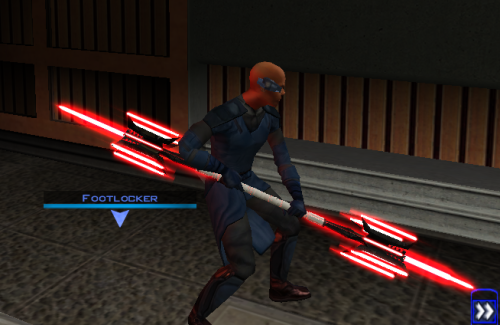
View File Lightmace and 2h Lightmace Thought I already uploaded this here but I forgot so if anyone is interested here you go! The readme's in the zipped files are outdate. Please refer to the standalone ReadMe file or the below instructions regarding instalaltions. To install: *Steps 3 and 4 may not be necessary, try running without doing them first, but if the game crashes do steps 3+ 4 and try again.* 1: Drop all files except readme.txt swkotor.ini files and upcrystals.2da into override folder. 2: A) If you don't an upcrystals.2da file in your override folder, just copy the one provided into your override folder. If you do already have an upcrystals.2da file in your override folder, - Insert a new row at the end of the table. - Copy the last row from the table provided, paste it into the new row you just created. - Save the file. *3: In your folder that contains your swkotor.exe (usually named Star Wars - KotOR) locate the file named swkotor.ini and rename it BACKUPswkotor.ini so that you can revert to it later if you desire. *4: Paste the swkotor.ini file included with this download into that same folder ( Star Wars - KotOR) --note you can use either included .ini but if using WINDOWEDswkotor.ini rename it to swkotor.ini They are basically the same but one is set for fullscreen and the other windowed mode. ---- Uninstall: 1) Delete files from override folder. 2) Delete the .ini file you added, and rename the one you re-named as BACKUPswkotor.ini to it's original name. To get items in game: 1) Enter the cheat menu (~) 2) Type giveitem g_w_lghtsbr45 or giveitem_g_w_dblsbr045 and press enter. ---------- A giant shoutout and thanks to JCarter426 over on the DeadlyStream forums for helping me solve the rendering issue! Credits: This Mod contains source assets from other creators, all credit due to them for their original works. Permissions have been attained and followed per the licenses of their works. I own the $10 unlimited commercial license for 'Goblin Iron Mace - fantasy PBR game ready weapon' by Dominik Maral. https://cubebrush.co/orders/159g6hh95g?token=Eqyy2xDzWuarI9uPcWMzEVscuvTHnBazuWAxvQSkWTc This mod also uses FinBass' 'Battle Mace 3D Model' available at https://sketchfab.com/3d-models/battle-mace-07bfd5d2ff694f94b2f2f77c465fa0f5 a big thanks to them for making this available for free with a CC Attribution license. Also as always a big thanks to Crazy34 for making their lightsaber blades with ambient lighting available as a modders resource for the rest of the community to incorporate into their mods. Check out their mod here: https://deadlystream.com/files/file/1855-new_lightsaber_blades_modders_res/ Credit and thanks also to Kaidon Jorn as from my understanding the hilts used by Crazy's mod come from him "Lightsaber Hilts models and textures and icons are created by Kaidon Jorn " Also a giant thanks, along with credit go to J for making their Glitched Lightsaber Hilt Fix - TSL ASPYR 2.0 mod available as a modders resource! Without this I couldn't have solved the rendering issues. Make sure to go support their work at https://deadlystream.com/files/file/2735-glitched-lightsaber-hilt-fix-tsl-aspyr/ Full credit goes to the original developers, artists, and respective intellectual property rights holders (Lucasfilm, Pandemic Studios, and BioWare). This is a strictly non-profit, fan-made educational project intended exclusively as a technical proof-of-concept demonstrating asset handling for the KOTOR modding community. Furthermore, I do not own or claim rights to any of the third-party tools used or described in this project; all rights belong entirely to their respective developers. Permissions regarding use of this model: Feel free to use as you see fit, but please give due credit. ---------- Purpose: This mod is a prototype WORK IN PROGRESS. It adds a new weapon type, the lightmace (and a 2h version), to the game. I plan to fine tune the hilt textures later. IF you have any color requests please comment as I can easily make different colors with my script (also available for download). Submitter EwokKotor Submitted 09/16/2026 Category Mods K1R Compatible Yes
-
Version 1.0.0
26 downloads
Thought I already uploaded this here but I forgot so if anyone is interested here you go! The readme's in the zipped files are outdate. Please refer to the standalone ReadMe file or the below instructions regarding instalaltions. To install: *Steps 3 and 4 may not be necessary, try running without doing them first, but if the game crashes do steps 3+ 4 and try again.* 1: Drop all files except readme.txt swkotor.ini files and upcrystals.2da into override folder. 2: A) If you don't an upcrystals.2da file in your override folder, just copy the one provided into your override folder. If you do already have an upcrystals.2da file in your override folder, - Insert a new row at the end of the table. - Copy the last row from the table provided, paste it into the new row you just created. - Save the file. *3: In your folder that contains your swkotor.exe (usually named Star Wars - KotOR) locate the file named swkotor.ini and rename it BACKUPswkotor.ini so that you can revert to it later if you desire. *4: Paste the swkotor.ini file included with this download into that same folder ( Star Wars - KotOR) --note you can use either included .ini but if using WINDOWEDswkotor.ini rename it to swkotor.ini They are basically the same but one is set for fullscreen and the other windowed mode. ---- Uninstall: 1) Delete files from override folder. 2) Delete the .ini file you added, and rename the one you re-named as BACKUPswkotor.ini to it's original name. To get items in game: 1) Enter the cheat menu (~) 2) Type giveitem g_w_lghtsbr45 or giveitem_g_w_dblsbr045 and press enter. ---------- A giant shoutout and thanks to JCarter426 over on the DeadlyStream forums for helping me solve the rendering issue! Credits: This Mod contains source assets from other creators, all credit due to them for their original works. Permissions have been attained and followed per the licenses of their works. I own the $10 unlimited commercial license for 'Goblin Iron Mace - fantasy PBR game ready weapon' by Dominik Maral. https://cubebrush.co/orders/159g6hh95g?token=Eqyy2xDzWuarI9uPcWMzEVscuvTHnBazuWAxvQSkWTc This mod also uses FinBass' 'Battle Mace 3D Model' available at https://sketchfab.com/3d-models/battle-mace-07bfd5d2ff694f94b2f2f77c465fa0f5 a big thanks to them for making this available for free with a CC Attribution license. Also as always a big thanks to Crazy34 for making their lightsaber blades with ambient lighting available as a modders resource for the rest of the community to incorporate into their mods. Check out their mod here: https://deadlystream.com/files/file/1855-new_lightsaber_blades_modders_res/ Credit and thanks also to Kaidon Jorn as from my understanding the hilts used by Crazy's mod come from him "Lightsaber Hilts models and textures and icons are created by Kaidon Jorn " Also a giant thanks, along with credit go to J for making their Glitched Lightsaber Hilt Fix - TSL ASPYR 2.0 mod available as a modders resource! Without this I couldn't have solved the rendering issues. Make sure to go support their work at https://deadlystream.com/files/file/2735-glitched-lightsaber-hilt-fix-tsl-aspyr/ Full credit goes to the original developers, artists, and respective intellectual property rights holders (Lucasfilm, Pandemic Studios, and BioWare). This is a strictly non-profit, fan-made educational project intended exclusively as a technical proof-of-concept demonstrating asset handling for the KOTOR modding community. Furthermore, I do not own or claim rights to any of the third-party tools used or described in this project; all rights belong entirely to their respective developers. Permissions regarding use of this model: Feel free to use as you see fit, but please give due credit. ---------- Purpose: This mod is a prototype WORK IN PROGRESS. It adds a new weapon type, the lightmace (and a 2h version), to the game. I plan to fine tune the hilt textures later. IF you have any color requests please comment as I can easily make different colors with my script (also available for download). -
I believe so, but haven't actually got much experience editing modules like that unfortunately. I would be interested to hear if someone can confirm.
-
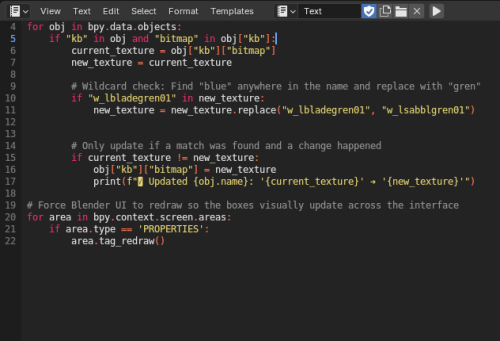
View File KotOR Blender Texture Swap script Have you ever had a model where you need to replace the textures for WAY to many meshes? This automates that process turning a tedious couple hours into a quick and easy process. No need to convert to .ascii and batch files, this python script allows you to work and achieve your goal right within KotOR Blender! This Script is meant to replace texture names in the KotOR Model Node ->Mesh -> Main Texture textbox in KBlender. To USE 1)In Blender switch to the scripting- text editor (shift+f11) 2)Create a new Text Data Block (ALT N) 2)Paste the script 3)On lines 10 and 11 replace "blue" (make sure to replace "blue" on BOTH lines) with your original texture name AND replace "green" with the new texture. -You can replace just part i.e. bladeblue will become bladegreen, OR specify the whole name (replace "blue" with "bladeblue" and "green" with "testgreen" and blueblade will become testgreen. 4) Run script by pressing play button at top of scripting window or (Alt P) 5) To confirm changes at top of blender select Window -> Toggle Console. K Blender Tex Swap.zip Submitter EwokKotor Submitted 09/07/2026 Category Modder's Resources
-
Version 1.0.0
5 downloads
Have you ever had a model where you need to replace the textures for WAY to many meshes? This automates that process turning a tedious couple hours into a quick and easy process. No need to convert to .ascii and batch files, this python script allows you to work and achieve your goal right within KotOR Blender! This Script is meant to replace texture names in the KotOR Model Node ->Mesh -> Main Texture textbox in KBlender. To USE 1)In Blender switch to the scripting- text editor (shift+f11) 2)Create a new Text Data Block (ALT N) 2)Paste the script 3)On lines 10 and 11 replace "blue" (make sure to replace "blue" on BOTH lines) with your original texture name AND replace "green" with the new texture. -You can replace just part i.e. bladeblue will become bladegreen, OR specify the whole name (replace "blue" with "bladeblue" and "green" with "testgreen" and blueblade will become testgreen. 4) Run script by pressing play button at top of scripting window or (Alt P) 5) To confirm changes at top of blender select Window -> Toggle Console. K Blender Tex Swap.zip -
Need help in repairing lightsaber glitch
EwokKotor replied to WhiteSaber's topic in General Kotor/TSL Modding
Did you ever find a solution? -
Help Editing appearance.2da in Override folder
EwokKotor replied to tgritzmodder's topic in General Kotor/TSL Modding
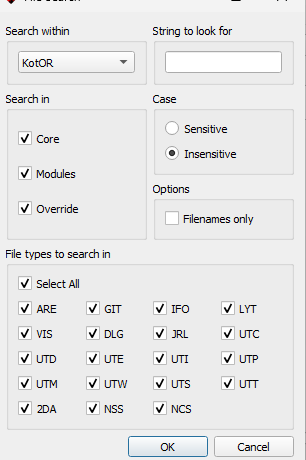
In KOTOR Tool you need to go to Tools/options/other and look at the bottom there is a box that says "Look in game's override folder for 2DA files" check that box. In Holocron I think it is Tools/filesearch then make sure the boxes are checked for Override and 2DA but I am pretty sure you can just use file -> open and select your override and open the 2da. (It's been a while since I last configured Holocron so memory is fuzzy)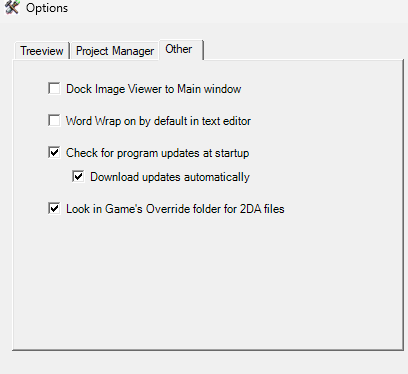
-
Ok that makes sense, thank you! I will check out the link you posted and see if that can hopefully work!
-
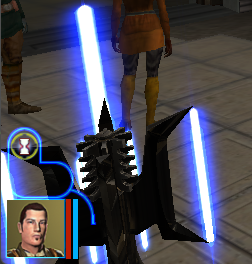
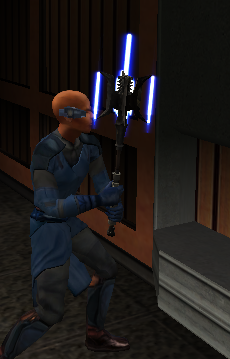
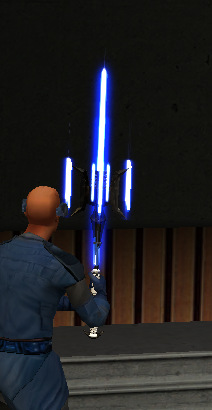
JCarter426 JCarter426's response below was right on the money! J's mod totally fixed the rendering issue! Below is a VERY rough draft I was able to throw together but the issue is solved! I am working on a mod where I have blades coming out of a mace head. I am using Kotor Blender for reference. The blades do not have transparency issues with the background or other models, but when viewed from an angle where the mace head mesh of the model is behind the blade it becomes transparent. I did, just for troubleshooting purposes, change the blade .txi from blending additive to blending normal, and this did solve the transparency issue, but of course ruined the glowing lightsaber blade effect. I am not sure if there is really a good fix for this but I thought it couldn't hurt to check and see if anyone could maybe help. I am attaching some screenshots and a short video of the issue I am having. Thanks for any help you can give. Screen Recording 2026-09-05 183311.mp4
-
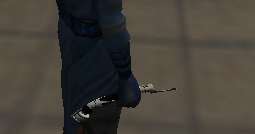
View File Count Dooku's Lightsaber A Massive thanks and credit for the hilt's source model, and the permission to use it in this mod goes to mrpanini.yt Check out their original work at https://sketchfab.com/3d-models/count-dooku-lightsaber-c82238e050de49ab93e25276c3c83d20 and make sure to show them some love! Also as always a big thanks to Crazy34 for making their lightsaber blades with ambient lighting available as a modders resource for the rest of the community to incorporate into their mods. I simply cannot play this game without the ambient lighting he innovated for sabers! Check out their mod here: https://deadlystream.com/files/file/1855-new_lightsaber_blades_modders_res/ ----- This Mod adds Count Dooku's actual lightsaber emitter as seen in the movies! It contains a red and blue version as Dooku did use both over the years. ----- To Install: 1: Drop the files from either or both folders (excluding upcrystals.2da) into your override folder. 2: If you already have an upcrystals.2da file in your override, simply add the last two rows of the included upcrystals.2da into your upcrystals.2da. -If you don't already have an upcrystals.2da file in your override just copy the included one to your override. To Uninstall: Delete files from override. ----- To use: Enter the cheat menu (~) and type: giveitem g_w_lghtsbr43 or g_w_lghtsbr44. OR Use KSE/ modules / scripting to add the lightsabers to the game. ----- This mod should be compatible with any mod that doesn't already have custom entries for w_lghtsbr043 or w_lghtsbr044. Including: Crazy34's new lighsaber blade model k1, Marius Fett's Movie Style Replacement Lightsaber Hilts (K1), and all of my other lightsaber mods. ----- Permissions: As far as I am concerned feel free to use this mod however you see fit! Just please make sure to give due credit! Submitter EwokKotor Submitted 08/22/2026 Category Mods K1R Compatible Yes
-
Version 1.0.0
12 downloads
A Massive thanks and credit for the hilt's source model, and the permission to use it in this mod goes to mrpanini.yt Check out their original work at https://sketchfab.com/3d-models/count-dooku-lightsaber-c82238e050de49ab93e25276c3c83d20 and make sure to show them some love! Also as always a big thanks to Crazy34 for making their lightsaber blades with ambient lighting available as a modders resource for the rest of the community to incorporate into their mods. I simply cannot play this game without the ambient lighting he innovated for sabers! Check out their mod here: https://deadlystream.com/files/file/1855-new_lightsaber_blades_modders_res/ ----- This Mod adds Count Dooku's actual lightsaber emitter as seen in the movies! It contains a red and blue version as Dooku did use both over the years. ----- To Install: 1: Drop the files from either or both folders (excluding upcrystals.2da) into your override folder. 2: If you already have an upcrystals.2da file in your override, simply add the last two rows of the included upcrystals.2da into your upcrystals.2da. -If you don't already have an upcrystals.2da file in your override just copy the included one to your override. To Uninstall: Delete files from override. ----- To use: Enter the cheat menu (~) and type: giveitem g_w_lghtsbr43 or g_w_lghtsbr44. OR Use KSE/ modules / scripting to add the lightsabers to the game. ----- This mod should be compatible with any mod that doesn't already have custom entries for w_lghtsbr043 or w_lghtsbr044. Including: Crazy34's new lighsaber blade model k1, Marius Fett's Movie Style Replacement Lightsaber Hilts (K1), and all of my other lightsaber mods. ----- Permissions: As far as I am concerned feel free to use this mod however you see fit! Just please make sure to give due credit! -
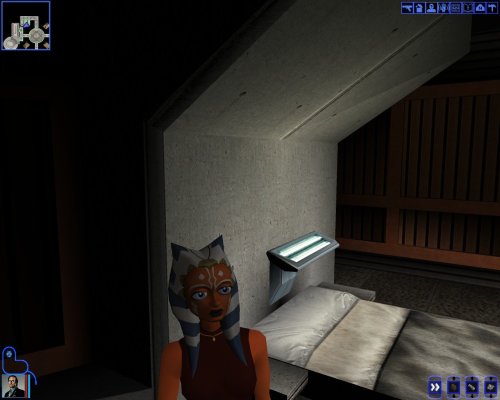
View File Ahsoka Tano Player Model / NPC KotOR 1 This mod adds a playable Ahsoka Tano to Kotor 1. Her mouth is also weight painted for use as a npc head. See ReadMe for more info. Source File Credits: A Giant thanks and all credits for the source files to KevBot! "Ahsoka Tano" (https://skfb.ly/6xO6J) by KevBot is licensed under Creative Commons Attribution (http://creativecommons.org/licenses/by/4.0/). Submitter EwokKotor Submitted 08/22/2026 Category Skins K1R Compatible Yes
-
View File Ahsoka Lightsabers TCW KotOR 1 This Mod adds Ahsoka's green lightsaber and two yellow-green shotos from TCW to KotOR 1. Also includes a blue version. The Hilts are Ahsoka's as seen in TCW. The blade of the lightsaber I made very slightly shorter than standard lightsabers. The blade length of the shoto models are two different lengths, one that is slightly shorter than standard short lightsaber blades, and one significantly shorter. To Use: Either Drop the included .ncs files into your override folder, this makes it so that when you receive your lightsaber crystal on Dantooine you will also receive two of each crystal (39 and 40). OR Alternatively Enter the cheat menu (~) and type: giveitem g_w_lghtsbr39 or g_w_lghtsbr40 for the full sized saber. For the Shoto models type: giveitem g_w_shortsbr39 or g_w_shortsbr40. OR Use KSE/ modules / scripting to add the lightsabers to the game. ------------------------------------- Installation: 1:Drop all files from folder except upcrystal.2da into override folder. 2:If you don't already have an upcrystal.2da file in your override drop the include one into override. If you do already have one add the last two rows from the included .2da to the one that is already in your override, and save it. (make sure to update the row numbers as needed!) --Note that if you don't update the upcrystals.2da the new lightsabers will appear in game but won't be customizable at a workbench. See ReadMe for more info. Credit for source files: A Very special Thanks and Credit for source hilt model goes to CtrlLight check out and support their work at https://sketchfab.com/3d-models/ahsoka-tano-clone-wars-lightsabers-30e5e52a41a3412db07a0002d1f1e5d3 A Very special Thanks and Credit to Crazy34 for their "New_Lightsaber_Blades_Modder's_Res_v1" on which the blade for this mod is based! Credit goes to them as the models and textures used to make this mod come directly from their source material! A special thanks again to them for making these resources available to modders. Check out their mod here: https://deadlystream.com/files/file/1855-new_lightsaber_blades_modders_res/ Also check out their full release of their mod here: https://deadlystream.com/files/file/1846-new_lightsaber_blade_model_k1/ Submitter EwokKotor Submitted 08/22/2026 Category Mods K1R Compatible Yes
-
Version 1.0.0
12 downloads
This mod adds a playable Ahsoka Tano to Kotor 1. Her mouth is also weight painted for use as a npc head. See ReadMe for more info. Source File Credits: A Giant thanks and all credits for the source files to KevBot! "Ahsoka Tano" (https://skfb.ly/6xO6J) by KevBot is licensed under Creative Commons Attribution (http://creativecommons.org/licenses/by/4.0/). -
Version 1.0.0
20 downloads
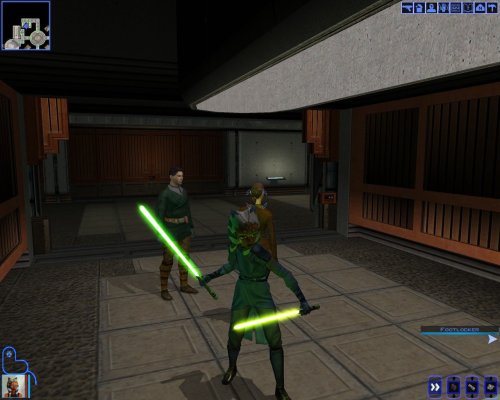
This Mod adds Ahsoka's green lightsaber and two yellow-green shotos from TCW to KotOR 1. Also includes a blue version. The Hilts are Ahsoka's as seen in TCW. The blade of the lightsaber I made very slightly shorter than standard lightsabers. The blade length of the shoto models are two different lengths, one that is slightly shorter than standard short lightsaber blades, and one significantly shorter. To Use: Either Drop the included .ncs files into your override folder, this makes it so that when you receive your lightsaber crystal on Dantooine you will also receive two of each crystal (39 and 40). OR Alternatively Enter the cheat menu (~) and type: giveitem g_w_lghtsbr39 or g_w_lghtsbr40 for the full sized saber. For the Shoto models type: giveitem g_w_shortsbr39 or g_w_shortsbr40. OR Use KSE/ modules / scripting to add the lightsabers to the game. ------------------------------------- Installation: 1:Drop all files from folder except upcrystal.2da into override folder. 2:If you don't already have an upcrystal.2da file in your override drop the include one into override. If you do already have one add the last two rows from the included .2da to the one that is already in your override, and save it. (make sure to update the row numbers as needed!) --Note that if you don't update the upcrystals.2da the new lightsabers will appear in game but won't be customizable at a workbench. See ReadMe for more info. Credit for source files: A Very special Thanks and Credit for source hilt model goes to CtrlLight check out and support their work at https://sketchfab.com/3d-models/ahsoka-tano-clone-wars-lightsabers-30e5e52a41a3412db07a0002d1f1e5d3 A Very special Thanks and Credit to Crazy34 for their "New_Lightsaber_Blades_Modder's_Res_v1" on which the blade for this mod is based! Credit goes to them as the models and textures used to make this mod come directly from their source material! A special thanks again to them for making these resources available to modders. Check out their mod here: https://deadlystream.com/files/file/1855-new_lightsaber_blades_modders_res/ Also check out their full release of their mod here: https://deadlystream.com/files/file/1846-new_lightsaber_blade_model_k1/ -
View File Darth Maul Head for Kotor 1 Credit: Full credit and a giant thanks goes to Effix(ian) for their mod Effixian's Zabrak Player Characters 1.0.0. Credit also goes to DarthParametric for their modder's resource "Bao-Dur Head Model Neck Fix" and a big thanks for giving permission to use that asset. The assets from these two mods are the basis of this one, but Effixian's mod has many more features than the simple head model included here that I have simply made the head compatible with KOTOR 1. Deffinitley go check out and support their great work at https://deadlystream.com/files/file/2190-effixians-zabrak-player-characters/ for TSL! Purpose: This Mod makes the Darth Maul style head compatible with KOTOR 1 by rigging the mdl to PMHB03, essentially replacing the vanilla mesh. I then moved the eyes to match the new head, and finally adjusted the uv mapping for the eyes, and assigned the new texture to the mdl. I will probably be uploading a video of this process to the Youtube channel at some point for anyone who is interested. Variants: There are two head .mdl's included with this mod, the one labeled PMHB04's neck should be aligned perfectly without any clipping. It looks a little odd to me personally though as I feel the neck is too long, so I have included the model I use in my game as well labeled PMHB03. PMHB03 looks more correct in terms of height to me, but be aware there is very slight clipping with this model on some outfits. -As the models are distinct you can technically drop both variants in your override and choose whichever you like more at character selection. Installation: Drop the files you want to use into your override folder, rename them to the head you want to replace, by default they replace PMHB03, and thus you can choose Maul when starting a new game, just cycle through until you see his head appear. If you want portraits or further textures I once again refer you to Effixian's mod. Submitter EwokKotor Submitted 08/11/2026 Category Skins K1R Compatible Yes
-
View File Curved Hilt Ambient Glow Lightsabers Credit: A Very special Thanks and Credit to Crazy34 for their "New_Lightsaber_Blades_Modder's_Res_v1" on which this mod is based! Full Credit goes to them as the models and textures used to make this mod come directly from their source material! A special thanks again to them for making these resources available to modders. Check out their mod here: Also check out their full release of their mod here: Credit also very much goes to Kaidon Jorn and Sithspectre for their contributions to Crazy 34's mod as well! Without them none of these mods would be possible so please make sure to go check out all of their work also! Description: This Mod adds 7 new colored (well 6 colored technically) crooked hilt (think Count Dooku) lightsabers with ambient glow to Kotor 1. To Install: First drag all the files from the folder of the color you wish to add into your override folder. Second if you don't already have an upcrystals.2da in your override folder drag the included .2da file to your override. If you do already have an upcrystals.2da file, add 7 rows to the bottom of your existing .2da file and paste in rows 7-13 from the included .2da into these new rows (make sure to update the row numbers if needed!) --Note that if you don't update the upcrystals.2da the new lightsabers will appear in game but won't be customizable at a workbench. Compatibility: This mod should be fully compatible with Crazy34's mod, as all the lightsabers should be in unused variant slots by his mod. I am unsure about compatibility with other lightsaber mods. I believe it should work without having his mod installed, but this is not verified and again I cannot endorse his mod enough I wouldn't play without it. Permissions: As far as I am concerned feel free to use this mod however you see fit! Just please make sure to give due credit! ----- Blender Tutorial for texture swapping and ambient lighting coming soon stay tuned! ----- Full credit goes to the original developers, artists, and respective intellectual property rights holders (Lucasfilm, Pandemic Studios, and BioWare). This is a strictly non-profit, fan-made educational project intended exclusively as a technical proof-of-concept demonstrating asset handling for the KOTOR modding community. Furthermore, I do not own or claim rights to any of the third-party tools used or described in this project; all rights belong entirely to their respective developers. Submitter EwokKotor Submitted 08/10/2026 Category Mods K1R Compatible Yes
-
Version 4
40 downloads
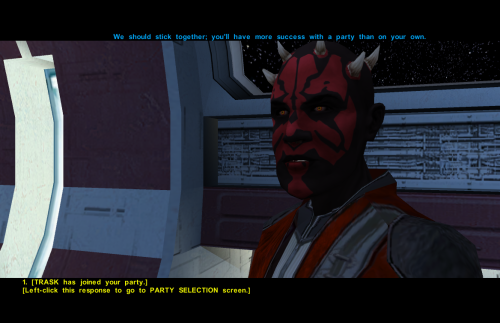
Credit: Full credit and a giant thanks goes to Effix(ian) for their mod Effixian's Zabrak Player Characters 1.0.0. Credit also goes to DarthParametric for their modder's resource "Bao-Dur Head Model Neck Fix" and a big thanks for giving permission to use that asset. The assets from these two mods are the basis of this one, but Effixian's mod has many more features than the simple head model included here that I have simply made the head compatible with KOTOR 1. Deffinitley go check out and support their great work at https://deadlystream.com/files/file/2190-effixians-zabrak-player-characters/ for TSL! Purpose: This Mod makes the Darth Maul style head compatible with KOTOR 1 by rigging the mdl to PMHB03, essentially replacing the vanilla mesh. I then moved the eyes to match the new head, and finally adjusted the uv mapping for the eyes, and assigned the new texture to the mdl. I will probably be uploading a video of this process to the Youtube channel at some point for anyone who is interested. Variants: There are two head .mdl's included with this mod, the one labeled PMHB04's neck should be aligned perfectly without any clipping. It looks a little odd to me personally though as I feel the neck is too long, so I have included the model I use in my game as well labeled PMHB03. PMHB03 looks more correct in terms of height to me, but be aware there is very slight clipping with this model on some outfits. -As the models are distinct you can technically drop both variants in your override and choose whichever you like more at character selection. Installation: Drop the files you want to use into your override folder, rename them to the head you want to replace, by default they replace PMHB03, and thus you can choose Maul when starting a new game, just cycle through until you see his head appear. If you want portraits or further textures I once again refer you to Effixian's mod. -
Hello, I recently made a video (attached) tutorial on my recent mod and thought it may be useful for anyone who isn't aware (as I wasn't) that you can adjust aurora light properties(such as the color of the light) AND change the texture for .mdl's directly in Blender. The video covers the complete process I used to create the new lightsabers, but the section about using Blender to edit those properties starts around 7:37. Hopefully this can help someone. -EK Lightsaber Ambient Light Kotor Blender(1).mp4
-
Version 1.0.0
27 downloads
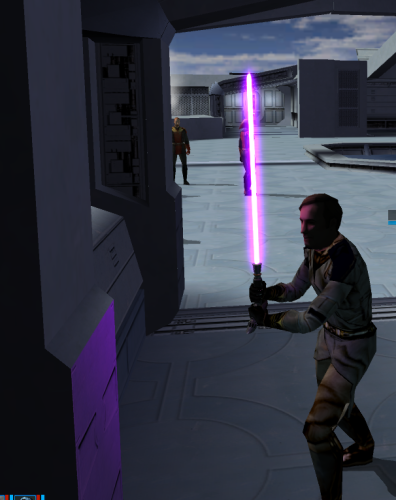
Credit: A Very special Thanks and Credit to Crazy34 for their "New_Lightsaber_Blades_Modder's_Res_v1" on which this mod is based! Full Credit goes to them as the models and textures used to make this mod come directly from their source material! A special thanks again to them for making these resources available to modders. Check out their mod here: Also check out their full release of their mod here: Credit also very much goes to Kaidon Jorn and Sithspectre for their contributions to Crazy 34's mod as well! Without them none of these mods would be possible so please make sure to go check out all of their work also! Description: This Mod adds 7 new colored (well 6 colored technically) crooked hilt (think Count Dooku) lightsabers with ambient glow to Kotor 1. To Install: First drag all the files from the folder of the color you wish to add into your override folder. Second if you don't already have an upcrystals.2da in your override folder drag the included .2da file to your override. If you do already have an upcrystals.2da file, add 7 rows to the bottom of your existing .2da file and paste in rows 7-13 from the included .2da into these new rows (make sure to update the row numbers if needed!) --Note that if you don't update the upcrystals.2da the new lightsabers will appear in game but won't be customizable at a workbench. Compatibility: This mod should be fully compatible with Crazy34's mod, as all the lightsabers should be in unused variant slots by his mod. I am unsure about compatibility with other lightsaber mods. I believe it should work without having his mod installed, but this is not verified and again I cannot endorse his mod enough I wouldn't play without it. Permissions: As far as I am concerned feel free to use this mod however you see fit! Just please make sure to give due credit! ----- Blender Tutorial for texture swapping and ambient lighting coming soon stay tuned! ----- Full credit goes to the original developers, artists, and respective intellectual property rights holders (Lucasfilm, Pandemic Studios, and BioWare). This is a strictly non-profit, fan-made educational project intended exclusively as a technical proof-of-concept demonstrating asset handling for the KOTOR modding community. Furthermore, I do not own or claim rights to any of the third-party tools used or described in this project; all rights belong entirely to their respective developers. -
View File SanAndreasKotor Adds playable Sweet, Ryder, and OG Loc to KOTOR 1. Mouths should be weighted for dialogue. Any feedback much appreciated! Special thanks to huckpie for their permission to use the source files from their San Andreas Guitar Hero World Tour mods on Nexus, as I lacked the assets and tools to port the vanilla San Andreas Files into Blender. Go check out their mods on Nexus! Planning on releasing Big Smoke later potentially with voiced lines for the Player character, although right now experiencing some trouble with audio breaking the game at certain points but stay tuned! If not will at the least release the model. Submitter EwokKotor Submitted 07/29/2026 Category Mods K1R Compatible Yes