



tgritzmodder
-
Posts
12 -
Joined
-
Last visited
tgritzmodder's Achievements





-
Update: Yeah, taking that dlg file out fixed the problem with the cutscene. The only problems after that were the fact that there is now a clone of T3 standing near the computer bank as well as where he was originally standing (Vima's new spot). Also for some reason going the dark side route and killing Vima still made her show up on the ebon hawk anyway (just not selectable as a party memeber now), but these things aren't really related to any of the initial problems I've been having so I guess that's it for now. Thank you both for the help! I'm looking forward to the expanded party mod you mentioned.
-
I didn't want to mention this earlier because I wasn't sure it was related, but yes, I did run into an issue where my screen went black but the final cutscene on the beach wouldn't start. I could still move around and hear background noise, and I could quicksave and reload, but then you're kinda just stuck there. Haven't tried much to fix it yet (busy couple of days coming) but I might try taking that dlg file out of the override as a quick test to see if it changes anything.
-
Thank you both for the quick replies! @N-DReW25 I don't have the tweak pack installed so there is no complications there, although in this same playthrough I tested I did run into the problem with Jolee's absence causing a break in dialogue (I did Kashyyyk last) so that fix is interesting to know about. @SAO1138 Yeah, I did run into issues with the T3 fix at times as well where I think it was "cloning" him on the ebon hawk(?) (it's been a few months so I don't really remember). As it turns out though, the reason the dialogue was being cut in half was because the unk41_carth.dlg that I mentioned earlier wasn't even in my override folder. So I plopped that in there and the rest of the conversation went like normal (obviously T3's dialogue is missing still, but I can probably just add that myself by editing the file when I have time). Thank you both again
-
 This probably seems like an odd question but does this only work after the star forge? Like, say you complete the temple of the ancients but wanted to roam a bit before heading to the final battle. Is that doable?
 -
Hi Everyone, I was testing a playthrough with the Sleheyron mod installed (fantastic mod btw) and had a question about some lines from T3-M4 that appear to be absent in a couple places. The two most notable places this happens is on the Ebon Hawk when you're confessing your identity as Revan to everyone. There's an option for you to ask T3 how he feels but the dialogue kind of skips over his response and goes straight to what Mission says right after him. Another place this happens is when you first land on the unknown world. T3 is supposed to point out some power fluctuations coming from the temple, but the dialogue is missing there. And, unlike with the post-leviathan dialogue, it cuts off the entire convo right there along with a huge chunk of dialogue and goes straight to the updated journal entry, which is a little unfortunate. Is there a way to restore these lines? I'm not sure if the 'T3 fix' included in the Sleheyron mod folder is meant to take care of that. When I get the time I plan to try editing the dlg file to put T3's dialogue back where it should be (unk41_carth.dlg is one of the ones I mentioned above) but I figured I'd ask here in the meantime in case someone has a better fix for this. Thank you all!
-
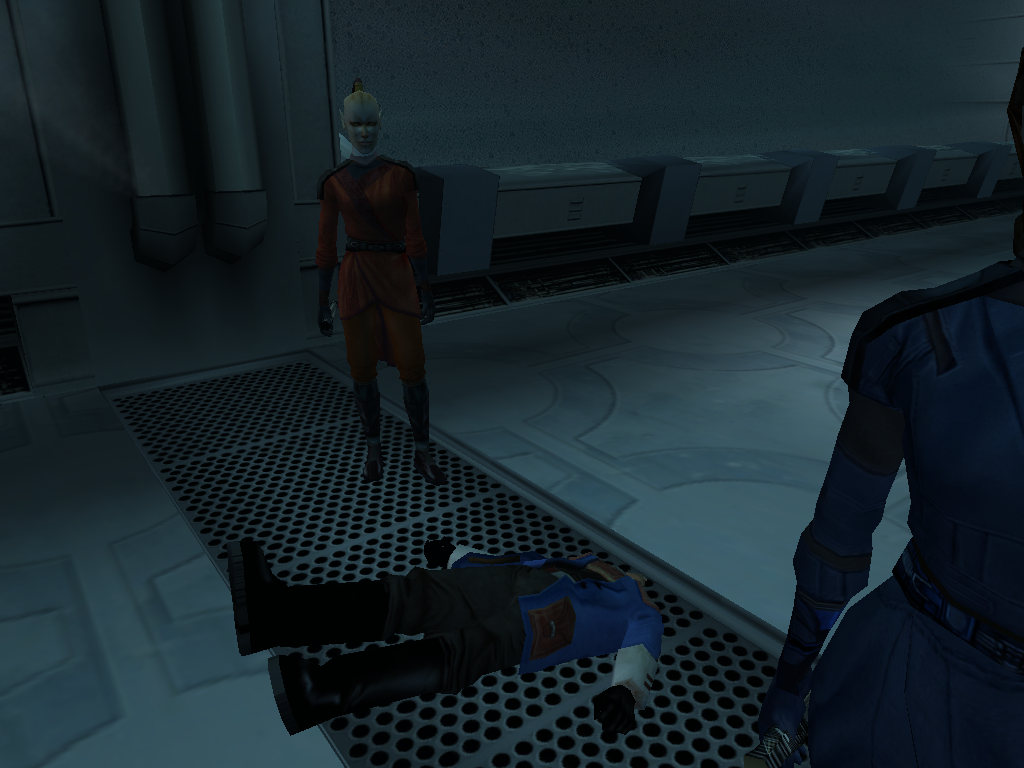
Calo must've had a few too many drinks on the ride down here cuz he did NOT have a good time in my force whirlwind.
-
Changing robe model appearance
tgritzmodder replied to tgritzmodder's topic in General Kotor/TSL Modding
Looks like that did the trick. I went into appearance.2da and for the model I was using (P_MAL_B_LRG_01) the modelj and texj entries are set to N_BandModel and N_SpecialRobe respectively. Taking these models out of the override crashes the game if you try to put them on, but changing the entries in the appearance 2da file to PMBJL (modelj) and PMBJ (texj) changes the models to their original. Then you can take out the texture files from the override to make them look like their original colors. Thanks for the help on this! -
Hi All, I was using the Yavin planet mod and while I like the look of the new robes that were added in Exar Kun's tomb, I was kinda hoping I could switch the "star forge robes" and "dark lord/darth revan's robes" back to their original models and textures. It was easy enough to do this for the female version; the model of the robes looks the same so all I had to do was move the texture file to a different location (I didn't delete it, don't worry). I could do the same thing with the icons for the robes. The male version is a bit trickier though, since the robes are using a different model (same as the sith governor/master robes). I'm assuming this is tied to the .uti files for this? I attempted to relocate what I thought was the associated uti file (g_a_mstrrobe06.uti in this case) like I did before, but that didn't change anything. Am I supposed to edit something else instead? I thought maybe baseitems.2da might have something I could look at but I couldn't find anything relating to the robes there.
-
Help Editing appearance.2da in Override folder
tgritzmodder replied to tgritzmodder's topic in General Kotor/TSL Modding
Unfortunately the 2DA editor didn't really lead me anywhere. I know the kotor tool is old, but I took a screenshot to kinda show what I've been trying to correct. All of the Iridorians on Yavin (except the yellow one) all have the wrong armor color. The blue one in particular looks like a male republic soldier (see image). When you put on the armor after killing that NPC, it makes you look the same. This UTC file I'm using was in Kotor I > ERFs > Modules > Yav_98.mod > Y > yav01_iridorian6.utc. What I'm wondering is if this is the file I need to edit and if it's possible to do so? I doubt it's as simple as changing the appearance from the dropdown menu and saving the file. Sorry if I'm making this more complicated than it needs to be, I'm pretty new to all of this.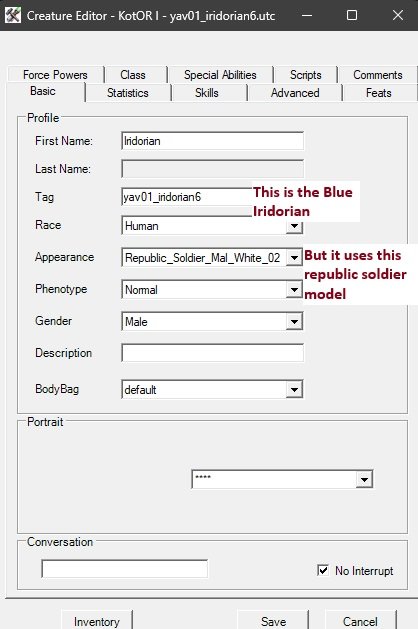
-
Help Editing appearance.2da in Override folder
tgritzmodder replied to tgritzmodder's topic in General Kotor/TSL Modding
Thanks for the recommendation, I'll try the new tool and see how it goes. Long story short some of the Yavin Planet mod's models (specifically the 'wraiths' and 'ghost terentateks') are missing their textures, probably as a result of conflicts with other mods like Sleheyron. The Iridorian armor colors are also mismatched (and the blue one just turns you into a republic soldier model). I'm trying to see if I can fix those models/textures somehow. Thanks again! -
Hello all, Not sure if this has been asked before, but I've been trying to edit the appearance.2da file in my kotor modding tool. I understand that the appearance.2da file that is in the bifs 2da path is just the base one and not the override one. But, when I check the box for looking in the overrides in Tools>Options, I don't see the "Override" section in the tree that I was expecting to find. Did I miss a step? If anything needs clarifying let me know. Any help would be appreciated!
-
Hello all, Not sure if this has been asked before (or if I'm asking in the right place), but I've been trying to edit the appearance.2da file in my kotor modding tool. I understand that the appearance.2da file that is in the bifs 2da path is just the base one and not the override one. But, when I check the box for looking in the overrides in Tools>Options, I don't see the "Override" section in the tree that I was expecting to find. Did I miss a step? Any help would be appreciated
