Kirin
-
Posts
38 -
Joined
-
Last visited
-
Days Won
2
Recent Profile Visitors
3,027 profile views


Kirin's Achievements





-
 Thank you !!!
 -
 Thank you!!! For the hilts: https://deadlystream.com/files/file/671-revans-tor-saber/ https://deadlystream.com/files/file/1847-new_lightsaber_blade_model_tsl/ Note that in some images the revan lightsaber hilt has the extra glow I have combined the 2 mods but it was only for my use I didn't upload it.
 -
Thank you !!! 1. In short I don't have the skills. I only know how to work on existing textures. 2. Yes I know. I fixed it on one iteration but I didn't like how it looked, weierdly looks better with the clipping (in my opinion, don't know why, something about the body proportions). Now I don't have time to work on it and also I'm kind of burned out with modding. When I will have some time I will give another shot on fixing it.
-
Perfect
-
. I think I have fixed it I uploaded a new version.
-
Thank you I apreciate it !!! After I spawned Sion I got him with the bad textures but after save and load again he was ok.(If you see the video at the end I have a 1v1 with Sion and the textures are ok). I will try to find what is the problem and fix it.
-
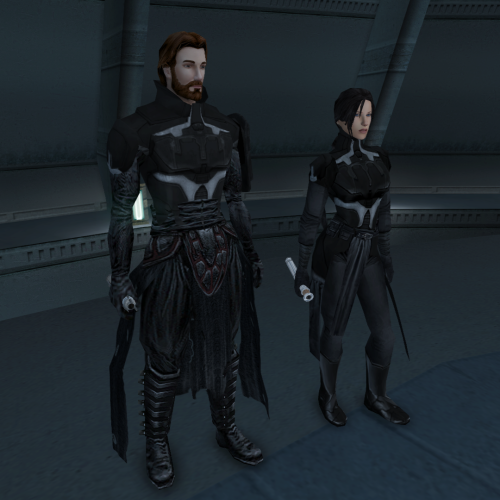
View File Kirin's Armor This mod is the one that I'm the most proud of so enjoy !!!!!!!!! The male armor is a combination between DeadMan "Modders Resource: TFU-style Darth Sion model" and Darth Bandon Armor. And for the female armor is a modified reskin of Bastila Armor by Seikan. ----------------- Video Showcase here: ----------------- When you equipe the male armor you will be taller then normal. The female version is not an exact copy of the male but looks similar This mod replaces Reven/Starforge model so any other mod that does this will not be compatible. If you equipe Atton with this armor the game will crash. ----------------- INSTALATION: 1. Add the files from the folder "1-Main Files" in your game override folder. NOTE: If you want the model without the sholder pad add the files in the optional folder after you installed the main files HOW TO GET THEM: - Method 1: Add the items in the inventory with the Savegame editor - Method 2: Cheat Codes: giveitem a_robe_67 giveitem a_robe_68 giveitem a_robe_69 ----------------- Uninstall: Remove the files you added to your game override folder. ----------------- Donations: If you want to support my work you can here: buymeacoffee.com/kirin117 ----------------- Aknoladegemnet: - Effix: Thank you for allowing me to use the structure of the files. - DeadMan Thank you for "Modders Resource: TFU-style Darth Sion model" https://deadlystream.com/files/file/172-modders-resource-tfu-style-darth-sion-model/ - Thank you for allowing me to use Seikan's Armors of the Old Republic 2.2 https://deadlystream.com/files/file/902-seikans-armors-of-the-old-republic/ - Thanks to those who took the time and effort to create the tools required to mod KOTOR. Without those, none of this would have been possible. Submitter Kirin Submitted 02/23/2026 Category Mods TSLRCM Compatible Yes
-
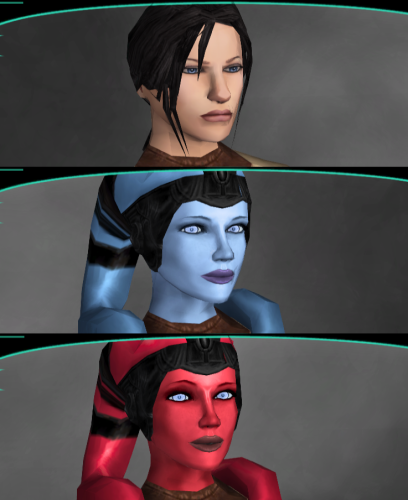
View File Kirin's Female Playable Characters Play as my modified version of Mission from KOTOR 1. This will replace the female playeble character PFHC05. This mod was requested by a nexus mods user. ----------------- Instalation: Add the files from one of the main folders in your game override folder. If you prefer to have the neck coller on add the file in the optional folder. ----------------- Uninstall: Remove the files you added to your game override folder. ----------------- Donations: If you want to support my work you can here: buymeacoffee.com/kirin117 ----------------- Acknowledgements: - Thanks to those who took the time and effort to create the tools required to mod KOTOR. Without those, none of this would have been possible. - Leilukin: Thank you for Missing K1 Party Member Ports for TSL [Modder's Resource] 1.0.0 https://deadlystream.com/files/file/2249-missing-k1-party-member-ports-for-tsl-modders-resource/ Submitter Kirin Submitted 02/21/2026 Category Mods TSLRCM Compatible Yes
-
Version 1.1.0
377 downloads
This mod is the one that I'm the most proud of so enjoy !!!!!!!!! The male armor is a combination between DeadMan "Modders Resource: TFU-style Darth Sion model" and Darth Bandon Armor. And for the female armor is a modified reskin of Bastila Armor by Seikan. ----------------- Video Showcase here: ----------------- When you equipe the male armor you will be taller then normal. The female version is not an exact copy of the male but looks similar This mod replaces Reven/Starforge model so any other mod that does this will not be compatible. If you equipe Atton with this armor the game will crash. ----------------- INSTALATION: 1. Add the files from the folder "1-Main Files" in your game override folder. NOTE: If you want the model without the sholder pad add the files in the optional folder after you installed the main files HOW TO GET THEM: - Method 1: Add the items in the inventory with the Savegame editor - Method 2: Cheat Codes: giveitem a_robe_67 giveitem a_robe_68 giveitem a_robe_69 ----------------- Uninstall: Remove the files you added to your game override folder. ----------------- Donations: If you want to support my work you can here: buymeacoffee.com/kirin117 ----------------- Aknoladegemnet: - Effix: Thank you for allowing me to use the structure of the files. - DeadMan Thank you for "Modders Resource: TFU-style Darth Sion model" https://deadlystream.com/files/file/172-modders-resource-tfu-style-darth-sion-model/ - Thank you for allowing me to use Seikan's Armors of the Old Republic 2.2 https://deadlystream.com/files/file/902-seikans-armors-of-the-old-republic/ - Thanks to those who took the time and effort to create the tools required to mod KOTOR. Without those, none of this would have been possible. -
Version 1.2.0
181 downloads
Play as my modified version of Mission from KOTOR 1. This will replace the female playeble character PFHC05. This mod was requested by a nexus mods user. ----------------- Instalation: Add the files from one of the main folders in your game override folder. If you prefer to have the neck coller on add the file in the optional folder. ----------------- Uninstall: Remove the files you added to your game override folder. ----------------- Donations: If you want to support my work you can here: buymeacoffee.com/kirin117 ----------------- Acknowledgements: - Thanks to those who took the time and effort to create the tools required to mod KOTOR. Without those, none of this would have been possible. - Leilukin: Thank you for Missing K1 Party Member Ports for TSL [Modder's Resource] 1.0.0 https://deadlystream.com/files/file/2249-missing-k1-party-member-ports-for-tsl-modders-resource/- 1 review
-
- 1
-

-
 💖
💖 -
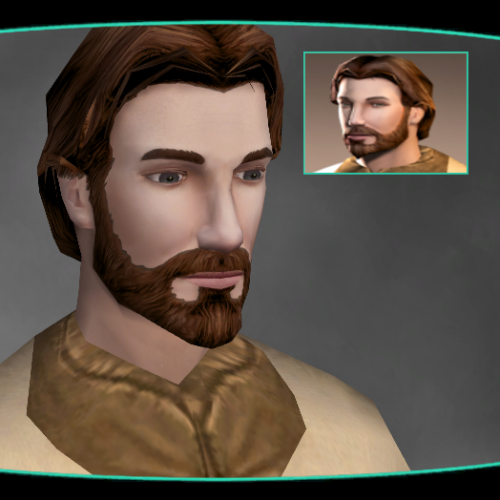
View File Kirin PMHC04 Red Hair My interpretation of PMHC04 with red hair. In the future I want to make more variants for hair and eye color for more player character models. ----------------- Instalation: Add the files in your game override folder. ----------------- Uninstall: Remove the files you added to your game override folder. ----------------- Donations: If you want to support my work you can here: buymeacoffee.com/kirin117 ----------------- Acknowledgements: - Thanks to those who took the time and effort to create the tools required to mod KOTOR. Without those, none of this would have been possible. Submitter Kirin Submitted 02/07/2026 Category Mods TSLRCM Compatible Yes
-
Version 1.0.0
49 downloads
My interpretation of PMHC04 with red hair. In the future I want to make more variants for hair and eye color for more player character models. ----------------- Instalation: Add the files in your game override folder. ----------------- Uninstall: Remove the files you added to your game override folder. ----------------- Donations: If you want to support my work you can here: buymeacoffee.com/kirin117 ----------------- Acknowledgements: - Thanks to those who took the time and effort to create the tools required to mod KOTOR. Without those, none of this would have been possible. -
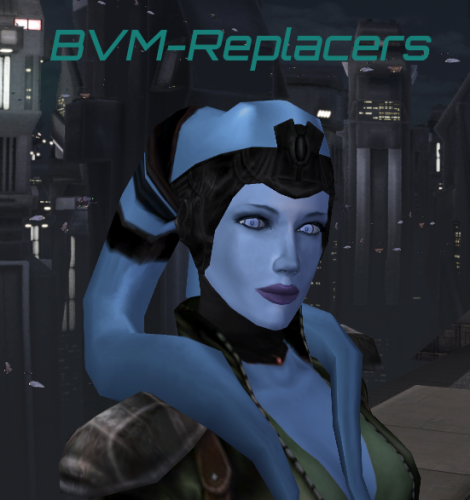
View File Kirin's Brianna Visas Mira-Replacers Female Companions Replacers. The initial Ideea for this mod was to add Mission into TSL as a companion. The blue skin matched more with Handmaiden or Mira so I made the red skin for Visas. After I saw PFHX01 and I wanted to modifie and add her also, the model and texture is modified. Atris was done because I wanted a longer hair Handmaiden and it kind of matched. When I saw this post I understood that it is possible to make this mod and added her as an homage. https://steamcommunity.com/app/208580/discussions/0/618459109269516721 So practically my main interest ware to do Mission and PFHX01, the rest are as a bonus. Now because I have so many replacers I didn't know what works with what or what people want so I made a variant for all. As can you see in the photo with all models you can replace how you want I have made an option for all posibilities. ----------------- Instalation: I will give an example and is the same for all. Lets say you want to replace Visas with Blue Mission go to Visas-Replacers\Visas to Mission\Blue and copy all the files into your game override folder and you are done. Colar: All Visas head textures have the neck colar to match with her clothes. If you want to have the colar for Brianna or Mira you need to install de desiered model after go to Visas folders and copy the head textures from her folders see list bellow with the texture names. And do it inverse if you want to have no colar for Visas P_AtrisH01.tga(Atris), P_BastilaH04.tga(Bastila), p_missionh01.tga(Mission), PFHC05.tga, PFHC07.tga, PFHC07.tga ----------------- Uninstall: Remove the files you added to your game override folder is that simple. ----------------- Compatibilities/Bugs: There are some combinations that are not compatible I didn't think of all but I will give an example: -You can't replace one companion with Blue Mission and one with Red Mission both will be the color you added last because the texture that gives the skin color is the same and will be replaced by the last one you added. -At the moment the dark side transformation does not work the models will look the same dark or light side. I'm not planning to modifie this. -The underware skins color change work for all except Mira. ----------------- Donations: If you want to support my work you can here: buymeacoffee.com/kirin117 ----------------- Requests: At the moment I have in mind some modifications but I got tiered on working on this mod so this is the version I want to release. I will see in the future if I will add more. If you have any sugeations for a new model or any modification to the existing models (hair color, eye color, skin color...) to add or modifie ask in the comments or DM me I will add it if I have time. ----------------- Acknowledgements: - Thanks to those who took the time and effort to create the tools required to mod KOTOR. Without those, none of this would have been possible. - Effixian Thank you for allowing me to use your ported female head model that was combined with Belaya's Unique Look https://deadlystream.com/files/file/1392-effixians-k1-to-k2-heads/ - Leilukin: Thank you for Missing K1 Party Member Ports for TSL [Modder's Resource] 1.0.0 https://deadlystream.com/files/file/2249-missing-k1-party-member-ports-for-tsl-modders-resource/ And also thank you for allowing me to modifie and use your model Belaya's Unique Look https://www.nexusmods.com/kotor/mods/1494?tab=description - tabularasa: Thank you for allowing us to use "PFHC07 redone" https://www.nexusmods.com/kotor2/mods/1173 Submitter Kirin Submitted 02/04/2026 Category Mods TSLRCM Compatible Yes
-
Version 1.1.0
165 downloads
Female Companions Replacers. The initial Ideea for this mod was to add Mission into TSL as a companion. The blue skin matched more with Handmaiden or Mira so I made the red skin for Visas. After I saw PFHX01 and I wanted to modifie and add her also, the model and texture is modified. Atris was done because I wanted a longer hair Handmaiden and it kind of matched. When I saw this post I understood that it is possible to make this mod and added her as an homage. https://steamcommunity.com/app/208580/discussions/0/618459109269516721 So practically my main interest ware to do Mission and PFHX01, the rest are as a bonus. Now because I have so many replacers I didn't know what works with what or what people want so I made a variant for all. As can you see in the photo with all models you can replace how you want I have made an option for all posibilities. ----------------- Instalation: I will give an example and is the same for all. Lets say you want to replace Visas with Blue Mission go to Visas-Replacers\Visas to Mission\Blue and copy all the files into your game override folder and you are done. Colar: All Visas head textures have the neck colar to match with her clothes. If you want to have the colar for Brianna or Mira you need to install de desiered model after go to Visas folders and copy the head textures from her folders see list bellow with the texture names. And do it inverse if you want to have no colar for Visas P_AtrisH01.tga(Atris), P_BastilaH04.tga(Bastila), p_missionh01.tga(Mission), PFHC05.tga, PFHC07.tga, PFHC07.tga ----------------- Uninstall: Remove the files you added to your game override folder is that simple. ----------------- Compatibilities/Bugs: There are some combinations that are not compatible I didn't think of all but I will give an example: -You can't replace one companion with Blue Mission and one with Red Mission both will be the color you added last because the texture that gives the skin color is the same and will be replaced by the last one you added. -At the moment the dark side transformation does not work the models will look the same dark or light side. I'm not planning to modifie this. -The underware skins color change work for all except Mira. ----------------- Donations: If you want to support my work you can here: buymeacoffee.com/kirin117 ----------------- Requests: At the moment I have in mind some modifications but I got tiered on working on this mod so this is the version I want to release. I will see in the future if I will add more. If you have any sugeations for a new model or any modification to the existing models (hair color, eye color, skin color...) to add or modifie ask in the comments or DM me I will add it if I have time. ----------------- Acknowledgements: - Thanks to those who took the time and effort to create the tools required to mod KOTOR. Without those, none of this would have been possible. - Effixian Thank you for allowing me to use your ported female head model that was combined with Belaya's Unique Look https://deadlystream.com/files/file/1392-effixians-k1-to-k2-heads/ - Leilukin: Thank you for Missing K1 Party Member Ports for TSL [Modder's Resource] 1.0.0 https://deadlystream.com/files/file/2249-missing-k1-party-member-ports-for-tsl-modders-resource/ And also thank you for allowing me to modifie and use your model Belaya's Unique Look https://www.nexusmods.com/kotor/mods/1494?tab=description - tabularasa: Thank you for allowing us to use "PFHC07 redone" https://www.nexusmods.com/kotor2/mods/1173