



Leilukin
-
Posts
456 -
Joined
-
Last visited
-
Days Won
28
Content Type
Profiles
Forums
Blogs
Forum & Tracker Requests
Downloads
Gallery
Store
Events
Posts posted by Leilukin
-
-
On 11/21/2025 at 7:47 PM, CrimsonTest said:
Hey can anyone help me install this mod on android
You can refer to KOTOR Community Portal's modding guide for how to install mods in the Android version of the game.
-
On 6/2/2025 at 9:15 PM, LeZombieFluo said:
I installed TSLRCM first, then the party swap, then this mod
Did you install any other mods, like M4-78 Enhancement Project? If so, list ALL the mods you installed.
On 6/2/2025 at 9:29 PM, LeZombieFluo said:The link just says "File not found" when I checked it out, so it seems like the file you uploaded there has expired. I suggest you directly upload and attach the install log file to your post here on this forum, so the file can exist longer.
-
On 5/31/2025 at 11:29 AM, Angelvizsla19 said:
HELP, i´m having this issue:
Did you install the "Default Installation" option or "PartySwap Compatible Installation"? Did you install any other mods?
Also, if you want to report errors in the installation log, it would be more helpful if you upload and attach the installog.txt file. The error logs you copied and pasted left out information about which file the installer was trying to make changes to when it encountered the errors. If you attached the instllog.txt file, I could look through the log and had a better chance in identifying the cause of the issue.
-
Consistent Bastila Recognition
=Consistent Bastila Recognition=
A KNIGHTS OF THE OLD REPUBLIC II: THE SITH LORDS MODIFICATION
AUTHOR: Leilukin
FILE NAME: Consistent Bastila Recognition.7z
LATEST VERSION: 1.0
CONTACT: E-mail to contact@leilukin.com, or message to Leilukin on Deadly Stream1. DESCRIPTION:
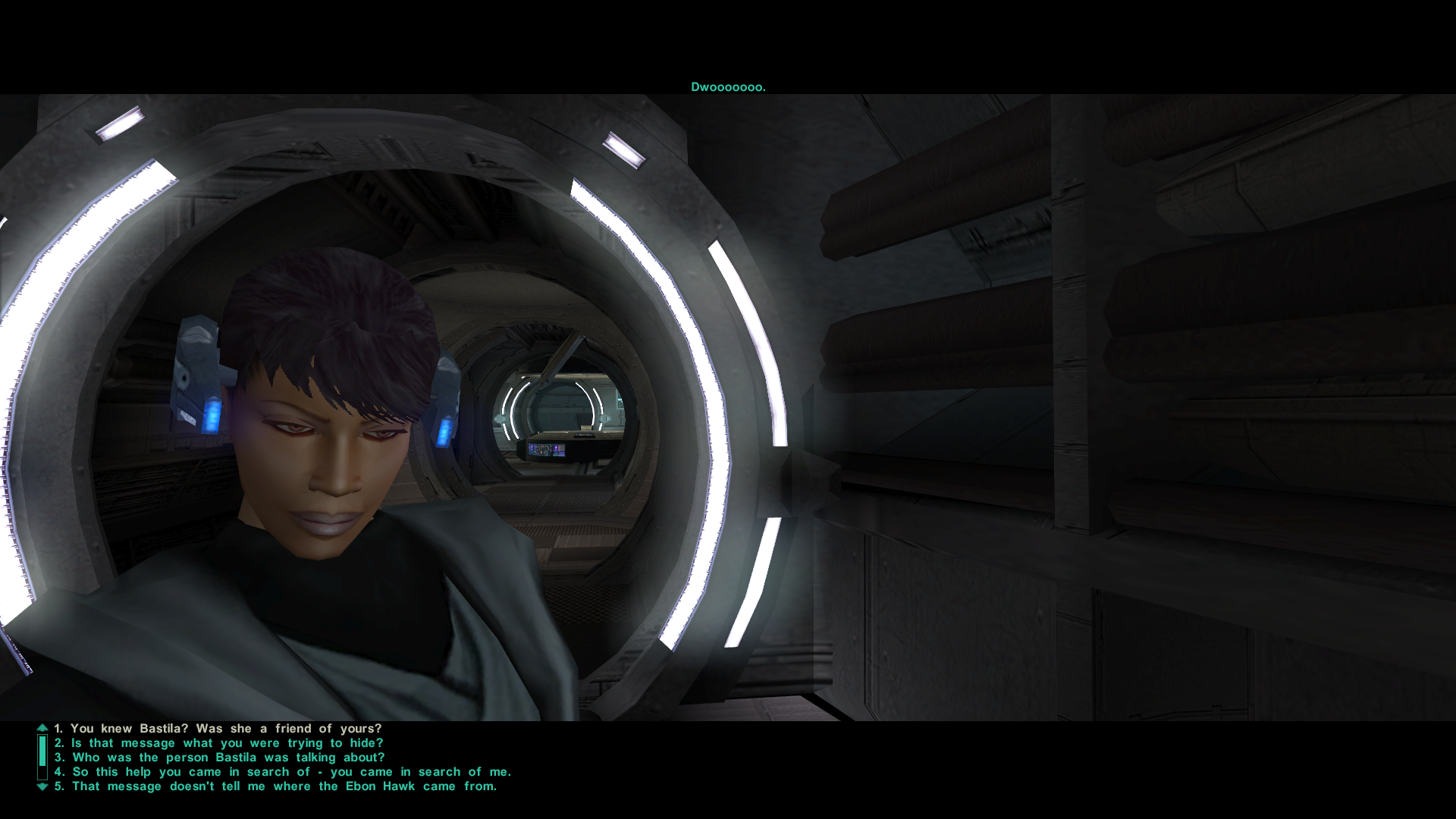
In KotOR II: TSL, entering the secret tomb on Korriban will reveal that the player character, the Exile, knew Bastila. However, if Bastila appears as a hologram in T3-M4's holo-recording, provided Revan is male, none of the dialogue options for the Exile when they talk to T3 allow them to mention Bastila by name. Instead, the Exile merely refers to Bastila with generic terms such as "the person in the hologram", presumedly because the hologram could be either Bastila or Carth depending on Revan's gender.
This mod aims to correct the inconsistency of the Exile not recognizing Bastila in the hologram, by making the Exile refer to Bastila by name when talking to T3 about the holo-recording.
2. INSTALLATION:
First and foremost, make sure you have The Sith Lords Restored Content Mod (TSLRCM) installed, since TSLRCM is REQUIRED for this mod to work.
Extract the Consistent Bastila Recognition.7z archive you downloaded to anywhere you like, as long as it is not within the KotOR 2 directory.
Run Install.exe. Select either "Default Installation" or "M4-78EP Compatible Installation", depending on if you have installed M4-78 Enhancemnet Project (M4-78EP) or not. You should choose ONLY ONE of these two options to install the main part of the mod.
Once you have chosen the installation option you want, and select your KotOR 2 game folder as your KotOR 2 directory path, click the “Install” button and let the installer do its job.
If you have also installed WildKarrde's TSL Expanded Ending, run Install.exe again, select the "TSL Expanded Ending Compatibility" installation option, then select your KotOR 2 directory path, and click the “Install” button.
***IMPORTANT NOTE FOR STEAM USERS:***
I DO NOT recommend using the Steam Workshop if you want to use this mod. Steam Workshop is frankly a mod compatibility nightmare, and I recommend reading this post on why Steam Workshop is NOT recommended for modding KotOR 2.3. UNINSTALLATION:
Run Install.exe and select your KotOR 2 directory where you installed this mod. From the “Tools” drop-down menu, select “Uninstall Mod / Restore Backup”, then confirm to uninstall the mod.
4. KNOWN ISSUES:
None currently known. If you find any bugs or problems, please let me know.
5. MOD COMPATIBILITY:
Apart from The Sith Lords Restored Content Mod (TSLRCM), which is required for this mod to work, any other mods that modify T3-M4's main dialogue file, t3m4.dlg, may conflict with this mod.
I have set up the installer to install this mod by patching the t3m4.dlg file to improve compatibility with other mods that modify t3m4.dlg as much as possible, but it is still not guaranteed to be compatible with every other mods that modify the same file.
This mod is not compatible with my Alternate Revan Romances REDUX. Note that Alternate Revan Romances REDUX has implemented similar changes by making the player character refer to Bastila by name during T3’s conversation, so if you use Alternate Revan Romances REDUX, you do not need Consistent Bastila Recognition.
6. PERMISSION:
You may modify this mod for personal use or show this mod in screenshots. However, do not release your mods containing assets from my mod without my permission.
I do not use nor support Steam Workshop, so I do not want any of my mods to be uploaded to Steam Workshop.
7. CREDITS:
Snigaroo for suggesting the idea of this mod in his KotOR 2 mod build request thread on Deadly Stream
WildKarrde for giving me the permission to make this mod compatible with TSL Expanded Ending
Cortisol for Holocron Toolset
tk102 for DLG Editor
Cortisol and th3w1zard1 for HoloPatcherTHIS MODIFICATION IS NOT SUPPORTED BY BIOWARE/OBSIDIAN ENTERTAINMENT OR LUCASARTS OR ANY LICENSERS/SPONSORS OF THE MENTIONED COMPANIES. USE THIS FILE AT YOUR OWN RISK AND NEITHER THE ABOVE MENTIONED COMPANIES NOR THE AUTHOR IS RESPONSIBLE FOR ANY DAMAGE CAUSED TO YOUR COMPUTER FOR THE USAGE OF THIS FILE.
-
Submitter
-
Submitted03/25/2025
-
Category
-
TSLRCM CompatibleYes
-
-
On 2/11/2025 at 11:39 AM, Raven3166 said:
I installed it after PartySwap, but i just realized that I installed it after Extended Enclave as well, considering I followed the popular KOTOR 2 Mod Build that's out there first and then downloaded standalone mods like yours here.
As I suspected, wrong installation order was the cause of the errors you encountered. The Extended Enclave compatibility patch of my Handmaiden romance mod has instructed that if you want to use my mod with Extended Enclave, you should install Extended Enclave AFTER my mod.
The Instruction section of the KOTOR Community Portal's mod build has clearly stated that:
Quote- If you are intending to use any content not included in the mod builds, search for and identify that content BEFORE installing the builds! Certain mods have install steps or overwrite requirements that will necessitate you installing them midway through the mod build install, so if you want to use content outside the builds, you should identify that content before you start your install.
So if you want to use my Handmaiden/Disciple romance mod, you should read and understand my mod's instructions first BEFORE installing the KOTOR Communtiy Portal's mod build.
On 2/11/2025 at 11:39 AM, Raven3166 said:So far I've had no problems yet with handmaiden (granted, I don't think I've had the opportunity for any "romance" dialogues yet), and I'm currently at the end of Nar Shaddaa. Is reinstalling still a must?
Yes, you still must reinstall your game and the mods, because you have messed up the installation of the mod build and my mod by installing my mod only after Extended Enclave. If you do not reinstall, you will likely encounter potentially game-breaking issues when you reach the Rebuilt Jedi Enclave sequence when you return to Dantooine after meeting the Jedi Masters.
On 2/11/2025 at 11:39 AM, Raven3166 said:I installed extended enclave, but I'm honestly not sure yet what it actually does haha.
Did you not read mod descriptions before you installed a mod? Both the KOTOR Community Portal and the download page of Extended Enclave itself has stated that it restores content to the Rebuilt Jedi Enclave sequence on Dantooine.
The KOTOR Community Portal's description of Extended Enclave:
QuoteRestores some additional content to the Dantooine Enclave, including more variance depending upon your influence with Kreia.
Description of the download page of Extended Enclave:
QuoteThis is an extended version of the Rebuilt Enclave sequence. We went through the dialogs as modified by TSLRCM and compared them to the original versions and made changes and restored additional dialog based on developer notes, etc...
On 2/11/2025 at 11:39 AM, Raven3166 said:I assume reinstalling makes you lose your saves, unless you can back those up, but would they still function correctly?
Since you have not reached the Rebuilt Jedi Enclave sequence yet, you may back up your current saves and use your current saves after you reinstall the game and the mods.
-
 1
1
-
On 2/8/2025 at 2:28 PM, Raven3166 said:
Hi!
So I followed the popular KOTOR 2 Mod build (which also features your mod partyswap) and wanted to install this mod. I started doing so but encountered 33 errors, I ran the patcher a couple more times until I eventually reached 0 errors. Did I kind of mess my game up now? Or is there no need for worry?
At what point did you install my mod? Installation order matters a lot when you want to install a lot of mods. As pointed out in the FAQ article of my same-gender romance mods regarding installing my mods alongside the KOTOR Community Portal's mod build:
Quote[...]some of my mods require you to install at a very specific point of the mod builds:
- Handmaiden and Female Exile - Disciple and Male Exile Romance should be installed immediately after PartySwap and before Extended Enclave. If you also want to install Extended Enclave, you should use the compatibility patch included in my Handmaiden/Disciple romance mod, instead of the standalone patch I made for the mod build. If you plan on using Kreia's Fall In-Game Cutscene, you need to install the compatibility patch included in my mod.
Unless the mod explicitly instructs to do so, re-running the patcher will more than likely mess up your game, so I suggest you reinstall your game and the mods from scratch.
-
On 5/13/2024 at 3:16 PM, blcv2 said:
Is there suppose to be a delay before she speaks to you again? I landed on dantooine talked to her, she had the outburst and then I tried to talk to her again right after but she refuses to speak with me
To repeat my questions to you on Nexus Mods:
- Did you install this mod before or after Handmaiden got angry? Did you get any errors when you installed my mod?
- What exactly are the other mods you are using?
-
@WillJMC Did you make sure you actually pointed the mod's installer to your main KotOR 2 folder, where swkotor2.exe is located? Do not point the installer to the Override folder.
Is your lips folder Read-only? Right-click your lips folder, go to Properties and see if the "Read-only" box is checked. If yes, make sure that your KotOR 2game directory and all subfolders are not set as read-only by unchecking the "Read-only" box of these folders.
If my above suggestions still does not work or apply to you, you may need to try to verify integrity of game files of your KotOR 2 game on Steam to check if your game has been installed properly.
-
On 12/8/2023 at 9:25 AM, WillJMC said:
Yes and steam. those _loc and i believe every other media _loc is in the folder. It's in my game's directory in he folder "lips"
What is your operating system: WIndows, maxOS or Linux?
If you are playing on Linux, you need to point the mod's installer to the "steamassests" folder.
-
On 12/5/2023 at 3:52 PM, WillJMC said:
• Error: Destination file "lips\003EBO_loc.mod" does not exist at the specified location! Skipping section...
• Error: Destination file "lips\262TEL_loc.mod" does not exist at the specified location! Skipping section...
Error: Destination file "lips\402DXN_loc.mod" does not exist at the specified location! Skipping section...
Error: Destination file "lips\903MAL_loc.mod" does not exist at the specified location! Skipping section...
Error: Destination file "lips\localization.mod" does not exist at the specified location! Skipping section...
My 5 errors. and i have no clue how to fix it... for Handmaiden/Disciple (For PC)Do you have a folder named "lips" in your KotOR 2 game folder? Do you play KotOR 2 on Steam, GOG or the CD version?
-
On 10/8/2023 at 4:46 AM, DasRoteBaron said:
So when this says it's not compatible with Schematic Lightsaber Mod, are we talking like, the game-breaking sort incompatible, or the "you're just not able to get a lightsaber" from her sort of incompatible?
To quote my reply to you on Nexus Mods:
"It is the game-breaking sort of incompatibility, since Schematic Lightsaber Mod uses its own module files for the Sith Academy on Korriban, which will overwrite all the changes made by my mod to the Sith Academy, causing you unable to progress the Korriban's quest line in the way intended by my mod. Not to mention, SLM is an outdated mod that was built on an old version of TSLRCM, so I would not recommend using SLM at all even if you don't use my mod. "
-
On 7/16/2023 at 11:15 AM, N-DReW25 said:
Didn't @Leilukin restore this already?
Yes, my Juhani Dialogue Restoration was made specifically for players who want the cut Juhani dialogue but do not want to use K1R. You may integrate my mod into your KotOR 1 restored content mod if you want to.
22 hours ago, Darth Imperitus said:It makes me excited about the prospect of having fully voiced protagonists for these games one day.
Don't expect mods that make the KotOR protagonists fully-voiced will happen. It will require extremely extensive work, involving not just in creating voice-overs for every single dialogue option for the player characters, but also editing most dialogue files of the entire game to find a way to play the PC's voiced lines after selecting a dialogue option. This will conflict with almost all existing KotOR mods that edit dialogue.
-
1
-
-
@Jikker Did you fight the Handmaiden sisters before leaving the Telos secret academy?
If you want to reload your save again to see if you still have issues about Handmaiden not joining your party, you need to reload your save at the polar mesa, before entering the secret academy.
When you tried to restore your game to vanilla state, did you ensure your Override folder was empty? If you have used mods, Steam will not delete every file from the mod even when you uninstall the game through Steam client, so if you want to do a clean reinstallation of the game, after uninstalling the game you need to delete the game's folder before install the game again.
Similarly, even when you are currently not using the Steam Workshop, if you have every used it in your previous playthrough, it is possible that there would be leftover files that interfere with the mods you are currently using, so you need to ensure there is no Steam Workshop folders in your computer (the directory is \Steam\SteamApps\Workshop\) as well.
-
6 hours ago, DarthTyren said:
Alright, here's the big update:
Everyone give a nice, warm welcome to the new manager of PartySwap: @Leilukin!
I'm aware how long I took with this announcement. I sat on this decision for months, but with Leilukin's current activity level in the community and as a modder, as well as her familiarity with the mod and how it works and her vision for the future, there really was no one else this mod could be passed off to.
I want to thank everyone who supported me and PartySwap over the last several years, and even as I step away from modding and Star Wars entirely, I hope you'll join me in wishing Leilukin the best.
For the last time...
Darth Tyren has spoken!
Thank you for making PartySwap and trusting me with the management of PartySwap!
9 hours ago, AttilaThePun said:I've been looking for this since I was informed of this mod on the KotOR subreddit. I only recently got the game on mobile. So, did PartySwap work after Peragus? Did you get both companions?
PartySwap has been included in the KotOR subreddit's KotOR 2 full mobile mod build itself, meaning this mod has been tested to ensure it works on the mobile version of KotOR 2 and TSLRCM, as long as you follow the mod build's instructions to install mods on mobile.
On 6/23/2023 at 2:32 AM, Sticks said:Hello. I'm a first-time player of KOTOR2 and was advised that this was a go-to mod along with the content restorer mod.
I've downloaded it and run the installer, but I had a number of errors pop up. This is not all of them, but it's a chunk. I wanted to know if this should cause any issues.
You play KotOR 2 on Steam, is that correct? Did you make sure you have installed TSLRCM into the Steam version of your game? Do you see TSLRCM's logo when you launch your game?
-
 4
4
-
-
The TSLPatcher of version 0.4.1 gives two error messages during installation:
Quote• Error: No instruction section found for file tar03_blackv038.utc, skipping...
• Error: No instruction section found for file tar03_blackv038.utc, skipping...-
1
-
-
3 hours ago, Kelerick said:
i've installed the mod however it gaves me this error (Picture)
I'm using the TSLRCM (English) + M4-78EP (English) in steam workshop.
I don't know it's normal the error or it's because the workshop file.
EDIT: made a pastebin about the logs here.If you are subscribed to the Steam Workshop version of TSLRCM and you want to install a different mod that uses TSLPatcher, such as PartySwap, you need to point the TSLPatcher installer to TSLRCM's Steam Workshop folder, not the main KotOR 2 directory. For the TSLRCM + M4-78EP combined Steam Workshop mod, its folder is /\Steam\SteamApps\Workshop\content\208580\1402798020.
Since you have got errors and warnings for not installing PartySwap properly, you will need to do a clean reinstallation of your game, then reinstall PartySwap to ensure the mod is installed correctly.
-
1
-
-
On 4/30/2023 at 2:56 AM, RaztoR said:
I may decide to do a more thorough investigation if the issue cannot be replicated elsewhere when the partyswap mod is used either by itself or in tandem with your romance mods. The only other suspect I can think of is the latest TSLRCM version.
I just tested PartySwap with the latest version of TSLRCM again with the Aspyr patch on GOG,, both with and without my Handmaiden/Disciple romance mod,and I did not encounter the issue with Kreia's "No. It is a battle she must face alone" line, so I'm afraid I have zero clue on why it happened to you, especially since that line is not the only spliced VO used in either Party Swap and my mod, but apparently you did not encounter such issue with any other dialogue involving Handmaiden.
-
5 hours ago, RaztoR said:
After Kreia's line get interrupted, the scene will continue as normal. The bug simply acts as a voice-over skip similar to that of left-clicking during a conversation. The file sadly did not do anything to change the outcome of the scene.
If you play TSL with the Aspyr patch, either on Steam or on GOG, dialogue and voice-over skipping can happen randomly. It can be fixed by restarting the game, or reverting the Aspyr patch. However, if even my file doesn't fix it for you, I'm afraid I have no idea why it happened.
-
On 4/22/2023 at 1:42 AM, RaztoR said:
I'd like to inform you of a bug that seems to be caused by your PartySwap mod. Specifically. After you've ...
entered the rebuilt Jedi Enclave on Dantooine and encountered the Jedi Masters, Handmaiden will appear to ask why Kreia did not go to join the Exile in their meeting. Kreia's voice line gets interrupted before it is finished. i.e. "Not it is a battl--".
The issue is repeatable on two different character profiles with polar opposite alignments. Could you check and see if the issue is there for you as well? Beside TSLRCM, I am using Leilukin's Visas Marr and Female Exile Romance mod along with their Handmaiden and Disciple romance mod.It's possible that your issue was caused by my mod because my mod also modifies the Rebuilt Jedi Enclave sequence. What happened after Kreia's line got interrupted? Did the game stop progressing?
Can you try putting this file in your Override folder and see if it fixes your issue?
-
@jjuacamole As I pointed out in the FAQ article of my same-gender romance mods for KotOR 2, I cannot help directly with modding KotOR 2 on any console or mobile devices, because I only own the PC version KotOR 2. However, since the KotOR subreddit mod build includes another one of my mod, Darth Sion and Male Exile Mod, which also involves injecting files in the lips folder, there must be a way to install mods that involve the lip folder on the mobile version of KotOR 2, so you may have better luck in getting help with identifying your issue by asking it on the KotOR subreddit mod build thread.
-
1
-
-
Leilukin's Juhani's Outfit Reskin Pack
=Leilukin's Juhani's Outfit Reskin Pack=
A KNIGHTS OF THE OLD REPUBLIC MODIFICATION
AUTHOR: Leilukin
FILE NAME: Leilukin's Juhani's Outfit Reskin Pack.7z
LATEST VERSION: 1.0
CONTACT: E-mail to contact@leilukin.com, or message to Leilukin on Deadly Stream1. DESCRIPTION:
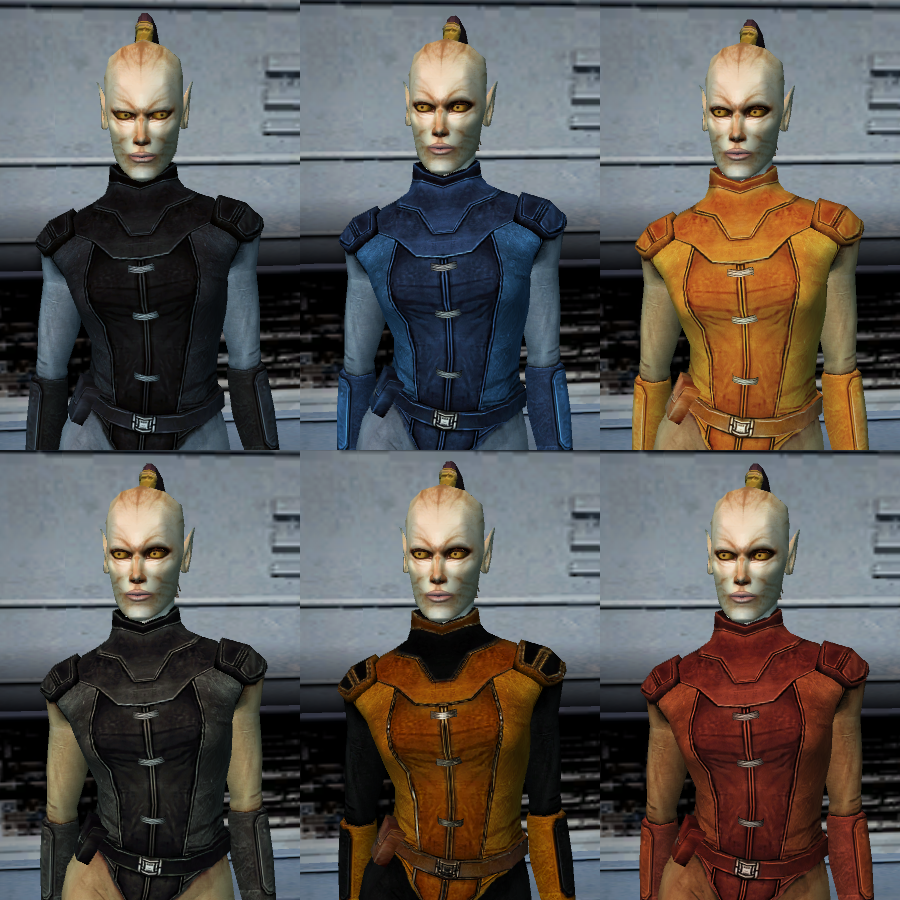
This mod reskins Juhani's outfit by changing the outfit's color scheme, with multiple versions of reskin provided.
The different color versions of Juhani's outfit reskin include: Black, Blue, Buff, Gray, Red, and Orange and Black. Refer to the screenshot included in the mod file or on the mod's download page for how the outfit reskins look in the game.
These reskins were made by utilizing modder's resources. Specifically, the Orange and Black version is based on SpaceAlex's K1 Enhancement Pack, while the others are based on JC's Cloaked Jedi Robes & Supermodel Port for K1.
2. INSTALLATION:
Go to the "Installation" folder, choose the color you want for Juhani's outfit, enter the subfolder of the color of your choice, and put P_JuhaniBB01.tpc into your Override folder.
3. UNINSTALLATION:
Delete P_JuhaniBB01.tpc from your Override folder.
4. KNOWN ISSUES:
None currently known. If you find any bugs or problems, please let me know.
5. MOD COMPATIBILITY:
This mod is not compatible with any other mods that modify P_JuhaniBB01, the texture of Juhani's outfit. However, this mod is compatible with any mod that modifies the texture and model of Juhani's head.
6. PERMISSION:
You may use assets from this mod as part of your mod, however, SpaceAlex, JCarter426 and I should be credited accordingly, with SpaceAlex being credited for K1 Enhancement Pack modder's resource, or JCarter426 for JC's Cloaked Jedi Robes & Supermodel Port for K1 modder's resource.
7. CREDITS:
SpaceAlex for the K1 Enhancement Pack modder's resource
JCarter426 for JC's Cloaked Jedi Robes & Supermodel Port for K1 modder's resource
Cortisol for Holocron Toolset
ndix UR for tga2tpc and tpcviewTHIS MODIFICATION IS NOT SUPPORTED BY BIOWARE/OBSIDIAN ENTERTAINMENT OR LUCASARTS OR ANY LICENSERS/SPONSORS OF THE MENTIONED COMPANIES. USE THIS FILE AT YOUR OWN RISK AND NEITHER THE ABOVE MENTIONED COMPANIES NOR THE AUTHOR IS RESPONSIBLE FOR ANY DAMAGE CAUSED TO YOUR COMPUTER FOR THE USAGE OF THIS FILE.
-
Submitter
-
Submitted03/27/2023
-
Category
-
K1R CompatibleYes
-
-
What do you mean by OG robes? Move-style Jedi robes?
Is this what you want?
-
Missing K1 Party Member Ports for TSL [Modder's Resource]
MODDER'S RESOURCE FOR STAR WARS: KNIGHTS OF THE OLD REPUBLIC II: THE SITH LORDS
This modder's resource includes models and textures of Jolee, Juhani, Mission and Zaalbar that are ported from KotOR 1 to be usable in KotOR 2: TSL. I have also included character templates (in UTC format) for them, allowing you to spawn them as NPCs in your mod.
This resource is made because Jolee, Juhani, Mission and Zaalbar never make any physical appearance in TSL, thus their textures and models do not exist within TSLs game files. However, both appearance.2da and heads.2da of TSL, including vanilla, still include entries for these characters, so if you want to make them appear as NPCs in TSL, there is no need to create extra entries for them in said 2DA files.
PERMISSION:
This modder's resource is free to use in any mod you create or release. Credit is appreciated, but not required.
CREDITS:
- Cortisol for Holocron Toolset
- bead-v for MDLEdit
-
Submitter
-
Submitted02/06/2023
-
Category
-
1
-
Juhani Item Pack for TSL
=Juhani Item Pack for TSL=
A KNIGHTS OF THE OLD REPUBLIC II: THE SITH LORDS MODIFICATION
AUTHOR: Leilukin
FILE NAME: Juhani Item Pack for TSL.7z
LATEST VERSION: 1.0
CONTACT: E-mail to contact@leilukin.com, or message to Leilukin on Deadly Stream1. DESCRIPTION:
This mod adds a new Jedi robe, a new headband and a new armband to In KotOR II: TSL, named Juhani's Robe, Juhani's Armband and Juhani's Band, with item descriptions that indicate these items once belonged to Juhani.
I have also made unique inventory icons for Juhani's Robe and Armband, as well as a unique texture for Juhani's Robe. The properties of these items are chosen to reflect Juhani's Jedi Guardian class in the first KotOR game. In addition, Juhani's Robe can be upgraded with underlays.
These Juhani items can be purchased from Daralaa's store at the Dantooine Enclave Courtyard. Daralaa's store is chosen to be the location to obtain these items because Juhani was trained at the Jedi Academy on Dantooine, and Daralaa is a salvager who sells Jedi artifacts.
If you want to add the Juhani items manually via the cheat console or KotOR Savegame Editor, here are the item codes:
- llk_juharmband —— Juhani's Armband
- llk_juhband —— Juhani's Band
- llk_juhjedirob —— Juhani's Robe
The concept of this mod started with my frustration with the fact that Juhani is literally the only KotOR 1 party member whose existence never gets acknowledged in the entire TSL, even in cut content. Even among the KotOR 1 party members who do not appear in TSL, Jolee gets mentioned in a conversation with Handmaiden as well as a robe and a headband that are named after him, while Mission and Zaalbar are referenced in an unused item named Vao Armband. Therefore, I decided to make this mod to add custom items that reference Juhani.
2. INSTALLATION:
Extract the Juhani Item Pack for TSL.7z archive you downloaded to anywhere you like, as long as it is not within the KotOR 2 directory. Run Install.exe, point the installer to your KotOR directory, where swkotor2.exe is located, and let the installer do its job.
If you have installed some other mods, when you install this mod, a new folder named "backup" may be created by the installer in the same folder as the installer. Do not delete the folder or the file within the folder if you plan to uninstall this mod.
***IMPORTANT NOTE FOR STEAM WORKSHOP USERS:***
If you have subscribed to the Steam Workshop version of TSLRCM, you must install this mod to TSLRCM's Steam Workshop folder instead of the main KOTOR 2 directory. The directory of the Steam Workshop version of TSLRCM is \Steam\SteamApps\Workshop\content\208580\485537937.Note: The "Source" folder includes the source of the script used by this mod for modders' reference. Ignore the "Source" folder if you only want to install and play this mod.
3. UNINSTALLATION:
Go to the Override folder of your KotOR 2 directory, and delete the following files:
- ia_jedirobe_070.tpc
- ii_frarmbnds_070.tpc
- llk_darastore.ncs
- llk_juharmband.uti
- llk_juhband.uti
- llk_juhjedirobe.uti
- PFBI70.tpc
- PMBI70.tpc
If a backup folder was created when you installed this mod, go to the backup folder, cut and paste daraala.dlg in your Override folder. If no backup folder was created, delete daraala.dlg from your Override folder.
4. KNOWN ISSUES:None currently known. If you find any bugs or problems, please let me know.
5. MOD COMPATIBILITY:
This mod is compatible with The Sith Lords Restored Content Mod (TSLRCM).
Any other mod that modifies daraala.dlg, Daralaa's dialogue file, may conflict with this mod. I have set up TSLPatcher to patch the dialogue file instead of hard replacing it to improve compatibility with other mods as much as possible. If you are using another mod that modifies Daralaa's dialogue, and that mod places Daralaa's dialogue in the Override folder, you need to install my mod after that mod.
This mod is not compatible with any other mod happens to use the same file names for the textures of the Jedi Robe (PFBI70 and PMBI70) and inventory icons for the Jedi Robe and the armband (ia_jedirobe_070 and ii_frarmbnds_070 respectively).
6. PERMISSION:
You may modify this mod for personal use or show this mod in screenshots.
You may use the custom llk_darastore script from this mod to make a compatibility patch with your mod, but do not claim the script as your own.
Do not use any of the custom items from this mod, including llk_juharmband, llk_juhband and llk_juhjedirobe, in your mod without my permission.
Do not upload this mod to Steam Workshop.
7. CREDITS:
Cortisol for Holocron Toolset
tk102 for DLG Editor
KobaltBlu for KotOR Scripting Tool
Stoffe for TSLPatcher; Fair Strides for the updated versionTHIS MODIFICATION IS NOT SUPPORTED BY BIOWARE/OBSIDIAN ENTERTAINMENT OR LUCASARTS OR ANY LICENSERS/SPONSORS OF THE MENTIONED COMPANIES. USE THIS FILE AT YOUR OWN RISK AND NEITHER THE ABOVE MENTIONED COMPANIES NOR THE AUTHOR IS RESPONSIBLE FOR ANY DAMAGE CAUSED TO YOUR COMPUTER FOR THE USAGE OF THIS FILE.
-
Submitter
-
Submitted01/30/2023
-
Category
-
TSLRCM CompatibleYes
-
1
![Missing K1 Party Member Ports for TSL [Modder's Resource]](https://deadlystream.com/downloads/screens/monthly_2023_02/1051809094_swkotor22023-02-0700-40-59-304.png.0faad355993d363c7a32184d944e5ae7.png)

MOD:PartySwap
in Mod Releases
Posted · Edited by Leilukin
When you ran PartySwap's installer with Proton, did you try to click the "Browse" button beside the "Select your KOTOR directory path" drop-down to find and select your KotOR 2 game's install path?
PartySwap uses HoloPatcher as its installer. HoloPatcher has a Linux version that you can use to install a mod by placing it in the mod's folder and then execute it, but since you managed to run the EXE installer for TSLRCM and M4-78EP with Proton to install them, you should be able to run PartySwap's EXE installer with Proton and install it as well. The Linux version of HoloPatcher still requires you to manually find and select your KotOR 2 game's install path by clicking the "Browse" button.