
Leaderboard


Popular Content
Showing content with the highest reputation on 02/04/2026 in all areas
-
1 point
-
1 point
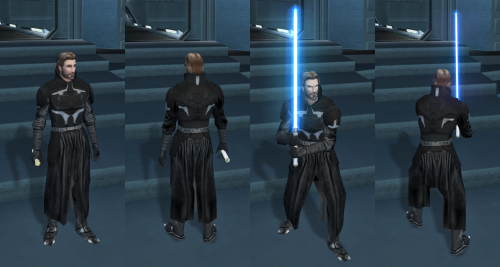 Hey man, it works! It even uses the lower neck guard. I'm a use it for my playthrough.
 -
1 point
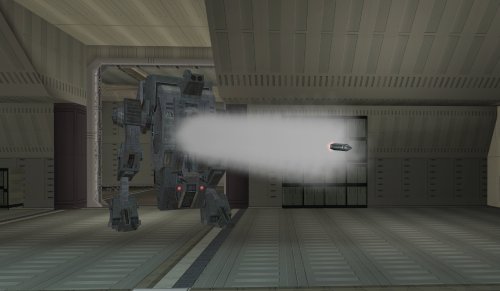
Version 1.0.0
23 downloads
Makes the tank droid more tank-like. SUMMARY The tank droid is a pretty cool unique enemy in TSL, but a couple of things bother me about it. I always found it disappointing that it has these giant gun barrels which look like they’re for launching missiles, like a tank, but instead it just tosses frag grenades at you. The game even has functioning rockets but for whatever reason they weren’t given to the tank droid. It also has a super high defense which makes it dodge attacks like the Matrix, which feels pretty odd. This is just a feature of the game mechanics, but it becomes particularly glaring on the tank droid. I mean it’s a giant droid, can it really be that hard to hit? This mod makes a few changes to make the tank droid more true to form. It will now shoot rockets instead of throwing grenades. These are not your average wrist rockets; they are bigger and more deadly, dealing 60 pts of piercing AOE damage. Additionally, the tank droid gets a -5 defense penalty for being a chonker but its base health is doubled and it gets Master Toughness granting -10% damage immunity. Its natural energy resistance is also reduced from -15 to -10 but it gains -5 slashing, piercing and bludgeoning resistance. Essentially you’ll miss significantly less but you’ll need more hits using the right weapons and moves to take it down. INSTALLATION To install, run TSLPatcher.exe. Unaltered copies of any modified files will be placed inside the backup folder in the location of TSLPatcher.exe. UNINSTALLATION Remove the following files from Override: c_drdmkfour001.utc, crhide_tankdroid.uti, c_tankdroid.mdl, c_tankdroid.mdx, w_roktank.mdl, w_roktank.mdx, m_imp_tankrocket.ncs, m_rnd_tankdroid.ncs, and spells.2da. If any files were created inside the backup folder, move them to Override. COMPATIBILITY Should be compatible with most other mods unless they edit the tank droid. When in doubt, install this mod after others. This mod edits the c_tankdroid model to line up the rocket with the gun barrels a little better, which will overwrite model changes made by other mods. Install after Droid Models Animation Fix by CapitaineSpoque, which this mod forwards the relevant changes from. PERMISSIONS Please do not reupload this mod without my permission. CREDITS offthegridmorty CapitaineSpoque - base tank droid model, Droid Models Animation Fix TSLPatcher - stoffe, Fair Strides KOTOR Tool - Fred Tetra KotorBlender - seedhartha Mods in screenshot: Ultimate High Resolution Pack - ShiningRedHD Ultimate Character Overhaul - ShiningRedHD -
1 pointPlease see the official GitHub repo to get support and find updates: https://github.com/OldRepublicDevs/NCSDecomp NCSDecomp - Turn Your Compiled KOTOR Scripts Back Into Readable Code! Ever wanted to see what's inside those compiled .ncs script files from KOTOR? Or maybe you found a mod with scripts you want to understand or modify? NCSDecomp can take those compiled script files and turn them back into readable source code that you can actually understand and edit! What does it do? Simply put, NCSDecomp converts compiled KOTOR scripts (.ncs files) back into source code (.nss files). It's like having a translator that converts the game's internal script format back into human-readable code. Works with both KOTOR 1 and KOTOR 2! How to use: There are two ways to use NCSDecomp - a simple graphical program (GUI) or command-line tools. Most users will want the GUI version! Option 1: The Easy Way (GUI - Recommended!) 1. Download the NCSDecomp folder 2. Double-click NCSDecomp.exe (Windows) or NCSDecomp.app (Mac) 3. That's it! No Java installation needed - everything is included! Once it opens: Drag and drop any .ncs file onto the window to decompile it Or use File → Open to browse for files The decompiled code will appear with syntax highlighting (color-coded keywords, functions, etc.) You can edit the code right there if you want Press Ctrl+S (or Cmd+S on Mac) to save your changes Open multiple files at once - each gets its own tab The program supports both KOTOR 1 and 2 (configurable in the settings) and attempts to unify most nwnnsscomp.exe variants, but has mainly been tested with kotorscript and ktool's variants. Option 2: Command Line (For Advanced Users) If you prefer using the command line or want to automate tasks: Windows: .\NCSDecompCLI.exe -i "script.ncs" -o "script.nss" --k2 Mac/Linux: ./NCSDecompCLI -i "script.ncs" -o "script.nss" --k2 This reads script.ncs and creates script.nss with the decompiled code. Use --k1 for KOTOR 1 scripts, or --k2 for KOTOR 2 scripts. Decompile an entire folder: .\NCSDecompCLI.exe -i "scripts_folder" -r --k2 -O "output_folder" This processes all .ncs files in the folder (including subfolders) and saves the results to your output folder. Features: Works with both KOTOR 1 and KOTOR 2/TSL scripts Beautiful graphical interface with syntax highlighting Edit decompiled scripts and compile them back Round-trip verification - see if your edited code compiles correctly Batch process entire folders of scripts at once View bytecode if you're curious about the low-level details Self-contained - no Java installation needed! Cross-platform - works on Windows, Mac, and Linux What can you do with it? Decompile .ncs files to see the original source code Understand how game scripts work Edit scripts and recompile them for mods Analyze scripts from your favorite mods Batch process entire script folders quickly Troubleshooting: "Error: nwscript file not found" Make sure you haven't deleted or moved the tools folder that came with the download The program should find everything automatically, but if you get this error, check that the tools folder is in the same directory as the executable "Program won't start" (Windows) Windows might be blocking it. Right-click NCSDecomp.exe → Properties → Check "Unblock" → Apply Try running as Administrator if you get permission errors "Program won't start" (Mac) You may need to allow the app in System Preferences → Security & Privacy Right-click the app and select "Open" the first time "Program won't start" (Linux) Make sure the executable has permission to run: Make sure the executable has permission to run: chmod +x NCSDecompCLI/NCSDecompCLI For more help: Run .\NCSDecompCLI.exe --help (Windows) or ./NCSDecompCLI --help (Mac/Linux) to see all available options Check the included README files for detailed documentation Source code and more info: https://github.com/bolabaden https://bolabaden.org Credits: Original Developers (The Foundation): JdNoa - Created the original script decompiler engine Dashus - Created the original GUI These developers did the hard foundational work that made this tool possible. The original DeNCS was an internal tool used by TSLRP (The Sith Lords Restoration Project) and was released to the public "as is" with no warranty. Current Maintainer: th3w1zard1 - Complete rewrite and modernization This version represents a near-complete rewrite and modernization of the original DeNCS tool. While based on the original developers' foundational work, the current version has been extensively revamped with a new GUI, modernized codebase, cross-platform support, and many new features. The core decompilation concepts from the original work remain, but the implementation has been significantly rewritten for modern development practices. License: This software is provided under the Business Source License 1.1 (BSL 1.1). See LICENSE.txt in the download for full license information. Enjoy decompiling! 🎮✨ NCSDecomp-v1.0.2-Windows.zip
-
1 point
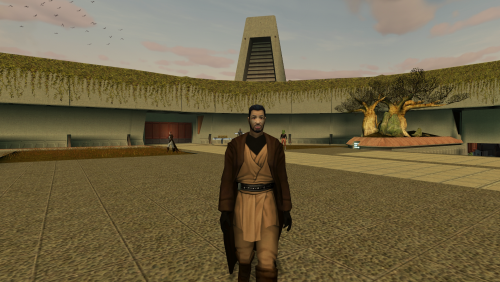 In the interim, this should fix it - https://www.darthparametric.com/files/kotor/k1/[K1]_Jedi_NPCs_Wear_Player_Robes.7z
