Leaderboard


Popular Content
Showing content with the highest reputation on 02/03/2026 in all areas
-
Version 1.0.0
124 downloads
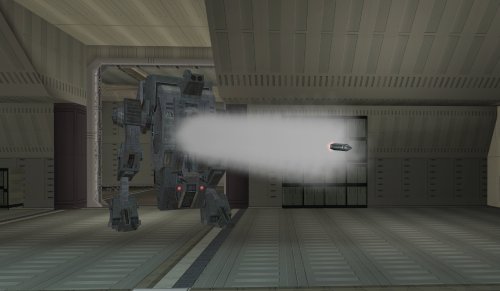
Makes the tank droid more tank-like. SUMMARY The tank droid is a pretty cool unique enemy in TSL, but a couple of things bother me about it. I always found it disappointing that it has these giant gun barrels which look like they’re for launching missiles, like a tank, but instead it just tosses frag grenades at you. The game even has functioning rockets but for whatever reason they weren’t given to the tank droid. It also has a super high defense which makes it dodge attacks like the Matrix, which feels pretty odd. This is just a feature of the game mechanics, but it becomes particularly glaring on the tank droid. I mean it’s a giant droid, can it really be that hard to hit? This mod makes a few changes to make the tank droid more true to form. It will now shoot rockets instead of throwing grenades. These are not your average wrist rockets; they are bigger and more deadly, dealing 60 pts of piercing AOE damage. Additionally, the tank droid gets a -5 defense penalty for being a chonker but its base health is doubled and it gets Master Toughness granting -10% damage immunity. Its natural energy resistance is also reduced from -15 to -10 but it gains -5 slashing, piercing and bludgeoning resistance. Essentially you’ll miss significantly less but you’ll need more hits using the right weapons and moves to take it down. INSTALLATION To install, run TSLPatcher.exe. Unaltered copies of any modified files will be placed inside the backup folder in the location of TSLPatcher.exe. UNINSTALLATION Remove the following files from Override: c_drdmkfour001.utc, crhide_tankdroid.uti, c_tankdroid.mdl, c_tankdroid.mdx, w_roktank.mdl, w_roktank.mdx, m_imp_tankrocket.ncs, m_rnd_tankdroid.ncs, and spells.2da. If any files were created inside the backup folder, move them to Override. COMPATIBILITY Should be compatible with most other mods unless they edit the tank droid. When in doubt, install this mod after others. This mod edits the c_tankdroid model to line up the rocket with the gun barrels a little better, which will overwrite model changes made by other mods. Install after Droid Models Animation Fix by CapitaineSpoque, which this mod forwards the relevant changes from. PERMISSIONS Please do not reupload this mod without my permission. CREDITS offthegridmorty CapitaineSpoque - base tank droid model, Droid Models Animation Fix TSLPatcher - stoffe, Fair Strides KOTOR Tool - Fred Tetra KotorBlender - seedhartha Mods in screenshot: Ultimate High Resolution Pack - ShiningRedHD Ultimate Character Overhaul - ShiningRedHD8 points -
Version 1.0.0
410 downloads
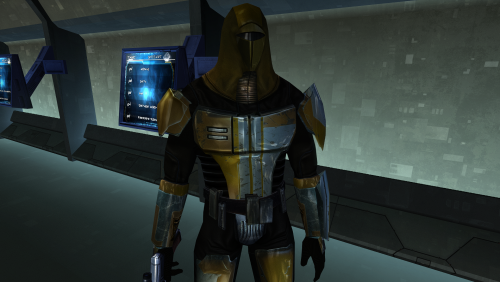
This mod will replace and update Mandalorian Neo-Crusaders texture files. The Vurt textures have been edited. Seams have been refined, and details have been added and removed. Thanks to Vurt for the wonderful textures. It was a pleasure working with them. To Install 1. Download: N_Mandalorian (Vurt's KotOR Visual Resurgence).rar 2. Copy all files to the Knights of the Old republic's Override folder. (Example location - C:\Program Files (x86)\Steam\steamapps\common\swkotor\Override) 3. When/if prompted to overwrite files, press okay. 4. If you like the mod; leave a comment or endorse! (It would be much appreciated) Made with love.1 point -
I was thinking of something like pulling modules and textured game models into Blender and then rig and animate them from scratch. Hell, making these things from scratch may be the only option. After all these years, AI upscaled scenes can't be the only option. If there's some folks out there that want to work on this too, please contact me. Otherwise, I'm fully prepared to tackle this myself. I have. I just don't care for them. I don't think they fit the mise en scene of the original Star Wars films, which KOTOR draws heavy inspiration from, and that of the first game itself. It's too polished, too flashy. I don't believe they integrate with the base game very well. I want something that stays truer to the intent of the original game.1 point
-
1 point
-
For reasons I can't explain, ever since I played TSL for the first time far longer ago than I care to admit, I've always wanted to have the interior doors in the Ebon Hawk in the first game. I noticed nobody else had added this feature in as of yet, so I decided to take a crack at doing it myself: All of the doors are added in and working, but obviously once they've opened, they stay that way. This feels like it makes the mod a bit pointless, so I'm currently working on a way to have each door automatically close once you move a certain distance away from it. I originally planned to use an OnHeartbeat script attached to each door to close it once you move a certain distance away, but it didn’t come out as well as I’d hoped: It’s a bit janky and doesn’t always seem to work as intended, so I’m not sold on this method. I did try using a trigger instead, having the doors open/close using the OnEnter and OnExit scripts instead and it’s a LOT smoother, so I think I’m gonna switch to that. Setting all those triggers isn’t going to be the quickest process in the world though so… that’ll be fun! As you can see, since the doors were originally intended to only be seen from one side in TSL, so once you pass through, you can see some of the door geometry poking out the wall on the other side. I'm not too bothered with that though, since it's unlikely anyone is going to be stopping and turning around to look up every time they walk through a door. I did show it at the end off the video though, just as a point of interest. I’ll hopefully get all of the triggers set tomorrow, give it a thorough test and then maybe put up a new test video before I create an installer and package it up for release.1 point
-
The triggers have been placed in the game and I think the effect is about as smooth as I'm going to get it: Much happier with this iteration of the mod than I was the previous one, so I think this going to be the approach I go with for the final product. I've done a little play-testing to make sure cutscenes aren't broken by the doors stopping NPC's moving etc and it all seems to be ok. The triggers all work as they should. There might be the odd bit of jank with NPC's getting lost for a second and turning on the spot while they wait for a door to open, but other than that, it's all good. Not that there are many proper cutscenes aboard the Ebon Hawk, anyway. At least not in ebo_m12aa, which is the only module I've added the doors to. The other stunt modules, I've left alone. I was mainly concerned that this would interfere with things like Sasha leaving the ship, but she just acts as above. Some of the doors go a little nuts if you try to follow her directly, as multiple creatures are entering/exiting the trigger areas at once, but don't do that it's fine. Well, here it is!1 point
-

Version 1.10.1
313,154 downloads
The K1 Community Patch (K1CP) is a compilation of previous bugfix mods and a multitude of new original fixes put together with the intention of resolving the many and various issues that KOTOR has. This includes some well-known game breaking bugs/softlocks, broken quests, inaccessible content, as well as lesser issues such as problems in conversations, visual inconsistencies, player annoyances, etc. The intention is for the changes to be as seamless as possible, fixing and improving things whilst still retaining the original developer intent. A huge thanks to all of the mod authors who created these mods, and allowed them to be included in this patch! Unfortunately, the individual list of changes has grown far too long to be included in this post. However, you can view a detailed breakdown of each author's individual contributions in the included readme file and a summary of the changes the current version has made since the previous release in the changelog file. List of Contributing Authors (alphabetical): A Future Pilot blennus danil-ch darthbdaman DarthParametric Ebmar Frykas Gimmick5000 jc2 JCarter426 Kainzorus Prime Kexikus KOTOR 1 Restoration Team Leilukin Markus Ramikin N-DReW25 ndix UR R2-X2 Red Hessian Salk th3w1zard1 Thrak Farelle WildKarrde Installation: Run INSTALL.exe and navigate to your K1 install folder. Generally speaking, this mod should be installed before anything else, except mods that do hard edits/overwrites of 2DA, TLK or MOD (module) files. Warning: Never run the installer from inside the archive! Always extract the archive onto your hard drive first. N.B.: With the advent of version 1.10.0, K1CP has migrated away from the use of TSLPatcher and switched to HoloPatcher. This allows for additional patching functionality and resolves some bugs encountered with TSLPatcher. HoloPatcher is also multi-platform. The bundled installer is the Windows version, but Mac and Linux users can download the appropriate installer for their system here. It is highly recommended that you do not install the game on your system's C drive, especially in Program Files. Windows can have permissions issues when trying to install the mod to a C drive destination. If you are using the Steam version of the game and have installed Steam in its default Program Files location, we advise creating a new Steam Library on a different drive and moving the game there via the game's Properties pop-up in Steam. Translation: The mod now has translations in French and Russian, available as separate patches. To use, first download the base K1CP v1.10.0 archive and extract it to your harddrive. Download your translation patch of choice and extract its contents into K1CP's tslpatchdata folder. Proceed to install the mod as normal. Traduction (Français - Harlockin): Le mod a maintenant des traductions en français et en russe, disponibles sous forme de patchs séparés. Pour l'utiliser, téléchargez d'abord l'archive de base de K1CP v1.10.0 et extrayez-la sur votre disque dur. Téléchargez le patch de traduction de votre choix et extrayez son contenu dans le dossier tslpatchdata de K1CP. Procédez à l'installation du mod comme d'habitude. Переводы (Русский - olegkuz1997): Мод теперь включает в себя переводы на французский и русский языки, доступные в виде отдельных патчей. Для использования сперва скачайте базовый архив K1CP v1.10.0 и распакуйте его на жесткий диск. Скачайте нужный вам патч с переводом и извлеките его содержимое с заменой в папку tslpatchdata K1CP. После чего приступите к установке мода как обычно. Compatibility/Known Issues: K1CP uses module injection in an attempt to remain as compatible as possible with other mods. This may result in issues with mods that simply put files in the Override folder. It is recommended that you consult the individual authors of any large scale mods, particularly those that edit DLGs and scripts, as to whether their work is compatible with K1CP. Some mods will likely require updates, some may need to be installed in a specific order, whilst others may be fundamentally incompatible. K1CP currently only supports the English language version of the game, and makes a number of edits to the TLK file in English. If anyone is able to provide translations of these changes to other languages, please let us know. The KOTOR 1 Restoration (K1R) mod is incompatible with K1CP, however there is ongoing work to re-create the K1R mod for K1CP: https://deadlystream.com/files/file/2345-restored-content-for-k1cp-demo/ These are the currently known bugs/issues with KOTOR or the mod that the K1CP is looking to resolve: https://github.com/KOTORCommunityPatches/K1_Community_Patch/issues If you find any others, especially with changes/additions K1CP makes, please report them on the Github issue page or here on Deadly Stream so they can be addressed. Be sure to include as much information as possible, including a list of all the other mods you have installed, the order you installed them in, steps to reproduce the problem, along with screenshots and save files, if appropriate. You may also be directed to provide the install log file, a list of the contents of your Override folder, and specific MOD files from your modules folder. Uninstallation: Given the complexity of this mod, a clean install of KOTOR is the recommended approach for uninstalling K1CP. However, HoloPatcher does provide uninstall Shell (Bash) and PowerShell scripts which will work as long as K1CP was the most recent mod installed. Permissions: Due to this mod being a compilation from many different authors, please do not distribute/rehost it. Acknowledgements: All of the mod authors who have helped make this patch a reality - thank you! - especially for agreeing to distribution outside of Deadly Stream Fred Tetra - For KOTOR Tool tk102 - For DLGEditor and K-GFF JdNoa/Dashus - For DeNCS stoffe - For TSLPatcher/ChangeEdit/TalkEd bead-v - For MDLEdit and KOTORMax ndix UR - For TGA2TPC, TPCView, and MDLOps v1.0+ seedhartha - For KOTORBlender fork for Blender 2.8+ Cortisol - For Holocron Toolset and HoloPatcher/PyKotor th3w1zard1 - For additional customisation and feature improvement of HoloPatcher Fair Strides - For various tools and updates to older tools DrMcCoy - For Xoreos Tools Snigaroo - For maintaining mod builds at https://kotor.neocities.org/modding/mod_builds/ danil-ch - For the original info.rtf template Many thanks to ebmar, Salk, and KnifeMaster for providing numerous bug reports and beta testing certain fixes THIS MODIFICATION IS PROVIDED AS-IS AND IS NOT SUPPORTED BY BIOWARE/OBSIDIAN ENTERTAINMENT, LUCASARTS, DISNEY OR ANY LICENSEES/SPONSORS OF THE MENTIONED COMPANIES. USE OF THIS MODIFICATION IS AT YOUR OWN RISK AND NEITHER THE ABOVE MENTIONED COMPANIES NOR THE AUTHORS ARE RESPONSIBLE FOR ANY DAMAGE CAUSED TO YOUR COMPUTER BY THE USAGE OF THIS MODIFICATION.0 points