Leaderboard



Popular Content
Showing content with the highest reputation on 01/23/2026 in all areas
-
Version 1.0.0
437 downloads
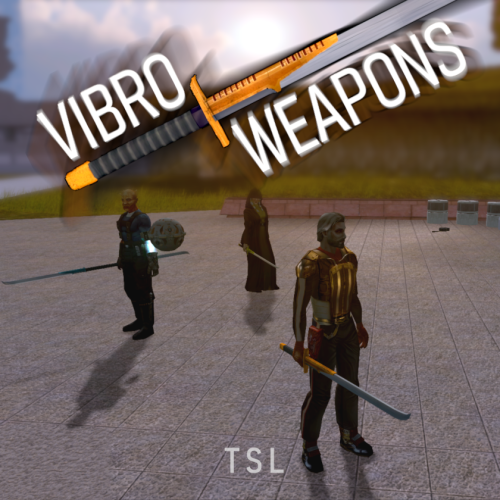
Vibro Weapons with vibration effects. All vanilla vibroswords, vibroblades, and vibro double-blades updated. Toasty Fresh vibro models were used as a base and each texture was color matched to the vanilla style. Vibrocutter and Ludo Kressh's War Sword now have their own unique textures and icons. Vibration and motion blur effects were added to the blades. 4 Vibroblades Vibrocutter - vibrocutter Vibroblade - w_melee_05 Zabrak Vibroblade - w_melee_10 Tehk'la Blade - w_melee_27 3 Vibroswords Vibrosword - w_melee_06 Echani Vibrosword - w_melee_21 Sith Tremor Sword - w_melee_22 5 Vibro Double- Blades Sith War Sword - w_melee_12 Vibro Double-Blade - w_melee_15 Trandoshan Double-Blade - w_melee_20 Zhaboka - w_melee_28 Ludo Kressh's War Sword - w_melee_x12 Credit: KoTOR Weapon Model Overhaul by Toasty Fresh - 3 models/textures were used as base KOTOR Blender1 point -
For reasons I can't explain, ever since I played TSL for the first time far longer ago than I care to admit, I've always wanted to have the interior doors in the Ebon Hawk in the first game. I noticed nobody else had added this feature in as of yet, so I decided to take a crack at doing it myself: All of the doors are added in and working, but obviously once they've opened, they stay that way. This feels like it makes the mod a bit pointless, so I'm currently working on a way to have each door automatically close once you move a certain distance away from it. I originally planned to use an OnHeartbeat script attached to each door to close it once you move a certain distance away, but it didn’t come out as well as I’d hoped: It’s a bit janky and doesn’t always seem to work as intended, so I’m not sold on this method. I did try using a trigger instead, having the doors open/close using the OnEnter and OnExit scripts instead and it’s a LOT smoother, so I think I’m gonna switch to that. Setting all those triggers isn’t going to be the quickest process in the world though so… that’ll be fun! As you can see, since the doors were originally intended to only be seen from one side in TSL, so once you pass through, you can see some of the door geometry poking out the wall on the other side. I'm not too bothered with that though, since it's unlikely anyone is going to be stopping and turning around to look up every time they walk through a door. I did show it at the end off the video though, just as a point of interest. I’ll hopefully get all of the triggers set tomorrow, give it a thorough test and then maybe put up a new test video before I create an installer and package it up for release.1 point
-
KOTOR 1 has essentially two types of level scaling: 1. Spawning more and/or different NPCs. This may be done either through a script or through an encounter object. 2. Buffing NPCs when they are spawned. This may be done either in an individual script or with the global script k_def_buff. With the first, I would expect the change in stats to feel consistent regardless of PC level. With the second, you will experience diminishing returns at higher PC levels because enemies will be getting the same flat bonus added to a higher base stat.1 point
-
Version 1.0.0
128 downloads
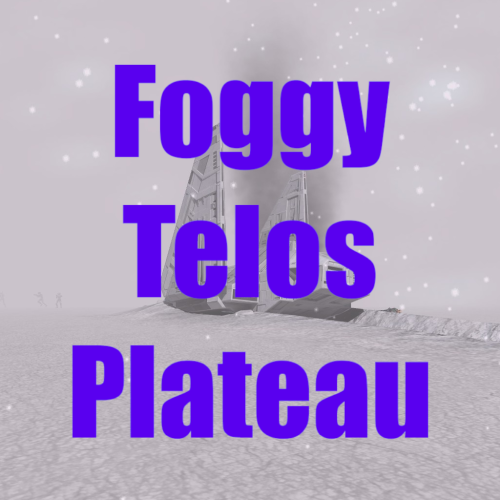
Description: The Plateau in the polar region of Telos always felt like you were meant to be kind of lost and blind finding the entrance to the Polar Academy. I think the fog helps with that, even though you know the area from playing before. I've also done a loading screen and edited the map so it seems like the crashed shuttle and Academy entrance are your landmarks. Installation: If you're playing with the Aspyr Patch, I'd recommend using J's 3C-FD Patcher to fix fog for TSL. Just drop the files after extracting the .zip archive into your override folder. The .are is necessary for the fog, but lbl_map261tel.tga and load_261tel.tga aren't required for the fog to function. Delete/overwrite any files with the same name. Credits: Holocron Toolset by Cortisol JC's Loadscreen template modders resource GIMP1 point -
Hi there! I've seen this topic quite recently, and i got in touch with Brents as i was working myself on the Jedi Enclave module for K1. I'll be sharing my ressources for my own mod to Brents Im not saying everything displayed here will make its way through, and i'm not making any promises instead of the author himself. Just saying i'm willing to give a hand, we did not settle on anything concrete yet and i wanted to showcase a bit of my own work without opening another thread. As there is a placeable limit in K1, everything you see in the video i'm linking is added into the module models themselves. I reused assets from K2 (Khoonda assets, Peragus kolto tank, Placeables...). The extracted placeables are not lightmapped yet, and i was wondering if it would cause troubles in the long run? There is also the sunlight from K1 Dantooine appearing in the main hall/garden.
 1 point
 -
 I've noticed a bug with the mod. If you use this ability during any fight that gets interrupted by dialogue (such as fighting the various Jedi Masters during a DS run), it will break the encounter. The screen will fade to black but dialogue won't begin. Other than that this has worked perfectly, you just have to be careful not to use this during story critical fights.1 point