
Jump to content

6 Screenshots

About This File

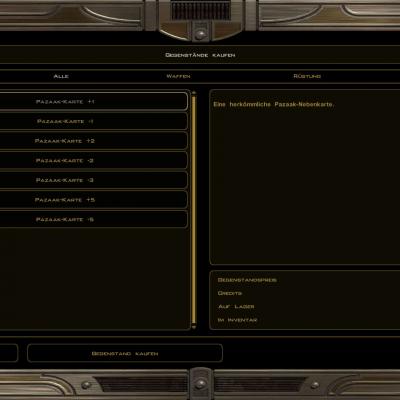
Staring at the cold, metallic UI of vanilla Pazaak i always wonder who wants to be in a casino like that?

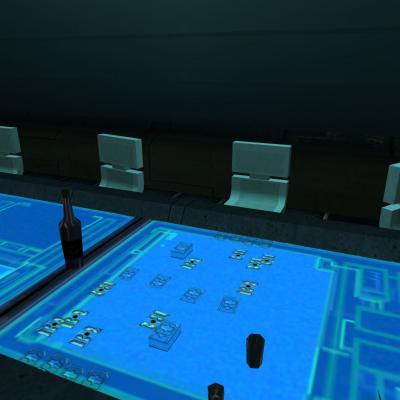
In this mod i want to make Pazaak more enjoyable and beside that more up to date looking.


What i tried to achieve is to combine the exclusive, wooden look of modern casino-tables with the tech-look of the Cards.

Visually i didnt take ANY prisoners, the main UI is slightly animated in the background and comes with a whooping 4k file.

The Cards highlighter is retextured in a subtle blueish way and the flipcard symbol comes with a 256 pics animation.

Thanks to todays fast PCs, it shouldnt affect performance.


Compatibility:


This should be compatible with everything. The only conflict could be with mods that change the Pazaak Cards and UI, but i yet havent seen any mod, that does that.

TSLRCM 100% compatible.


Install:

Download the mod, extract the contents with an archive extraction program such as 7zip or WinRAR, then move the extracted files to your game's override folder.


Enjoy!


also watch Xuuls wonderful review (with installation instructions) of my mod:


Update 1.1: it contains new files - just install both (CasinoPazaak.rar and Update1.1.rar) into your Override.


Bugs:


Since its a texture replacer, there shouldnt be any.


Brightness (optional):


for best results visually you may turn brightness bar to exactly 1/2.


What's New in Version 1.2a   See changelog

Released

  • 1.1: adds new icons to the different stores
  • changes the appearance of the cards placeables
  •  
  • 1.2. thanks to Xuul now with installation instructions for XnView to prevent "UpsideDown" Bug.
  •  
  • 1.2a Repackaging of Mod Contents & Removal of XnView Install Step
  • Like 2

User Feedback

Recommended Comments

InSidious

Posted

Looks nice! A huge improvement - well done.

  • Like 1
Mutilator57

Posted

I'm blown away, what a great job you did! An immediate DL from me! 

MVacc224

Posted

I play way too much pazaak in TSL for my own good haha thanks for making it easier on the eyes!

thelovebat

Posted

Will there possibly be a KOTOR 1 version of this mod soon?

  • Like 2
EndlessBirthday

Posted

I'm running into an issue where, once I'm done choosing cards, the pazaak board is cycling between corners of the blown up background images. I think I've installed correctly, and I've reinstalled once already, but I'll try again.


To reiterate:

Download mod

Manually move 3 files

Extract using XnViewer into override

Start KotOR 2

Play pazaak

Choose side deck, hit next

THE ACTUAL GAME BOARD goes berserk, cycling the background with blown up images of metal textures. The cards are fine.

EndlessBirthday

Posted

UPDATE: The new background .tgas didn't import to override. I keep trying, but they aren't working. The new the .txis and cards work just fine, as well as the 'rotate' button animation, but there's no working backgrounds beside original metal texture zoomed in and scrolling like a trippy trainwreck.

HecticFears

Posted

yeah the background files are bugged and dont work. so delete both pnl_pazaakgam_pc files. the tga and txi files and it will work fine 

mserto

Posted

Amazing job, now I only play pazzak for this! xD

  • Like 1
Ramesses

Posted

Love your work. Any chance we can get HD Pazzak in Kotor 1?

  • Like 1
Jorak Uln

Posted

i dont have TSL installed on my laptop at the moment and cant look into the background error right now, but if its rotating weirdly means the txi is not placed correctly in Override folder.

SHEEN

Posted

I did have the Widescreen Ui Steam Workshop Mod installed, would that have caused the error? It does compress the Pazaak background UI, but the bug was that the Brown/Wooden textures wouldn't even appear in the background.

Maniax2

Posted

Why is it i cannot get this to align properly on full hd?

Maniax2

Posted

Why is it i cannot get this to align properly on full hd?


ah this mod and the wide UI fix not compatible since it touches the pazaak board gui and tga

Jahus

Posted

I'm genuinely curious about why the mod creator didn't batch process the TGA files before uploading.

vnth

Posted

If I need to move my game folder around would that ruin the batch processed files?

Join the conversation

You can post now and register later. If you have an account, sign in now to post with your account.

Guest
Add a comment...

×   Pasted as rich text.   Paste as plain text instead

  Only 75 emoji are allowed.

×   Your link has been automatically embedded.   Display as a link instead

×   Your previous content has been restored.   Clear editor

×   You cannot paste images directly. Upload or insert images from URL.

×
×
  • Create New...

Important Information

By using this site, you agree to our Guidelines.