



About This File
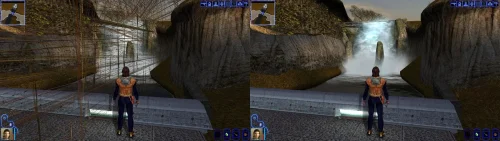
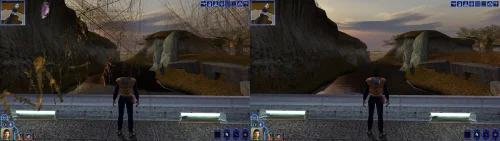
Turn off grass.
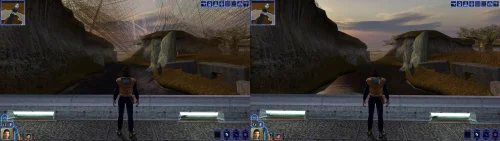
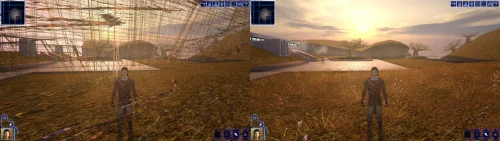
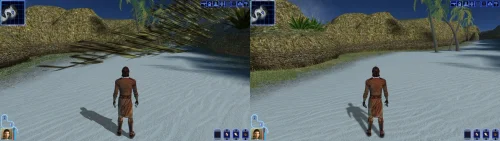
For years that has been the first answer to almost any KOTOR problem, and it was good advice, because on a modern PC the grass really does tear itself across the sky.
This patch fixes that, and quite a lot else.
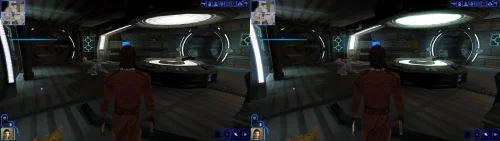
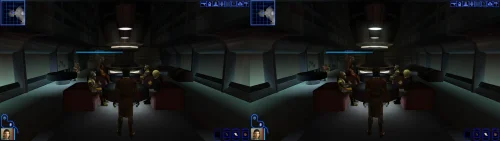
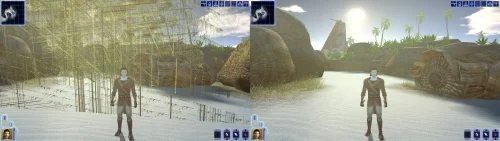
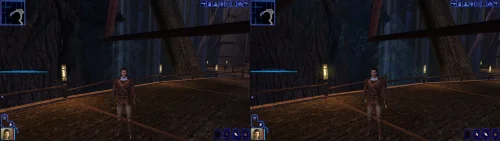
KOTOR decides how to light the world once, when it starts, choosing between two methods built for graphics cards of 2003. On most machines today neither is on offer, so the game quietly falls back to a path that was never finished: no proper lighting on walls and floors, no reflections on metal or armour, no fog, no soft shadows, and none of the screen effects. It still runs. It just looks wrong, and a lot of people have never seen it look right.
This rebuilds that lighting using something every modern card does support, and puts the game back on the paths the developers actually finished. The grass is one of them.
If you play on an NVIDIA card, the lighting has been working for you all along. Those drivers still carry register combiners, one of the two original methods, and it does the job properly. It is also an extension from 2001 that no other vendor implements, surviving on one company's willingness to keep shipping it. This moves every card onto a method that is still current, so there is one path everyone is exercising rather than one propped up by goodwill.
What you get back
- Grass that stays on the ground
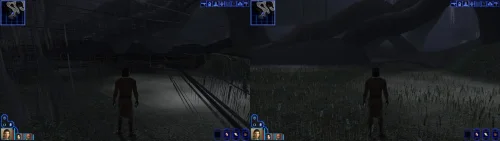
- Lighting on walls and floors, the baked lighting that makes interiors look lit rather than flat
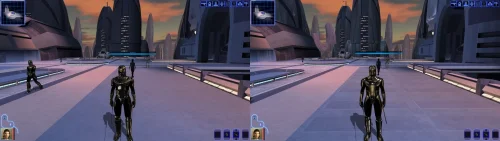
- Reflections on metal, armour and polished surfaces
- Fog, in the places the game meant to have it
- Soft shadows, and the screen effects: bloom, blur, film grain, the distortion around force powers, and the colour wash on some cutscenes
Requirements
KOTOR 1, version 1.0.3. GOG, Steam and the CD release all work. Install it with the KotOR Patch Manager. Your game files are not modified; the manager applies the patch while the game runs.
It replaces the separate cube map fix and soft shadows fix. Both are folded in, so disable those if you have them enabled in the patch manager.
Source, releases and issues: https://codeberg.org/Synchro/kotor-modern-driver-compatibility
Settings, if you ever need them
You do not need any of this to play. The first time you run it, a file called `K1DriverCompat.ini` appears next to `swkotor.exe` with every option listed, explained, and switched off. Open it and delete the `#` in front of anything you want to change.
The one worth knowing about is `look`, which chooses between the two ways cards of 2003 drew bright light. `look = nvidia` is the default and the calmer of the two. `look = ati` lets strong lights bleach out what they land on, the way a Radeon did. Neither is a bug, and neither is more correct than the other.
Replacement shaders
You can drop your own shader files into override/shaders/, you can create it if it isn't there. The patch will use shaders in there instead of the ones it generates, with no rebuilding and no tools. They are plain text in ARB fragment program assembly, which is what the patch compiles its own into.
It sits under override so a replacement can ship as an ordinary TSLPatcher mod rather than needing its own packaging, and in a subdirectory because these are not game resources. The game ignores them completely: it only looks in override for the file extensions it knows, and has no idea what an .arb file is. Reading them is this patch's job.
For more information on naming, shader inputs, and all of the mode types, take a look at this section of the README: https://codeberg.org/Synchro/kotor-modern-driver-compatibility#replacement-shaders
Tested on
AMD, Intel and NVIDIA hardware, on Windows and on Linux through Proton, across the GOG, Steam and CD releases.
If something looks wrong
`logs/K1DriverCompat.log` in your game folder holds one session and is overwritten each run, so there is only ever one file to send. Setting `log = debug` in the ini before reproducing the problem makes it far more useful.
Thanks
@Lane and @J tested this on cards and I don't own. Nearly everything here is based on how some particular drivers behave, and that is worth nothing until somebody with that hardware runs it and reports back. The faults that turned up that way are ones I had no way of finding on my own. @Lane also wrote the KotOR Patch Manager, which is what this ships for.
LLM Disclosure
This project made use of an LLM during development, in the following capacities:
- Brainstorming: exploring possible approaches and design directions
- Decompilation assistance: help interpreting and structuring reverse-engineered code
- Code comments: refining and clarifying existing comments
- Skeletons and fixes: generating initial code scaffolding and minor fixes
All LLM-assisted output was modified and reviewed by a human before being committed.
Edited by Synchro
Added a section on shader replacement.
What's New in Version 1.1.0 See changelog
Released
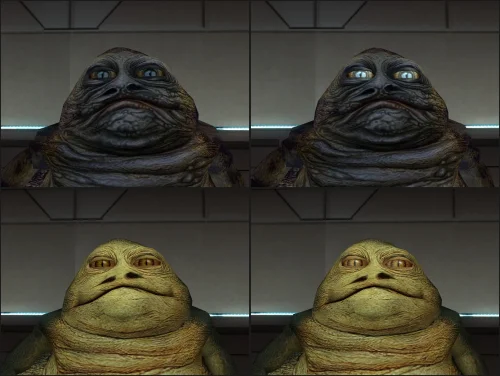
Eyeballs! Two things you can see in this one. (ha)
Creatures get their bump lighting back. The game only ever drew it on an NVIDIA card, and this patch had been answering "no" to the capability that turns it on. The Hutts are where you notice it first, around the eyes.
And shiny surfaces are fogged again. Armour, sabres and anything else wearing a reflection were punching straight through the fog on the default look, in every area that has any. The Taris cantina makes it obvious.
Fixed
- Bump lighting on creatures now draws on every card, clamped so strong lights do not blow out
- Environment mapped surfaces are fogged again on the default look
- Shaders that already blend their own fog no longer get a second blend applied on top of it
Added
- Settings files pick up new options. An ini written by an earlier version has the new switches appended with their documentation, rather than needing to be deleted and set up again
- The log says which shader family the programs were built as, and which source the build came from
- A frames switch reports what the patch did per window of frames instead of per session
Requires
The KotOR Patch Manager 0.6.2 or newer. Earlier versions did not always
deploy sqlite3.dll, without which the game will crash on load.


Recommended Comments
Join the conversation
You can post now and register later. If you have an account, sign in now to post with your account.