Search the Community
Showing results for tags 'blending additive'.
Found 2 results
-
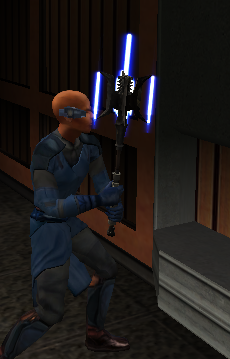
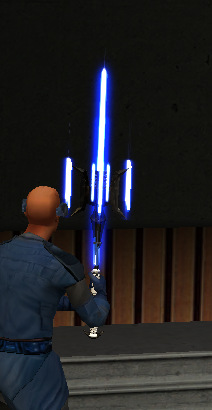
 JCarter426 JCarter426's response below was right on the money! J's mod totally fixed the rendering issue! Below is a VERY rough draft I was able to throw together but the issue is solved! I am working on a mod where I have blades coming out of a mace head. I am using Kotor Blender for reference. The blades do not have transparency issues with the background or other models, but when viewed from an angle where the mace head mesh of the model is behind the blade it becomes transparent. I did, just for troubleshooting purposes, change the blade .txi from blending additive to blending normal, and this did solve the transparency issue, but of course ruined the glowing lightsaber blade effect. I am not sure if there is really a good fix for this but I thought it couldn't hurt to check and see if anyone could maybe help. I am attaching some screenshots and a short video of the issue I am having. Thanks for any help you can give. Screen Recording 2026-09-05 183311.mp4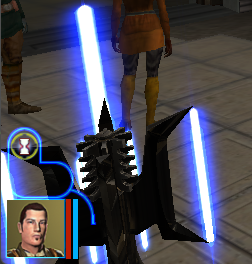
-
Greetings, fellow Jedi! Hope y'all doing fine. In vanilla and/or modded state of the game there seems to be rendering issue with a texture that is rendered behind blending additive shader. As seen in the screenshot: Is there any way to get around this problem? I have tried with removing the additive and using the alpha channel as transparency instead but it looks ugly and then again, another problem as the hilt that was rendered behind is hidden accordingly with the dimension of the top layer's texture. By using the TPC format seems to didn't help much as any alpha-blending value between 0 to 1.0 failed to resolve the issue. I haven't tried with removing the shader/alpha from the hilt that is in the left-hand but- will it work? And even if it works, is there any other way around as a hilt without metal shade is 🤪. Many thanks for considering this!