Search the Community
Showing results for tags 'armband'.
Found 4 results
-
Version 1.0.0
436 downloads
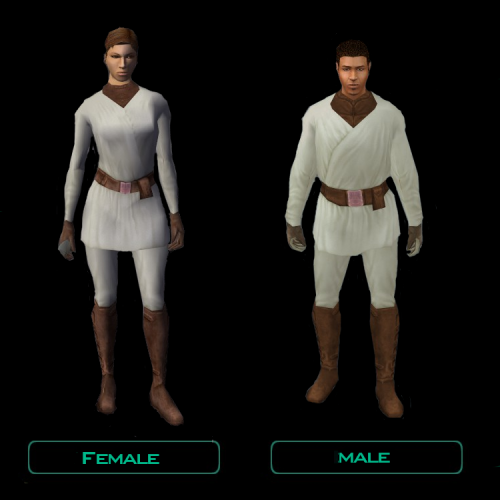
Description: This mod gives a stat boost to the player armband acquired on the Harbinger and adds in a robe in that same footlocker. It has a lighter version of the normal clothing texture. Armband: Robe: There are 3 Install Options: Both the new robe and armband stats, armband stats, or just the new robe. Installation: 1. Extract the .zip this mod is located in. You can use 7zip or WinRAR. 2. Launch the "TSLPatcher.exe" located in the folder in the .zip you just extracted 3. You will be presented with 3 options: - Robe and Armband - Armband - Robe Select which you will want. If you want both the armband stat boost and the robe, select the first option. Armband is just the stat boost. Robe adds in the Robe, without the armband stat boost. 4. Continue with TSLPatcher instructions. Getting a warning that 152har.mod already exists in Modules is perfectly normal; but any errors are not. 5. Load a save before first entering the Harbinger med bay. UnInstalling: 1. Delete these files from override if you have them in there: a_band_c01.uti exilerobe.uti ia_cloths_020.tga N_CommF20.tga N_CommM20.tga 2. Open up "Backup" in the main folder with the TSLPatcher.exe. 3. Copy 152har.mod and put that in the Modules folder in your TSL directory. Overwrite when prompted. Compatability: TSLRCM and K2CP compatible. Incompatible with any mod that edits the exile's footlocker in 152har.mod/Harbinger med bay or any mod that has N_CommF20.tga, N_CommM20.tga, and ia_cloths_020.tga in it. Credits: Kotor Tool GIMP TSLPatcher Permissions: Feel free to use assets I have made in this mod in your own, as long as I am credited. Do not upload this mod to any other Platforms (NexusMods. Steam Workshop, Gamebanana, etc.) If I have not uploaded it to there without any modifications to this mod. Legal: THIS MODIFICATION IS PROVIDED AS-IS AND IS NOT SUPPORTED BY BIOWARE/OBSIDIAN ENTERTAINMENT, LUCASARTS, DISNEY OR ANY LICENSERS/SPONSORS OF THE MENTIONED COMPANIES. USE OF THIS FILE IS AT YOUR OWN RISK AND THE ABOVE-MENTIONED COMPANIES OR THE AUTHOR IS NOT RESPONSIBLE FOR ANY DAMAGE CAUSED TO YOUR COMPUTER FOR THE USAGE OF THIS FILE. -
View File PC's Robe & Armband Improvement Description: This mod gives a stat boost to the player armband acquired on the Harbinger and adds in a robe in that same footlocker. It has a lighter version of the normal clothing texture. Armband: Robe: There are 3 Install Options: Both the new robe and armband stats, armband stats, or just the new robe. Installation: 1. Extract the .zip this mod is located in. You can use 7zip or WinRAR. 2. Launch the "TSLPatcher.exe" located in the folder in the .zip you just extracted 3. You will be presented with 3 options: - Robe and Armband - Armband - Robe Select which you will want. If you want both the armband stat boost and the robe, select the first option. Armband is just the stat boost. Robe adds in the Robe, without the armband stat boost. 4. Continue with TSLPatcher instructions. Getting a warning that 152har.mod already exists in Modules is perfectly normal; but any errors are not. 5. Load a save before first entering the Harbinger med bay. UnInstalling: 1. Delete these files from override if you have them in there: a_band_c01.uti exilerobe.uti ia_cloths_020.tga N_CommF20.tga N_CommM20.tga 2. Open up "Backup" in the main folder with the TSLPatcher.exe. 3. Copy 152har.mod and put that in the Modules folder in your TSL directory. Overwrite when prompted. Compatability: TSLRCM and K2CP compatible. Incompatible with any mod that edits the exile's footlocker in 152har.mod/Harbinger med bay or any mod that has N_CommF20.tga, N_CommM20.tga, and ia_cloths_020.tga in it. Credits: Kotor Tool GIMP TSLPatcher Permissions: Feel free to use assets I have made in this mod in your own, as long as I am credited. Do not upload this mod to any other Platforms (NexusMods. Steam Workshop, Gamebanana, etc.) If I have not uploaded it to there without any modifications to this mod. Legal: THIS MODIFICATION IS PROVIDED AS-IS AND IS NOT SUPPORTED BY BIOWARE/OBSIDIAN ENTERTAINMENT, LUCASARTS, DISNEY OR ANY LICENSERS/SPONSORS OF THE MENTIONED COMPANIES. USE OF THIS FILE IS AT YOUR OWN RISK AND THE ABOVE-MENTIONED COMPANIES OR THE AUTHOR IS NOT RESPONSIBLE FOR ANY DAMAGE CAUSED TO YOUR COMPUTER FOR THE USAGE OF THIS FILE. Submitter Lewok2007 Submitted 07/13/2023 Category Mods TSLRCM Compatible Yes
-

Version 1.0.0
416 downloads
Author : RedHawke 03/01/05 Version 1.1 ============================================================================ This simple armband mod gives you an armband, that can give you Lightside or Darkside points at will, also it will allow you to gain or lose influence with the NPC's currently in your party, this function works outside the Ebon Hawk only. New in Version 1.1: Added the ability to Increase or Decrease Main PC's Attributes (One or Two points at a time), and Increase or Decrease the Main PC's Skills (One, Two, or Five points at a time). The reason I did this is to ease in Workbench and Item mod testing. I created this armband, my first by the way, because I grew tired of all the LS or DS hits I had to take in conversations to gain influence with a particular NPC, or to complete cartain quests... basically I wanted to be able to play the Lightside or the Darkside my way... and I didn't want to edit a thousand dialog files to do so, this was the easiest solution. You will have to use the giveitem cheat to get it, this is a purely cheating/testing device after all. Installation Instructions: ----------------------------- Run tslpatcher. Un-installation Instructions: ----------------------------- Simply delete these files from your override directory, and use backup folder to replace spells.2da. Giveitem Item Cheat Console Codes: --------------------------------------------------- rh_correction - Correction Armband Acknowledgements: ------------------------------------------------ A boatload of thanks to Fred Tetra for creating the awesome and simple to use kotor editing tool. And Darth333 for without her Whereami armband this would have not been possible... Also a very appreciative thanks to the many friendly and informative people at the Lucasforums Holowan Laboratories board who have shown and or helped me to learn how to do stuff like this. Bug Notes: ------------------------------------------------ Bug reports, if any, can be directed to the Holowan Labs, to the appropriate thread for this mod. Most likey a thread titled... "TSL Mod: Correction Armband now up at my site" http://www.lucasforums.com/forumdisplay.php?s=&forumid=324 -
View File Redhawke's Correction Armband Author : RedHawke 03/01/05 Version 1.1 ============================================================================ This simple armband mod gives you an armband, that can give you Lightside or Darkside points at will, also it will allow you to gain or lose influence with the NPC's currently in your party, this function works outside the Ebon Hawk only. New in Version 1.1: Added the ability to Increase or Decrease Main PC's Attributes (One or Two points at a time), and Increase or Decrease the Main PC's Skills (One, Two, or Five points at a time). The reason I did this is to ease in Workbench and Item mod testing. I created this armband, my first by the way, because I grew tired of all the LS or DS hits I had to take in conversations to gain influence with a particular NPC, or to complete cartain quests... basically I wanted to be able to play the Lightside or the Darkside my way... and I didn't want to edit a thousand dialog files to do so, this was the easiest solution. You will have to use the giveitem cheat to get it, this is a purely cheating/testing device after all. Installation Instructions: ----------------------------- Run tslpatcher. Un-installation Instructions: ----------------------------- Simply delete these files from your override directory, and use backup folder to replace spells.2da. Giveitem Item Cheat Console Codes: --------------------------------------------------- rh_correction - Correction Armband Acknowledgements: ------------------------------------------------ A boatload of thanks to Fred Tetra for creating the awesome and simple to use kotor editing tool. And Darth333 for without her Whereami armband this would have not been possible... Also a very appreciative thanks to the many friendly and informative people at the Lucasforums Holowan Laboratories board who have shown and or helped me to learn how to do stuff like this. Bug Notes: ------------------------------------------------ Bug reports, if any, can be directed to the Holowan Labs, to the appropriate thread for this mod. Most likey a thread titled... "TSL Mod: Correction Armband now up at my site" http://www.lucasforums.com/forumdisplay.php?s=&forumid=324 Submitter JumpStationZ Submitted 03/16/2020 Category Mods TSLRCM Compatible No