Search the Community
Showing results for tags 'Spooky'.
Found 4 results
-
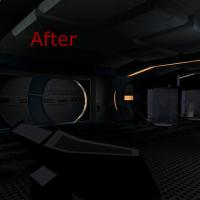
Version 1.0
2,955 downloads
Using the techniques pioneered by the great modder Canderis, I have created my own version of the Darker Peragus formula. However, when working with the darker areas, I noticed that no matter what I did, all of the Plasteel Canisters and Footlockers were much too bright. And so, with the help of my modding compatriots, I have darkened all of the placeable items in the Peragus, Peragus Spacewalk, and Harbinger portions to match the darker lightmaps. To Install: Choose from either the full REDUX (WIth all of my customized lightmaps), or from the compatibility option (For those using Canderis' A Darker Peragus mod) (Note: There are two versions available to download. Use the A_Darker_Peragus_REDUX_TSLRCM if you have TSLRCM installed, and A_Darker_Peragus_REDUX_Vanilla if you don't) To Uninstall: 1) Replace the .mod files in your Modules folder with the .mod files found in the Backup folder created by the TSLPatcher, 2) Replace the placeables.2DA in your Override with the placeables.2DA from the Backup folder, and 3) Copy all of the TGA MDX and TXI files from the TSLPatchdata folder to your Override (let them overwrite files if they’re already there), and then delete them all from it Permissions: Please inform me if you would like to use this mod or its assets in your own projects. Credits: Canderis for his permission in making a compatibility for his mod and for teaching me how to edit lightmaps to darken levels with his own mod A Darker Peragus; FairStrides for his endless insight, his BGR-RGB Converter, and for packaging this mod’s install as well as walking me through the process, LiliArch for her research into editing assets within the GIT and teaching me what a ColorTweak variable is; Darth Sapiens for his resource Cubemap Pack to make the Spacesuit snazzy; The rest of the Deadlystream community for their continued support and enthusiasm; TK102’s KGFF for its easy to use interface and raw GIT editing power; Fred Tetra for making KOTORTool which is still my favorite modding utility; Adobe for their Photoshop; Obsidian for making KOTOR2 in the first place; Bioware for starting the KOTOR craze in the first place; and George Lucas for starting all of the Star Wars insanity. -

Version 1.0.0
42 downloads
It's the Spooky Month of the year, so there will be Spooky Mods! This changes the Rakatan to be more spooky. What their designs are meant to be like: N_Rakata01 - Supposed to be a killer cult member murdere kind of vibe. (I also put in some blood dripping details) N_Rakata02 - Supposed to look like a demon, with sharp teeth and red clothing (This one has some details I put on it, some obvious, some aren't.) N_Rakata03 - This one is the most scariest of all, it was supposed to be a ghost Rakata. (Doesn't look like it lol) Installation Directions: 1. UNZIP/Extract Spooky Rakatan K1 1.0.zip 2. Copy all of the files in Spooky Rakatan K1 into the Override Folder OPTIONAL - 3. Download and Install Kotor Save Editor if you haven't, and change your in game appearence to be one of the Rakata. - The name of the Rakata appearences should be something like "Alien_Rakata01" to "Alien_Rakata03" or just something that looks like these. Hope you enjoy my Mod ______________________ You are allowed to use these retextures in your own mods, just give me credit Should be K1R compatible. -
View File Spooky Rakatan K1 - By Lewok It's the Spooky Month of the year, so there will be Spooky Mods! This changes the Rakatan to be more spooky. What their designs are meant to be like: N_Rakata01 - Supposed to be a killer cult member murdere kind of vibe. (I also put in some blood dripping details) N_Rakata02 - Supposed to look like a demon, with sharp teeth and red clothing (This one has some details I put on it, some obvious, some aren't.) N_Rakata03 - This one is the most scariest of all, it was supposed to be a ghost Rakata. (Doesn't look like it lol) Installation Directions: 1. UNZIP/Extract Spooky Rakatan K1 1.0.zip 2. Copy all of the files in Spooky Rakatan K1 into the Override Folder OPTIONAL - 3. Download and Install Kotor Save Editor if you haven't, and change your in game appearence to be one of the Rakata. - The name of the Rakata appearences should be something like "Alien_Rakata01" to "Alien_Rakata03" or just something that looks like these. Hope you enjoy my Mod ______________________ You are allowed to use these retextures in your own mods, just give me credit Should be K1R compatible. Submitter LewokGuy Submitted 10/02/2022 Category Skins K1R Compatible Yes
-
File Name: A Darker Peragus REDUX File Submitter: Malkior File Submitted: 22 Oct 2015 File Category: Mods TSLRCM Compatible: Yes Using the techniques pioneered by the great modder Canderis, I have created my own version of the Darker Peragus formula. However, when working with the darker areas, I noticed that no matter what I did, all of the Plasteel Canisters and Footlockers were much too bright. And so, with the help of my modding compatriots, I have darkened all of the placeable items in the Peragus, Peragus Spacewalk, and Harbinger portions to match the darker lightmaps. To Install: Choose from either the full REDUX (WIth all of my customized lightmaps), or from the compatibility option (For those using Canderis' A Darker Peragus mod) (Note: There are two versions available to download. Use the A_Darker_Peragus_REDUX_TSLRCM if you have TSLRCM installed, and A_Darker_Peragus_REDUX_Vanilla if you don't) To Uninstall: 1) Replace the .mod files in your Modules folder with the .mod files found in the Backup folder created by the TSLPatcher, 2) Replace the placeables.2DA in your Override with the placeables.2DA from the Backup folder, and 3) Copy all of the TGA MDX and TXI files from the TSLPatchdata folder to your Override (let them overwrite files if they’re already there), and then delete them all from it Permissions: Please inform me if you would like to use this mod or its assets in your own projects. Credits: Canderis for his permission in making a compatibility for his mod and for teaching me how to edit lightmaps to darken levels with his own mod A Darker Peragus; FairStrides for his endless insight, his BGR-RGB Converter, and for packaging this mod’s install as well as walking me through the process, LiliArch for her research into editing assets within the GIT and teaching me what a ColorTweak variable is; Darth Sapiens for his resource Cubemap Pack to make the Spacesuit snazzy; The rest of the Deadlystream community for their continued support and enthusiasm; TK102’s KGFF for its easy to use interface and raw GIT editing power; Fred Tetra for making KOTORTool which is still my favorite modding utility; Adobe for their Photoshop; Obsidian for making KOTOR2 in the first place; Bioware for starting the KOTOR craze in the first place; and George Lucas for starting all of the Star Wars insanity. Click here to download this file