PrettyFly4aJedi
-
Posts
10 -
Joined
-
Last visited
Content Type
Profiles
Forums
Blogs
Forum & Tracker Requests
Downloads
Gallery
Store
Events
Everything posted by PrettyFly4aJedi
-

swkotor 2021-09-10 06-54-34.png
PrettyFly4aJedi commented on EAF97's gallery image in Members Gallery
 Hey EAF97, I'm a big fan of your mods and was hoping you could share this head model you used for Brejik? PMHH02 is my go-to head for my Exile, and I like this skin tone much better than the yellow-greenish KotOR 2 uses. Please let me know if possible, thanks!
 -
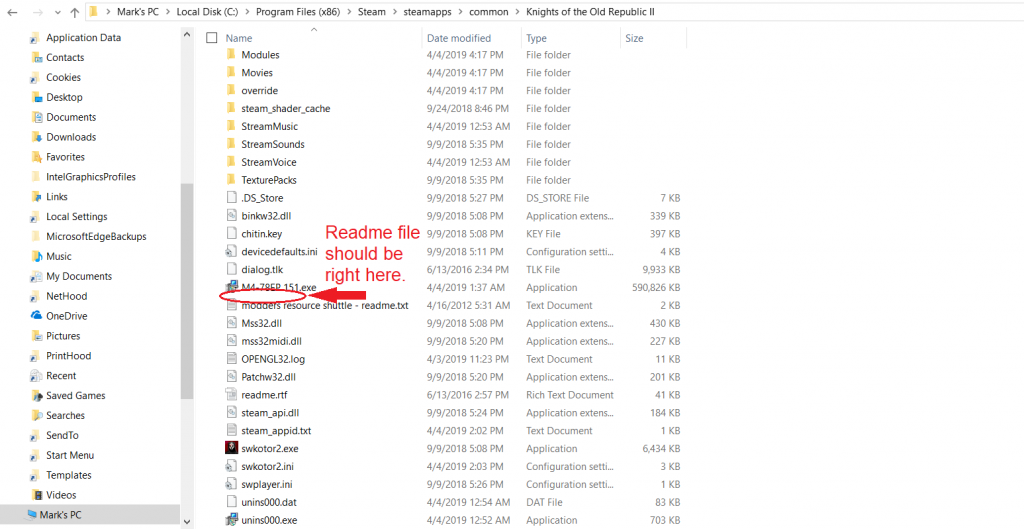
Really sorry to be a bother again, but now that the installer runs and claims to have installed M4-78EP 1.5, there are no file changes and the mod seems not to be installed. I tried to install Extended Enclave 2.5 afterwards, but the TSLPatcher installer stopped immediately telling me that M4-78 wasn't installed correctly. I've run M478EP 151.exe smoothly several times with no changes to the files. The installation part of the forum post says that it should ask you to indicate the path to the game's folder, but I think it's worth noting that it doesn't give me that option. It extracts all these files for the module folder, override folder and streamvoice folders, but these new files are nowhere to be found. EDIT - Found that the files do... "exist," but are invisible and inaccessable for some reason. When the installer finishes, it gives me the option to open the Read Me, so I open that just fine. However, it does not come up whatsoever in Windows Explorer except in the "Save As..." window. From this window, I can even right-click the file and go into its Properties. There, the path clearly reads C:\Program Files (x86)\Steam\steamapps\common\Knights of the Old Republic II\M4-78EP Readme.rtf, but disappears without a trace when I try to navigate to it in a new window. I feel like Obi-Wan looking for Kamino right now.

-
Having an issue starting the installer. Upon opening the executable setup file-- M478EP 151.exe-- I immediately get an error that reads: "Unable to create a temporary file. Setup aborted. Error 123: The filename, directory name, or volume label syntax is incorrect." I tried running the installer as an administrator, tried moving M478EP 151.exe to the game folder where swkotor2.exe is, and nothing has worked, same message each time. I am using the Steam version of the game with the non-Workshop version of TSLRCM 1.8.5 installed, trying to install the non-Workshop version of M4-78 EP 1.5. I haven't started a new game yet as I'm trying to install all desired mods beforehand. I did notice that I only got the executable file upon downloading, whereas previous versions of M4-78EP have contained many more files and folders. Am I missing some other files that I needed to have downloaded beforehand? Any guidance would be much appreciated. EDIT - Fixed it! It was a separate issue. Followed this video's instructions:
-
 Do you plan on making these files available? Amazing job!
 -
Only 5 warnings, all on .mp3 files. For safe measure though, I've attached my instal log below. installlog.rtf
-
Ending spoiler ahead. I cannot progress any further because of this.
-
EDIT: Got it to work, I successfuly recruited the Handmaiden! Hey, so I reinstalled the game and my mods, with much fewer warnings in my install log. The only warnings I got were on .mp3 files, so I assume it's fine now. For safe measures though, here's the file. How's it look? installlog.rtf
-
Ah okay. Should I follow the regular uninstall instructions and simply re-install it? Also, would I then need to start a new game? Thanks for the help
-
As requested, my installlog.rtf file is attached. Here are the mods I have installed (nothing from Steam Workshop): - TSLRCM 1.8.5 - M478EP 1.2.4 - 4k Atton by Constar - Admiral Onasi Reskin by Silveredge9 - TSL ORIGINS - Telos Overhaul by Jorak Uln - TSL Backdrop Improvements by Kexikus - HD Darth Nihilus, T3-M4, Visas Marr and Darth Sion by Darth Sapiens - Peragus OTE by Xedii X Warz - K2 Exterior Textures, Parts 1 & 2 by vurt And PartySwap 1.3.1a, obviously lol installlog.rtf
-
Hey all, so I'm trying to recruit the Handmaiden with my female Exile. After the movie of the Ebon Hawk departing from the Telos Polar Region, I do get the cutscene of Atris telling the Handmaiden Sisters that she sent the Last of the Handmaidens to travel with the Exile. But after going through the holorecord of the trial and the list of missing Jedi masters, I do not get the Handmaiden walking in with the "Those are Atris' files..." scene where you recruit her. It just autosaves and starts the party member cutscenes (Bao-Dur asking about your lightsaber, Atton & T3 playing pazaak, etc.) Am I doing something wrong? I read somewhere that your dialog choices with Atris supposedly have an effect on recruitment as well. I installed all my mods *before* starting the game as recommended, and none of my mods are incompatible. I made a save game right before you board the shuttle at the Old Military Base to make sure whatever changes I make to the game's files can properly play out. Nothing I've tried has worked, and I'm at my wits' end.