

Leaderboard




Popular Content
Showing content with the highest reputation on 10/15/2026 in Files
-
Version 1.0.0
200 downloads
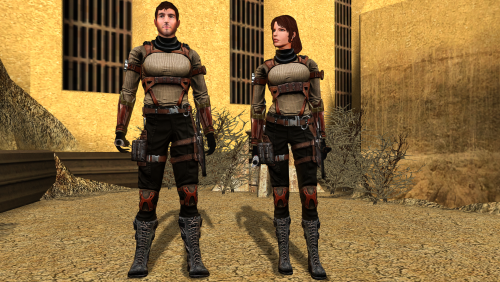
The mod replaces the Scout model and textures. To Install 1. Download: Scout 2. Copy all files to the Knights of the Old republic's Override folder. (Example location - C:\Program Files (x86)\Steam\steamapps\common\swkotor\Override) 3. When/if prompted to overwrite files, press okay. 4. If you like the mod; leave a comment or endorse! (It would be much appreciated) Made with love.2 points -
Version 1.0
82 downloads
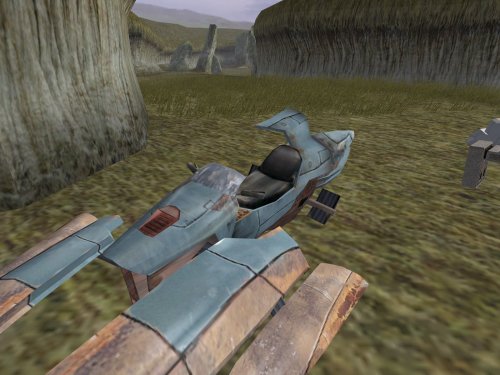
This mod contains fixes to various models from throughout the game. There is no particular theme to these fixes, which cover elements from nearly every planet. Please see below for a full list. Separate from the model fixes, I have also provided an additional option adds scripting to open the roof of the Telos underground base's hangar before departing. This is not strictly a fix because the game already included scripting to open the roof...but it happened as the player boarded the shuttle to leave, so even with the fixed animation, there was no opportunity to see the result. This option changes the timing so that the roof opens when the player unlocks the doors with the hangar console. Thank you for downloading, and I hope you enjoy this mod! ------------------------------------------------------------------- LIST OF FIXES GENERAL - plc_jnkswpb1, plc_jnkswpb2 - Corrected the crashed swoops' windscreen texture to match the non-crashed swoops. PERAGUS - dor_per02 - Corrected mirrored texture coordinates on one side of one door panel. TELOS - 202tel12, 202tel13, 222tel12 - Corrected typos in the hierarchy which caused overlapping windows to flicker. - 232tel14 - Fixed a broken animation for the hangar roof to open. Note that the "Telos Hangar Roof Change" option is also required to showcase the result in-game. EBON HAWK - 950cori - Filled a blank doorway during the post-Telos cutscene. NAR SHADDAA - 301narm - Assigned the correct Ebon Hawk textures during Kreia's telepathy cutscenes. - 304nar13 - Filled a missing Ebon Hawk corridor while Kreia teaches the player Force Breath. - 306nare - Filled a gap between the entry corridor's floor and wall. KORRIBAN - 701kore - Filled a gap in the face of one of the tombs which was visible as the camera panned across the Valley of the Dark Lords. DANTOOINE - 650dan_03 - Filled a hole in the tree stump in the enclave's central courtyard. HK FACTORY - 298telp, 299teld, 299telm, 299teln - Resolved overlapping geometry in a console which appears in multiple locations. - 299telh - Filled a gap in the front of the elevated control platform. Also fixed a gap and overlapping geometry at the central door's frame. - 299telq - Resolved overlapping geometry and walls misaligned with the edge of a platform at the back of the factory space. MALACHOR V - 902malc, 902malj - Grounded some floating rocks. ------------------------------------------------------------------- INSTALLATION If you are using The Sith Lords Restored Content Mod (TSLRCM), install it first. Copy all files in the "MAIN INSTALLATION" folder to your game's Override folder. If asked, confirm to overwrite 299telq.mdl. If you would like to use the option to open the Telos hangar's roof before you leave, open the folder "OPTION - Telos Hangar Roof Change" and run "INSTALL.exe". It is normal to see a warning that 232tel.mod already exists and has been skipped. ------------------------------------------------------------------- UNINSTALLATION Delete the files from the Override folder. The "Telos Hangar Roof Change" option cannot be easily uninstalled, but deleting 232tel14.mdl/mdx will effectively disable the roof animation. ------------------------------------------------------------------- COMPATIBILITY This mod is compatible with The Sith Lords Restored Content Mod (TSLRCM) (https://deadlystream.com/files/file/578-tsl-restored-content-mod/) and the KOTOR 2 Community Patch (K2CP) (https://deadlystream.com/files/file/1280-kotor-2-community-patch/). It is compatible with texture reskin mods. Several of these fixes are already included in my mod "Transparent Cockpit Windows for TSL" (https://deadlystream.com/files/file/2355-transparent-cockpit-windows-for-tsl/). If you are using that mod, install it after these fixes, and allow it to overwrite the conflicting files. This mod is incompatible with any other mods that edit the same area files. ------------------------------------------------------------------- CREDITS KotorBlender by seedhartha tpcview by ndix UR NWNSSCOMP by Torlack and tk102 TSL Patcher by stoffe and Fair Strides ERFEdit by stoffe and Fair Strides Kotor Tool by Fred Tetra Holocron Toolset by Cortisol and th3w1zard1 299telq.mdl includes edits made by the TSLRCM team. Thanks to DarthParametric for identifying the broken animation in 232tel14 and how to fix it. Thanks to Snigaroo for identifying the gap in 306nare. ------------------------------------------------------------------- VERSION HISTORY 1.0 - Initial Release ------------------------------------------------------------------- DISCLAIMER AND PERMISSIONS This modification is provided as-is and is not supported by Disney, Lucasarts, or Obsidian. Use at your own risk. The author shall not be held responsible for damage to your game installation, computer, or saved games resulting from the use of this mod. These models may be used as a basis for mods which make additional edits to the same models as long as appropriate credit is given to this mod's author. Other uses require the author's permission. This mod shall not be reposted on any sites other than Deadly Stream without permission.2 points -
Version 1.0
64 downloads
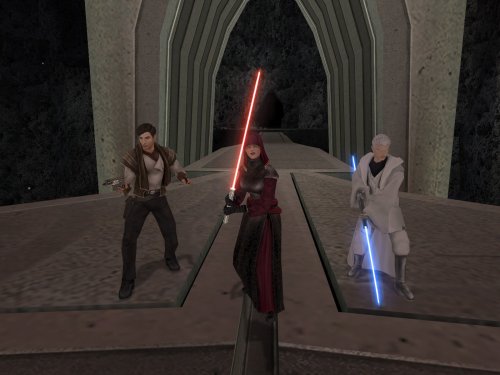
After the Dantooine Enclave sequence, there are very few opportunities to change your party's equipment before arriving on Malachor V. If you are like me and regularly unequip your party's gear to keep it available, you may then find that your companions unwisely attempt to fight Darth Traya armed with nothing but their fists. This mod makes it so that you return to the Ebon Hawk after finishing the Ravager sequence, giving you the opportunity to select your party's gear for the Malachor cutscenes. It also modifies the "traveling to Malachor" cutscene so that Atton does not appear if he has left with Kreia because of jealousy over the Disciple. This mod comes in two versions which affect how the galaxy map behaves when you travel to Malachor: - OPTION A (Limited Galaxy Map): Displays the full galaxy map, including Malachor. All planets are visible, but you will only be allowed to select Malachor as a valid destination. - OPTION B (No Galaxy Map): Does not display the full map and instead offers a dialog option confirming whether you are ready to go to Malachor. Malachor's appearance is therefore not revealed until the Ebon Hawk arrives there, as in the vanilla game. Thank you for downloading, and I hope you enjoy this mod! ------------------------------------------------------------------- INSTALLATION If you are using any of the mods noted in the "Compatibility" section below, install them first. Afterwards, navigate to the folder for either Option A or B, run "INSTALL.exe", and select the Typical Installation option. After the installation is complete, if you are using "Coruscant Jedi Temple" by deathdisco and/or M4-78 Enhancement Project, rerun "INSTALL.exe", and select the appropriate compatibility patch. If you are using The Sith Lords Restored Content Mod (TSLRCM) from the Steam Workshop, see this guide for how to combine installer-based mods with the Workshop: https://steamcommunity.com/sharedfiles/filedetails/?id=488641307. ------------------------------------------------------------------- COMPATIBILITY This mod requires The Sith Lords Restored Content Mod (TSLRCM) (https://deadlystream.com/files/file/578-tsl-restored-content-mod/). It is also compatible with the KotOR 2 Community Patch (K2CP) (https://deadlystream.com/files/file/1280-kotor-2-community-patch/). If you are using any of the following mods, they must be installed prior to this mod: - TSLRCM - PartySwap by DarthTyren and Leilukin (https://deadlystream.com/files/file/544-partyswap/) - M4-78 Enhancement Project by zbyl2, DarthStoney, and Hassat Hunter (https://deadlystream.com/files/file/277-m4-78-enhancement-project/) - Coruscant Jedi Temple by deathdisco (https://deadlystream.com/files/file/585-coruscant-jedi-temple-by-deathdisco/) - Jedi Temple Expansion by HK42 (https://www.gamefront.com/games/knights-of-the-old-republic-ii/file/jedi-temple-expansion) - Coruscant - Jedi Temple Compatibility by Hassat Hunter (https://deadlystream.com/files/file/394-coruscant-jedi-temple-compatibility/) This mod is not compatible with any mods which add new planets to the galaxy map other than those listed above. It is compatible with mods which only edit the locations of the planets on the map. This mod is incompatible with mods other than those mentioned above which edit the following files: - a_901jump.ncs - a_escape_851.ncs - tr_leave_ehawk.ncs - a_galaxymap.ncs - k_sup_galaxymap.ncs It is incompatible with mods which overwrite pcdead2.dlg in 003ebo.mod. It may be compatible with mods which edit pcdead2.dlg in place if this mod is installed first. It is compatible with Extended Enclave (https://deadlystream.com/files/file/428-extended-enclave-tslrcm-add-on/), which edits a file called pcdead2.dlg in a different module which does not conflict. ------------------------------------------------------------------- CREDITS KotorBlender by seedhartha tpcview and tga2tpc by ndix UR NWNSSCOMP by Torlack and tk102 K-GFF by tk102 DLGEditor by tk102 TSL Patcher by stoffe and Fair Strides ERFEdit by stoffe and Fair Strides Kotor Tool by Fred Tetra Holocron Toolset by Cortisol and th3w1zard1 2DA Editor by VarsityPuppet TalkEd by stoffe Edited vanilla and TSLRCM scripts are based on the K2CP team's repository of unaltered, decompiled vanilla scripts, which may be found at https://github.com/KOTORCommunityPatches/Vanilla_KOTOR_Script_Source. Thanks to Snigaroo for inspiring this by requesting a mod to allow the player to equip the party before the endgame Thanks to deathdisco and Leilukin for granting permission to include modified versions of scripts from their mods for compatibility. ------------------------------------------------------------------- VERSION HISTORY 1.0 - Initial Release ------------------------------------------------------------------- DISCLAIMER AND PERMISSIONS This modification is provided as-is and is not supported by Disney, Lucasarts, or Obsidian. Use at your own risk. The author shall not be held responsible for damage to your game installation, computer, or saved games resulting from the use of this mod. This mod shall not be reposted, in whole or in part, on any sites other than Deadly Stream without the author's permission. Scripts from this mod may be modified and redistributed for the purpose of compatibility with this mod as long as credit is given to this mod's author. Otherwise, assets from this mod shall not be redistributed in other modifications without the author's permission. Assets containing work by other authors also require the permission of those authors.1 point -

Version 1.6.1
54,748 downloads
=PartySwap= A KNIGHTS OF THE OLD REPUBLIC II: THE SITH LORDS MODIFICATION ORIGINAL AUTHOR: DarthTyren (darthtyren@gmail.com) CURRENT MAINTAINER: Leilukin LATEST VERSION: 1.6 FILE NAME: PartySwap 1.6.7z CONTACT: E-mail to Leilukin at contact@leilukin.com, or message to Leilukin on Deadly Stream 1. DESCRIPTION: This mod allows the player to recruit both Handmaiden and Disciple in the same playthrough regardless of the player character's gender. If you install the “PartySwap Item” add-on of this mod, when Disciple joins your party on Dantooine, a usable item named PartySwap will be added to your inventory, and will appear in the shield item slot of the quick bar. You can use this PartySwap item to add or remove Handmaiden from your current party, including replacing any member of your current party with Handmaiden, as long as you are able to choose your party at that point of the game. This item was created to work around the limitations of not being able to select Handmaiden from the party selection screen after Disciple joins your party and takes Handmaiden’s slot in the party selection screen. However, Handmaiden remains part of the Ebon Hawk crew, and you can still talk to Handmaiden. Alternatively, you can choose to install the “Full Party Select” patch from KotOR Patch Manager (KPM), which expands the number of slots displayed in the party selection screen, and thus allows you to add Handmaiden to your current party, or remove her from your current party, without needing to install the “PartySwap Item” add-on and use the PartySwap item. For the PartySwap mod to take effect, you must install this mod before you leave the secret academy on Telos, where Handmaiden joins your party. For the “PartySwap Item” add-on to take effect, you must install the add-on before Discple joins your party on Dantooine. NOTE: Since July 2023, the original mod author DarthTyren has officially handed over the management and development of this mod to Leilukin, due to DarthTyren's departure from the KotOR modding scene. Therefore, if you have questions about or encountered any issues with this mod, Leilukin is the one to contact for. 2. INSTALLATION: First and foremost, make sure you have The Sith Lords Restored Content Mod (TSLRCM) installed, since TSLRCM is REQUIRED for this mod to work. After downloading this mod, extract the mod’s 7z file to anywhere you like, as long as it is not within the KotOR 2 directory. Run the PartySwap Installer.exe installer located inside the extracted folder. Choose the “Main Installation” option, select your KotOR 2 game folder as your KotOR 2 directory path, click the “Install” button and let the installer do its job. If you also have M4-78 Enhancement Project (M4-78EP) installed, when PartySwap is getting installed, you may receive a warning that a resource located at the 650jedi.dlg file in your Override folder is shadowing this mod's changes in modules\650dan.mod. This is to be expected. Regardless, if you have M4-78EP installed, you need to install this mod’s compatibility patch for M4-78EP. FOR REGULAR TSLRCM USERS: Choose the installation option you want, and select your KotOR 2 game folder as your KotOR 2 directory path, click the “Install” button and let the installer do its job. FOR STEAM WORKSHOP USERS: If you have subscribed to The Sith Lords Restored Content Mod (TSLRCM) from the Steam Workshop, for your KotOR directory path, you must choose TSLRCM's Steam Workshop folder, NOT the main KOTOR 2 directory. The directory of the Steam Workshop version of TSLRCM is \Steam\SteamApps\Workshop\content\208580\485537937, while the directory of the TSLRCM + M4-78EP combined Steam Workshop mod is \Steam\SteamApps\Workshop\content\208580\1402798020. Note that PartySwap will NOT be added to the Steam Workshop. Reading this on why it is NOT recommended to use the Steam Workshop for modding the KotOR games: PARTYSWAP ITEM ADD-ON OR FULL PARTY SELECT PATCH: To keep being able to add Handmaiden to your current party after Disciple joins your party, you have two options: Install the “PartySwap Item” add-on from this mod: After installing the main part of this PartySwap mod, select “ADD-ON: PartySwap Item” from the install option drop-down of PartySwap Installer.exe, and click the “Install” button. If you choose to install this add-on, you must install the add-on before Disciple joins your party on Dantooine to be able to receive the PartySwap item. Install the “Full Party Select” patch from KotOR Patch Manager (KPM): (Note that it does not matter if you apply the Full Party Select patch before or after installing this PartySwap mod) Download and install KotOR Patch Manager. Extract the downloaded archive, then run KpatchLauncher from the “bin” sub-folder. If you are on Windows, it is recommended to check "Use library proxy" under the "Options" menu at the top bar, otherwise you may need to launch KotOR 2 through KPM for the KPM patches to take effect. This step is not required if you are on macOS or Linux. In the KPM window, set the "Game" path to target your KotOR 2 game’s folder that contains your KotOR 2 game executable (such as swkotor2.exe), and the "Patches" path to target KPM’s “patches” sub-folder. Select and apply the “Full Party Select” patch. Go to KPM’s “patch” sub-folder, then the “FullPartySelect additional files” sub-folder, and put the partyselect_p.gui file into your game’s Override folder. When you install this mod, two new folders named "backup" and “uninstall” will be created by the installer in the same folder as the installer. Do not delete the folders or any of the files within the folder if you are planning on uninstalling this mod. COMPATIBILITY PATCHES: This mod also provides compatibility patches for the following mods: M4-78 Enhancement Project (M4-78EP) danil-ch's Kreia's Fall Cutscene (In-Game) deathdisco’s Coruscant Jedi Temple Go to the “Compatibility Patches” folder included in this mod, read the READ ME file within the sub-folder and follow the instructions to make PartySwap compatible with these mods. Note: The "Source" folder includes the source of the script used by this mod for modders' reference. Ignore the "Source" folder if you only want to install and play this mod. 3. UNINSTALLATION: Run PartySwap Installer.exe. rom the “Tools” drop-down menu, select “Uninstall Mod / Restore Backup”, then confirm to uninstall the mod. If you have also installed the PartySwap Item add-on, it will uninstall the add-on first. After uninstalling the add-on, you need to select Yes to delete the most recent backup folder, then select “Uninstall Mod / Restore Backup” from the drop-down menu again to uninstall the main part of the mod. 4. KNOWN ISSUES: None currently known. If you find any bugs or issues, please report them by posting on PartySwap’s download page or support thread on the Deadly Stream forums, or contact Leilukin directly. 5. MOD COMPATIBILITY: Apart from The Sith Lords Restored Content Mod (TSLRCM), which is required for this mod to work, any mod that edits Kreia's endgame dialog (904kreia.dlg) or Zuka's dialog on Dxun (zuka.dlg) is incompatible with this mod, unless they merge in installation. In that case, you must install PartySwap first. This mod is not compatible with any other mod that involves putting the holorec.dlg file in the Override folder. If you want to use this mod, make sure you DO NOT have holorec.dlg in your Override folder, or Handmaiden will not be able to join your party when you play a female character! This mod provides compatibility patches for M4-78 Enhancement Project (M4-78EP), danil-ch's Kreia's Fall Cutscene (In-Game) and deathdisco’s Coruscant Jedi Temple. This mod is compatible with KOTOR 2 Community Patch. This mod is compatible with all Leilukin’s mods for KotOR 2, including the romance mods, as long as you follow the instructions from Leilukin’s mod. If you want to use danil-ch and Darth Hayze’s Extended Enclave, downloading and installing a separate compatibility patch is required to make PartySwap compatible with Extended Enclave. If you use Leilukin’s Handmaiden and Female Exile – Disciple and Male Exile Romance, you need to use the patch included in that mod. Otherwise, go to this page for a standalone compatibility patch: https://deadlystream.com/files/file/1304-partyswap-and-extended-enclave-compatibility-patch/ This mod is compatible with WildKarrde’s TSL Expanded Ending, as long as you install PartySwap first before installing TSL Expanded Ending. 6. PERMISSION: You may modify this mod for personal use or show this mod in screenshots. However, please do not redistribute or re-host this mod. Do not release your mods containing assets from this mod without permission. 7. CREDITS: Fair Strides — Can almost take credit for half the mod getting done, by helping with scripts, understanding Waypoints and TSLPatcher, etc. Thank you! Thanks to the wonderful modding community at Holowan Labs/DeadlyStream for helping with the problems faced with the development of this mod. Special thanks to VarsityPuppet, for teaching about #include scripts and how this mod does not need to bother with them. Sith Holocron — Thanks for the aid with VO splicing! Snigaroo — For testing and reporting bugs, including the game breaking bug surrounding Disciple's endgame dialog, suggesting improvements to the mechanics of the PartySwap item, as well as transferring the ownership of this mod file to Leilukin on Deadly Stream. OpenKotOR — For developing and maintaining HoloPatcher as an alternative to TSLPatcher to make installing and uninstalling this mod faster. danil-ch — For giving permission to create compatibility patch for Kreia’s Fall Cutscene (in-game) JCarter426 — For developing SithCodec for modding audio files of the KotOR games THIS MODIFICATION IS NOT SUPPORTED BY BIOWARE/OBSIDIAN ENTERTAINMENT OR LUCASARTS OR ANY LICENSERS/SPONSORS OF THE MENTIONED COMPANIES. USE THIS FILE AT YOUR OWN RISK AND NEITHER THE ABOVE MENTIONED COMPANIES NOR THE AUTHOR IS RESPONSIBLE FOR ANY DAMAGE CAUSED TO YOUR COMPUTER FOR THE USAGE OF THIS FILE.1 point -
Version 1.0.0
67 downloads
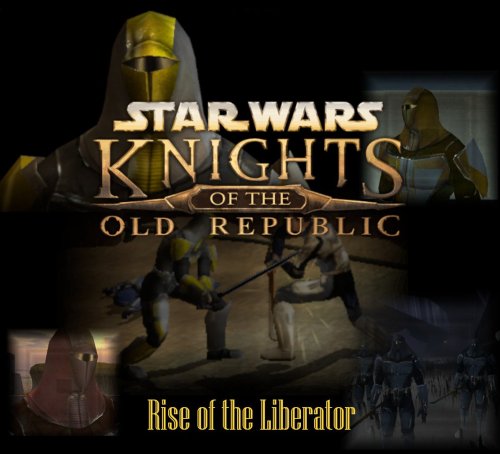
Rise of the Liberator Game: KOTOR 1 Author: Dodrari Kaan Version: 1.0.0 GitHub: https://github.com/danielstegink/Kotor.RiseOfTheLiberator Within the world of Kotor, there are hints that the Mandalorians are stirring, that a new Mandalore is rising to claim the mantle after the fall of Mandalore the Ultimate. Now, with Rise of the Liberator, that mystery has a name and a face. Face the Mandalorians of Kotor as you haven't faced them before, with new types, new equipment, new maps, and a mighty foe waiting for you at the end of the galaxy! This mod adds 2 new maps to the Rakata homeworld, where a new Mandalore and a small army of Mandalorians wait for you. Additionally, Mandalorian encounters throughout the game hint at the rise of this new Mandalore, transforming the Mandalorian experience into a proper sub-plot. Encounter new Mandalorian types, each with a unique armor that comes in both heltmetless and helmeted versions, and face the final boss to claim a very special weapon. Instructions Install BoS:SR (https://deadlystream.com/files/file/761-brotherhood-of-shadow-solomons-revenge) Use the TSLPatcher Permissions Use this mod however you want. Just make sure to credit me. Compatibility This mod should be compatible with the Jagi Mandalorian and Sherruk with Lightsabers mods. This mod uses GFF and overrides to modify the following characters and items. Any mods that modify the same may not be compatible: Bendak's Blaster dan14ac_mand04 in danm14ac (one of Sherruk's cronies) tat18_ in tat_m18aa (one of Jagi's minions) tat_thug3 in tat_m18aa (the GenoHaradan Mandalorian) kas25_mandcomm in kas_m25aa (the Mandalorian Commander in the Shadowlands) kas25_mandalor03 in kas_m25aa (one of the Mandalorians in the Shadowlands) kas25_mandalor04 in kas_m25aa (one of the Mandalorians in the Shadowlands) kas25_mandalor06 in kas_m25aa (one of the Mandalorians in the Shadowlands) kas25_mandalor07 in kas_m25aa (one of the Mandalorians in the Shadowlands) mikastore in korr_m33aa (Mika Dorin's merchant inventory in Dreshdae) g_mandalor004 in unk_m41ad (the Mandalorian Captain on the Rakata homeworld) m41ad.git in unk_m41ad (the map for the area around the Ancient Temple on the Rakata Homeworld) mand_armor_red (the Mandalorian Scout Armor in BoS:SR) g_a_class9004 (the unused Mandalorian Heavy Armor item) g_a_class9010 (the Mandalorian Assault Armor item) This mod adds item texture variations which may overlap with texture variations added by other mods D9 Heavy Armor - Texture Variations 21, 22, 23, 24, 25, 26 Lightsaber, Shortsaber and Doublesaber - Texture Variation 21 Lightsaber Crystal - Texture Variation 22 Special Thanks Fred Tetra - Kotor Tool tk102 - DLG Editor, K-GFF Stoffe and Fair Strides - ERFEdit Fair Strides - MdlOps Stoffe - TSLPatcher ndix UR - TPCView SilverEdge9 - Brotherhood of Shadow: Solomon's Revenge Vriff and Synchro - Kotorblender Disclaimer THIS MODIFICATION IS NOT MADE, DISTRIBUTED, OR SUPPORTED BY BIOWARE, OR LUCASARTS ENTERTAINMENT COMPANY LLC. ELEMENTS TM & © LUCASARTS ENTERTAINMENT COMPANY LLC AND/OR ITS LICENSORS.0 points