Leaderboard

.thumb.png.d8b108d1620cfd7d697f7271e60714db.png)


Popular Content
Showing content with the highest reputation on 09/05/2026 in Files
-
Version 1.0.0
35 downloads
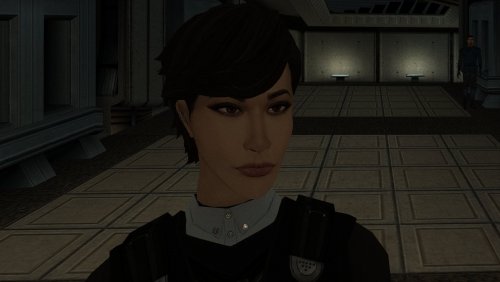
The mod replaces the PFHA01 model and textures. To Install 1. Download: PFHA01 2. Copy all files to the Knights of the Old republic's Override folder. (Example location - C:\Program Files (x86)\Steam\steamapps\common\swkotor\Override) 3. When/if prompted to overwrite files, press okay. 4. If you like the mod; leave a comment or endorse! (It would be much appreciated) Made with love.3 points -
Version 1.0.0
365 downloads
KMRP - KOTOR MODERN RESTORATION PATCH Modern resolutions, properly scaled UI, engine fixes and restored interface behaviour for KOTOR 1 48 resolutions | 800x600 to 15360x8640 | 4:3 | 16:10 | 16:9 | 21:9 | 32:9 WHAT IS KMRP? Vanilla KOTOR was built around fixed pixel sizes and interface layouts originally designed for resolutions such as 640x480. On modern displays this causes tiny text, overlapping list entries, undersized icons, broken map scaling and other interface problems. KMRP fixes these problems in the game engine itself. It supports 48 resolutions from 800x600 up to 15360x8640 across 4:3, 16:10, 16:9, 21:9 and 32:9. Several of these fixes require changes to swkotor.exe because the affected values are hardcoded inside the engine and cannot be reached through GUI or 2DA files alone. WHAT IT FIXES Readable text with properly scaled list rows Inventory, Abilities and Store icons and rows scale correctly Item stack counts remain visible with larger fonts Long item description crash fixed Description text no longer runs under the scrollbar Area map fills its frame Fog of war covers the complete map Map marker clicks line up correctly 250 misplaced map notes can be corrected using Derslok's fixes HUD minimap is zoomed correctly again Dialogue letterboxing, tutorial popups and interface artwork follow the selected resolution INSTALLATION Install other content mods first, such as K1CP or K1R, then install KMRP. Download the standard KOTOR Editable Executable Run KMRP - KOTOR Modern Restoration Patch.exe. Select your resolution. Open Advanced Settings if you want to change optional components. Click Start Patching. Launch KOTOR. To change resolution later, use Restore Original first, then patch again. KMRP backs up the executable, INI and every Override file it modifies before patching. EXE PATCHING KMRP modifies swkotor.exe because several interface values and bugs are hardcoded inside the game engine. Before writing anything, KMRP verifies the executable by SHA-256 and file size. Unknown executables are rejected. KMRP modifies 893 bytes of the 4,042,752-byte executable, around 0.022%, and adds ten 4KB code sections where additional space is required. Every executable patch is documented in the GitHub repository. KMRP is not a launcher and nothing stays running in the background. The only exception is the optional Modern Driver Compatibility component, which places two files beside the executable. If you do not want your executable modified, do not install KMRP. INCLUDED COMPONENTS K1 Modern Driver Compatibility 1.2.0 by Synchro Optional. Restores lighting, reflections, fog, soft shadows and correct grass rendering on modern hardware. K1 Area Map Fixes by Derslok Optional. Corrects 250 misplaced map-note positions. Party Portraits by MadDerp Bundled with permission. KOTOR 1 HD Icon Pack 1.0 by JackInTheBox Bundled with permission. COMPATIBILITY Tested with: KOTOR 1 Community Patch 1.10.0 KOTOR 1 Restoration 1.2 K1CP replaces two icons also included in the HD Icon Pack. KMRP keeps the K1CP versions where applicable. DOWNLOADS GitHub Releases https://github.com/RayesDiyab/KMRP-KOTOR-Modern-Restoration-Patch/releases Nexus Mods https://www.nexusmods.com/kotor/mods/1879 Deadly Stream Available on this page SOURCE AND DOCUMENTATION Full source code, executable patch documentation and reverse-engineering notes: https://github.com/RayesDiyab/KMRP-KOTOR-Modern-Restoration-Patch CREDITS ndix UR KOTOR High Resolution Menus 1.5 Synchro K1 Modern Driver Compatibility and published area-map research Derslok K1 Area Map Fixes MadDerp Party Portraits JackInTheBox KOTOR 1 HD Icon Pack RaymanGT HD menu and UI asset set LICENSE KMRP is licensed under GPL-3.0. Star Wars: Knights of the Old Republic © 2003 BioWare Corp. / LucasArts. KMRP is an unofficial community patch and is not affiliated with or endorsed by BioWare, LucasArts, Lucasfilm or Disney. You must own the game.2 points -
Version 1.1
5,720 downloads
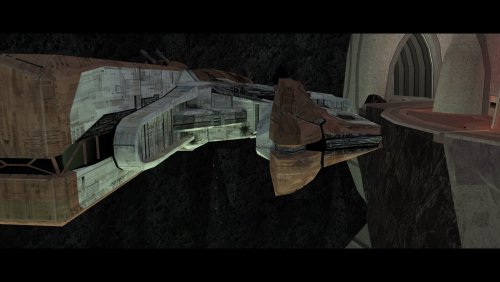
Knights of the Old Republic 2 infamously has a rather abrupt ending: The player fights the final boss, there is some final dialog with said boss, and the game ends. The Sith Lords Restored Content Mod (TSLRCM) restores a couple of short scenes which provide some closure, but it arguably still feels like there are some gaps. This mod attempts to make the ending a bit more complete with the following changes: - A restored dialog option allows the player to choose to stay on Malachor and train other Force users. - After the final dialog, the player contacts Bao-Dur's remote and chooses whether or not to destroy Malachor, which may be chosen regardless of player alignment. (If G0-T0 succeeded in disabling the remote, this conversation will not occur, and the player cannot choose to destroy Malachor.) - If the player decides to destroy Malachor, all subsequent dialog takes place on the Ebon Hawk. If Malachor is not destroyed, the remaining party members rejoin the player in the Trayus Core. - The player has a short conversation with T3-M4 and reiterates what they intend to do next. - Atton, Visas, and/or the Handmaiden express their desire to accompany the player, as in the scenes previously restored by TSLRCM. The Visas/Handmaiden conversation is now available even if Malachor is destroyed, as long as the player freed the party from the academy's prison. Atton's dialogs will now only occur if the player has medium to high influence with him, loosely inspired by the "Unoffical TSLRCM Tweak Pack" by Pavijan357 (https://deadlystream.com/files/file/296-unofficial-tslrcm-tweak-pack/). Note that since these scenes all refer to the player leaving, they will not occur if the player decides to stay on Malachor. Thank you for downloading, and I hope you enjoy this mod! ------------------------------------------------------------------- ASPYR (STEAM/GOG) COMPATIBILITY NOTES When using this mod with the Aspyr version of the game from Steam or GOG, some of the background sound effects will be almost inaudible, making the destruction of Malachor feel strangely quiet. This seems to be due to a "feature" added by Aspyr which reduces the volume of the music (and, apparently, some sound effects) during cutscenes. I strongly recommend using the 3C-FD patcher by J (https://deadlystream.com/files/file/2734-fog-fix-more-3c-fd-patcher/), which returns the volume to its pre-Aspyr behavior and also fixes some graphical issues. I have not tested this mod with the achievements system, and it is possible that it might interfere with achievements related to the ending of the game. Use at your own risk. ------------------------------------------------------------------- INSTALLATION Run "INSTALL.exe" and follow the prompts. When asked, select the "MAIN INSTALL" option which matches your display's aspect ratio, 4:3 or 16:9. It is normal to see a warning that modulesave.2da already exists and has been skipped. If you are installing with Holopatcher instead of the INSTALL.exe included with this mod, see the compatibility instructions below. If you are using The Sith Lords Restored Content Mod (TSLRCM) from the Steam Workshop, see this guide for how to combine installer-based mods with the Workshop: https://steamcommunity.com/sharedfiles/filedetails/?id=488641307. If you are using an aspect ratio other than 4:3 or 16:9, try the 16:9 option. The camera differences between the two versions are fairly minor, so ultimately you may use whichever one looks better to you. To switch between the two versions after the mod has already been installed, run "INSTALL.exe" and select "Convert to 16:9" or "Convert to 4:3". For best results, I recommend using a saved game from before arriving on Malachor. However, using a save from after reaching Malachor will only result in a few missing sound effects, and the majority of the mod will still work. ------------------------------------------------------------------- HOLOPATCHER COMPATIBILITY INSTRUCTIONS This mod's installer uses a tslPatcher parameter which Holopatcher does not interpret correctly. If you are installing this mod with Holopatcher, copy the files in "Holopatcher-Compatible INIs" into the "tslpatchdata" folder before installing the mod, overwriting when asked. ------------------------------------------------------------------- TRANSPARENT COCKPIT WINDOWS Options are available to make the Ebon Hawk's cockpit interior visible through the front window during the new ending sequence, as in my mod "Transparent Cockpit Windows for TSL" (https://deadlystream.com/files/file/2355-transparent-cockpit-windows-for-tsl/). To use them, run "INSTALL.exe" again after the main installation is complete, and select one of the following options: - "OPTION - Transparent Cockpit Windows, Enhanced Reflections" - Adds an area-specific reflection to the Ebon Hawk's exterior. Not recommended if you use any mods that reskin/upscale the Ebon Hawk exterior. - "OPTION - Transparent Cockpit Windows, Reskin Friendly" - More readily compatibility with reskins of the Ebon Hawk exterior. Does not include the new reflection. "Transparent Cockpit Windows" does not need to be installed to use these options. ------------------------------------------------------------------- COMPATIBILITY This mod requires The Sith Lords Restored Content Mod (TSLRCM) (https://deadlystream.com/files/file/578-tsl-restored-content-mod/). It has not been tested without TSLRCM installed. It is also compatible with the KotOR 2 Community Patch (K2CP) (https://deadlystream.com/files/file/1280-kotor-2-community-patch/). For best results, install this mod after TSLRCM, K2CP, and any other mods which make significant changes to the Trayus Core module. This mod is incompatible with other mods which edit the ending sequence, including "Unofficial TSLRCM Tweak Pack" component 4 ("Atton's Ending Dialogue") by Pavijan357 (https://deadlystream.com/files/file/296-unofficial-tslrcm-tweak-pack/). It is also incompatible with any other mods which edit the Trayus Core area layout. ------------------------------------------------------------------- CREDITS KotorBlender by seedhartha MDLedit by bead-v tpcview and tga2tpc by ndix UR NWNSSCOMP by Torlack and tk102 K-GFF by tk102 DLGEditor by tk102 TSL Patcher by stoffe and Fair Strides ERFEdit by stoffe and Fair Strides Kotor Tool by Fred Tetra Holocron Toolset by Cortisol and th3w1zard1 SithCodec by JCarter426 2DA Editor by VarsityPuppet AniCam by JdNoa Lipsynch Editor by JdNoa TSL Loadscreen Template by JCarter426 Reone Toolkit by seedhartha Edited vanilla and TSLRCM scripts are based on the K2CP team's repository of unaltered, decompiled vanilla scripts, which may be found at https://github.com/KOTORCommunityPatches/Vanilla_KOTOR_Script_Source. Thank you to the TSLRCM team for doing so much to expand and complete the original game and for restoring the original concluding scenes. The final scenes with Atton on Malachor still follow their staging, as I couldn't think of much I could do to improve upon them. Thank you to Pavijan357 for pointing out in his "Unofficial TSLRCM Tweak Pack" that Atton's ending dialog makes less sense if the player has low influence with him. The modified Ebon Hawk room models incorporate fixes by PapaZinos. Thank you to him for allowing me to use his fixes in my work. This mod includes material ported from Star Wars: Knights of the Old Republic by Bioware. ------------------------------------------------------------------- VERSION HISTORY 1.0 - Initial Release 1.1 - Improved lip syncing for Kreia's restored line. - Corrected minor punctuation and spacing errors. Thanks to Snigaroo for pointing them out. - Fixed incorrect references to a different mod in the installer text. Thanks to Cancerous Ordo for reporting the error. - Included previously-published INI files for use with Holopatcher. Thanks to nadrino for reporting the issue and testing the fix. ------------------------------------------------------------------- DISCLAIMER AND PERMISSIONS This modification is provided as-is and is not supported by Disney, Lucasarts, or Obsidian. Use at your own risk. The author shall not be held responsible for damage to your game installation, computer, or saved games resulting from the use of this mod. This mod shall not be reposted, in whole or in part, on any sites other than Deadly Stream without the author's permission. Assets from this mod shall not be redistributed in other modifications without the author's permission.1 point -
Version 1.0.0
104 downloads
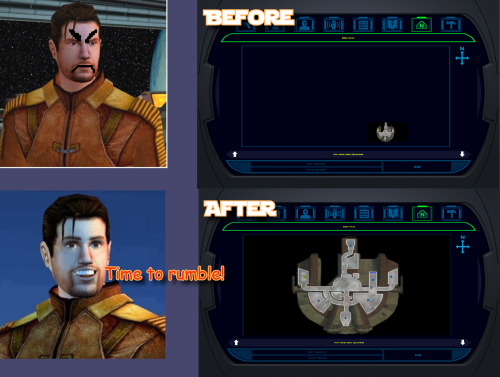
K1 Area Map Fixes High Resolution Area Map & Map Marker Fix TL;DR When you play KOTOR 1 at widescreen or high resolution the area map screen is broken: the map sits shrunken in a corner instead of filling its frame. This mod fixes that. It also corrects 250 map note positions that BioWare put in a strange spot in 2003. It does not change your resolution. It fixes the map after something else has already got the game running at your resolution, so UniWS and KotOR High Resolution Menus have to be installed first, in that order. Steam users need the KOTOR Editable Executable before either of those; GOG users do not. Unzip the folder somewhere and double-click Install.bat. It finds the game and reads your resolution out of the exe, so there is nothing to configure. Uninstall.bat puts your original exe back. Detailed installation instructions are bellow. (next page) What this fixes At widescreen and high resolutions the area map is drawn at its old size in a corner of the frame. This mod rescales the map to fill the frame, puts all three kinds of marker where they belong (scaling the icons up at very high resolutions so they stay big enough to see), and corrects 250 map notes that BioWare left in the slightly (sometimes majorly) wrong spot. One thing it fixes that is not its own bug KotOR High Resolution Menus patcher, the .exe one, leaves the area map shoved off to one side. This patcher checks for it and fixes it, and Uninstall.bat undoes that along with everything else. Requirements Required, in this order 1. KOTOR Editable Executable (for Steam only) https://deadlystream.com/files/file/1320-kotor-editable-executable/ Steam ships a locked swkotor.exe that no mod can edit, including the two below. This is an unlocked copy you drop into your game folder. On GOG, skip this step. GOG's own v1.03 swkotor.exe is already the same unlocked file, byte for byte, apart from 16 bytes of unused header padding. Start at step 2. 2. UniWS https://www.wsgf.org/article/universal-widescreen-uniws-patcher Makes the game run at your screen resolution. Pick "Star Wars: KOTOR" from the list, choose 1024x768 interface. Choose your game folder, type in resolution of your screen and patch it. 3. KotOR High Resolution Menus (k1hrm) by ndix UR https://deadlystream.com/files/file/1159-kotor-high-resolution-menus/ Redraws all the menus for your resolution. Run its patcher, then copy the menu files for your resolution into your game's Override folder. Then this mod, last. If those links are dead by the time you read this, search DeadlyStream for the mod names. They have all been up for years. Resolutions support The maths is checked automatically against all 49 resolutions k1hrm supports, from 800x600 up to 15360x8640. Four of them have actually been played: Resolution Aspect 2560x1600 16:10 1920x1080 16:9 3840x2400 16:10 1600x1200 4:3 Everything else is checked but has not been looked at on a real screen. That includes ultrawide (21:9 and 32:9), because there was no ultrawide monitor here to test on. If you run one, we would genuinely like to hear how it goes, either way. Should be working. Installation Install the requirements above first, in that order. Steam needs all three, GOG needs UniWS and k1hrm only. Unzip this mod's folder somewhere. Do not run it from inside the zip; if you try, it stops and tells you to unzip first. Double-click Install.bat. Wait until it says it has finished. It can take a moment to think. That is the whole thing. It finds your game folder on its own and reads the resolution out of the exe, so it never asks you questions. If it cannot find your game: drag your KOTOR folder onto Install.bat and let go. That means the whole main game folder, the one with swkotor.exe inside it, not the exe itself. If Windows shows a blue "Windows protected your PC" box: click "More info", then "Run anyway". Any small unsigned mod tool gets this warning. If you would rather not run an exe at all: the whole thing is a Python script and it is in the download. python "More info\source\install.py" That does exactly what Install.bat does. This route needs Python installed; Install.bat does not. More info\SHA256SUMS.txt lists a checksum for every file in the download if you want to check nothing changed in transit. Compatibility Tested and working KOTOR 1 Community Patch (K1CP) 1.10.0. Checked by measurement: K1CP moves 35 waypoints and none of them is a map note, so all 250 note corrections still match. The whole stack was then played at 2560x1600 with K1CP, k1hrm and this mod together, and everything was working. K1 Ultrawide Letterbox Fix. Both install orders were tested, and it has to go before this mod. The other way round its patcher refuses to run and blames your game build, which is misleading, because your build is fine. Uninstall in reverse: this mod first, theirs second. 4 GB (Large Address Aware) patch. Confirmed with the real NTCore tool, and it leaves everything this mod uses untouched. Apply it before this mod: nothing breaks if you do it afterwards, but Uninstall.bat restores the exe from the backup taken at install time, so uninstalling this mod later would quietly take the 4 GB patch with it. GOG retail v1.03. Played at 3840x2400, area map and HUD minimap both correct. Compatible 3440x1440 Enhanced HUD/UI and Menus. Be aware it is a replacement for k1hrm's own 3440x1440 set, not an addition to it. Its map frame is identical to k1hrm's, so this mod's checks pass on either. Its bundled exe carries the k1hrm centring defect described above, which this patcher detects and fixes. Override art and texture mods, including HD UI Menu Pack, Pretty Good! Icons, HD portraits, Main Menu Widescreen Fix and KOTOR Widescreen Fade Fix. No shared ground with anything this mod writes. Anything that does not modify the game exe will probably work. Larger Text Fonts. Works alongside this mod. Be aware it is separately known to break item stack counts on its own; that is not caused by this mod. Works, with one setting turned off Kotor Patch Manager (KPM). Fine alongside this mod as long as you switch off its KotorUniResPatch. Everything else KPM does is unaffected. That one patch is an alternative to this mod rather than an addition to it: it rescales the same area map at runtime using the same shared constants, so with both live the map gets scaled twice and comes out wrong, and no install order fixes that. This patcher warns you if it spots KPM's files in your game folder rather than refusing to run, because having KPM installed does not mean that particular patch is switched on. Expected to work, not tested True Controller Support. It is a dinput8.dll ASI that works at the process level and touches none of the same bytes, so there is no reason for it to conflict, but it has not been tested. The other 45 resolutions. Checked automatically, never seen on a screen. Not tested No-CD executables. If yours still measures 4,042,752 bytes the patcher will accept it, but nothing here has been checked against one. Incompatible Flawless Widescreen. It injects into the running process and leaves nothing on disk, so this mod cannot detect it and cannot warn you. Do not use it together with this stack. WSGF themselves recommend UniWS and k1hrm for KOTOR 1 and reserve Flawless Widescreen for KOTOR 2. Maybe we will add support for it in the future. Not supported 4-CD retail build. Probably patchable in principle, but there is no such binary here to test against and its spare code space is not guaranteed to match. The patcher refuses anything that is not 4,042,752 bytes. One thing that is not about mod conflicts but will bite you anyway: Steam's "verify integrity of game files" replaces any exe it does not recognise, which undoes this mod and every other exe mod. Keep a copy of your patched swkotor.exe somewhere outside the game folder. Uninstallation Double-click Uninstall.bat. It puts your original swkotor.exe back, exactly as it was. UniWS and k1hrm stay installed, so your game still runs at your resolution, it just does not have the map fixes any more. You can drag your game folder onto Uninstall.bat as well, the same way as with install, which helps if you have two separate KOTOR installs. Your original exe is copied somewhere safe before anything is changed: %LOCALAPPDATA%\K1AreaMapFixes\backup Paste that into File Explorer's address bar to see it. It is kept out of the download folder and out of the game folder deliberately, so deleting the download cannot cost you your original game file. If you have already deleted the mod folder and want to uninstall, download the mod again and run Uninstall.bat from the new copy. It will find the backup. If you installed the K1 Ultrawide Letterbox Fix, uninstall this mod first and theirs second. What the patcher does It is built to refuse rather than guess. Copies your swkotor.exe to %LOCALAPPDATA%\K1AreaMapFixes\backup before changing anything. Reads your resolution out of the exe instead of asking, then cross-checks it against Override\map.gui, so it will tell you if UniWS and k1hrm disagree with each other. That mismatch is the most common failure in this category of mod. Refuses an executable that is not the expected build, an install where UniWS or k1hrm has not been run, and a second install on top of itself. Refuses to run from inside the zip, so your backup cannot end up in a temp folder Windows later deletes. Warns you if it finds Kotor Patch Manager in your game folder. After writing, re-reads the file from disk and runs 21 checks against it, including one that no byte outside the intended ranges changed. If any check fails it says so and points you at the backup. It does not report success on a write it has not verified. Writes an install record next to the backup listing every step, its offsets, and hashes of the exe before and after. Every run also writes last-run-log.txt next to Install.bat, so if something goes wrong there is a file to attach to a report rather than a command to re-run. Technical details Every offset this mod writes is documented in More info\TECHNICAL.txt in the download, and the full source is in More info\source\. It is published so that a collision with another executable patcher can be diagnosed by someone other than the author, which is the precedent k1hrm set by publishing its own offsets. A few things worth knowing without reading all of it: The patcher only accepts the 4,042,752-byte executable, which is what you have after the Editable Executable (or GOG's own exe) plus UniWS and k1hrm. Anything else is refused rather than written into on the assumption that the spare space matches. The exe grows by 8 KB. That is a reserved region added at the end of the resource section, holding the 250-entry note correction table, and it is the only change to the file's size. The two float constants the area map divides by are shared with the HUD minimap, so they are not rewritten in place. Editing them directly turns the minimap black. Scaled private copies are written elsewhere instead, and only the area map's own operands are pointed at them. The note corrections are keyed on each note's position in the game world rather than on module or index numbers, which is why they survive mods that edit module files. Credits ndix UR for KotOR High Resolution Menus, and for hires_patcher.pl, which the map scaling here is derived from. Required, and not included here. wsgf.org for UniWS. Required, and not included here. LaneDibello for Kotor Patch Manager, whose published address database was a useful cross-check against findings worked out here independently. PyKotor for reading the game's file formats. Everyone at DeadlyStream who documented this engine over the last decade. License GPL version 3 or later. The full text is in More info\LICENSE. The resolution work this builds on is ndix UR's hires_patcher.pl, also GPLv3. None of it is included in this download; you install it yourself, as step 3 of the requirements.1 point -

Version 1.2
93,113 downloads
This is a companion to my TSL Main Menu Model Fix for Widescreen mod. In a similar manner, it adjusts the model file for K1's main menu so that it properly fills the full screen width of widescreen aspect ratios (i.e. 16:9, 16:10). It is designed to be used in conjunction with ndix UR’s KotOR High Resolution Menus mod (as pictured). Because the original vanilla background texture is very low resolution, it looks pretty terrible when scaled up to fullscreen at 1080 (or above). I created a new, higher resolution background texture that approximates the same look. As of v1.1, an optional replacement logo is provided. This is a TOR-style version of the logo, created by GOG. Two versions are provided, one of which is offset in order to better align using the current version of ndix UR's GUI mod. A centered version is also provided in the even that the GUI mod is updated. Note that I have only tested this at 1080. I have no idea how the image may be positioned at different resolutions. Obviously this mod will not be compatible with any other mod that also alters/replaces the menu model. As mentioned, it is intended to be used with ndix UR’s UI mod, and serves no real purpose without that mod. N.B.: This is NOT a widescreen mod! This is just an addition for when you are already using a widescreen mod like UniWS. Installation Instructions Extract the archive, copy the MDL, MDX, and TGA files, and paste them into your Override folder. If you also wish to use the upscaled vanilla logo or the TOR-style logo, copy the appropriate version to your Override folder as well. Acknowledgements Thanks to @bead-v for MDLEdit and KOTORMax that made editing and compiling the menu model possible. Thanks to @ndix UR for testing the mod and various discussions pertaining to its development, as well as all the behind-the-scenes work in getting the new mod tools off the ground. Thanks to @JCarter426 for helping out with filtering via waifu2x to clean up some of the aliasing1 point -
Version 1.0.0
217 downloads
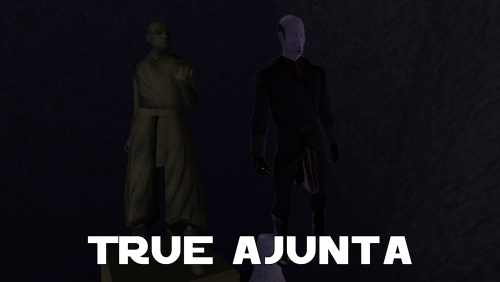
A Mod for Star Wars Knights of The Old Republic Author: N-DReW25 1.0.0 Release Date: 15.11.2025 Installation: Install the Kotor 1 Community Patch FIRST before this mod. Simply click on the HoloPatcher.exe, select your swkotor directory, click install and sit back and watch the HoloPatcher do its magic. If you want Ajunta Pall to appear transparent, please copy the textures from the "Transparent Skins" folder into your Override folder and overwrite the non-transparent skins that were installed by the HoloPatcher. Description: Ajunta Pall is a long dead Sith Lord who you encounter in Kotor I as a Force Ghost. The problem with Ajunta's depiction as a Force Ghost, other than George Lucas' (and later Disney's) retcons to how Force Ghosts work, is that Bioware was lazy when it came to making Ajunta's appearance and gave him a generic Dark Jedi model with a basic reskin that makes his robes a whitish blue color and they also gave him an energy shield effect to make him appear more ghostly. There have been two mods over the years that turn Ajunta Pall's appearance from an underpaid Bioware intern's first draft into something that you'd actually expect a Sith's Force Ghost to look like. In 2007, we saw the Ajunta Pall Unique Appearance mod by SilverEdge9 that reskinned the cut Jedi Council robe model and Deadeye Duncan's head to make Ajunta look like a creepy old Sith Lord. And in 2018, we saw the Spectral Ajunta Pall Canonical Appearance mod by VarsityPuppet that added a unique model that's heavily inspired by the TOR MMO that makes Ajunta look like he was a strong Sith Warrior during his lifetime. These two mods are great, but my problem with the Ajunta Pall mods was caused by the Kotor Mod Builds managed by Snigaroo. In his builds, he lists SilverEdge9's Ajunta Pall Unique Appearance as being faithful to Ajunta Pall's canonical appearance. What is Ajunta Pall's canonical appearance? The statue inside his tomb, of course. But when you look at the statue and compare it to SilverEdge9's Ajunta Pall, you will quickly realize that SilverEdge9's depiction of Ajunta is in no way inspired by the statue. The Ajunta Pall statue uses the old Asian man head and the Nemo Jedi robes whilst SilverEdge9's Ajunta Pall uses Deadeye Duncans head and the cut Jedi Council robes. My mod, the True Ajunta mod, adds what I think is Ajunta Pall's *actual* canonical appearance to the game. This mod gives Ajunta a reskinned old Asian man head and a reskinned Nemo robe so that Ajunta *actually* resembles the statue inside the tomb. As for the mention of Snigaroo's Mod Build here, should Snigaroo not approve of how my mod handles Ajunta he won't be adding it to the Build despite my opinion that my mod is a more accurate canonical representation of Ajunta than SilverEdge9's mod - ultimately it is his decision whether to include, or not include, mods in the Builds and should he not include this mod I do not want you, the player, to harass him for that decision. Known Bugs: This mod shouldn't have any bugs but if you find any please report it to me on Deadlystream. Incompatibilities: Obviously incompatible with any mod that modifies Ajunta Pall's appearance. Please report any further incompatibilities! Permissions: Do NOT claim credit for this mod and do not use assets from this mod without my permission. The texture of Ajunta Pall's robes, on the other hand, is free to use as it came from the K1EP Modder's Resource Thanks to: SilverEdge9: For making the Ajunta Pall Unique Appearance mod from which I borrowed the source code which removes Ajunta Pall's shield! VarsityPuppet: For making the Spectral Ajunta Pall Canonical Appearance mod! Sniggles: For adding SilverEdge9's mod to his Mod Build which inspired me to make this mod! Bioware: For such an amazing game! Fred Tetra: For Kotor Tool! th3w1zard1: For HoloPatcher! Everyone who downloads the mod! Legal: THIS MODIFICATION IS NOT SUPPORTED BY BIOWARE/OBSIDIAN ENTERTAINMENT, LUCASARTS, DISNEY OR ANY LICENSERS/SPONSORS OF THE MENTIONED COMPANIES. USE OF THIS FILE IS AT YOUR OWN RISK AND THE ABOVE-MENTIONED COMPANIES OR THE AUTHOR IS NOT RESPONSIBLE FOR ANY DAMAGE CAUSED TO YOUR COMPUTER FOR THE USAGE OF THIS FILE.1 point -
![More information about "[TSL] More Upgradeable Guns Mod by smugglerAlex"](https://deadlystream.com/downloads/screens/monthly_09_2017/thumb-9a3d1d8f9378b53bd5af9abb7f58b422-screen02.png)
901 downloads
==================================================================================================================== Knights of the Old Republic II : The Sith Lords Modification ==================================================================================================================== This mod makes all guns upgradeable (not fully upgradeable cuz i dont want to break game's balance here). All melee is upgradeable in this game, but many guns are not upgradeable, and that makes no sense (developers do really think reforging a blade from a new alloy using only some blowtorch is alot easier than SIMPLY attaching a scope to a goddamn rail *sigh*). Early-game guns are really underpowered, so am here to fix it with that mod! ==================================================================================================================== Included Guns ==================================================================================================================== Pistols: Blaster Pistol - [scope only] Sonic Pistol - [scope only] Disruptor Pistol - [scope only] Heavy Blaster - [scope only] Systech Static Blaster - [scope only] Arkanian Heavy Pistol - [scope & Chamber] Arkanian Sonic Blaster - [scope & Chamber] Zabrak Blaster Pistol - [scope & Chamber] Systech Electric Blaster - [scope & Chamber] Freedon Nadd's Blaster - [scope & Chamber] (I didnt make Mining Laser upgradeable to make some reason go get that Blaster Pistol on Peragus Dormitory hidden compartment.) Rifles: Blaster Carbine - [scope only] Ion Carbine - [scope only] Sonic Carbine - [scope only] Bowcaster - [scope only] Repeating Blaster Carbine - [scope only] Disruptor Carbine - [scope only] Argazdan Riot Buster - [scope & Chamber] Heavy Repeating Carbine - [scope & Chamber] Ceremonial Bowcaster - [scope & Chamber] Zabrak Blaster Carbine - [scope & Chamber] Onderon Repeating Carbine - [scope & Chamber] Slavemaster Stun Carbine - [Fully Upgradeable] ==================================================================================================================== Installation ==================================================================================================================== SIMPLY put those files into your Override folder Note: You need to start a new game, it wont work with existing saves (or u could try cheats/save game editors) ==================================================================================================================== Uninstallation ==================================================================================================================== Delete those files from your Override folder. ==================================================================================================================== Credits ==================================================================================================================== smugglerAlex (Me) - For creating this mod. Oh, and, ALL HAIL THE CREATOR OF KOTOR TOOL!!1 point -

Version 1.1
14,819 downloads
These are beautiful portraits of the KOTOR PC and companions by Reddit user u/Tinman888 . This mod was made with the artist's permission. There's two folders in the Override - PC and Companions, in case you just want to use one or the other. As you can see from the preview, the PC portrait is one size fits all, and will appear as such regardless of your character's gender or appearance. I really loved the style of the portraits done here and just had to have them in my game, so I set about converting the images, and now you can all enjoy them too.1 point