Leaderboard

Popular Content
Showing content with the highest reputation on 08/16/2026 in Files
-
![More information about "[TSL] Immersive TSL Maps"](https://deadlystream.com/downloads/screens/monthly_2026_08/Screenshot2026-08-06063718.thumb.png.55ee84f8ed71feecd0adc61432c09a15.png)
Version 1.1
116 downloads
[TSL] Immersive TSL Maps AUTHOR: Sith Holocron ORIGINAL RELEASE: 13 AUG 2026 UPDATED RELEASE: 15 AUG 2026 GAMES: Star Wars Knights of the Old Republic II Description: This will be a longer description. Buckle up. I didn’t originally set out to make this a full mod. I suppose this originally started as a response to a request. In the comments for Ashton Scorpius’ “TSL Ebon Hawk Downloadable Map” (https://deadlystream.com/files/file/1406-tsl-ebon-hawk-downloadable-map/?tab=comments) someone asked if the swoop bike could be removed from the Ebon Hawk’s map. I decided to take this on – partly as a challenge to myself and partly because the requester has been making ridiculous specific requests for years. In short, I worked on a mod request out of spite. I thought that would be the end of it. Then at some point, I was working on textures for the Dantooine Enclave sublevel. I was doing a lot of fooling around with textures back then. (This was before I picked up a subscription to Topaz Gigapixel.) While checking - and rechecking - textures in game, I kept seeing that map. Since I already had new textures to work with, why not put them in the map? I requested a upscale of that map from someone and I went to work. I never posted as a mod but I do recall showing it on Discord at some point. Later, I wound up redoing the maps for the M4-78 Enhancement Project as one-off. As there weren’t many maps to do there, I figured that would be the end of it. (Yes, I have also updated that mod recently as N-DReW25 has adjusted some of the maps for his Unofficial Patch.) Not too long ago in Discord, there was a discussion about how the Ebon Hawk seemingly has supposed to be in another hangar on Telos Citadel Station at one point in development. As the participants were discussing that, I did some preliminary work on a map for that Docks section and then quickly posted it in that discussion so folks new to the conversation would have a better idea of the area they were talking about. Realizing that I kept on coming back to this part of texturing, I just decided to jump into this as my next project. I’ve mainly concentrated on the interior maps but all of the standard maps have been upscaled. Additionally, most maps of external spaces have also had tweaks made to the as well. My Workflow: For starters, I generally extract the maps from the game and then upscale them to use as the foundation. There have been occasions where I have acquired maps from elsewhere (such as 204TEL, 208TEL, and 506OND from N-DReW25) which show extra rooms that may not be accessible through in game play but can be entered via the whereami armband mod. I warp to each of the map locations armed with that whereami armband. Using GLIntercept, I’ll take numerous screenshots of the area I’m in from above so I can compare what textures they used for each of the rooms I’m tackling. I sort through my textures, adjust the lighting/coloring depending on the variable they’ve set for that area, and just paste them over the upscaled map. Repeat ad nauseum. In addition to this method, I’ll sometimes take a picture of an area from directly above and paste that directly into the map. There’s also the fun part of sometimes having to redraw the white borders of rooms because the AI doesn’t know exactly what’s important in the thing it’s upscaling. When the map has a background, I’ve sometimes reinterpreted what it should look like but if there wasn’t a background, I’ve left it alone. To sum up, it’s not just a simple upscale but it is a time-consuming pain in the ass which is why I’ve only created an average of one map per day during the project’s creation period. You’re welcome? Installation: If you’re using “TSL Ebon Hawk Downloadable Map 1.2.3” by Ashton Scorpius, you’ll want to install my mod after Ashton’s mod. Copy all TGA files (excepting those in the “Alternate 003EBO map” folder) to the Knights of the Old Republic II's Override folder. (Example location - C:\Program Files (x86)\Steam\steamapps\common\swkotor2\Override) When/if prompted to overwrite files, press okay. If you prefer the alternate map in the “Alternate 003EBO map”, now copy that one file to the Knights of the Old Republic II's Override folder. Please let me know in the comment or review section which of the maps is your favorite. If you like the mod; please leave a comment or endorse! It would be much appreciated. Uninstall: Remove the files you’ve added in Installation instructions. Changelog: 1.1: Updated the 401DXN (Dxun - Jungle Landing) map. The Ebon Hawk and crashed freighter have been replaced on the map. Thanks: N-DReW25: For both feedback on the maps themselves and providing three of the maps for be to have a more complete version. Fair Strides: For continual feedback on the maps. Vriff: For continual feedback on the maps. Kharak (of SketchFab.com): For hosting a viewable 3d model of the Ravager on this website used in my two Ravager maps: https://sketchfab.com/3d-models/sith-centurion-battlecruiser-3f2934da83cb421c87a3510ce62ceb8d To the too many folks in the KOTOR Discord’s media section to name for all of their feedback. P.S. I have no plans to redo the KotOR1 maps. Besides the map window being extremely small in that game, it’s also a game I find myself returning to less and less. You’ll have to convince someone else to work on the KotOR1 maps.2 points -
Version 1.0
28 downloads
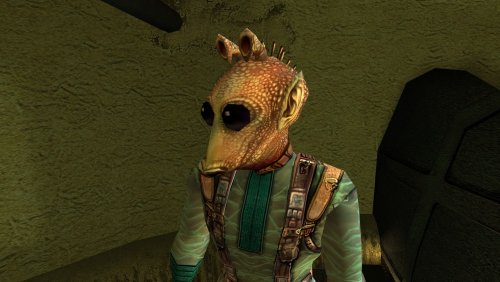
Fixes an overflow in Kudos's Pazaak progression counter on Tatooine. After the player's 128th win against Kudos, tat_fazzpazzstate overflows to -128. While the counter remains negative, Kudos is effectively stuck in his novice state for the next 128 wins, reverting to his initial dialogue branch, tier-1 deck and stake. Once the counter wraps back to 0, his normal progression starts over from the beginning. This mod caps the counter at its final meaningful state once Kudos's normal progression is complete. It also restores overflowed negative values to that final state the next time the reset script runs. Normal progression through the first ten wins is unchanged. Installation instructions Copy: k_ptat_paz_rese2.ncs into your game's Override folder. To uninstall, remove k_ptat_paz_rese2.ncs from the Override folder. Main features Prevents tat_fazzpazzstate from overflowing after 128 wins. Preserves Kudos's normal progression through the first ten wins. Freezes the counter at its final meaningful state once progression is complete. Automatically repairs already-overflowed negative counter values when the script next runs. Does not alter Kudos's Pazaak decks, wagers, rewards or game balance. Compatibility Compatible with vanilla KotOR, K1R and K1CP. The mod does not alter Pazaak decks, wagers or rewards. It may conflict with another mod that modifies k_ptat_paz_rese2.ncs or deliberately extends tat_fazzpazzstate beyond its vanilla progression. Tested with tat_fazzpazzstate already overflowed: one final 75-credit game occurred, after which the variable was restored to 10 and subsequent games returned to the permanent high-tier state. The original bug can be reproduced by playing 128+ games against Kudos or by manipulating tat_fazzpazzstate with KotOR Savegame Editor. Discovered during an apparently unreasonable amount of legitimate Pazaak grinding. Notes Already-overflowed saves: If the counter has already overflowed, one final 75-credit game may occur before the fix takes effect. After that game, the counter is restored to 10 and subsequent games return to Kudos's permanent high-tier deck state. Vanilla note: In the unmodded PC game, Kudos's permanent high-tier wager is only 50 credits, while his overflowed novice-state wager is 75. As a result, the original overflow can actually be advantageous for credit grinding in vanilla. This fix restores the intended permanent high-tier behavior regardless of wager values and is therefore most beneficial with K1CP (which increases the late-game stake to 500) or other mods that increase Kudos's late-game stake.2 points -
Version 1.0.1
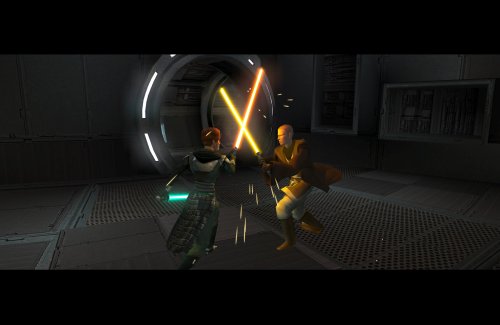
333 downloads
Expands the mechanics of training your Jedi companions in TSLRCM. SUMMARY TSLRCM adds the ability to teach your Jedi party members a select few powers, feats, and forms. It’s a cool concept that adds to the feeling of training your companions, but it was never very fleshed out. As is, there’s a very limited pool of abilities to teach, no real player choice in what to teach, and no depiction of the training aside from a fade to black. This isn’t a fault of the TSLRCM team, there just wasn’t much to restore. The mod aims to expand the whole training mechanic to make it more interesting and immersive. Summary of the main changes of this mod: - You can now choose which abilities to teach your companions. - The pool of teachable powers, feats and forms has been significantly expanded. - Every teachable ability now includes a brief cutscene depicting the training. - Party members can learn 1 power or feat and 1 form at a time and must level up before learning more. - Different prestige classes can teach different abilities. JM/SL can teach a wider selection of powers, JWM/SM can teach more combat feats, and JW/SA can teach a mix of both. - Handmaiden and Disciple can now be trained like other Jedi companions. DETAILS INSTALLATION TSLRCM required. Ensure TSLRCM is installed first before installing this mod. To install, run HoloPatcher.exe. Select the main install option and run. Unaltered copies of any modified files will be placed inside the "backup" folder in the location of HoloPatcher.exe. If you have PartySwap installed, run the included compatibility patch. Ensure both PartySwap and the main mod have been installed first before installing this patch. UNINSTALLATION Remove the following files from override: If any files were created inside the backup folder, move them to override. COMPATIBILITY Incompatible with any mods that hard overwrite the dlg files for Atton, Bao-Dur, Disciple, Handmaiden, Mira, or Visas. Compatible with PartySwap by Darth Tyren & Leilukin using the included compatibility patch. Compatible with Visas Marr and Female Exile Romance by Leilukin. The following mods appear compatible but have not been extensively tested: Handmaiden and Female Exile - Disciple and Male Exile Romance by Leilukin Atton Rand and Male Exile Romance by Leilukin Not compatible with Mira Romance Mod by JediArchivist. Soft conflict with Train the Handmaiden by jc2 as this mod also allows training Handmaiden. BUGS Minor bug where Handmaiden doesn’t restart her idle animation after learning Burst of Speed, for some reason. Talking to her fixes it. No other bugs that I’m aware of. Please report any. PERMISSIONS You are free to use and edit this mod’s dlg files if needed to make a compatibility patch for another mod. However, please ask permission before reuploading or modifying the files for any other reason. Do not reupload any files from the PartySwap patch without permission from the author. CREDITS offthegridmorty zbyl2, DarthStoney, Hassat Hunter, VarsityPuppet & contributors - TSLRCM dlg files DarthTyren, Leilukin - PartySwap dlg files HoloPatcher - Cortisol, th3w1zard1 TSLPatcher - stoffe, Fair Strides KOTOR Tool - Fred Tetra K-GFF - tk102 AniCam - JdNoa Reone Toolkit Lip Composer - seedhartha Holocron Toolset - Cortisol, th3w1zard11 point -
Version 1.0.0
195 downloads
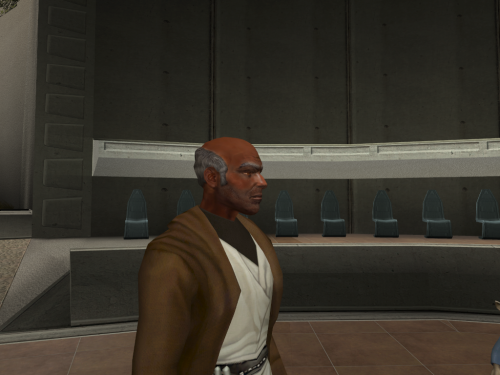
I decided to remesh Dorak you will see that there is no more painted hair on his skull they all have relief Also you can install the mesh only if you want another or the vanilla textures and you can just install the texture if you dont want the change of mesh. !!!THIS MOD IS FOR KOTOR 1 I ACCIDENTLY IMPORTED IT AD K2 MOD!!!1 point -
Version 1.0.0
102 downloads
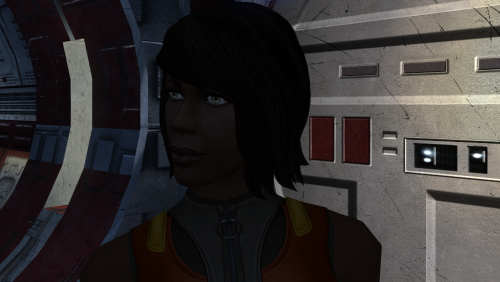
The mod replaces the PFHB02 model and textures. Thanks to DarthParametric, without him this mod would not have seen the light of day. To Install 1. Download: PFHB02 2. Copy all files to the Knights of the Old republic's Override folder. (Example location - C:\Program Files (x86)\Steam\steamapps\common\swkotor\Override) 3. When/if prompted to overwrite files, press okay. 4. If you like the mod; leave a comment or endorse! (It would be much appreciated) Made with love.1 point -
Version 1.0.1
27 downloads
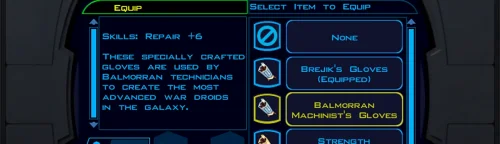
Repair Gloves Game: KOTOR 1 Author: Dodrari Kaan GitHub: https://github.com/danielstegink/Kotor.RepairGloves HK-47's quest line requires an extremely high Repair rank to complete, and must be completed before you start the Leviathan arc. With the worst possible build (Soldier/Guardian, minimal Intelligence, no Force Valor or Gearhead feats), it's impossible to get a high enough Repair rank before level 15, which I consider the ideal level for doing Leviathan. To fix this, Karal Kaar on Dantooine now sells a pair of gloves that provide the necessary bonus to Repair. Instructions Use the TSLPatcher Permissions Use this mod however you want. Just make sure to credit me. Compatibility This mod uses TSLPatcher to modify Karal Kaar's inventory on Dantooine. Any mods that modify the same may not be compatible. This mod is compatible with K1R and K1CP. Special Thanks Fred Tetra - Kotor Tool Stoffe - TSLPatcher Disclaimer THIS MODIFICATION IS NOT MADE, DISTRIBUTED, OR SUPPORTED BY BIOWARE, OR LUCASARTS ENTERTAINMENT COMPANY LLC. ELEMENTS TM & © LUCASARTS ENTERTAINMENT COMPANY LLC AND/OR ITS LICENSORS.1 point -
Version 1.0.1
398 downloads
Starship Combat Pay v1.0.1 Overview Starship Combat Pay give players a tangible reward, beyond avoiding a game over screen, for surviving the Ebon Hawk Gunnery Station mini-game. After escaping the Sith Blockade and landing on Dantooine, you’ll get a message from the Republic. It reads: "Republic Combat Pay Thank you for registering your Dynamic-class freighter, designation: the Ebon Hawk, as a civilian paramilitary vessel. Until further notice, as an enlisted soldier of the Galactic Republic Navy, you are hereby entitled to a financial reward of 200 Republic credits for the successful elimination of each Sith Imperial starfighter you encounter aboard your registered personal starship. You'll find a payment of 1200 Republic credits has already been deposited directly into your account. Further payments will be deposited immediately after each conflict. May the Force be with you." …And that’s exactly what the mod does. It pays you a total of 1200 credits every time you’re forced to play the Ebon Hawk Gunner Station mini game. Notes Unfortunately, this mod doesn’t change the mini-game itself in any meaningful way. It does however make playing it more rewarding. When deciding on the number of credits players should receive, we looked at different amounts of pay that scale with level and we arrived at a flat 1200 credits for a number of reasons. A scaling number of credits requires an in-setting explanation for why the main character’s pay increases, which logically goes to rank. Applying any sort of rank to the main character adds a level of non-canon material that I’m not comfortable adding in my mods. In terms of the game’s existing financial rewards go 1200 credits is pushing it. However, in terms of the setting, a 1200 credit bonus is a paltry sum for destroying a 300,000 credits worth of starfighters. So, since most players tend to only travel between planets after fully completing them, the number of randomly generated starfighter encounters is relatively low. In any case, once you get full access to the Ebon Hawk, you’re free to win heaps of credits by swoop racing or savescum an infinite number of credits by gambling with Suvam Tan. So, exploiting the turret minigame isn’t going to unbalance anything. Credits Script Writer: Thor110 Contributor: Zoctavous Mod Author: Timbo Special Thanks I want to thank Thor110 who had the script almost entirely worked out within minutes of pitching the idea and for patiently sticking with it over the next couple weeks to fine tune it. Seriously, this part was about 90% of the work. I also want to thank Zoctavous who has very quickly become my go-to scripting confidante. Whenever there’s something I don’t understand or need help fixing. He’s usually the first person I hit up. Without him helping me get past the very first problem with this mod, this release simply wouldn’t have happened. Finally, I want to give a special thanks to Discord user sharkynebula from the KOTOR server who casually suggested that the Republic should have to pay you for playing the minigame. This is the idea set this whole thing off.1 point -
![More information about "[KotOR] Dialogue Fixes"](https://deadlystream.com/downloads/screens/monthly_2018_07/images.thumb.jpg.c19371df3c91f00aba389a76a8b84c77.jpg)
Version 5.5
84,429 downloads
In an attempt to salvage some material from the now defunct SW:KotOR Upgrade project, I have decided to share this modification with the community. This file is meant to replace the original dialog.tlk that comes with the original game. It is meant to be used exclusively with the English version of the game. It is technically compatible with every other modification that alter this same file by patching it, provided this is installed first. Two versions are offered: one that includes only corrections and a revised one that includes most of the changes found in the PC Response Moderation modification by Kainzorus Prime. Enjoy!1 point -
Version 1.0.0
155 downloads
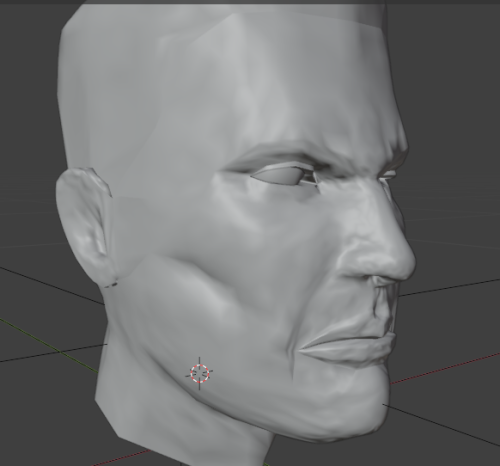
I remeshed Canderous and retextured him i inspired myself with this artwork. I uploaded 2 versions of my textures. one more like the original textures and the other more like the image. I did not remade him AS the image but i was inspired.1 point -
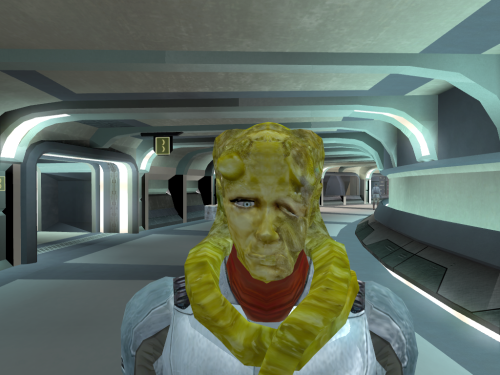
Version 1.0.1
111 downloads
!!!THIS MOD IS FOR KOTOR 1 I ACCIDENTLY IMPORTED IT AD K2 MOD!!! I remade Kohmad the beast hunter.1 point -
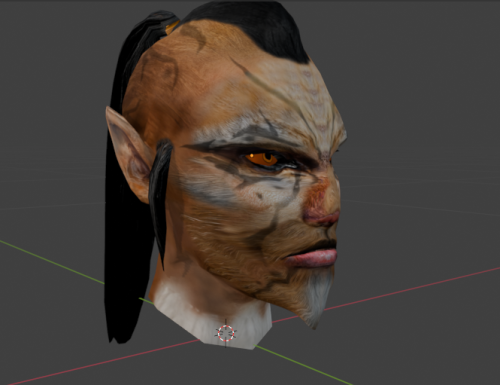
Version 1.0.1
119 downloads
I remodeled Juhani so she look more Cathar using this nice mod from Stormie97. Thanks to Stormie97 for the permission to upload mine. You don't need his mod for mine to work but have a look at his work.1 point -
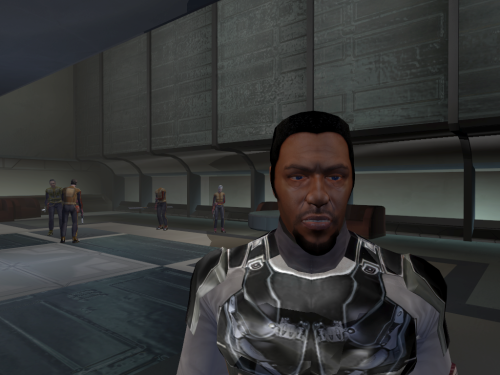
Version 1.0.0
147 downloads
I retextured and remeshed 3 characters Deadeye need a little remade in the future.1 point -
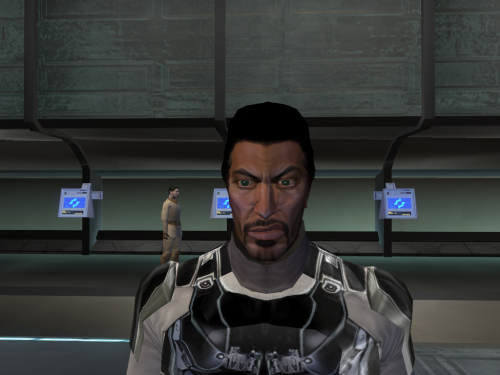
Version 1.0.1
394 downloads
!!!THIS MOD IS FOR KOTOR 1 I ACCIDENTLY IMPORTED IT AD K2 MOD!!! I remade Brejik the mesh and textures1 point -
Version 1.0.0
574 downloads
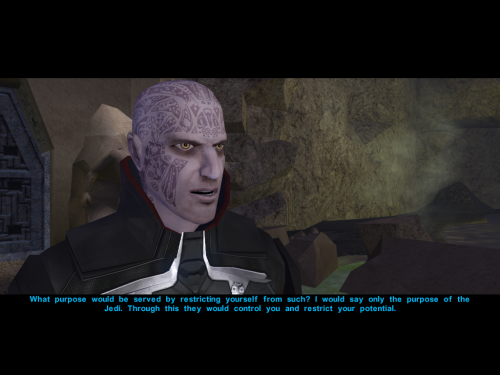
I made a higher poly ulthar to end the spiked head problem. This mod wont contain the textures you see on the pictures. I dont own them even if i modified them for myself. I also dont remember where i downloaded them. Edit: i had Darkhope's permission here is her original texture. I included my modification.1 point -

Version 1.0.1
641 downloads
Adds the ability to switch or holster your weapons in K1. SUMMARY KOTOR 2 added a nice QOL feature which allows you to switch between sets of weapons by clicking a button, saving time scrolling through your inventory to find your favorites. This mod is an attempt to bring that functionality to the first game. This mod adds a usable item which allows you to switch between two sets of weapons. Simply activate the item to save your current weapons as a set and switch to your other set. You can use this to quickly switch between melee and ranged weapons, keep a special set of weapons saved for certain enemies, or you can keep your second set empty and use it as a holster/unholster button. NOTE: In order to get the Switch Weapons item without cheats, you must start a new game (you will get it when Trask joins your party). Otherwise, you can get the item with the cheat “giveitem switchweapons” or by using a save editor. Please read Compatibility and Bugs sections before installing. INSTALLATION To install, run TSLPatcher.exe. Unaltered copies of any modified files will be placed inside the "backup" folder in the location of TSLPatcher.exe. UNINSTALLATION 1. Remove the following files from override: 2. If any files were created in the backup folder, move them to override. COMPATIBILITY This mod will only work with weapons that exist in the vanilla game and weapons added by a limited number of mods. See list below. If you want a weapon from a mod not listed below supported, just ask. This mod will also not work with custom companions. Again, let me know and I will see about making a patch. Supported Mods New Lightsaber Blade Model by Crazy34 (standard installation only) Juhani Appearance Overhaul by Stormie97 BUGS Activating the item while running can interrupt the action which will effectively clear your second set of weapons, as there’s no way to tell if a character is running in the first game. To avoid this, do not run while using the item. When switching to a set of duel-wielded weapons which are both identical weapons (e.g. two vibroblades), the game will try to play both the single and duel-wield weapon flourish animations in short succession, which produces odd results visually. This is due to the need to slightly delay the equipping of the left hand in such cases in order for the left hand weapon to be equipped at all. The game could get confused between weapons which share the same tag. This should be rare though I think and hopefully irrelevant for most playthroughs. PERMISSIONS Please do not reupload this mod without my expressed permission. You are free to use the source script to create a patch for another mod. CREDITS offthegridmorty Thanks to JC for help fixing some bugs and issues. Credit to Xiskio who was the first to make a mod like this many years ago with their Holster Weapons mod. KOTOR Tool - Fred Tetra TSLPatcher, TalkEd - stoffe, Fair Strides K-GFF - tk102 Holocron Toolset - Cortisol1 point -
7,507 downloads
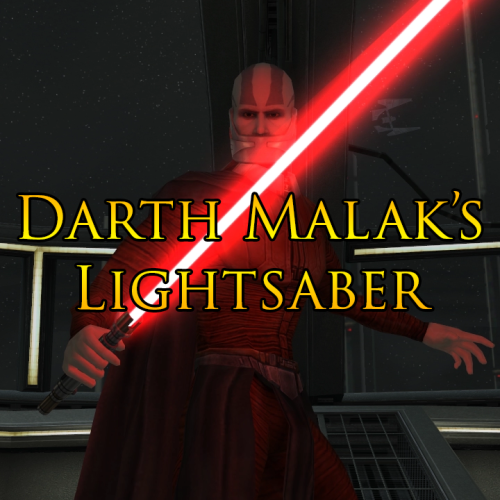
This mod gives Darth Malak his own unique lightsaber hilt and also uses Crazy34’s lightsaber blade with ambient lighting. Darth Malak’s lightsaber was the only one not altered with my Movie Style Lightsaber Hilt Replacement mod, so this mod is intended to be used alongside that for consistency. This replaces the lightsaber Malak uses in the vanilla game and is used each time you battle him as well as in all cutscenes where he is holding/wielding a lightsaber. This mod is fully compatible with the KotOR Community Patch, as the changes it makes to Malak’s files on the Star Forge are identical to those made by the Community Patch itself.0 points -
Version 1.0.0
293 downloads
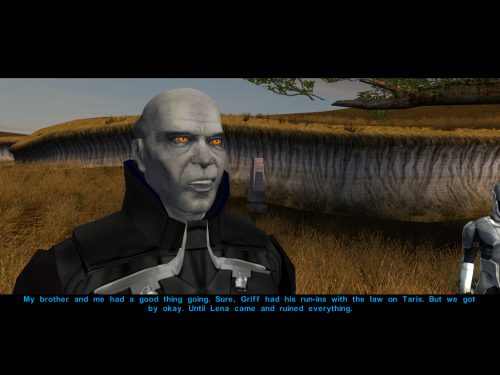
The armor is retextured but not from me so it wont be uploaded here and i don't remember where i downloaded it years ago. I retextured the face and i added some love to the mesh to he has no more painted hair and i modified his mouth so he has a little smirk when he talk. Even if he smile on the picture he doesnt always smile theets out.0 points