

Leaderboard




Popular Content
Showing content with the highest reputation on 06/07/2026 in Files
-
Version 1.0.0
33 downloads
THE SITH LORDS RESTORED CONTENT MOD ADD-ON: M4-78EP Unofficial Patch 1.0 1. Description: ---------- One of the most ambitious Kotor II mods is also one of its most controversial. The M4-78 Enhancement Project, or M4-78EP, was the culmination of years of hard work to restore the legendary Droid Planet of M4-78 back into Kotor II, however, the first releases of M4-78EP was plagued by two critical issues which gave the mod a bad reputation. 1) A mix of low-quality, amateurish voice acting and bizarre Droid filter choices. 2) Crippling lag in the Industrial Zone. Updates 1.3 and 1.5 of the M4-78EP were intended to fix these two issues. The majority of the Droid VO is now reasonably competent for a fan mod and the lag in the Industrial Zone was fixed, however, these updates also added more problems which simply replaced the old issues with new issues. 1) The teleportation mechanic during the Radiation section was controversial with some players. 2) The removal of the side quest “Termination Required” during the Radiation section was controversial with some players. 3) Removal of content was unfinished in some places. The Security Droid trio which was removed spill spawn during the Radiation section and could be found if you ran backwards in the Industrial Zone before clearing the Radiation. 4) Kaah’s new dialogue in ES-05’s Archon Chamber was amateurishly written when you compare it to the old dialogue. 5) Having Vash and possibly Kaah be killed by the weak Sith Assassins you mow down throughout the game was hardly seen as an improvement over the old ending. 6) In the attempt to fix the lag an important placeable was deleted which prevented the side quest “Fixing Droids” from being completed. This mod, the M4-78EP Unofficial Patch, is the work of a coalition of modder’s who have come together to fix M4-78 to improve the new content added in updates 1.3 and 1.5 whilst restoring the much beloved features which were removed in those updates from update 1.2. Please consult the “Features.txt” file for a full changelog of changes made to M4-78EP 1.5. Please note the following: Whilst M4-78EP 1.5 has language support for English and Russian the M4-78EP Unofficial Patch is ONLY SUPPORTS ENGLISH AT THIS TIME! Whilst M4-78EP 1.5 is available on the Steam Workshop via TSLRCM (English) + M4-78EP (English), the M4-78EP Unofficial Patch ONLY SUPPORTS THE DEADLSYTREAM VERSION OF TSLRCM AND M4-78EP! 2. Installation: ---------- Note: TSLRCM must be installed FIRST, M4-78EP 1.5 must be installed SECOND, and the M4-78EP Unofficial Patch must be installed THIRD, in that PRECISE order, and ALL other mods are to be installed AFTER these three mods. 1. First, you will need to get the most up-to-date version of TSL Restored Content Mod (TSLRCM 1.8.5). It's available for download here: http://deadlystream.com/forum/files/file/578-tsl-restored-content-mod/ Please note that M4-78EP will NOT work AT ALL without TSLRCM. 2. Follow TSLRCM's installation instructions. 3. Once TSLRCM is successfully installed, run M4-78EP.exe. Installer will ask you where you want to install the mod - it should figure out where TSLRCM is installed by itself, so you probably won't need to change that. If, for some reason, the installer shows an incorrect folder, make sure you change it to directory where Kotor II is installed (where swkotor2.exe is located, NOT any of subfolders), same as TSLRCM. 4. If you want to install the “British Female Warning Voice” open the “British Female Warning Voice” and copy the audio files from there into the “tslpatchdata” folder inside the M4-78 Unofficial Patch download and overwrite the existing audio files. Doing this will install the British Female Warning Voice instead of the American Female Warning Voice. 5. Run the HoloPatcher.exe inside the M4-78 Unofficial Patch download, navigate to your Kotor II install folder and click install. Warning: Never run the installer from inside the archive! Always extract the archive onto your hard drive first. 6. While we try our best to make this mod as bug-free as possible, with the many options of KOTOR2 and our small testing team it can happen that bugs, including critical ones, pass through. We will fix them, so check our site for any potential updates and patches. 7. Install any of the included Bonus Addons from the “Bonus Addons” folder that you’d like. Note: If you plan on using Ashton Scorpius’ TSL Better Male Twi'lek Heads mod, install that mod, open the folder “TSL Better Male Twi'lek Compatibility Patch” in the “Bonus Addons” folder, choose between Vanilla Quality and High Quality, and copy the two files from one of these folders and place them into your Override folder. 8. Install any other compatible mods you desire now. 4. Uninstall ---------- Not possible. Make sure you backup your Kotor II game folder before installing TSLRCM and M4-78EP 1.5 to ensure that you can go back and reinstall your mods without M4-78EP 1.5 should you change your mind. 5. Known Issues --------- - When entering 812DRO, the Droid Manufacturing Module, the side quest Deadly Upgrade reactivates again for unknown reasons should it have already been completed. - Whilst the shadow of the Droid Construction Boss model, L5-65’s model, was fixed I suspect it has a few problems. The Environmental Zone’s Guardian Droid boss fight appears to be doing a T-Stance when Kaah has his final line and, when talking to L5-65, the Droid will “Moon Walk” on the spot without stopping. - The Escort Droid will still teleport you to 810DRO and 811DR (M4-78EP 1.5’s Droid Manufacturing and Research & Development modules) instead of 812DRO which is the new Droid Manufacturing Module made by Thor110 which merges 810DRO and 811DRO into one module. - Kaah Ohtok’s unique death scene if you spare him in the Environmental Archon Chamber and then try to “recruit” him into your Party may not fire properly. If this is the case and it can’t be fixed the option to fake recruit him may be removed, however, do know that this scene not firing should not break your game. 6. Future Plans --------- - Improve Korriban content. - Restore the bonus side quests for HK-47, T3-M4, and G0-T0 during the Radiation section of M4-78. - Rename every single Droid on M4-78 to make Droids easier to identify. For example, instead of “CS-36” he’d be named “Greeter Droid CS-36” and journal entries will specify that detail so that he should stand out amongst the plethora of CS named Droids. - Give every single named Droid a unique texture to make Droids easier to identify. For example, if CS-36 was the only droid that was colored hot pink and the journal entry said he was hot pink it would be easier to identify that Droid. An optional HD pack is also planned for these new Droid textures. - Reword and reorganize certain Droid dialogues so that the dialogue is more consistent with the rest of the game. - Add more Party dialogue interjections throughout M4-78. Some of these could be lifted from other parts of the game, spliced together, or created with AI so that Party members can actually interact with the planet they are on. Do note that Hanharr uses alien VO and can be written to actually talk about M4-78. - Fix the 1.5 content where you could use Bao-Dur to break into the Environmental Zone first before going to the Industrial Zone. - Add more Power Cores. - Revoice Master Vash with a human voice actor, NO AI, and change the ending to allow her to reunite with the others on Dantooine. 7. Credits: -------------------------------------------------- » Developers -------------------------------------------------- - N-DReW25 - Project Leader, dialog correction, dialog editing, git file editing, texture editing, VO splicing. - Thor110 - Project Leader, scripting, git file editing, modeling. -------------------------------------------------- » Beta Testing -------------------------------------------------- - AxConsortium - Doodmane444 - Vriff - th3w1zard1 8. Contributors: -------------------------------------------------- - Ashton Scorpius – Creator of the TSL Better Male Twi'lek Heads mod which contained an M4-78 compatibility patch which was used as a base for the Kaah Ohtok Compatibility Patch found in this mod as Kaah’s texture was changed. - Dark Hope – Creator of the PROTOCOL DROID HD mod and the, as of today unreleased, HD Male Twi’lek head texture, which served as a base for IS-18’s HD texture and Kaah Ohtok’s HD texture. - ndix UR – For fixing the glowing eyes of the Foreman Droid model. - Sith Holocron – Creator of the optional HD M4-78 textures, several upscaled droid textures, and edited VO. -------------------------------------------------- Special Thanks -------------------------------------------------- Zbyl2, Stoney, Hassat Hunter and the other developers and contributors of M4-78EP. Please consult the M4-78EP page for the full list of users. 8. Distribution Notes ---------- This mod may not be modified or distributed without the explicit permission of the authors. THIS MODIFICATION IS PROVIDED AS-IS AND IS NOT SUPPORTED BY BIOWARE/OBSIDIAN ENTERTAINMENT OR LUCASARTS OR ANY LICENSERS/SPONSORS OF THE MENTIONED COMPANIES. USE OF THIS FILE IS AT YOUR OWN RISK AND THE ABOVE MENTIONED COMPANIES OR THE AUTHOR IS NOT RESPONSIBLE FOR ANY DAMAGE CAUSED TO YOUR COMPUTER FOR THE USAGE OF THIS FILE.4 points -
Version 1.0.1
2,240 downloads
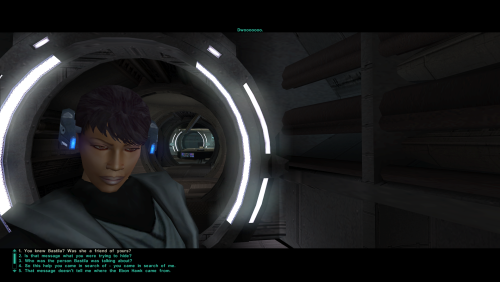
=Consistent Bastila Recognition= A KNIGHTS OF THE OLD REPUBLIC II: THE SITH LORDS MODIFICATION AUTHOR: Leilukin FILE NAME: Consistent Bastila Recognition.7z LATEST VERSION: 1.0.1 CONTACT: E-mail to contact@leilukin.com, or message to Leilukin on Deadly Stream 1. DESCRIPTION: In KotOR II: TSL, entering the secret tomb on Korriban will reveal that the player character, the Exile, knew Bastila. However, if Bastila appears as a hologram in T3-M4's holo-recording, provided Revan is male, none of the dialogue options for the Exile when they talk to T3 allow them to mention Bastila by name. Instead, the Exile merely refers to Bastila with generic terms such as "the person in the hologram", presumedly because the hologram could be either Bastila or Carth depending on Revan's gender. This mod aims to correct the inconsistency of the Exile not recognizing Bastila in the hologram, by making the Exile refer to Bastila by name when talking to T3 about the holo-recording. 2. INSTALLATION: First and foremost, make sure you have The Sith Lords Restored Content Mod (TSLRCM) installed, since TSLRCM is REQUIRED for this mod to work. Extract the Consistent Bastila Recognition.7z archive you downloaded to anywhere you like, as long as it is not within the KotOR 2 directory. Run Install.exe. Select either "Default Installation" or "M4-78EP Compatible Installation", depending on if you have installed M4-78 Enhancemnet Project (M4-78EP) or not. You should choose ONLY ONE of these two options to install the main part of the mod. Once you have chosen the installation option you want, and select your KotOR 2 game folder as your KotOR 2 directory path, click the “Install” button and let the installer do its job. If you have also installed WildKarrde's TSL Expanded Ending, run Install.exe again, select the "TSL Expanded Ending Compatibility" installation option, then select your KotOR 2 directory path, and click the “Install” button. ***IMPORTANT NOTE FOR STEAM USERS:*** I DO NOT recommend using the Steam Workshop if you want to use this mod. Steam Workshop is frankly a mod compatibility nightmare, and I recommend reading this post on why Steam Workshop is NOT recommended for modding KotOR 2. 3. UNINSTALLATION: Run Install.exe and select your KotOR 2 directory where you installed this mod. From the “Tools” drop-down menu, select “Uninstall Mod / Restore Backup”, then confirm to uninstall the mod. 4. KNOWN ISSUES: None currently known. If you find any bugs or problems, please let me know. 5. MOD COMPATIBILITY: Apart from The Sith Lords Restored Content Mod (TSLRCM), which is required for this mod to work, any other mods that modify T3-M4's main dialogue file, t3m4.dlg, may conflict with this mod. I have set up the installer to install this mod by patching the t3m4.dlg file to improve compatibility with other mods that modify t3m4.dlg as much as possible, but it is still not guaranteed to be compatible with every other mods that modify the same file. This mod is not compatible with my Alternate Revan Romances REDUX. Note that Alternate Revan Romances REDUX has implemented similar changes by making the player character refer to Bastila by name during T3’s conversation, so if you use Alternate Revan Romances REDUX, you do not need Consistent Bastila Recognition. 6. PERMISSION: You may modify this mod for personal use or show this mod in screenshots. However, do not release your mods containing assets from my mod without my permission. I do not use nor support Steam Workshop, so I do not want any of my mods to be uploaded to Steam Workshop. 7. CREDITS: Snigaroo for suggesting the idea of this mod in his KotOR 2 mod build request thread on Deadly Stream WildKarrde for giving me the permission to make this mod compatible with TSL Expanded Ending OpenKotOR for Holocron Toolset and HoloPatcher tk102 for DLG Editor THIS MODIFICATION IS NOT SUPPORTED BY BIOWARE/OBSIDIAN ENTERTAINMENT OR LUCASARTS OR ANY LICENSERS/SPONSORS OF THE MENTIONED COMPANIES. USE THIS FILE AT YOUR OWN RISK AND NEITHER THE ABOVE MENTIONED COMPANIES NOR THE AUTHOR IS RESPONSIBLE FOR ANY DAMAGE CAUSED TO YOUR COMPUTER FOR THE USAGE OF THIS FILE.1 point -
Version 1.0.0
45 downloads
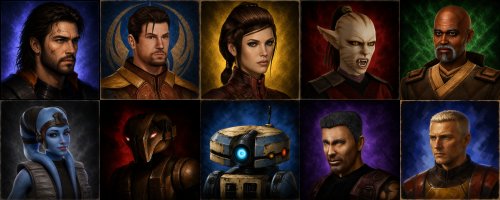
Description Some companion portraits that I generated with AI Installation instructions Place the .TGA files in your Override folder Main features Uses to replace old portraits with modern ones Requirements Have created an Override file or followed an installation guide beforehand Shout outs I thank the KOTOR Community Portal for modernizing the game; it inspired me to request the creation of more realistic portraits.1 point -

Version 1.5.1
10,373 downloads
This mod modernizes all K1 cutscenes by upscaling, slight compositing, and remaking text elements. This in 3440x1440, 3840x2160, 2560x1440 and 1920x1080 resolutions at the original framerate and interpolated to a 60fps version. Disclaimer This mod only includes enhanced cutscenes. Adjusting your game to the preferred resolution is necessary. There's multiple guides on how to do this online. (like this one.) Information - Cutscenes have been upscaled using a combination of AI models in Topaz Video AI 4-5, then re-composited and exported back to bink files at a high bitrrate. - Remade the subtitles for videos 02-09-31a-50-56b - Remade legal screen - Remade title crawl in video 01a - Fixed issues in certain videos (color grading, broken fades,..) Mirror - Google drive currently down as I'm looking for an alternative hosting solution. Installation - Download preferred resolution and frame rate versions. - Extract the downloaded folders into the "movies" folder in your game installation directory. Remember to make a backup of the original folder first if you want to restore them at some point. - Overwrite with any preferred alt versions. Alts All the resolution versions have the same alternative options. - "legal" an alternative legalscreen option. - "nosubs" removes subtitles from videos 02-09-31a-50-56b - "whitesubs" adds white instead of blue subtitles to videos 02-09-31a-50-56b Let me know if you run into any issues or have any thoughts. This is by no means perfect since the upscaling process still introduces a lot of artifacts but I'm hoping to revisit and improve this project whenever there's a significant update in available upscaling video tech. [UPDATE: Working on a new version based on the Starlight Mini model from Topaz]1 point