yangloup
-
Posts
6 -
Joined
-
Last visited
-
Days Won
1
Content Type
Profiles
Forums
Blogs
Forum & Tracker Requests
Downloads
Gallery
Store
Events
Everything posted by yangloup
-
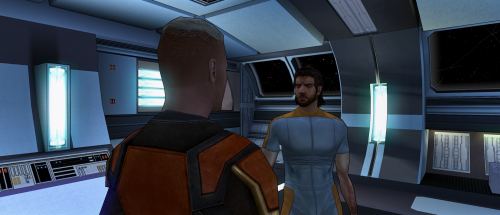 That’s completely fair honestly. But just to clarify: this portrait was not fully AI generated. I manually edited and reworked the texture myself in GIMP because I wanted a more realistic look while keeping the RPG painted style I like. I’m not an artist capable of creating faces or fully original portraits from scratch. My real job is cooking, not digital art ahah. But adding a scar and blue eyes by hand didn’t seem impossible to try, so I spent around two days working on it and learning as I went. I’m honestly proud of the result, even if it’s far from perfect. Also, everyone is free to create the kind of mods they want. I personally wanted a blue-eyed version with a scar for my own playthrough, and nothing exactly like that existed, so I made one for myself. If other people happen to like it too, I just wanted to share it freely. 🙂
 -
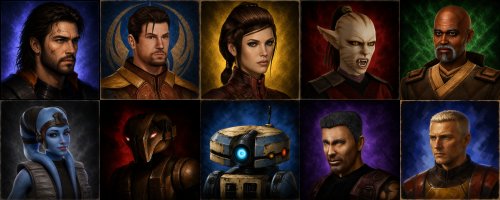 I understand your point, and I genuinely respect the original mod author and the work behind those portraits. There was no plagiarism intended here, and I did not use the original portraits to train or generate the AI edits either, since that would not be allowed. I simply appreciate the painted art style, but personally wanted something a bit more realistic and closer to my own taste, so I used AI as a tool for that purpose. I’m happy with the result, so I decided to share it for people who might enjoy that style too. If it’s not your thing, that’s completely fine. Please continue supporting the modders and artists you prefer. Modding is all about personal preference. 🙂
 -
View File Protrait HD KOTOR Description Some companion portraits that I generated with AI Installation instructions Place the .TGA files in your Override folder Main features Uses to replace old portraits with modern ones Requirements Have created an Override file or followed an installation guide beforehand Shout outs I thank the KOTOR Community Portal for modernizing the game; it inspired me to request the creation of more realistic portraits. Submitter yangloup Submitted 05/31/2026 Category Mods K1R Compatible No
-
View File PMHC04 for main character Description Face of the character PMHC04 with hand-drawn scars Installation instructions Make sure you don't have a file with the same name in TCP format, as it will overwrite it otherwise. Otherwise, drag the file into your Override folder. Main features Describe the core features of your mod Requirements You must have created an Override folder or followed an installation guide beforehand. Shout outs Thanks to the KOTOR Community Portal team for creating an excellent guide that inspired me to redo a beautiful portrait of Revan Submitter yangloup Submitted 05/31/2026 Category Mods K1R Compatible No
-
Version 1.0.0
165 downloads
Description Some companion portraits that I generated with AI Installation instructions Place the .TGA files in your Override folder Main features Uses to replace old portraits with modern ones Requirements Have created an Override file or followed an installation guide beforehand Shout outs I thank the KOTOR Community Portal for modernizing the game; it inspired me to request the creation of more realistic portraits. -
Version 1.0.0
84 downloads
Description Face of the character PMHC04 with hand-drawn scars Installation instructions Make sure you don't have a file with the same name in TCP format, as it will overwrite it otherwise. Otherwise, drag the file into your Override folder. Main features Describe the core features of your mod Requirements You must have created an Override folder or followed an installation guide beforehand. Shout outs Thanks to the KOTOR Community Portal team for creating an excellent guide that inspired me to redo a beautiful portrait of Revan