

Leaderboard




Popular Content
Showing content with the highest reputation on 05/30/2026 in Files
-

Version 1.6.0
4,012 downloads
N-DReW's Bug Fix Collection for TSL A Mod for Star Wars Knights of The Old Republic 2 Author: N-DReW25 1.6.0 Release Date: 23.09.2025 Installation: Please install The Sith Lords Restored Content Mod 1.8.6 FIRST, no exceptions. It is highly advised to install the KOTOR 2 Community Patch before this mod, this is optional. This mod is divided into two parts, the TSLPatcher component and the Override Component. To install Override Component features, simply open their folders and copy their mod files to the Kotor 2 Override folder. To install TSLPatcher Component features, simply click on the HoloPatcher.exe, click install, and sit back and watch the installer do its magic. WARNING: It is highly recommended that you do not install the game on your system's C drive, especially in Program Files. Windows can have permissions issues when trying to install the mod to a C drive destination. If you are using the Steam version of the game and have installed Steam in its default Program Files location, we advise creating a new Steam Library on a different drive and moving the game there via the game's Properties pop-up in Steam. Description: My Bug Fix Collection is another bug fix mod, though unlike most bug fix mods that have been made for the Kotor games this mod is for Kotor 2 in particular. The popular TSLRCM and K2CP mods are two excellent mods that bug fix hundreds of bugs throughout the game... though they haven't fixed all the bugs. Since TSLRCM development is essentially finished and the K2CP dev team are focused on the K1CP mod, I made my own bug fix mods to squash the rest I could. Contents: Known Bugs: This mod shouldn't have bugs but if there is Just PM me on Deadlystream. Incompatibilities: Please report any incompatibilities! Permissions: Do NOT claim credit for this mod and do not use assets from this mod without my permission. Thanks: Bioware: For such an amazing game! Obsidian: For such an amazing sequel! Fred Tetra: For Kotor Tool! th3w1zard1: For both the HoloPatcher and for helping me debug this mod's HoloPatcher during the development of version 1.4! Everyone who downloads the mod! Legal: THIS MODIFICATION IS NOT SUPPORTED BY BIOWARE/OBSIDIAN ENTERTAINMENT, LUCASARTS, DISNEY OR ANY LICENSERS/SPONSORS OF THE MENTIONED COMPANIES. USE OF THIS FILE IS AT YOUR OWN RISK AND THE ABOVE-MENTIONED COMPANIES OR THE AUTHOR IS NOT RESPONSIBLE FOR ANY DAMAGE CAUSED TO YOUR COMPUTER FOR THE USAGE OF THIS FILE.1 point -
Version 4.1.2
8,722 downloads
While you sleep in the medical room, 3C-FD is patching your game. Restores fog and reflections which were broken in the Aspyr update. Works with both Steam and GOG versions. Compatible for KOTOR 1 and 2. Graphical INI edtor. Included KOTOR2 Patches: - Fog Fix - Reflections Fix - 4GB Patch - Subtle Color Shift (yellow tint removal) - Music Volume During Dialogue Fix - Borderless Window Mode Included KOTOR1 Patches: - 4GB Patch - Borderless Window Mode How to use: Place in game directory and run it. Load kotor exe on the 'patches' tab, select patches to install, click apply. How this was made: - The fog shading was just covered up when the latest version was released. I was able to send that data to the new Fracture shaders and apply fog coloring. It checks if the fog color is set to black and if not then it applies fog. Modules that don't use fog have a default fog color of black, Duxn and Dantoonie use a grayish color. - The shader for when both a lightmap and a cubemap is applied, to the same model, had a typo. Cubemap was labeled as a '2D' instead of 'CUBE'. Easy fix. Luckily the shaders are a plain text string, in the exe, and can be modified with a hex editor. The only issue is that the character length needs to be the same or smaller. The only way to get more data in the shader is to remove extra spaces/linebreaks and to shorten variables to single characters. - The music was lowered so much during dialogue that it was almost non existent. I was able to find the functions for calling volume control, using ghidra. The call was made only 3 times and from there it was process of elimination. Ultimately disabling a variable change if in dialogue, before the first volume change call, worked. Bugs: - Fog fix does not work with M478 Special Thanks: HappyFunTimes101 - ShaderOverride - I could not have done this without this tool. This made sorting out and identifying the shader data much easier. I probably wouldn't have even attempted or known where to look if this didn't exist. JCarter426 - For pointing out that the music was broken during dialogue. I hadn't noticed but couldn't stand it after hearing for myself. Source: https://github.com/J0-o/3C-FD-Patcher Browser-based Version: https://j0-o.github.io/3C-FD-Patcher-js/1 point -
Version 1.2
676 downloads
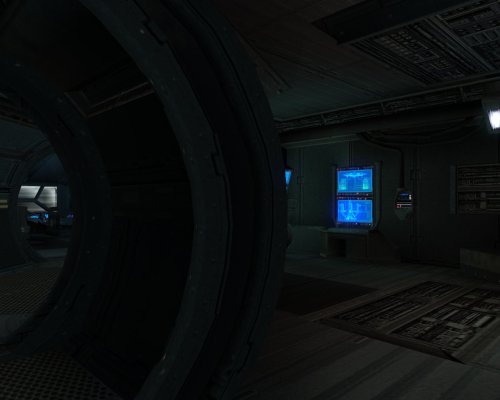
I loved the idea of Remote Influence Mod, a mod created by tk102 in which Bao-Dur's remote could tell you the influence of each of your party members. The issue is that TSLRCM has a modified version of Bao-Dur's remote dialog file in the override folder, creating compatibility issues with the Remote Influence Mod and TSLRCM. So I decided to use the security system computer on the Ebon Hawk to display this information instead of the remote, which should make this mod way less prone to compatibility issues.0 points -
![More information about "Icons: Feats, Skills and Force Powers [TSL] - Open Beta"](https://deadlystream.com/downloads/screens/monthly_2026_05/FeatsPrimaryThumbnail4.thumb.png.758a6cf42d6e348fa9c2589cbcafea04.png)
Version 1.0.0
13 downloads
AUTHOR: Sith Holocron OPEN BETA: 27 MAY 2026 GAMES: Star Wars Knights of the Old Republic II Description: This time, I’m doing this a little differently. This mod collection is being released as an open beta! But first, what is it? I’ve been tinkering with making icons for TSL (and also for K1 but that’s a whole separate story) for quite some time now. I’ve shown off a few of them on the Discords for the KotOR community but I never had a real plan to actually release them in a public way. It’s more of a fun thing that I didn’t need to share. The original icon interest came about from a thread on Deadly Stream from a (now retired) modder named Nomnisang. They made a post about making a collection of icons called the KotOR II High-Res Icon Suite. (link: https://deadlystream.com/topic/3563-kotor-ii-high-res-icon-suite/) They got a promotion in RL, lost a lot of the material, and went on to different things. I had the idea of salvaging what was posted. There were not many icons posted in the thread themselves but enough pieces were there that I could start to do some work. Some of the work came about with me testing out what Topaz Gigapixel could do – both with clean up and with creativity prompts. Some of the icons were my own takes on the vanilla icons. As can be seen in the many pictures posted on the download page, there’s a bit of range from Nomnisang’s style and my own versions of the vanilla icons. The icons as presented here cover Feats, Force Powers, and Skills for TSL. The text included on the icons as shown on the Download page is not included on the icons in the game – it is merely for illustrative purposes. The Open Beta: The feedback I’m looking for. 1) The sizes of the textures here vary. They vary from 128 x 128 to 512 x 512. I do know the general consensus amongst modders about what sizes should be the most effective, but I’d rather hear from the actual end user that would be actually be using this mod. If the feedback left in this open beta suggest I may need to resize the larger of the textures, so be it. But I’d rather not just doing on the whim of folks that will never use the mod in the first place. 2) I like to think that I’m thorough and have found all of the icons that should be in this set. However – despite the rumors – I am actually human. If I’ve missed any, Id like to know which ones. And not just the name of the powers, feats, etc. I’d also need to know the actual file name of the file I’ve missed! 3) Rotting out any bugs. Is everything appearing in the game the way it’s supposed to be? There’s nothing anything showing up upside down, right? If so, that’s something I’d need to remedy! The Open Beta: The feedback I’m NOT looking for. By this time, you’ve seen the icons. You have opinions on them. You might even have suggestions on how you think I could improve them. What they look like now is basically how they’re going to stay. If any of the icons in particular don’t appeal to you, I don’t particularly need to hear about that. So please keep that in mind before posting. Installation: Copy all TGA files to the Override folder on Knights of the Old Republic II. (Example location - C:\Program Files (x86)\Steam\steamapps\common\swkotor\Override) When/if prompted to overwrite files, press okay. If a TPC file is present with the same name, move it to another location outside the game folder. If you like the mod; please leave a comment and/or give me 5 stars! Uninstall: Remove the files you’ve added in Installation instructions. If you’ve moved TPC files as referenced in the Installation instructions, you can move those back into the Override folder after you’ve deleted my TGA files of the same name. If you do decide to move any of the TPC files back, that's completely optional and up to your discretion. Special Thanks: Nomnisang: Thanks for the inspiration for doing this and the icons you did post in your original thread. Dark Hope: Thanks for his open permissions, which allowed me to grab high quality grenades for those relevant feat icons. Sithspecter: Thanks for granting permissions, which allowed me to grab pictures of his weapons from his example pictures for those relevant feat icons. The KotOR Discord: For previously rendered feedback on the icons.0 points -
![More information about "Restored Content for K1CP [DEMO]"](https://deadlystream.com/downloads/screens/monthly_2023_07/qWN6hjo.thumb.png.1cf440e0102f68db8e2dfeab747215b5.png)
Version 0.12.1
6,483 downloads
Restored Content for K1CP [DEMO] A Mod for Star Wars Knights of The Old Republic Author: N-DReW25 0.11.0 Demo Release Date: 04.07.2025 Installation: Please install the K1 Community Patch FIRST before this mod! No exceptions! Once you click on the INSTALL.exe, you'll be given five options. Main Mod- This is the installation which installs the RC-K1CP mod. Lite NPCs Restored- This restores the Lite NPCs that were removed in the K1CP, install this option if you want these back in your game. Restored Gloveless Clothing- Left over textures and pre-release screenshots suggests that the commoner clothing didn't always have gloves that hid the NPCs hands, with this option installed all the generic NPCs will have exposed hands that correspond with the skin color of that NPCs race (White, Black and Asian). This option is fully compatible with the K1 Clothing Pack but is incompatible with Dark Hope's Commoner Clothing reskins. Restored Sith Officer Uniforms- Restores the unused Sith Officer uniform variants throughout the game, this option is incompatible with Heyorange's Sith Uniform Reformation. Restored Party Dialogue- As of right now, this option restores unused lines for Canderous' dialogue about Korriban. This option is cripplingly incompatible with mods that edit "k_hcan_dialog.dlg" so don't install this option if that file is already in your Override folder. Restored Unique Blaster- Restores unused textures for Carth's Blaster and the Baragwin Ion-X Weapon. These are an optional install as they are incompatible with the High Quality Blasters mod by Sithspecter. Restored Jedi Appearances- Restores many unused Jedi appearances and soundsets on both Dantooine and the Star Forge. This option is most likely incompatible with the NPC Diversity Pack, Jedi Diversity on the Star Forge, Diversified Jedi Captives on the Star Forge, or KotOR 1 Twi'lek Male NPC Diversity. Description: The Kotor 1 Community Patch (K1CP) is the biggest bug fix mod for Kotor 1 and is arguably the number one go-to mod for Kotor 1, similar to TSLRCM for Kotor 2. The Kotor 1 Restoration (K1R) mod is NOT compatible with the K1CP and as such players have to pick between hundreds of bug fixes offered by the K1CP or the restored content of K1R, they couldn't pick both... until now! Restored Content for K1CP is a restoration mod for Kotor 1 which has been developed for use alongside the K1CP mod, with this mod installed you shall experience restored content alongside the bug fixes of the K1CP mod. This mod also does not follow the same "rules" as K1R, that means this mod might restore cut content that K1R didn't restore either because the original K1R Dev Team didn't want to restore it or because they didn't know about it. This mod is an INDEPENDENT project developed by a single modder (and any future contributors) with no connection to the original K1R mod, everything in this mod was developed from scratch as getting permission to use K1R assets is impossible due to the disappearance of the K1R team leader. This mod is a DEMO meaning it does not restore all the cut content that K1R restores, future updates shall add more content and fix any bugs present in the mod. Whilst this mod is a Demo, it is not necessarily incomplete... what little restored content this mod has to offer is complete and will not standout as unfinished (in terms of the mod itself, your opinion on the cut content might be different). If you have feedback or any bugs to report for the next update, I urge you to report these to me so that the Restored Content for K1CP mod may be the best it can be! Restorations: Item Restoration: Known Bugs: This mod shouldn't have any bugs but if there are please report them to me on Deadlystream. Incompatibilities: To be added! Permissions: Do NOT claim credit for this mod and do not use assets from this mod without my permission. Thanks to: SithRevan (RIP): Beginning the restoration effort for K1! K1R Team: For developing the original K1R mod! Leilukin: For granting me permission to integrate her Juhani Dialogue Restoration mod into the RC-K1CP! SpaceAlex: For making the Bastila's Extra Dialog on Tatooine and allowing modders to use it freely! A Future Pilot: For kickstarting the K1 Community Patch mod, for making the Sith Soldier Texture Restoration mod and for allowing modders to use it freely! Sekan and Seamhainn: For including the source scripts in their Garrum and Tar'eelok Restoration mod which allowed me to recreate the restoration of those characters in this mod! DarthParametric and JCarter426: For maintaining the K1 Community Patch with ongoing updates! DarthParametric, th3w1zard1 and Salk: For valuable feedback! Sith Holocron: For the mod logo! ElevenLabs Website: For the custom AI VO service! Bioware: For such an amazing game! Fred Tetra: For Kotor Tool! Stoffee: For TSLPatcher! Everyone who downloads the mod! Legal: THIS MODIFICATION IS NOT SUPPORTED BY BIOWARE/OBSIDIAN ENTERTAINMENT, LUCASARTS, DISNEY OR ANY LICENSERS/SPONSORS OF THE MENTIONED COMPANIES. USE OF THIS FILE IS AT YOUR OWN RISK AND THE ABOVE-MENTIONED COMPANIES OR THE AUTHOR IS NOT RESPONSIBLE FOR ANY DAMAGE CAUSED TO YOUR COMPUTER FOR THE USAGE OF THIS FILE.0 points -

Version 1.1.0
5,342 downloads
THE SITH LORDS RESTORED CONTENT MOD ADD-ON: GenoHaradan Legacy 1.0.1 1. Description: ---------- This mod adds the GenoHaradan from the first Star Wars Knights of the Old Republic to its sequel. The GenoHaradan is an ancient secretive guild of assassins who work in the shadows operating to keep the Republic intact, however, following the Jedi Civil War something has changed the GenoHaradan, they no longer seek to kill the enemies of the Republic, instead they have focused all their energies into eliminating the once glorious Jedi Order who have stood as the guardians of peace and justice in the Republic for thousands of years for unknown reasons. While this version is complete, it is far from final. Similar to M4-78, at some point, the GenoHaradan Legacy will be improved with an improved story as an “Enhancement Project” as M4-78 did. Expect possible updates and patches to come. This mod also includes optional fixes for a few bugs and other problems not fixed by the Restored Content mod here and there but there won’t be too many of them. 2. Installation: ---------- 1. First, you will need to get the most up-to-date version of TSL Restored Content Mod (TSLRCM 1.8.5). It's available for download here: http://deadlystream.com/forum/files/file/578-tsl-restored-content-mod/ Please note that GenoHaradan Legacy will NOT work AT ALL without TSLRCM. 2. Follow TSLRCM's installation instructions. 3. Once TSLRCM is successfully installed, run the GenoHaradan Legacy Double TSLPatcher.exe. A menu will pop asking you which installation you want to install. To install the GenoHaradan Legacy, click on the ‘MAIN’ option and click install. If you wish to install the optional fixes be sure to rerun the TSLPatcher.exe and install whichever fix you like (You may need to do this several times to install all fixes) 4. While I try my best to make this mod as bug-free as possible, with the many options of KOTOR2 and my, at the moment, one man testing team it can happen that bugs, including critical ones, pass through. Please feel free to report any bugs and I will fix them. 5. Install any compatible mods you desire now. 3. FAQ / Known Issues --------- Q: When will GenoHaradan Legacy EP be released A: Not for a long time. "Release dates are for those that don't care about quality in mods"- Sith Holocron Q: Will your mod work on existing saves: A: A new game or a save before Citadel Station with the TSLRCM mod should work but I'm not too sure about Citadel Station saves and I'm sure Nar Shadda saves won't work. Q: Will your mod work on my Linux or Mac?: A: I see no reason why it shouldn't work on those OS. If you manage to either use or find an alternative to the TSLPatcher and manage to install the mod then it should work. Q: Will you upload the full mod to the Steam Workshop? A: For now, the answer is no because I'm not sure how the workshop works and if it can even support a mod like mine. In the far future, if this mod becomes popular enough, I might see if a TSLRCM+M4-78+GenoHaradan Legacy EP bundle would be possible Q: Will you update this mod again/Will you add... A: Most likely yes! This version will probably not be the last. If you find a bug please be sure to report it and leave feedback! Q: Will your mod work on my Xbox?: A: No Q: Can I play this mod in Vanilla: A: No! This mod requires TSLRCM to work Q: What makes your mod different from previous TSL GenoHaradan mods such as the unreleased The Sith Lords Restoration Project by Team Gizka and The GenoHaradan Beta by Exile007 A: The Dessicus boss fight in Exile007’s mod was inspired by the TSLRP boss fight but improved upon to make it less confusing, in my mod, I further improve upon Exile007’s work and made his work compatible with The Sith Lords Restored Content Mod 4. Credits: -------------------------------------------------- » Project Leaders -------------------------------------------------- - N-DReW25 - Project Leader, storyline/dialog writing, scripting & editing and more -------------------------------------------------- » Storyline -------------------------------------------------- - Exile007 (Original “The GenoHaradan” mod) - N-DReW25 -------------------------------------------------- » Modeling / Texturing -------------------------------------------------- -Effix -VarsityPuppet -------------------------------------------------- » Beta Testing -------------------------------------------------- N/A -------------------------------------------------- Voice Acting -------------------------------------------------- N/A -------------------------------------------------- Voice Splicing -------------------------------------------------- -danil-ch -N-DReW25 -------------------------------------------------- 5. Special Thanks -------------------------------------------------- Dashus – Project Lead of The Sith Lords Resotration Project (TSLRP), the original restored content mod which intended to restore the GenoHaradan, despite the TSLRP never being finished, its leaked betas which contained GenoHaradan content helped me understand the GenoHaradan plot in TSL a bit more. Lord of Hunger- Project Lead of the “GenoHaradan Revisioning” mod, his mod was never shown to the public thus makes his mod more of an inspiration. Exile007- Project Lead for “The GenoHaradan”, his mod was released to the public as a Beta file which was not compatible with TSLRCM. His mod and his work served as a major inspiration to the GenoHaradan Legacy mod and was used as a base for the first versions of the mod. Zybl2, Stoney, Hassat Hunter and VarsityPuppet- The main four developers of The Sith Lords Restored Content Mod (TSLRCM), the successor to the previously mentioned TSLRP. Despite not restoring the GenoHaradan, their efforts paved the way to more restoration mods such as the GenoHaradan Legacy. Danil-ch- Working on and Contribution of the Batu Rem and Goto scenes as seen in the GenoHaradan Legacy VarsityPuppet- The original creator of the “Layne Stanley PC Head” which was used for the unique GenoHaradan Assassin Effix- The original creator of the head texture for Dessicus Obsidian Entertainment- Making development on the GenoHaradan in TSL and leaving some trace of their existing for we modders to follow Bioware- For implementing the GenoHaradan into K1 Fred Tetra- Creator of Kotor Tool Stoffee- Creator of the TSLPatcher George Lucas- Creator of the beloved Star Wars Franchise 6. Distribution Notes ---------- This mod may not be modified or distributed without the explicit permission of the authors. THIS MODIFICATION IS PROVIDED AS-IS AND IS NOT SUPPORTED BY BIOWARE/OBSIDIAN ENTERTAINMENT, LUCASARTS, DISNEY OR ANY LICENSERS/SPONSORS OF THE MENTIONED COMPANIES. USE OF THIS FILE IS AT YOUR OWN RISK AND THE ABOVE MENTIONED COMPANIES OR THE AUTHOR IS NOT RESPONSIBLE FOR ANY DAMAGE CAUSED TO YOUR COMPUTER FOR THE USAGE OF THIS FILE.0 points