

Leaderboard




Popular Content
Showing content with the highest reputation on 03/10/2026 in all areas
-
Version 1.0.0
302 downloads
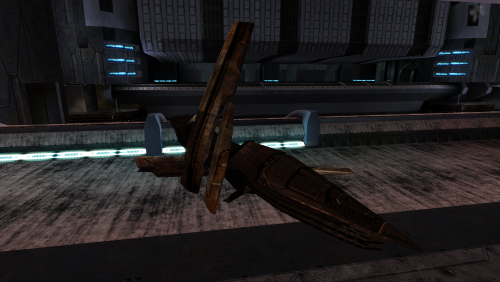
New textures for Swoop Bikes. Textures with elements from the Vurt's KotOR Visual Resurgence mod. To Install 1. Download: SwpBike.rar 2. Copy all files to the Knights of the Old republic's Override folder. (Example location - C:\Program Files (x86)\Steam\steamapps\common\swkotor\Override) 3. When/if prompted to overwrite files, press okay. 4. If you like the mod; leave a comment or endorse! (It would be much appreciated) Made with love1 point -
Hey everyone! I'm ShaolinGhost, a second-year Game Design student at AAU finishing my bachelor's degree and moving onto my Masters this year. I'm working on both of these tools as part of my thesis project, and I'm super excited to share what I've been building. Why I'm Making This KotOR isn't just my favorite game. It literally shaped how I see video games and the world. I played it when I was a kid, and it's stuck with me ever since. That's the whole reason I want to do this: give modders and game devs a toolkit that actually feels like real game development software. Right now, modding KotOR is awesome, but the tools are spread all over the place. You bounce between different programs, learn different interfaces, and it's honestly kind of a pain. I want to fix that. My goal is to bring KotOR modding and the game itself to Unity with a professional-grade modding kit. Two tools that work together perfectly: GhostRigger-K1-K2 — Your all-in-one 3D model editor (import/export, rigging, texturing, the whole pipeline) GhostScripter-K1-K2 — Your IDE for writing quests, dialogues, scripts, and managing everything else Both tools are built to feel like actual game development software based purely off of my experience using things like RizomUV, Zbrush, Maya, Topogun, Acurig, UnrealEngine etc. clean dark theme, intuitive layouts, everything in one place. What GhostRigger Can Do Browse and load any KotOR model directly from your game files Real-time 3D viewport with orbit, pan, zoom, and wireframe view Import your own models from OBJ or FBX (sculpt in ZBrush/Maya, bring it in) Auto-rigging to KotOR skeleton templates Manual Rigging in the tool supported Export back to KotOR format, compile, and test in seconds Handle all your textures (TGA → TPC conversion, UV viewing, the works) Basically: Sculpt your stuff outside, import it clean, and let GhostRigger handle the KotOR technical stuff. What GhostScripter Can Do Script Editor — Write NWScript with full syntax highlighting, auto-complete, and a built-in function reference Dialogue Editor — Build dialogue trees visually with a node-based graph (way easier than text editors) Quest Builder — Templates that scaffold out quests automatically with the right variable names and structure 2DA Manager — Edit spreadsheets like globalcat.2da without pain One-Click Export — Push your mod straight to the override folder or package it as an ERF It all connects together. You can even rig models in GhostRigger, and GhostScripter will automatically pull them in. What I'm Looking For I want to make sure these tools actually solve real problems for modders. So I'm opening this up for feedback: For GhostRigger: What features would make rigging faster for you? Are there things you wish you could do that other tools make hard? What about the workflow? Does the architecture I stated so far feel natural? For GhostScripter: Should I add a visual quest state editor, or is the current form good? Would a script dependency checker (find broken references) be useful? What about integrating a decompiler so you can edit existing mods? Any other QoL features you'd want in an IDE? Drop your thoughts in the replies! I'm building this for the community, and I want to make sure it's something you'll actually use. Timeline & Release Right now, both tools are functional and I'm actively testing them. Once I've verified that all the core features work smoothly and reliably, I'll release them for public use and testing. I want to make sure they're stable and solid before I put them in your hands. I'll keep you posted on progress, and when they're ready, you'll be the first to know!


 1 point
 -
I too have been a fan of your work and I was excited to see your work done on the area textures come to fruition. It's a shame to see you go when the work you've released and were working on was such high quality. On the topic of SH's suggestion, if not a modder's resource compilation of unfinished work for others to finish could there be any other place for modders here to contact you in the event any of us would ask you for your permission to use the assets you have already uploaded?1 point
-
View File AxC's Recover Nemo's Body In the game, the Council acknowledges they sent a Jedi to investigate the ruins, but he has not returned. They do nothing about it, never mention him again, and simply send you instead and call it a day. Consequently, we can do nothing either, except rob the corpse of his belongings and leave him in his tomb. This small immersion mod allows you to recover the body of Nemo from the Dantooine ruins. Or not. The choice is yours. Bring him not to the apathetic Council, but to Deesra, who trains under Master Dorak to one day become Chronicler of the Jedi Order. He will properly document Nemo's fate and attend to his burial. A short quest begins once you search Nemo's remains and decide to take his body back to the Enclave. You may also choose to deliberately leave him there, as the Council always intended, and the quest will auto-complete, affirming your decision. Upon completion, you receive a purple crystal that once belonged to Nemo himself. In my opinion, a fitting way to obtain this signature crystal before leaving Dantooine for the first time. Note: Due to how the game works, it's best to install this mod before entering the Dantooine Ruins for the first time. Otherwise, the dialogue after interacting with the corpse may not trigger naturally. As a failsafe, I've added an additional dialogue option with the Ancient Droid. After finishing your business in the ruins, ask him questions and a new line will appear: "Did you kill the Jedi over there?". This allows you to investigate the body the same way as after searching him. Bugs: Nothing major, but if installed on an existing save and using the failsafe route, the body may only disappear after you revisit the location. Installation: Use the HoloPatcher installer included in the archive. Credits: Fred Tetra, for KOTOR Tool TK102, for DLGEditor Torlack, stoffe & TK102, for NWNSSCOMP JdNoa & Dashus, for DeNCS Cortisol, for Holocron Toolset and HoloPatcher Submitter AxConsortium Submitted 03/10/2026 Category Mods K1R Compatible Yes0 points