
Jump to content

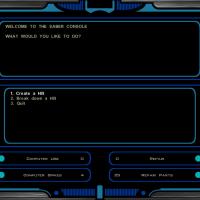
1 Screenshot

About This File

Making lightsabers is incredibly easy!


1. Go to the Workbench and select "Use Saber Console"


2. Choose "Create a hilt", choose a model and a color


3. The hilts are like a lightsaber crystal. Just equip it into the crystal spot and voila!


It comes with its own installer, but I assure you it's not malicious.


If you run into incorrect colors, simply switch out the crystal at a workbench and rebuild the lightsaber.


HOLOWAN DUPLISABER v.215b


Chainz.2da

Darth Deadman Evasto Inyri Forge OldFlash Qui-Don Jorn Quanon Seprithro Svosh T7Nowhere TriggerGod VarsityPuppet


This mod expands the current lightsaber selection to include 59 different hilts, 13 different colors and long-bladed lightsabers.

There are 59 total saber hilts to choose from, and they are available in 13 different colors, making for 767 possibilities.

Future versions will integrate the saber hilts into the game as prizes and earnable or collectible items.


Installation:

Just click "Install" and wait for the progress bar to finish. If the installer closes early, the installation was not successful.


Using the mod:

Once in game, go to any workbench and you should have the option to open up the Saber Console. From the Saber Console, you can choose any hilt and the color of that hilt. This will give you a "hilt" item that you can use at a workbench to create a lightsaber. Simply switch out the color crystal for the desired hilt and it will change your lightsaber. Due to the nature of the game engine, you can even change the type of the weapon based on the hilt you choose. Changing from short to long to single to double is as easy as switching out a hilt.

Disclaimer: This mod was built to be compatible with all mods (TSLRCM and M4-78 included). Any errors you encounter either come from a conflict caused by another mod or are a result of an installation error.

DO NOT MESS WITH THE FILE FOLDERS. DOING SO WILL RUIN THE INSTALLATION.


Credits:

This mod was made from saber mods for which I asked for permission to use or were already open for free use. Each lightsaber is marked in-game with its original designer in its description.


Thanks to:

Bioware - Documentation on GFF and 2da formats.

Designers -Chainz.2da Darth Deadman Evasto Inyri Forge OldFlash Qui-Don Jorn Quanon Seprithro Svosh T7Nowhere TriggerGod

Fair Strides - For integrating the mdlops replacer into my dev version of the project.


What's New in Version .215b

Released

  • Fixed an issue with installation where it would erase baseitems, breaking all items in the game
  • Like 5
  • Thanks 1

User Feedback

Recommended Comments


DarthArgost

Posted

For some reason it wont install, do you put in override or the main folder?

  • Like 1
VarsityPuppet

Posted

Extract the entire archive to your desktop (or somewhere) and run the exe

galaxydude3500

Posted

Wow VarsityPuppet this made it to featured downloads really quick i'll download it after i delete the UltimateSaberMod or are those compatible

VarsityPuppet

Posted

They technically are compatible, but this includes a lot of the USM models anyways. Unlike USM though, in this mod, they're only available through the Saber Console.

  • Like 1
galaxydude3500

Posted

I'll probably use both because finding them along the way and building them yourself seems good to me.

I've been looking forward to this mod.

  • Like 1
VarsityPuppet

Posted

Well, at some point, I'd like to (somehow) integrate the sabers into the game. The problem I face of course is that there are 70+ hilts and only so much game to distribute them over.

DarthArgost

Posted

Sorry for bothering you again but during my play through i noticed i was gaining no new hilts, there were none available at the the crafting bench except for the Acolyte and the Aggressor, please help if you have time.

DAFFYDAFFY

Posted

When u say "installer",do u mean tslpatcher ?

Menacingtaquito

Posted

When u say "installer",do u mean tslpatcher ?

Nope, its custom made by the mod author i believe, its better that way due to the fact it allows the modder to install the mods with less problems and better compatibility to my knowledge. I read it somewhere, i forgot where though. :(

Txwolf208

Posted

I can't make the installer work, I extract everything from the archive to a folder on my desktop, and then run the installer, navigate to the games main folder and click ok and then the installer crashes. Help?

DasRoteBaron

Posted

Is this compatible with the Workbench Crystal Attunement mod?


I would assume not, but there's nothing to lose by asking, right?

Xedii

Posted

Nice work thanks 4 this

Auslander66

Posted

You've done an amazing job, here. I'm loving the variety of saber styles, and also the fact that I was just wondering if anyone had ever managed to fix this glaring issue.  I did keep the UTI, MDL, MDX, and TGA's for one of the saber styles I liked from the Ultimate Saber Mod. I haven't had any problems, yet, but I shouldn't, right? I mean it didn't conflict with anything when I dropped them into Override.

VarsityPuppet

Posted

You've done an amazing job, here. I'm loving the variety of saber styles, and also the fact that I was just wondering if anyone had ever managed to fix this glaring issue.  I did keep the UTI, MDL, MDX, and TGA's for one of the saber styles I liked from the Ultimate Saber Mod. I haven't had any problems, yet, but I shouldn't, right? I mean it didn't conflict with anything when I dropped them into Override.

 Correct. It shouldn't conflict with anything, but the next version will.

Siyrah

Posted

For some reason force jump doesn't work when using any of the sabers from this mod. Not only that, but when speaking to Kreia and dueling with Visas, I need to use separate original sabers (not mod) in order to initiate the sparring. I switched back to the stock sabers and force jump works again. It's almost as if the game doesn't see the mod LS as an actual LS.

TheChickenNoodlest

Posted

I seem to have an issue. When I try to use the console, I can get as far as choosing a color; no options appear. What do?

  • Like 2
The Shadow

Posted

yeah.. how about telling us what folder to select for the installer? would be helpful im assuming its the main folder thatcontains the exe but.. it could be the override also not very helpful

VarsityPuppet

Posted

yeah.. how about telling us what folder to select for the installer? would be helpful im assuming its the main folder thatcontains the exe but.. it could be the override also not very helpful

Doesn't it say choose the installation folder?

Hiruko53

Posted

I installed this and now none of my items work and they all have a white box for an image.

budturn

Posted

i got the same white boxes

djnugent

Posted

i got the same white boxes

As did I - I just noted that the last update was Jan 4th - is this update supposed to fix this issue?

djnugent

Posted

As did I - I just noted that the last update was Jan 4th - is this update supposed to fix this issue?

The answer to my previous question is...no, it did not fix the baseitems.2da issue.


Still get white boxes instead of items on most things, including some descriptions being changed/gone.

Deadput

Posted

The answer to my previous question is...no, it did not fix the baseitems.2da issue.


Still get white boxes instead of items on most things, including some descriptions being changed/gone.

That's weird because this mod does work for me although i also have his Hi Poly Tin Cans Fixed Saber Icons and Colors installed so maybe that might fix it.

Psychloroform

Posted

A mass majority of my weapons and items do not have icons , just white boxes , and  they are unequippable , I equip them and its not shown in my hand or equipped . It's even affected my other weapon mods that arent lightsabers , i can't see them either .


Join the conversation

You can post now and register later. If you have an account, sign in now to post with your account.

Guest
Add a comment...

×   Pasted as rich text.   Paste as plain text instead

  Only 75 emoji are allowed.

×   Your link has been automatically embedded.   Display as a link instead

×   Your previous content has been restored.   Clear editor

×   You cannot paste images directly. Upload or insert images from URL.

×
×
  • Create New...

Important Information

By using this site, you agree to our Guidelines.
