


About This File
=====================================================
[TSL] Lily's Jedi Robe Fixes
=====================================================
Mod for Knights of the Old Republic II - The Sith Lords
Author: Lily
File Name: Lilys_Jedi_Robe_Fixes.zip
Latest Version: 1.0
---
1. DESCRIPTION:
This mod fixes several visual issues with the Jedi robe body models.
Padawan Robes:
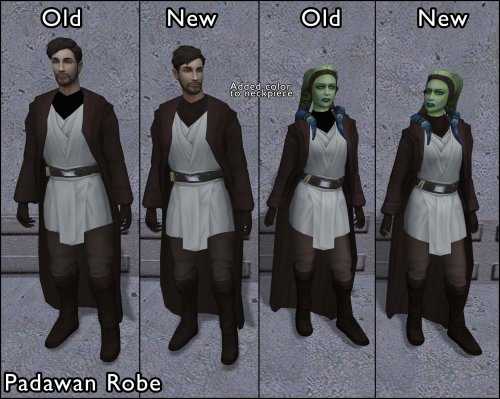
- Added color to the neckpiece, which was solid black by default
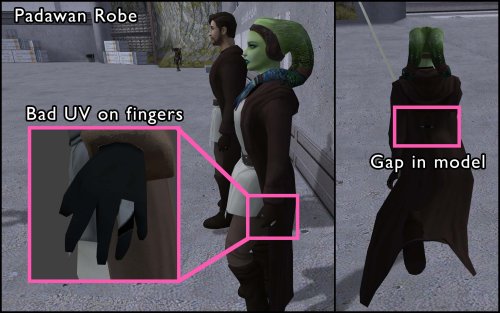
- Fixed incorrect UV mapping on fingers
- Fixed a gap/hole in the back of the female robe
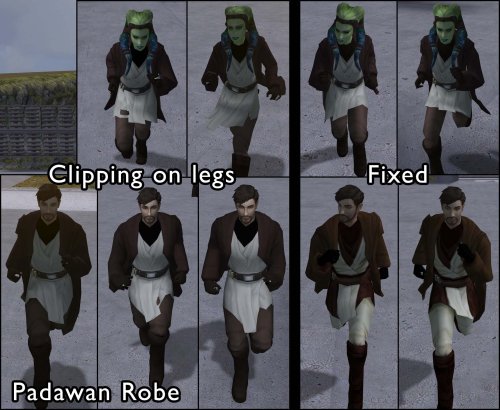
- Fixed robe clipping through the legs during run animations
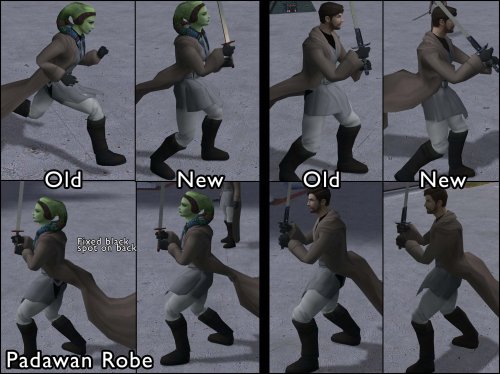
- Fixed a black spot appearing on the back of the torso
The Padawan Robes are based on PapaZinos's "Robes With Shadows For TSL" and includes all of the fixes from that mod.
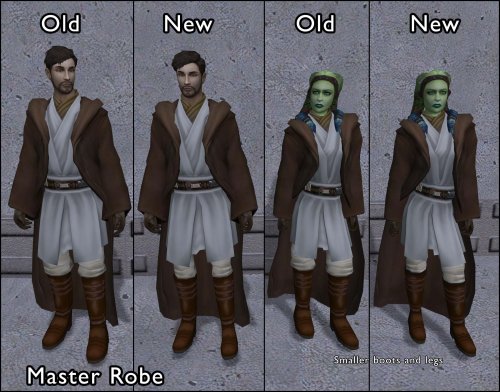
Master Robes:
- Adjusted boot and leg proportions
The Master Robes option uses models based on DeadMan's "Movie-style Jedi Master robes" mod. You need the textures from that mod (or another mod that provides textures for it) installed before using this option - the textures will be mapped incorrectly with default textures.
---
2. INSTALLATION:
Run Install.exe and select your KotOR 2 game directory.
There are two installation options:
- Padawan Robes: Fixes models for the Padawan robe. These are based on PapaZinos's "Robes With Shadows For TSL" and include all of the fixes from that mod. Any texture files will work.
- Master Robes: Fixes models for the Master robe. These are based on DeadMan's "Movie-style Jedi Master robes" models, so you must have the textures from that mod (or another mod that provides textures for it) installed first.
You can install one or both options. Run the installer once per option.
A "backup" folder is created by the installer in the same directory. Don't delete it if you plan to uninstall later.
---
3. UNINSTALLATION:
Run Install.exe, select your KotOR 2 directory, and use the "Tools > uninstall/restore backup" option to revert all changes made by this mod.
---
4. KNOWN ISSUES:
None.
If you find any bugs or problems, please report them.
---
5. MOD COMPATIBILITY:
This mod installs model files to your Override folder:
Padawan option: PFBIM.mdl, PFBIM.mdx, PMBIM.mdl, PMBIM.mdx
Master option: PFBNM.mdl, PFBNM.mdx, PMBNM.mdl, PMBNM.mdx
No 2DA files, scripts, or other game files are modified. Any mod that also replaces these model files will conflict with this one.
If you use the Master Robes option, install DeadMan's "Movie-style Jedi Master robes" (or a compatible texture mod) first.
Do not use the Steam Workshop for KotOR. It will almost certainly end with compatibility issues.
---
6. SUPPORT:
My mods are free to use. You do not need to pay for them, but if you would like to say thanks, you can buy me a coffee!
---
7. PERMISSIONS:
Please let me know if you plan on using any of the files in my mod for your own mod. The answer is "yes you may", but I would like to know what you are doing with it!
Do not directly reupload this mod anywhere else.
---
8. THANKS:
- PapaZinos - Robes With Shadows For TSL
- DeadMan - Movie-style Jedi Master robes
- bead-v - MDLEdit
- Cortisol - Holocron Toolset & HoloPatcher
- Fair Strides - TSLPatcher
- seedhartha - KotOR Blender
THIS MODIFICATION IS NOT SUPPORTED BY BIOWARE/OBSIDIAN ENTERTAINMENT OR LUCASARTS OR ANY LICENSORS/SPONSORS OF THE MENTIONED COMPANIES. USE THIS FILE AT YOUR OWN RISK.

