


About This File
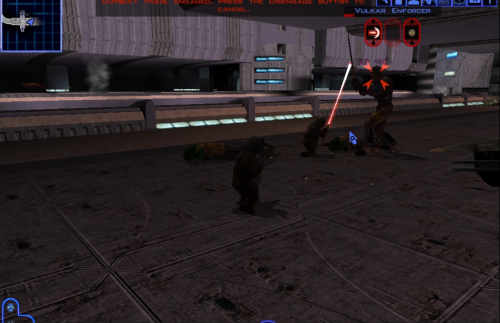
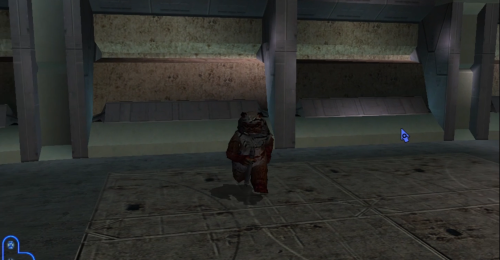
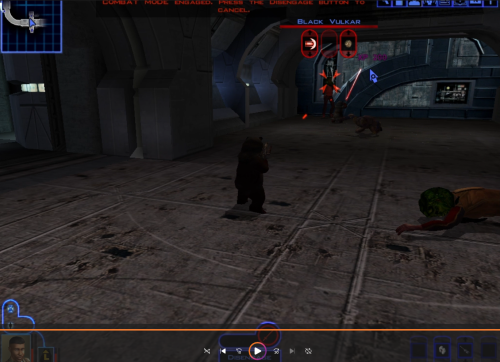
This Kotor 1 mod adds a playable custom ewok mdl that can be placed into the override folder to replace some npcs or used in conjunction with KSE as a playable character with combat animations. No 2 hand mele combat animations at this time.
This .Zip file contains a ReadMe.txt a brief tutorial.txt on how to recreate the mod process, the custom .tga files for the textures, and finally the custom .mdl and .mdx files that can be dropped into override following the instructions in the ReadMe file. I also included a link to how to recreate the process incase anyone is interested.
Disclaimer: This mod utilizes a modified asset from the community-maintained SWBF2 Mod Tools SDK 2020 available at ModDB, alongside original assets from Star Wars: Knights of the Old Republic. Full credit goes to the original developers, artists, and respective intellectual property rights holders (Lucasfilm, Pandemic Studios, and BioWare). This is a strictly non-profit, fan-made educational project intended exclusively as a technical proof-of-concept demonstrating asset handling for the KOTOR modding community. Furthermore, I do not own or claim rights to any of the third-party tools used or described in this project; all rights belong entirely to their respective developers
What's New in Version 2.1 See changelog
Released
V2.1
Fixes Bug that caused parts of character model to appear see-through
This Mod
By default: Replaces P_MAL_A_LRG_01, P_MAL_A_MED_01, and P_MAL_A_SML_01 player character models with a Playable Ewok.
--------
*If you want to replace a different model such as a npc instead of, or in addition to, the player character, simply rename the .mdl .mdx and .tga to the file you wish to replace. I.E. - n_calonord.mdx n_calonord.mdl n_calonord01.tga OR p_bastilabb.mdx p_bastilabb.mdl p_bastilabb01.tga
**Note: if changing a character such as Bastila who has different mdl's for different armors, consider updating the appearance.2da file so that all instances are set to the BB instance.
For example, replace columns modelc and texc with the modelb and texb entry's so in Bastila's case, replace PFBCM in the modelc column with P_BastilaBB from the modelb column. Also replace PFBC in the texc column with P_BastilaBB from the texb column. Repeat for all necessary columns. If unclear on format refer to rows 136 - 138 and see how all necessary columns are duplicates
Also consider updating to portrait .tga as well, again using Bastila as an example copy and rename po_pmha1.tga to PO_pbastila and PO_pbastila2
--------
How to Use:
1.Simply Install files in Override folder
2.When starting a new game select any male class and then when scrolling through select the PMA01 character (It will have a custom Ewok portrait, do not worry if the character model itself doesn't appear as an Ewok at the selection screen as it does in game).
--------
Armors will have stats applied but not appear in game
No 2h mele animations at this time.
--------
This is an update/upgrade from the prior release.
Disclaimer:
This mod utilizes a modified asset from the community-maintained SWBF2 Mod Tools SDK 2020 available at ModDB, alongside original assets from Star Wars: Knights of the Old Republic. Full credit goes to the original developers, artists, and respective intellectual property rights holders (Lucasfilm, Pandemic Studios, and BioWare). This is a strictly non-profit, fan-made educational project intended exclusively as a technical proof-of-concept demonstrating asset handling for the KOTOR modding community. Furthermore, I do not own or claim rights to any of the third-party tools used or described in this project; all rights belong entirely to their respective developers.


Recommended Comments
Join the conversation
You can post now and register later. If you have an account, sign in now to post with your account.