
Jump to content

5 Screenshots

About This File

-ABOUT-

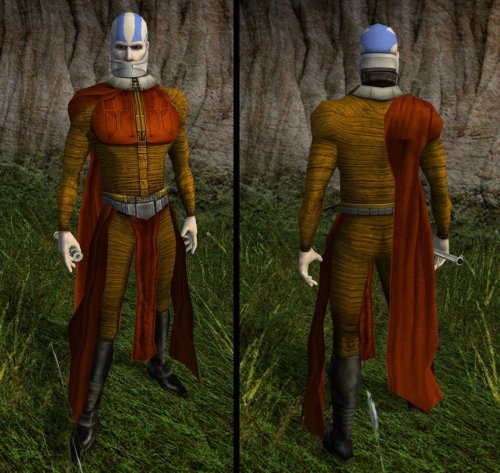
Basically, I saw this one joke years back about Malak actually being a Sith version of Aang from The Last Airbender. Now that I have some rudimentary skill in editing textures, I've finally made it a reality. Enjoy.

-INSTALLATION-

Simply copy/paste the texture files into your Override folder located in your "swkotor" directory.

-UNINSTALLATION-

Simply locate and remove the files. It's as easy as one, two... erm... um... damn it, this is what I get for being a Valve fan ._.

-COMPATIBILITY-

This reskin is not compatible with any mod/texture pack that alters:

-N_DarthMalak01.tga

-N_DarthMalakH01.tga

-N_JediMalekH02.tga

-PERMISSIONS-

You may use this mod for whatever project you want, so long as you credit me.

-CREDITS-

Cortisol - Holocron Toolset

ndix UR - TPCview

  • Haha 4

User Feedback

Recommended Comments

Effix

Posted

No arrow on his forehead?

Arson Hole

Posted

34 minutes ago, Effix said:

No arrow on his forehead?

Tried that, actually. It's what made me realize that I am absolutely a modeller first and a texture artist 5 trillionth.

DarthParametric

Posted

Given Bioware's traditionally terrible UV layouts, you'd be best served trying to do it in something where you can paint directly on the mesh rather than trying to edit the texture in PS or the like. I think Blender might let you do it, and you can import the game models directly via KBlender.

DarthParametric

Posted

Note that you'll need to edit the second Jedi Malak head texture variant for the jawless Malak scene. Naturally that has a completely different UV layout to the regular Malak head.

Arson Hole

Posted

And maybe tweak the default head texture too. I see what Para meant about painting on the model directly instead of editing the texture.

malak head.png

DarthParametric

Posted

I had a quick play with using stencils in Blender. It's a bit fiddly due to the UV distortion, but with a bit of trial and error I think you could get it pretty close. It might be easier to do the arrow head and the line as two separate stencils.

Blender_Arrow.jpg.9c6f1ea39c4bfcda465e84d9e9eeb809.jpg  Blender_Arrow_2.jpg.85361e60c2ba4c808dcd48f3466e8656.jpg

Here's a video that covers the basics of using stencils - https://www.youtube.com/watch?v=urUdMbO4E2c&t=155s

Edit: OK, I played around with it some more. Try these on for size:

Airbender_Malak_v2.jpg.66131147814fb9e4f544ae32543de901.jpg

Airbender_Malak_v2_Tex_01.jpg.5095d58118b88669d505cc942ed6a452.jpg  Airbender_Malak_v2_Tex_02.jpg.523165265552aeee7cbc1eb81815af9b.jpg

Game-ready textures, source masks, and Blender file attached: Malak Airbender_Source.7z

  • Like 3
Mephiles550

Posted

I'm so proud of what this community can come together to create

  • Like 2
DarthCeveo

Posted

Ngl, reading all this was absolutely brilliant. Love this community

Join the conversation

You can post now and register later. If you have an account, sign in now to post with your account.

Guest
Add a comment...

×   Pasted as rich text.   Paste as plain text instead

  Only 75 emoji are allowed.

×   Your link has been automatically embedded.   Display as a link instead

×   Your previous content has been restored.   Clear editor

×   You cannot paste images directly. Upload or insert images from URL.

×
×
  • Create New...

Important Information

By using this site, you agree to our Guidelines.