



About This File
=Belaya's Unique Look=
A KNIGHTS OF THE OLD REPUBLIC MODIFICATION
AUTHOR: Leilukin
FILE NAME: Belaya's Unique Look.7z
LATEST VERSION: 1.2
CONTACT: E-mail to contact@leilukin.com, or message to Leilukin on Deadly Stream
1. DESCRIPTION:
This mod gives the KotOR 1 NPC Belaya a unique look, with two variants for her different appearances in the game as a Jedi and as a Sith.
You meet Belaya when you visit Dantooine and are on your way to meet the Jedi Council. She is close to Juhani. If you choose to kill Juhani during your trials on Dantooine, Belaya will leave the Jedi Order, fall to the Dark Side and confront you again as a Sith at the entrance of the Korriban Sith Academy, where you will be forced to kill her.
This unique Belaya look was created by SpaceAlex as part of the K1 Enhancement Pack, which has been released as a modder's resource. While this is not the first mod that replaces Belaya's generic NPC look, the mods I found previously made the change by reusing a female player character head, which could be awkward for players who happen to choose the same head for their character. Therefore, I decided to make SpaceAlex's redesign of Belaya into a standalone mod.
This mod also provides:
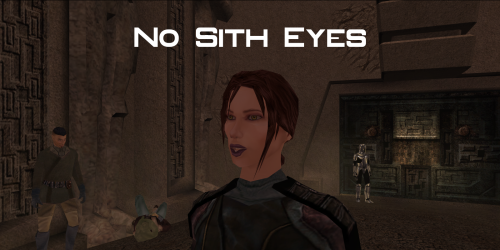
- An alternative version to Sith Belaya's head texture in which she does not have the yellow Sith eyes.
- Upscaled versions of the textures of Belaya's head, including the alternative version of Sith Belaya without Sith eyes. The textures are upscaled by using waifu2x, an image scaling program that has been around since 2015.
NOTE: In order for this mod to take effect, you must load a save before visiting Dantooine for the first time, and a save before visiting the entrance area of the Korriban Sith Academy for the first time.
2. INSTALLATION:
Extract the Belaya's Unique Look.7z you downloaded to anywhere you like, as long as it is not within the KotOR directory. Run Install.exe, select the "Main Installation" option, select your KotOR game folder as your KotOR directory path, click the “Install” button and let the installer do its job.
If you want to install the optional upscaled textures of Belaya's head, after installing the main part of the mod, select the "[Optional] Upscaled Textures" option in the mod's installer, and click the "Install" button.
If you do not want Sith Belaya to have the yellow Sith eyes, after installing the mod, go to the "Optional - No Sith Eyes" folder, then drop the n_belhd.tpc file from the folder itself or the "Upscaled Texture" subfolder into the Override folder of your KotOR game directory, and overwrite the file when prompted.
NOTE: When you install this mod, two new folders named "backup" and “uninstall” will be created by the installer in the same folder as the installer. Do not delete the folders or any of the files within the folder if you are planning on uninstalling this mod.
3. UNINSTALLATION:
Run Install.exe. From the “Tools” dropdown menu, select “Uninstall Mod / Restore Backup”, then confirm to uninstall the mod. You can also choose to delete the backup after uninstalling the mod.
If you have also installed the upscaled textures, it will uninstall the upscaled textures first. After uninstalling the upscaled textures, you need to select Yes to delete the most recent backup folder, then select “Uninstall Mod / Restore Backup” from the drop-down menu again to uninstall the main part of the mod.
4. KNOWN ISSUES:
None currently known. If you find any bugs or problems, please let me know.
5. MOD COMPATIBILITY:
This mod is not compatible with any other mods that modify or change Belaya's head.
This mod is compatible with KotOR 1 Community Patch (K1CP).
This mod is compatible with KotOR 1 Restoration (K1R).
6. PERMISSION:
You may use assets from this mod as part of your mod, however, SpaceAlex should be credited as the original creator of the assets, which were part of the K1 Enhancement Pack modder's resource. You may credit me for the TPC format of the textures from this mod, but it is not necessary. Crediting Sith Holocron for the upscaled version of the textures is encouraged.You may credit me for the TPC and upscaled version of the textures from this mod, but it is not necessary.
7. CREDITS:
SpaceAlex for the K1 Enhancement Pack modder's resource
Sith Holocron for helping with upscaling the textures with Topaz Gigapixel
OpenKotOR for PyKotor, Holocron Toolset and HoloPatcher
Fred Tetra for the KotOR Tool
ndix UR for tga2tpc and tpcview
THIS MODIFICATION IS NOT SUPPORTED BY BIOWARE/OBSIDIAN ENTERTAINMENT OR LUCASARTS OR ANY LICENSERS/SPONSORS OF THE MENTIONED COMPANIES. USE THIS FILE AT YOUR OWN RISK AND NEITHER THE ABOVE MENTIONED COMPANIES NOR THE AUTHOR IS RESPONSIBLE FOR ANY DAMAGE CAUSED TO YOUR COMPUTER FOR THE USAGE OF THIS FILE.
Edited by Leilukin
What's New in Version 1.2 See changelog
Released
- Update HoloPatcher to 2.0.
- Make upscaled textures of Belaya's head an additional optional install option of the mod's installer.
- Use waifu2x to upscale the Sith Belaya head texture without Sith eyes.