

Search the Community
Showing results for tags 'Asteroid'.
Found 4 results
-
Version 1.2
43,612 downloads
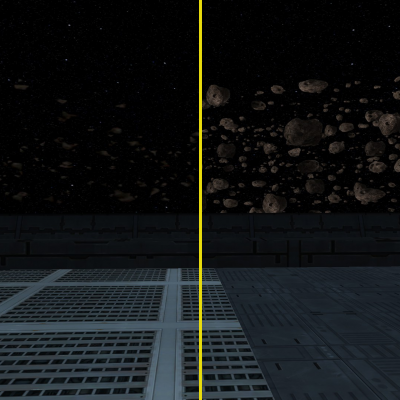
==================================================================== STAR WARS: KNIGHTS OF THE OLD REPUBLIC II: THE SITH LORDS MODIFICATION ==================================================================== --------------------------------------------- AUTHOR: VasiliiZaytsev (aka RenegadeSniper7) CONTACT: RenegadeSniper7 on LucasForums.com or vasilii.zaytsev@outlook.com MOD NAME: Improved Peragus Asteroid Fields VERSION: 1.2 DATE: July 22nd, 2015 --------------------------------------------- /*v1.2 CHANGELOG:*/ - Fixed an issue where an asteroid at the top of the asteroid field would be noticeably cut off as the field shifted up and down. --------------------------------------------- /*v1.1 CHANGELOG:*/ - Fixed a bug where the top and bottom of the texture was being slightly cut off in-game as the field oscillated up and down, causing a few asteroids to visibly slide in and out of existence. A "buffer zone" of empty space has been added to the top and bottom of the replacement textures to prevent this issue from happening. - Improved the placement of asteroids within the texture to produce a more realistic look. --------------------------------------------- DESCRIPTION: This is my first mod, and it's an extremely basic one. It takes the default 2D asteroid field texture used in the Peragus asteroid fields in the tutorial/prologue and outside of the Ebon Hawk hangar bay, and replaces them with much nicer ones. While it isn't perfect, I feel that it's a vast improvement over the eyesores that were the default textures. See the included screenshots to see the default textures vs. mine. NOTE: This DOES NOT replace the texture(s) of the individual free-floating 3D asteroids around Peragus, only the asteroid field textures. INSTALLATION: Copy and paste the "EBO_Astr.tga" and "PER_As02.tga" files to your KotOR II override folder. UNINSTALLATION: Remove the aforementioned files from your override folder. PERMISSIONS: If you want to use this mod as part of your own, that's fine. Just credit me as "VasiliiZaytsev/RenegadeSniper7." And if you do use my mod in yours, feel free to let me know by PMing me on LucasForums! I'd be interested to see what you're working on. -

Version 1.0
772 downloads
A hand painted (by yours truly) 1024x1024 reskin for the Ebon Hawk and Peragus To install, simply place the .tga file into your override folder. -
View File HD Asteroid field A hand painted (by yours truly) 1024x1024 reskin for the Ebon Hawk and Peragus To install, simply place the .tga file into your override folder. Submitter Emperor Turnip Submitted 12/29/2017 Category Mods TSLRCM Compatible
-
Improved Peragus Asteroid Fields View File ==================================================================== STAR WARS: KNIGHTS OF THE OLD REPUBLIC II: THE SITH LORDS MODIFICATION ==================================================================== --------------------------------------------- AUTHOR: VasiliiZaytsev (aka RenegadeSniper7) CONTACT: RenegadeSniper7 on LucasForums.com or vasilii.zaytsev@outlook.com MOD NAME: Improved Peragus Asteroid Fields VERSION: 1.2 DATE: July 22nd, 2015 --------------------------------------------- /*v1.2 CHANGELOG:*/ - Fixed an issue where an asteroid at the top of the asteroid field would be noticeably cut off as the field shifted up and down. --------------------------------------------- /*v1.1 CHANGELOG:*/ - Fixed a bug where the top and bottom of the texture was being slightly cut off in-game as the field oscillated up and down, causing a few asteroids to visibly slide in and out of existence. A "buffer zone" of empty space has been added to the top and bottom of the replacement textures to prevent this issue from happening. - Improved the placement of asteroids within the texture to produce a more realistic look. --------------------------------------------- DESCRIPTION: This is my first mod, and it's an extremely basic one. It takes the default 2D asteroid field texture used in the Peragus asteroid fields in the tutorial/prologue and outside of the Ebon Hawk hangar bay, and replaces them with much nicer ones. While it isn't perfect, I feel that it's a vast improvement over the eyesores that were the default textures. See the included screenshots to see the default textures vs. mine. NOTE: This DOES NOT replace the texture(s) of the individual free-floating 3D asteroids around Peragus, only the asteroid field textures. INSTALLATION: Copy and paste the "EBO_Astr.tga" and "PER_As02.tga" files to your KotOR II override folder. UNINSTALLATION: Remove the aforementioned files from your override folder. PERMISSIONS: If you want to use this mod as part of your own, that's fine. Just credit me as "VasiliiZaytsev/RenegadeSniper7." And if you do use my mod in yours, feel free to let me know by PMing me on LucasForums! I'd be interested to see what you're working on. Submitter Vasilii Zaytsev Submitted 08/05/2013 Category Skins TSLRCM Compatible


