



ShaolinGhost
-
Posts
13 -
Joined
-
Last visited
-
Days Won
4
1 Follower

ShaolinGhost's Achievements





-
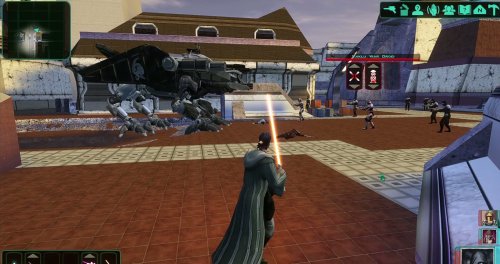
KOTOR ACADEMY Jedi Academy's movement and lightsaber combat inside Knights of the Old Republic II, with KOTOR keeping the rules Development journal · October 2026 Hey everyone, This one is quite different from my usual art and world-building posts. It's got far enough that it needs a proper write-up rather than the odd clip. Kotor Academy brings Jedi Academy's movement, acrobatics and live lightsaber combat into KOTOR II. KOTOR still does what it does best: your stats, the dice rolls, the Force powers and the story. First, where it stands. Everything in this post runs in a single test arena. It isn't playable in the campaign game modules yet by design, there's no download, and I won't give a release date. What I can show is that the core idea works. There are two videos of it running, and the rest of this post covers the larger design and the route from here to something you could actually play through. 01 · What Kotor Academy is Kotor Academy lets you play KOTOR II with Jedi Academy's movement and live saber combat, while KOTOR's d20 still decides every blow that gets through. You run, jump, flip and Force-jump the way you would in Jedi Academy. You swing your saber in real time, and your opponent blocks, parries and fights back using Jedi Academy's own AI. Your character is still your KOTOR character, though. The model, equipment, feats, Force powers, HP and FP all come from KOTOR. When a blow gets past the enemy's guard, KOTOR rolls for it the same way it does in vanilla combat. If that isn't for you, there's a single checkbox in the options menu that turns it all off and puts you back in standard KOTOR. One caveat: switching it off while you're on a platform or mid-air isn't safe yet. The hand-off that puts you back on solid ground is built but not tested. 02 · How it works Two engines run at the same time. KOTOR II is the game you see and play, and a hidden Jedi Academy handles movement, collision, saber combat and enemy AI behind it. Two games, one experience The inspiration is chasmlol's SkyCraft, which pairs Skyrim with a hidden Minecraft running underneath. Kotor Academy does the same thing with KOTOR II and Jedi Academy. KOTOR II is the visible game and renders the world, characters, effects and GUI. Behind it runs a fork of the open-source OpenJK single-player engine, which loads Jedi Academy's base assets from your own install. A patch DLL inside KOTOR II talks to the hidden Jedi Academy through shared memory every frame. KOTOR sends your input and your equipped weapons, so Jedi Academy only ever carries what KOTOR has equipped. Jedi Academy sends back your position, camera and skeleton pose, and KOTOR applies them to your KOTOR character model. The result is your KOTOR character, in your KOTOR gear, playing Jedi Academy animations. Every key has exactly one owner, so overlapping binds never fire twice. KOTOR keeps the rules KOTOR II handles: dialogue, quests, scripts, saves, inventory and equipment, party, XP and level-up, feats, alignment, HP and FP, Force power costs and saves, and all of the d20 combat math. Jedi Academy handles: player movement and acrobatics, collision against a Jedi Academy copy of the area geometry, saber swings, blocks and parries, the third- and first-person camera, and Reborn AI for the enemies handed to it. Hand-offs: dialogue, menus, pause and death all hand control back to KOTOR. Who decides a hit Jedi Academy detects saber, melee and other contacts. If Jedi Academy blocks or parries a swing, it never lands and nothing is rolled. Every contact that does get through goes to KOTOR, which makes its own attack roll (attack bonus against Defense, natural 20s included) and applies its own damage and death. The result goes back to Jedi Academy for presentation. This works in both directions, for your hits on enemies and for theirs on you. The patch is off by default and locked to one exact game executable. If anything doesn't match, it falls back to vanilla behaviour. 03 · Movement and acrobatics Your KOTOR character now moves like a Jedi Academy character, running, flipping and Force-jumping through an arena built for verticality. Showcase1.mp4 Jedi Academy movement on the KOTOR character in the test arena: running, flips, Force jumps up the red-topped towers, stepping stones and balance beams, saber lit. The test arena (plcaa) has purpose-built stations for exactly this: stepping stones, towers, balance beams, stairs and tables. The running, jumping, flips and Force jumps all come straight from Jedi Academy and drive the KOTOR model. Force Jump follows your feats How high you can jump depends on your character's own KOTOR II Force Jump feats, so it depends on your build. The cap is configurable and defaults to level 2. A data file can also set caps per area and mark no-jump zones, so an area that was never designed for a Jedi going over the walls doesn't have to allow it. Being honest: my test character got those Force Jump feats from a save edit, and plcaa is the only area that exists so far, so per-area caps haven't been tried anywhere else yet, and no-jump zones haven't been live-tested yet. The acrobatics also aren't polished on the KOTOR body yet. There's still foot sliding to clean up. 04 · Saber combat and the first duel The first real opponent is a Sith duelist driven by Jedi Academy's own Reborn AI and fighting under KOTOR's rules. CombatShowcase.mp4 The Sith duel: Reborn acrobatics and flips, saber exchanges, Force powers and Lightsaber Throws, with KOTOR's HUD throughout. The Sith is a KOTOR character spawned into Jedi Academy as a Reborn fencer. He fights with Jedi Academy's attack chains, flips, kicks and knockdowns, and he blocks and parries on his own. He also Force-jumps onto platforms to follow you, and in the video he follows me onto the teal table platform. He has since been levelled up to make the fight harder. The logged duel numbers below come from an earlier, lower-level version of him. The numbers behind it Across the logged duel runs, 12 of his contacts reached KOTOR's roll and only one hit, for 20 damage. Eight of mine reached the roll and all eight hit, and one run included a critical on a natural 20 for 33 damage. (My test character was levelled by save edits for testing, so don't read those numbers as balance.) In a separate test, 16 contacts went through the whole hand-off with zero faults. Two duels ran all the way to a native KOTOR death. When he goes down, KOTOR handles damage and death natively (and XP, as an earlier kill showed). His hits on you go through KOTOR as well, with Jedi Academy's pain reactions, and if you lose you get KOTOR's own death screen with control handed back to the game. Weapons Lightsabers: single, double-bladed, short and dual sabers render on the KOTOR model and follow Jedi Academy's swings, with the ignite and retract animation every time you toggle (key 1). The hilt stays in your hand through attacks, jumps, a back-flip and a cartwheel. With dual sabers, each hand's hits get their own d20 roll. Melee and unarmed: these work under KOTOR's rules too. A vibrosword landed 4 contacts on a droid with 2 crits (60 to 14 HP), and unarmed landed 10 punches (25 to 7 HP). Kicks: they roll the d20 and knock the target down but deal no damage. That's by design. Grenades: thrown with Jedi Academy's physics, then KOTOR takes over with its frag explosion, smoke, scorch mark and damage number. A direct hit took a droid from 60 to 40 HP. Stims: a quickbar stim (Adrenal Strength) worked in Live Combat with no round wait. Hostiles only Only enemies can be hurt, using KOTOR's own hostility check. KOTOR's queued, round-based attacks are blocked for the player while Live Combat is on, so the old attack queue can't fire on top of live combat. Scripted scenes are exempt. What's still rough Block and parry feedback: visible sparks, sounds and a Jedi Academy-style attacker bounce on misses aren't in yet. Block rates haven't been measured or balanced either. Hurt reactions: a short torso flinch that never interrupts movement or saber moves is in the build and waiting on my retest. Flourish: the X flourish plays real flourish motion, but one press still showed a brief body turn. Tuning: the Sith's FP pool and level still need tuning. 05 · The Force, KOTOR's way Force powers are KOTOR's own powers, cast through KOTOR's own system, while Jedi Academy keeps your body moving as you cast. You press F to cast from an interim selector bar at the lower right, which shows KOTOR's own power icons and scrolls with the mouse wheel. Push, Stun, Lightning, Lightsaber Throw and self powers go through KOTOR's native cast, with KOTOR's FP cost, saving throws, effects and visuals. Out-of-range or busy casts are refused the way KOTOR would refuse them. As in Jedi Academy, you can cast on the move: you keep running and a torso gesture plays. Two changes are specific to Live Combat. Armor no longer blocks Force powers (my call), and targeted powers auto-aim at the nearest enemy in front of the camera. Lightsaber Throw This is KOTOR's own Lightsaber Throw with its native damage, which is half your caster level (rounded down) in d6. The saber item's damage doesn't factor in. My level 15 test character rolls 7d6 and hit for 17, 27 and 29 in testing. It works from platforms and aims with the crosshair. If you haven't learned the power, right-click keeps the saber in your hand. Right now you stand still while throwing. Throwing on the move, with the saber returning to wherever you are, is on the list. The Sith casts too Jedi Academy's AI decides when he uses a power. KOTOR decides whether it works, based on the powers he knows, his FP and your saves. He cast Push on me and I resisted it on a KOTOR save, and he has cast Stasis too. Later in the fight his casts were refused because he'd run out of FP, which is how it should work. Not there yet Untested powers: plenty of KOTOR's powers, haven't been tried live in a fight yet but ill be testing every power in the game in depth. Built but not live-tested: Force Speed affecting Jedi Academy movement, stun and stasis freezing the target (or you), and a native KOTOR-HUD Force selector to replace the interim bar. Physics: powers don't use Jedi Academy physics yet (push knockback, grip lift and hold). That's planned, not done. 06 · Making it feel native to KOTOR The goal is for Kotor Academy to feel like an option KOTOR always had, not a different game bolted on top. The Live Combat option There's a Live Combat checkbox in KOTOR's Gameplay Options. Turning it on gives you Jedi Academy movement and live combat with KOTOR's d20. Turning it off gives you vanilla KOTOR movement and round-based combat, with the platform and mid-air caveat from section 01 still applying. It's a native checkbox added to the existing panel at runtime, with no .gui file replaced, and your choice is saved in swkotor2.ini under [Kotor Academy]. HUD In Live Combat, KOTOR's combat-queue and target action buttons are hidden (26 controls in all). The enemy you're aiming at gets a compact name and HP panel above its head, clear of the crosshair. Pausing brings back the native HUD. Pause, dialogue and camera Tactical pause: middle mouse uses KOTOR's own pause and gives you the free cursor, native UI and quickbar. Dialogue: conversations hand control to KOTOR, and Live Combat resumes afterwards. First person: F7 switches to a view from the eyes with the head hidden. Arms and saber in first person, and camera collision with walls and props, are still to do. Camera and input fixes: the camera no longer stops on bodies, and clicking with your saber holstered in combat draws it. Lightsaber forms The first pass of form rules is installed in the test build. Soresu works with any saber setup, and its Obi-Wan guard stance plays only with a single blade. All other forms are single-blade only, and dual and double-bladed setups get style buffs instead. This works in the test build but isn't final. I plan to author the final stance animations for each form myself, starting with the Soresu guard, and the buff numbers are first-pass values that still need tuning. Feats and d20 numbers Every contact that gets through is resolved from your character sheet. Your attack bonus and Defense decide hits, natural-20 criticals roll as in KOTOR (seen live), your Force Jump feats set your jump height, and every power costs KOTOR FP. Full KOTOR critical rules, shields, resistances and sneak attacks are still to verify. Stability A recurring crash when loading from the in-game menu or quitting was the big blocker. I traced it to a resource-teardown bug in KOTOR itself, which the arena's station models triggered because they're packed inside the module file (module-local models). A guard now handles it: 5 out of 5 in-game loads and a clean Exit Game, with no new crash dumps. To be clear, this is a fix for the case the arena triggered, not a general KOTOR crash fix. 07 · Shaped by the community A lot of these decisions came out of conversations with other modders, and the project is better for it. I've been sharing progress and asking questions on Discord, and that feedback has shaped the design in a few clear places: Verticality: Jedi Academy movement could carry you over a lot of KOTOR's level design. The discussion around that fed directly into jump height coming from your Force Jump feats, with a configurable cap, per-area limits and no-jump zones. Forms: conversations about how forms should behave with different saber setups helped settle the current form rules. Enemies: the point that the real fun is in fighting enemies, not just moving around, pushed enemy AI up the list, starting with the Sith duelist. Mod compatibility: the discussion made full compatibility with other mods a hard rule rather than a nice-to-have. Jedi Academy required: for legal reasons, owning Jedi Academy is a requirement rather than anything being bundled. Thank you to everyone who has weighed in. Please keep it coming, especially on how the combat feels. 08 · What's next Blasters come next, with more of the Force in parallel, then more enemy types, companions and, eventually, real modules. Blasters Blaster vs blaster: player blasters with Jedi Academy bolts and a KOTOR d20 for every shot. An early pistol prototype fired KOTOR's own red bolt and impact effects, and the d20 decided each hit on a training droid. The muzzle flash doesn't attach yet, I haven't checked the shot sounds, and repeaters, disruptors, bowcasters, ion and sonic weapons are all untested. Blaster vs lightsaber: deflecting and reflecting bolts, decided by the d20 and shown on screen. This isn't in yet. More of the Force Lower tiers (in progress): lower tiers will stay selectable as separate slots, grouped by family: Push/Whirlwind/Wave, Stun/Stasis/Stasis Field, Lightning/Storm, Drain/Death Field and Choke/Kill. Other power chains will show only their top tier. Presentation: every KOTOR Force power will get Jedi Academy presentation. That means KOTOR's visual effects by default, Jedi Academy body animation blended with KOTOR's cast animation, and Jedi Academy physics where it fits. For example, Choke will stay a KOTOR cast and Kill will become a hold-and-move grip. Enemies and companions Enemies: every enemy type driven by Jedi Academy AI and movement under KOTOR's rules, with Force users fighting as Jedi or Reborn and everyone else as troopers. Right now the Sith duelist is the only one. Blaster troopers on Jedi Academy AI and melee enemies who aren't Jedi are both in progress. Companions: party members fighting in Live Combat, with party AI, switching and follow. Combat depth Blocking and parrying: today Jedi Academy's own defence blocks first. The plan is for block skill to scale from KOTOR stats, and for blaster deflection to be decided by the d20 and shown on screen, with every balance number in ini and data files. KOTOR rules: energy shields, resistances, on-hit properties, sneak attacks and the full critical rules behaving as they do in KOTOR. These aren't verified yet, and neither is medpac healing in Live Combat. Dismemberment: Jedi Academy-style dismemberment for every KOTOR creature and character. Jedi Academy decides the cut, KOTOR confirms the death, and an offline pipeline pre-builds the stump caps and severed limbs. So far this is telemetry only. Real modules This is the big one. Jedi Academy collision has to be generated for each KOTOR area and loaded on area transitions. After that comes the campaign from Peragus to the ending, with cutscenes, scripts, puzzles, saves, party changes and mini-games all working. Longer term, I want to remake areas so they reward verticality, with jump rules tuned per area. That's my own level-design project, and it will take a while. Also on the list: merging character creation, visual polish (acrobatics on the KOTOR body without foot sliding, an optional first-person saber), and an additive, reversible installer and uninstaller. 09 · Requirements and compatibility You'll need both games, and Kotor Academy is being built to sit alongside other mods rather than replace their files. Both games: you need to own KOTOR II and Jedi Academy. No Jedi Academy assets are redistributed. The OpenJK fork stays under GPL-2.0, and its base assets load from your own Jedi Academy install. Your JA folder is untouched: Kotor Academy reads the base assets (assets0-3.pk3) from your install and never modifies it, and it doesn't load your Jedi Academy mod pk3s. Tested build: Steam KOTOR II with TSLRCM 1.8.6 installed. The patch is locked to the exact executable I tested with, so GOG and other versions are untested and currently wouldn't activate. Compatibility rule: no wholesale replacement of base 2DA, GUI, dialog or script files. KOTOR data is read at runtime through the game's own resource lookup, so your Override mods win, and Kotor Academy's files are namespaced kja_*. Installs are meant to be additive and reversible. GUI mods: the Live Combat checkbox is added at runtime, and a custom optgameplay_p.gui is accepted. A heavily rearranged GUI overhaul may make it back off safely, leaving the panel as it is without the checkbox. I'm not claiming support for every GUI overhaul. Other patches: its hooks are checked against the other patches in the shared patch_config.toml so nothing gets hooked twice, and it only edits its own section. With Live Combat off, the game is meant to behave like vanilla. My custom animation patches: they coexist. Single-saber custom clips now play only with a single saber, and a fix that hands the X flourish to Kotor Academy in Live Combat is in, waiting on my retest. Still to test: a broader live test with TSLRCM and M4-78EP and an install-manifest audit are planned. Only the test arena has Jedi Academy collision so far. Performance: two engines run at once, and I haven't done any performance or frame-rate testing yet. 10 · Credits Kotor Academy builds on other people's work, and they deserve credit up front. JACoders and the OpenJK project: the open-source (GPL-2.0) Jedi Academy engine that the hidden half of Kotor Academy runs on. chasmlol's SkyCraft: the idea of pairing two games, with one running hidden underneath the other. The TSLRCM team: TSLRCM is part of my test setup and the baseline this is built to respect. The community: for the design discussions that shaped a lot of this. The makers of KOTOR II and Jedi Academy: the two games this is built on. So that's where Kotor Academy is today: one arena and one opponent, and the foundation is doing what I hoped it would. I'm happy to answer questions about the design, and feedback on the combat feel is welcome below. — ShaolinGhost AI DISCLOSURE & FEEDBACK I use AI often in my workflows to assist with creating my mods, including handling monotonous and repetitive tasks. You should assume that anything I post has had AI assistance in some way. As I stated in my Dathomir WIP post, I expect discussion of my projects to remain professional and focused on the actual artwork, performance, and gameplay. Constructive criticism that helps improve the art or gameplay is welcome. Derogatory statements about AI will be ignored. I am here to improve the finished product, and I will not change my workflow to accommodate personal objections to AI.
-
- 1
-

-
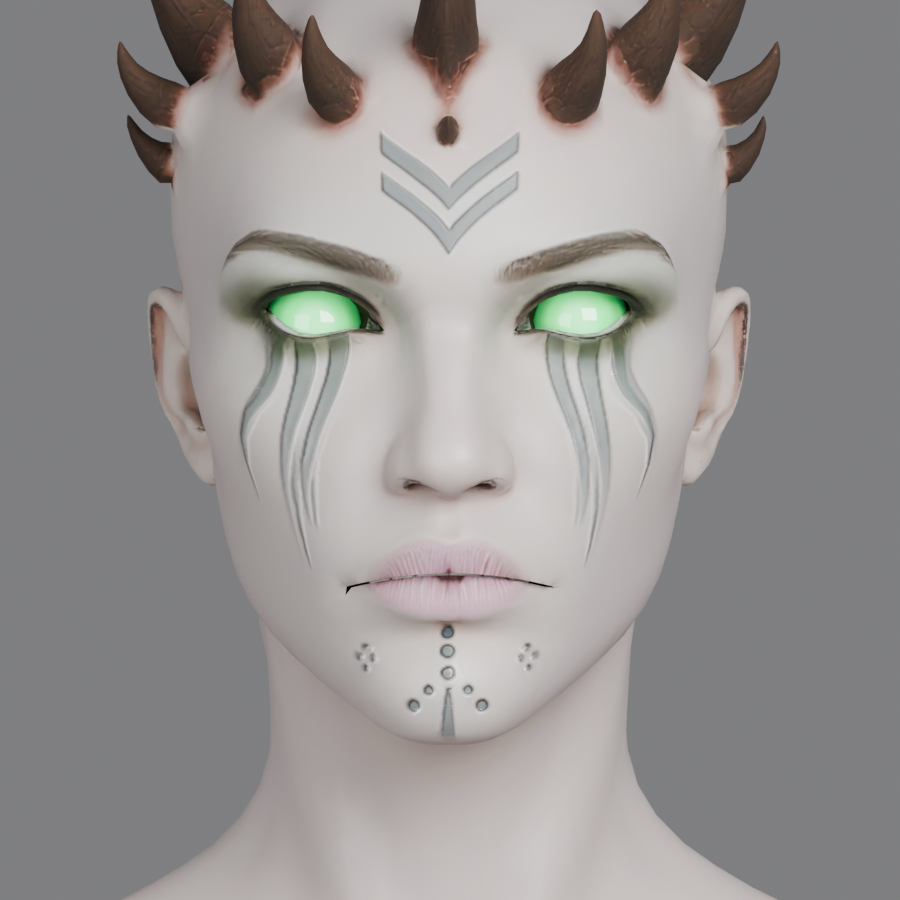
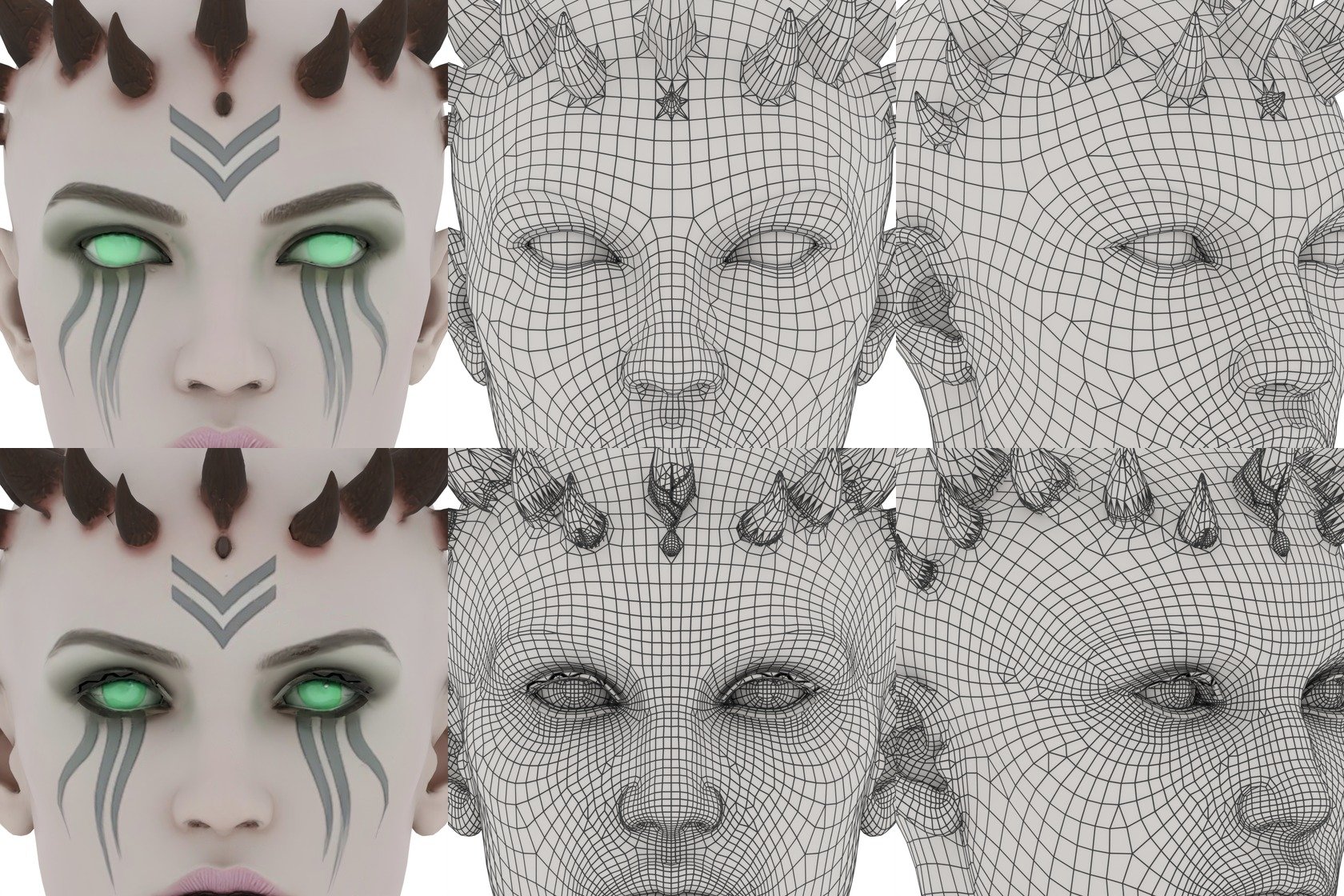
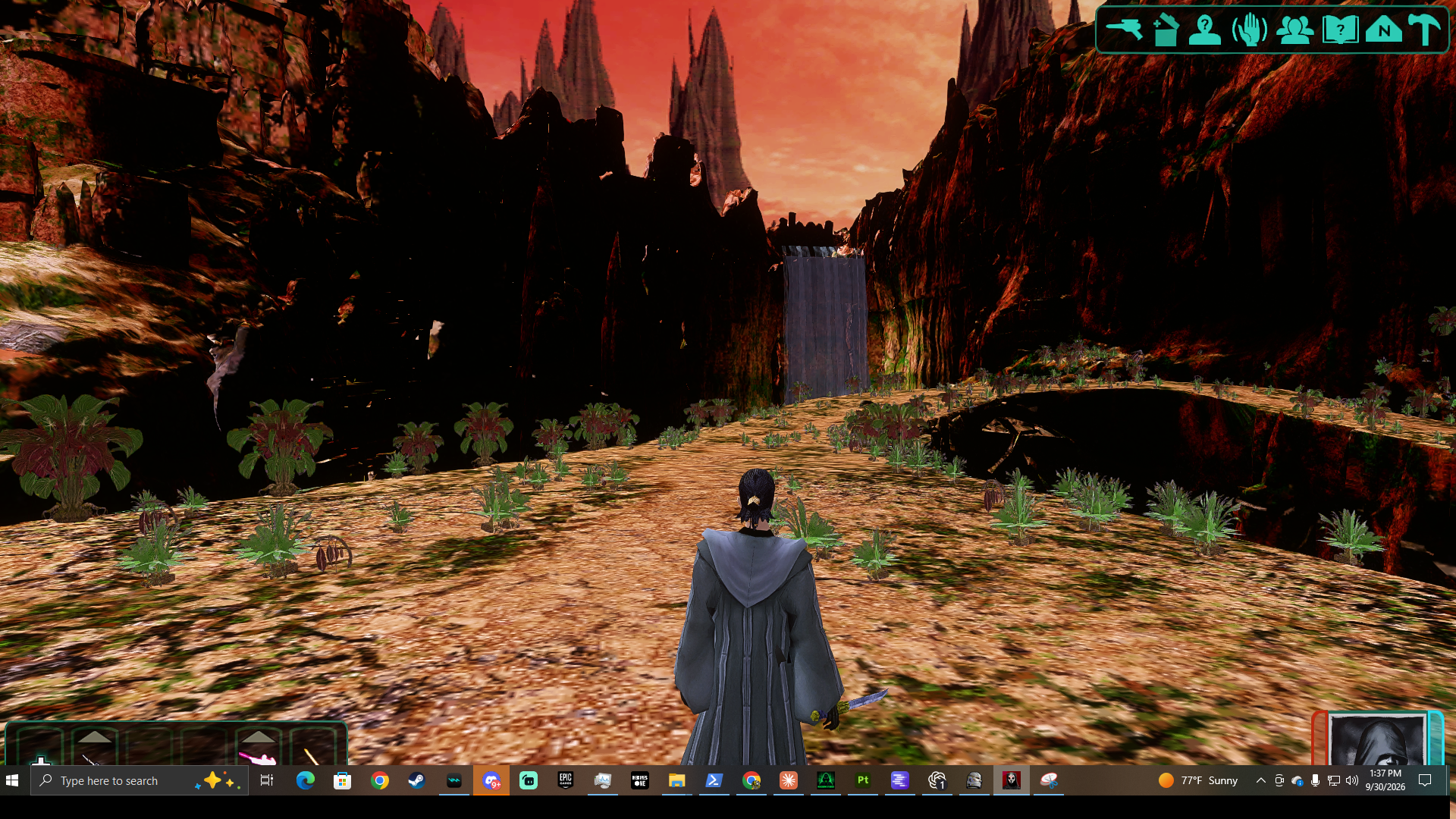
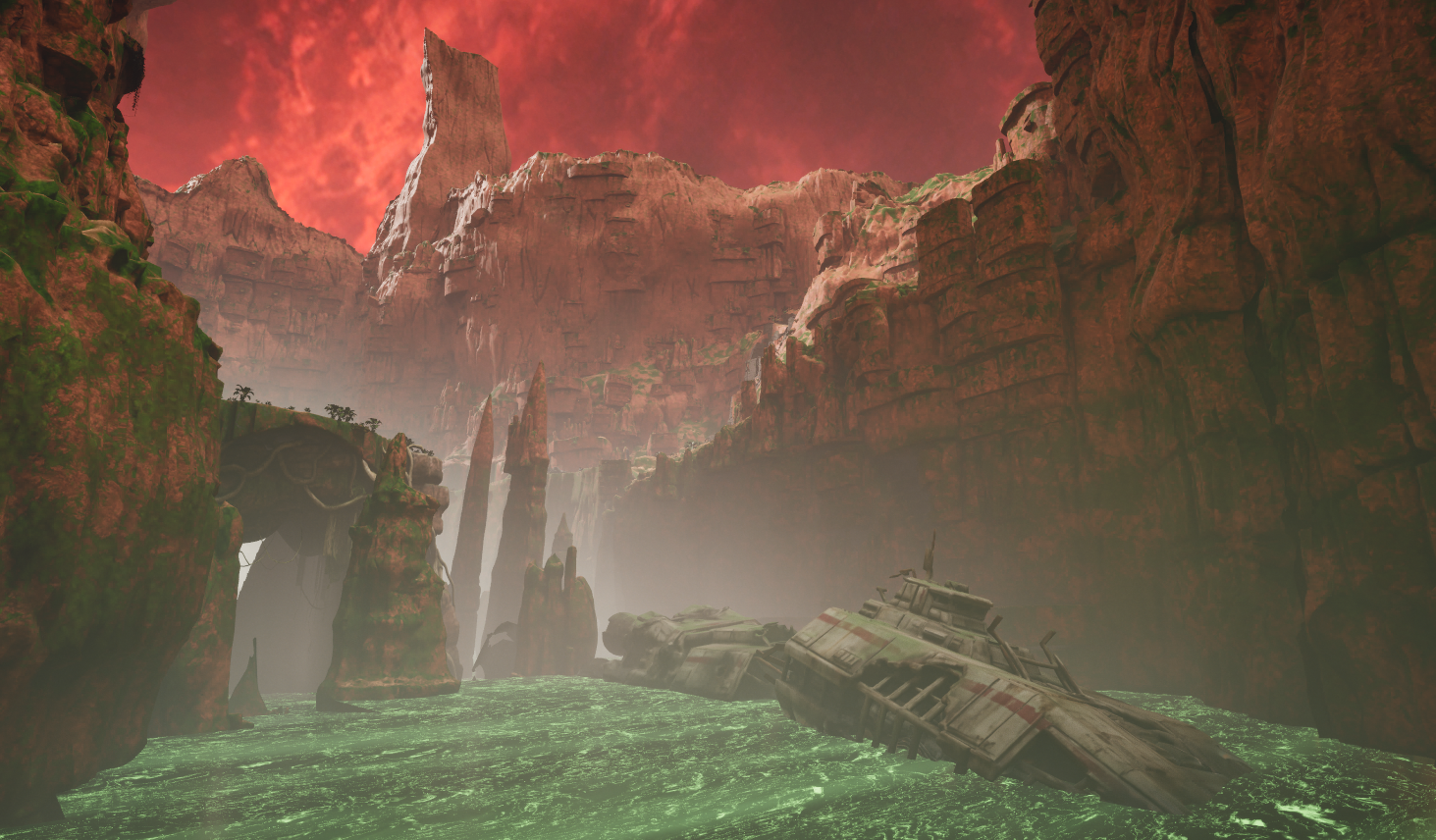
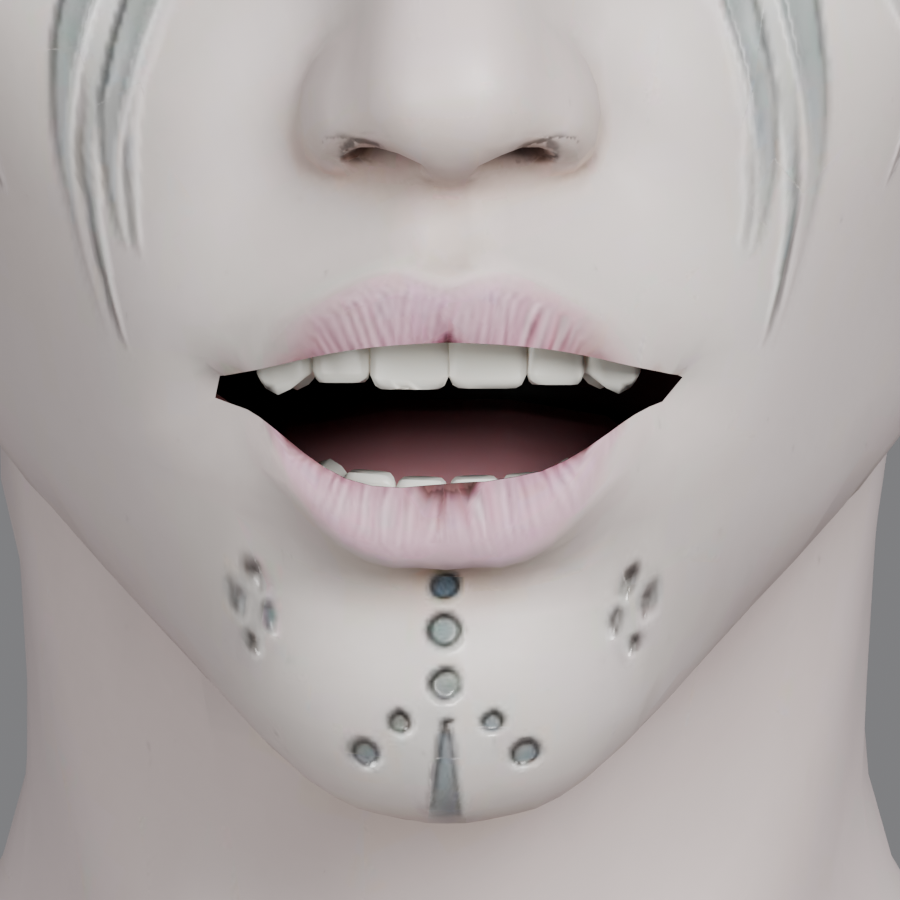
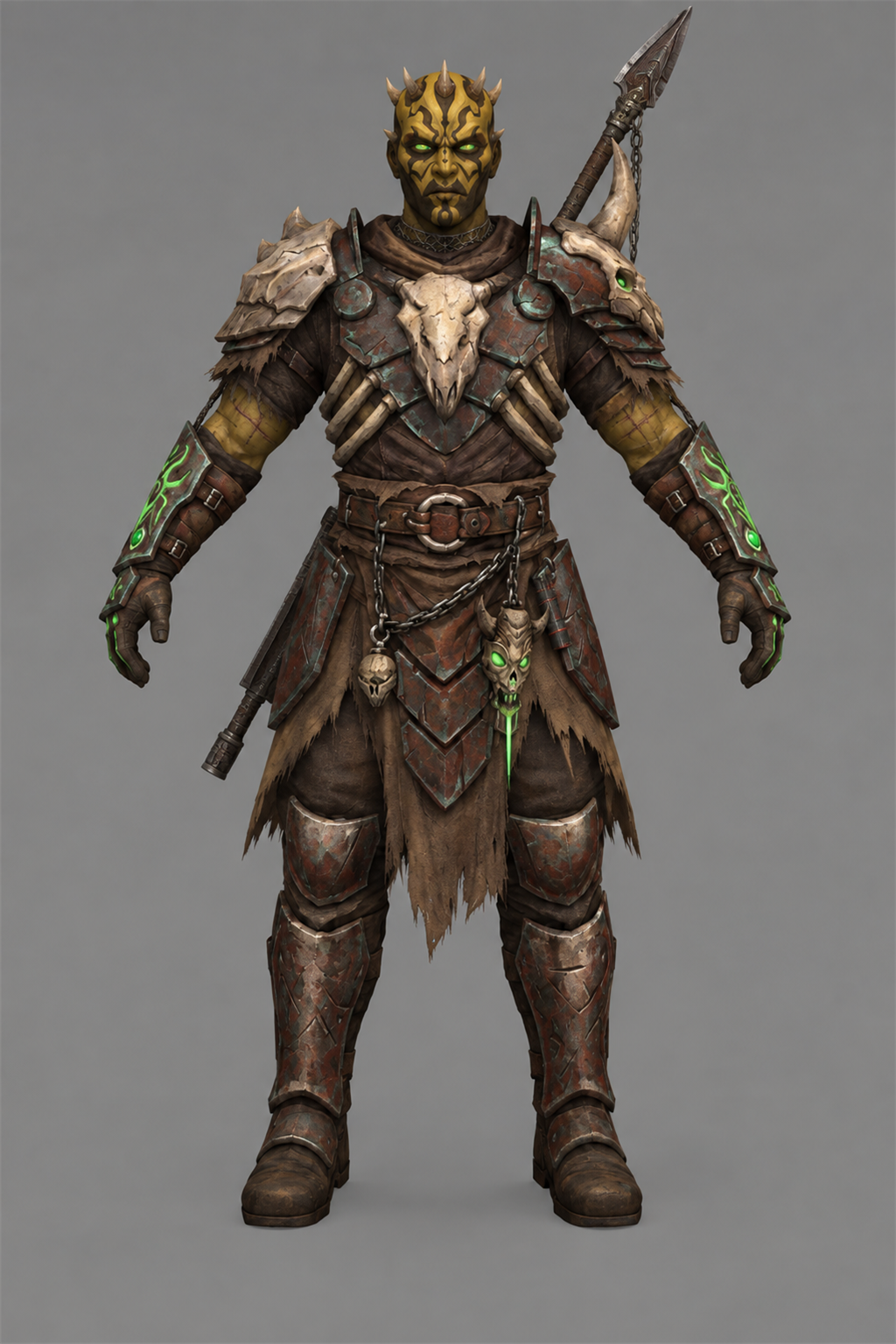
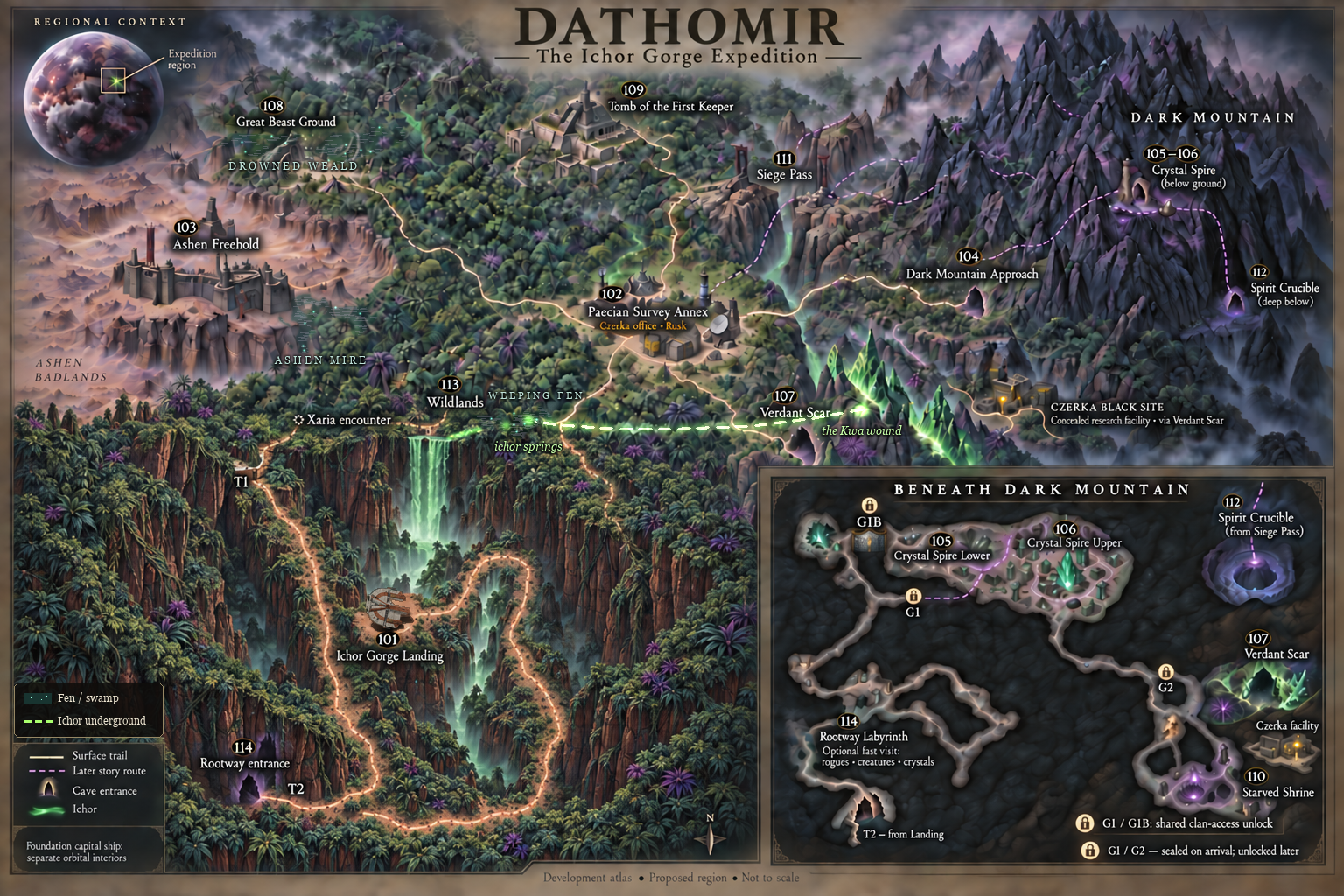
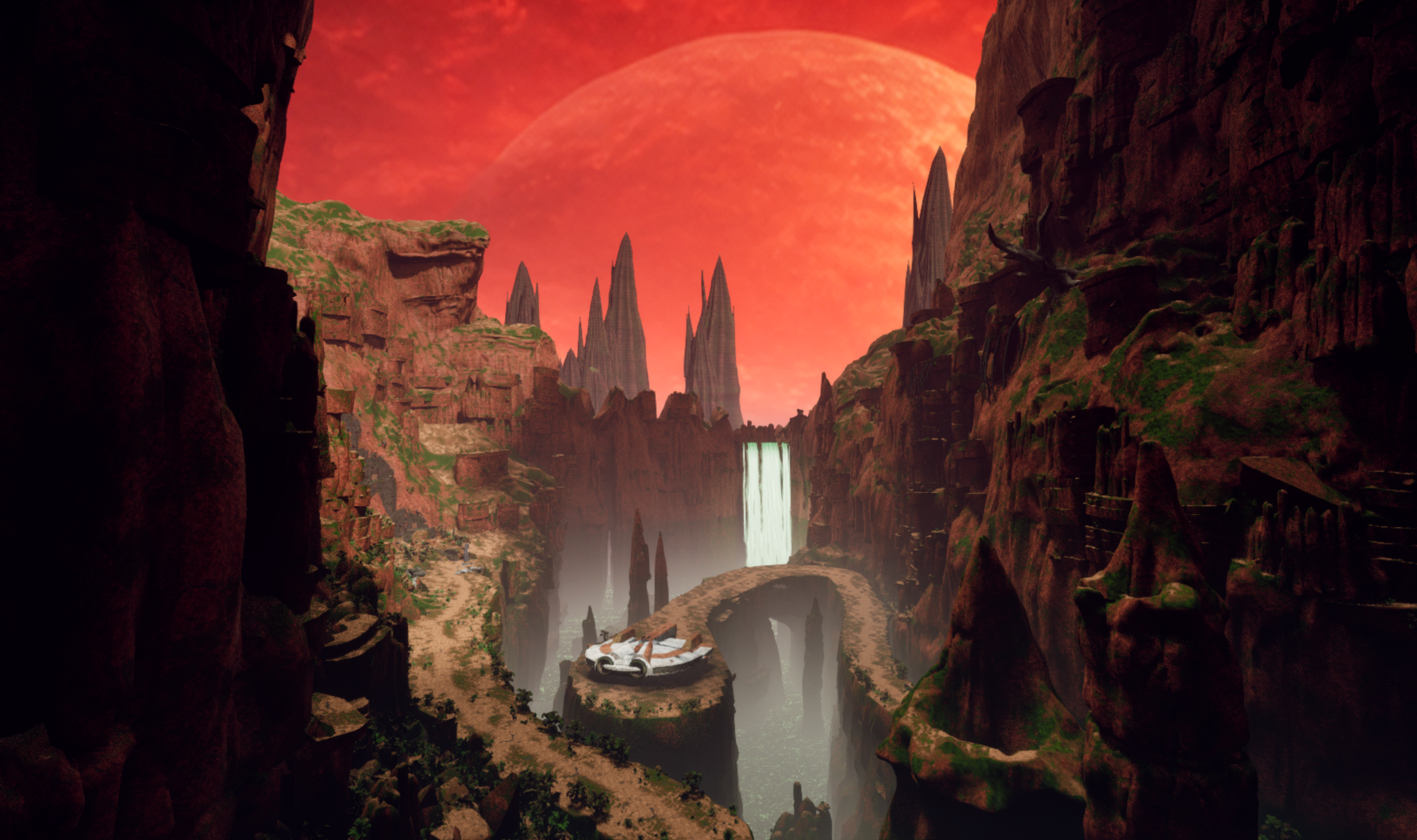
DATHOMIR EXPANSION A new world, a new story, and new companions for Knights of the Old Republic II Development journal · October 2026 Hey everyone, I've been back and forth on Dathomir for quite a while, and I owe this project a proper update. Some stretches have been all Dathomir; in others I've stepped away to work on smaller things, including my Basilisk and terentatek mods. Those projects have helped me learn, solve problems, and come back to this one with more to work with. I fully intend to finish Dathomir. I want to give the Exile a world worth exploring and a story worth carrying back into the rest of TSL. I'll be working in conjunction with @SAO1138to shape that story into something that fits the original game and delivers the kind of epic Star Wars adventure I want to play myself. There's a lot more planned than I've managed to show in scattered updates. This post brings together the current work, the larger design, and the route from one to the other. The screenshots are progress captures; the scope figures below describe the full development plan. 01 · The adventure A relic found on Korriban draws the Jedi Exile to a hidden enclave on Dathomir, where a civil war and a ritual to preserve the dead threaten to turn the bonds between people into something terrible. The story's working subtitle is The Wound and the Chain. It follows the Exile into a place where memory, grief, freedom, and control have become tangled together. The factions all have reasons to want the Exile's help, and reasons to be afraid of what that help might mean. I'm aiming for ancient mysteries, dangerous creatures, political choices, personal companion stories, and some big Star Wars moments. The quieter parts matter just as much: a conversation after a fight, a companion recognizing something you missed, or discovering that the person asking for help has left out a very important detail. This is a lost Dathomiri precursor society in TSL's era, thousands of years before the familiar later Nightsister traditions. Its settlements sit over older Kwa and Rakatan remains, with newer scars left by offworld interference. That history should be visible in the places you explore, rather than existing only in dialogue. There are also plans for a few beloved familiar faces to appear, and for an appropriate end to the story of a character many of us have loved since K1. I'm keeping those identities and circumstances under wraps. I want those moments to mean something when you reach them, with the player's established history respected. 02 · The full plan at a glance 15 planned Dathomir environments: 14 numbered planet modules plus the separately catalogued Czerka Black Site. 4 areas for a new upgrade. A capital ship to house your companions and travel the galaxy with (If you choose): a bridge, hangar, commons, and operations section. Together with Dathomir, that is 19 planned new locations, plus additions to the existing Korriban cave and Ebon Hawk. Final module boundaries may change; the first build combines some spaces. 1 branching main storyline: 11 numbered stages, expanded into 18 quest-and-route design sections, with 8 side quests and further shipboard and endgame story content. 2 recruitable companion candidates: Xaria and Kaius, with the permanent choice determined by the story and your convictions, not player gender. 43 cast catalog entries: 31 individual roles and 12 population/group entries. The individual roles include Oberon (A Rancor Mount), echoes, recordings, and remains as well as living people. 21 bestiary entries, 12 ambient fauna entries, and 37 flora entries. The bestiary includes creature families, variants, manifestations, and ancient Kwa lore forms; I have done extensive research on Dathomir flora and fauna in countless star wars comics thanks to @Lane and his coordination/knowledge of star wars comics. 4 principal conclusions with variations for companions, factions, civilians, and later events. The design targets roughly 5–7 hours for the critical path and 9–12 hours for a broad completionist run. These are planning totals and playtime targets, not finished-content counts or a release promise. The current playable work is still concentrated on the opening area, characters, encounters, and renderer. 03 · First look: Ichor Gorge Landing This is the first official module, and the place I want to set the tone for everything that follows. Red cliffs and a huge sky, green ichor deep below, broken machinery, ancient stone, and a small landing platform that makes the Ebon Hawk feel a long way from safety. The work behind these views includes route planning, blockouts, terrain and rock construction, vegetation, lighting, water, and repeated checks from the player's path. I'm trying to make a place that holds up when you walk around it, turn back, or look over an edge. I am applying all of my skills as a professional 3D environment artist to this work. The Unreal map is the visual master. Preserving that quality is what led me into the renderer work mentioned further down this post. 04 · The world beyond the landing The planet is planned around connected exploration and a hub-based investigation. You arrive as an outsider, get to know both major factions, and follow several lines of evidence before deciding who deserves your support, or whether to pursue another answer. Current illustrated development map: the surface regions and the passages beneath Dark Mountain. Ichor Gorge Landing, Wildlands, and Rootway Labyrinth: the arrival, dangerous open country, and an optional cave network beneath it, with branching routes, wildlife, and buried infrastructure. Paecian Survey Annex: a precarious neutral hub for researchers, traders, supplies, and investigations. Its dependence on outside commerce complicates its claim to neutrality. Ashen Freehold: the Brotherhood's settlement, with workshops, beast handlers, civilians, and a struggle over what freedom will look like after the war. Dark Mountain Approach, Crystal Spire Lower, and Crystal Spire Upper: villages, memorial fields, a public clan hub, archives, and the seats of ritual and political power. Verdant Scar and Czerka Black Site: a reactive crystal ecosystem and a concealed research operation, where the balance between value of living things and profit becomes an eerie choice. Great Beast Ground and Tomb of the First Keeper: large arena like territory with a creature boss encounter, ancient control systems, and a layered ruin central to Kaius and Oberon's story. Starved Shrine, Siege Pass, and Spirit Crucible: the later investigation and finale spaces, changing in meaning as the truth behind the war comes into focus. After the initial journey, survey beacons are planned to ease repeated travel between safe, discovered places. Skills and companions should open useful options: repairs, alternate routes, evidence, negotiations, and ways to handle creatures. Exploration should reward attention to detail of the world and its ecosystem. 05 · People, factions, and the choices between them The two central powers are the Dark Mountain Clan and the Ashen Brotherhood. Mother Sevrana wants to preserve her people's memory and continuity; Marro Venn leads a movement born from escape, labor, and resistance. Both have genuine supporters, internal disagreements, and actions the player will have to judge. The Paecian Survey Annex, led by Doctor Elira Vane, brings research and outside law into the conflict. Czerka, represented by Operations Manager Halden Rusk, brings transport, supplies, and an interest in owning whatever proves valuable. Korl Vesh operates between those interests as an Irodorian mercenary broker. Another familiar presence, has his own interest in the war. Beyond the principal cast, the plan includes wardens, archivists, researchers, quartermasters, displaced families, soldiers, captives, crew, witnesses, and echoes of earlier generations. Characters such as Warden Vaska, Archivist Mera, Pera Voss, and Quartermaster Seln give the settlements people to return to. The larger cast should make the consequences visible in ordinary lives. The ending structure supports backing either major faction, earning an alternative to their war, or pursuing a darker claim of your own. Trust and fear matter separately. I want different choices to change the finale, return visits, and the stories companions tell about what happened here. 06 · Xaria, Kaius, and Oberon Xaria: already speaking and fully working in TSL Xaria already has a working in-game encounter, custom powers and class, custom voice and dialogue, and post-combat recruitment. I have created a patch for the game that unlocks the party selection screen to have 20 open slots. @Vriff Has also released a 32 slot patch recently, and I will be working with him to combine our patches and make it the best experience for modders and mod enthusiats. Seeing her scene work in KOTOR II was a big moment. She is a seer with her own history and judgment of the Exile, and I want her to feel like someone you gradually get to know. 12-xaria-encounter-opening.mp4 In-game development footage — the creature encounter and Xaria’s opening line. Earlier character model, shown in the test module. Her planned combat identity combines ritual casting, stealth, repositioning, and reanimation: Miststep: Retreat, Miststep: Ambush, Veil of the Clanless, Raise Dead, Ichor Lightning, Ichor Drain, and Ichor Heal. Her longer arc includes a personal quest, influence-dependent conversations, six authored future glimpses, and connections to the wider TSL journey. I'm now rebuilding her head. The current work has separate eyes and improvements to the face, mouth, teeth, and topology. Hair, final speech and blink behavior, and testing the replacement in the game are still ahead. An earlier topology study from the same rebuild, before the latest mouth and dental refinements. Her outfit is also planned for an upgrade, drawing on the garment, armor, and material work I've been doing through my upcoming BetterArmor mod. The whole character needs to work in motion and in conversation. Kaius: a warrior with a history to recover Kaius is the other planned recruitable companion: a Zabrak veteran and beast master whose connection to Dathomir reaches into an earlier war. He and Xaria can both take part in the planet's story, but the permanent companion choice is intended to carry a real commitment. Kaius: character concept. His progression includes four staged Force-healing and training sessions, uncovering memories and restoring abilities. His planned kit combines Ichor Warform, Beast Accord, grip, hurl, and crushing techniques, culminating in Ichor Cataclysm. He also gains a retained summon progression of Boma → Zakkeg → Borhek → Terentatek, so a later beast adds an option rather than deleting the earlier ones. Oberon: our custom rancor Oberon is a named part of Kaius's story and one of the project's strongest completed creature assets. His custom model, rig, animation, and KOTOR II creature build are in place. The armor, scarred hide, bone details, and green accents give him a presence of his own. He has a major encounter, a continuing relationship with Kaius, and a planned signature summon and side quest. The way the player treats that relationship will affect its outcome. I'm keeping the scene itself for the game. The existing companions matter too. The design bible SAO and I have written includes travel reactions, environmental interactions, and shipboard scenes for TSL's standard cast. Xaria and Kaius should become part of the party's relationships, with people like Kreia, Atton, Bao-Dur, Visas, Mandalore, and the others responding in their own voices. AI disclosure: my workflow and the voices I want to be open about this: I use AI in my workflow on Dathomir, just as I do across my other projects and tools. I know some people will disagree with that choice, especially coming from a digital creator and professional artist. I understand that people feel strongly about it. The industry is changing, though, and I don’t intend to be left behind in my own industry. I have developed, written, and managed my own programs as part of working with this technology. As a technology professional, I believe I have a duty to explore new tools in a professional and ethical way. AI is amazing technology, and it has already helped us achieve a great deal on this project. I still take responsibility for what I make with it: the artistic decisions, the quality of the finished work, and how it fits into the game. That includes AI-generated voice work for new dialogue involving TSL’s existing cast. These are new AI-generated performances, not recordings made by the original actors for this mod. My intention is to do the characters justice with carefully written dialogue and high-quality scenes that respect who they are and make the world feel more alive. I plan to include an installer option to remove the AI voices; those lines would remain readable through subtitles, without voiced audio. I’m putting this disclosure here because I want to be honest about how the project is made. I hope that honesty will be met with respect and professionalism, and that discussion will focus on the actual work: the art, writing, gameplay, and experience I’m creating. The two short examples below show the current voice work in game. Kreia: AI voice demonstration 13-kreia-ai-voice-demo.mp4 Kreia’s reaction to Xaria. Development dialogue with an AI-generated voice. Atton: AI voice demonstration 14-atton-ai-voice-demo.mp4 Atton’s reaction to Xaria. Development dialogue with an AI-generated voice. 07 · Quests, creatures, and a living planet The main story moves from the Korriban discovery and Hawk decoding scene through arrival, faction audiences, the First Keeper investigation, three interlocking evidence trails, a commitment, a route-dependent siege, and the Spirit Crucible. Its 18 design sections include alternative branches; they are not 18 separate linear quests everyone completes. The eight planned side quests: A Name for the Beast: follow competing claims on Oberon and decide what his bond with Kaius should become. The Verdant Scar: explore a crystal ecosystem where extraction, aggression, and restraint have different consequences. The Dead Do Not Testify: investigate a murder where an apparently supernatural witness still needs evidence checked. The Weight of Ink: decide what to do with records that preserve family histories and enforce ownership. A Clean White Room: confront a medical crisis involving people whose employer and individual actions do not tell the same story. The General's Shadow: work through Xaria's memories and the Exile's wartime legacy. A Soldier After the War: recover Kaius's past through his staged healing and training arc. Hanharr's Hunt: a conditional companion story shaped by the player's Nar Shaddaa outcome and Mira/Hanharr availability. Alongside the quests are environmental puzzles, skill-led solutions, creature-control choices, journals, unique equipment, ritual items, and consequence-based rewards. The item document currently contains 20 item entries and 13 power entries, in addition to Xaria's seven-power list. That includes story and endgame items, not just loot. The bestiary is a mixture of familiar Star Wars creatures and original Dathomir designs. Its 21 entries cover rancors and Oberon; the Elder Terentatek known as the Great Beast; other terentateks; zakkegs; bomas; borheks; chirodactyls; Dathomir wraids; Kwi; whuffa worms; Vesper Kinrath; Rootmimes; Scar-stalkers; Glowwing Shyracks; Fen Maws; Siphon Matrons; Ash-hounds and Ward-hounds; Starved Husks; Czerka specimen splices; echo manifestations; and ancient Kwa represented through echoes and visual history. The original designs have different roles: a Rootmime hides among hanging roots, a Fen Maw imitates a harmless light over the water, and a Scar-stalker disappears among crystal growth. Some encounters can be avoided, calmed, or approached through a companion. The Elder Terentatek also gives the work on my smaller terentatek mod a direct place in the larger project. Ambient life has its own 12-entry roster: Burra Fish, Vesper Moths, Mourning Cranes, Cairn Crabs, Thornback Gliders, Echo-singers, Hide-pickers, Lantern Beetles, Hush-leeches, Kwa-glass Snails, Scar-grazers, and Canopy Tachs. The 37-entry flora plan covers canopy trees, roots and vines, ferns and ground cover, fungi, hazard plants, water plants, dryland growth, reactive crystal vegetation, and cultivated gardens. Grave Thorns, bloodgrass, lantern lilies, glowing cave fungi, memorial trees, and crops should help each place feel different. Settlements need food, medicine, work, and signs that people actually live there. 08 · Beyond Dathomir: the Foundation One of the largest planned additions is Foundation, a worn Republic cruiser (I haven't decided if it will be a hammerhead or another ship that is equipped with a hangar) that can become a mobile home for the party, with the Ebon Hawk docked inside. The opportunity to command it is tied to the Exile's history. Accepting a title, rejecting what it implies, taking an independent charter, or refusing the offer should all be meaningful choices. Its four planned areas are: Bridge: command, navigation, the galaxy map, and story decisions. Hangar: the docked Hawk, cargo handling, party departures, and arrivals. Commons: dormitories, mess, crew life, and companion conversations. Operations: armory storage, a Republic quartermaster, workbench, laboratory, medbay, and training facilities. The fuller plan adds a first-boarding ensemble, room-specific companion scenes, training tournaments, skill sharing, changing supplies, and reactions for companions recruited later. I want boarding the ship to feel like the party moving into a new place together with proper reactions from each character their first time walking onto the crew deck. Later phases extend that into a conditional Onderon arrival crisis, with attempted negotiation, bridge gunnery mini game, boarding defense, evacuation, and a damaged ship's return; Ghosts in the Fleet, a contained HK-50 investigation; and a Ravager support sequence involving Mandalorian battalion preparation scenes, a basilisk fleet launch from the hangar, a tactical protection choice, and consequences for the people doing the fighting. As you recruit mandalorians throughout the galaxy for Mandalore, they will gather and operate on your warship. You will effectively be building your own Mandalorian army throughout the course of the game and watch them interact on the ship. There are also planned responses to Dathomir in the later Sith confrontations, a Malachor perimeter rendezvous, and a final companion moment looking toward the Exile's future. I'm keeping the reveals and the K1 character's intended resolution out of this post. These additions have to respect the original game's events and TSLRCM's restored content. The Ebon Hawk remains the fallback when a ship feature is unavailable, refused, or belongs to a later development phase. 09 · Why we're building a new renderer I don't want to build the Unreal environment you've seen above and then lose the qualities that made it worth building when it reaches KOTOR. That has pushed us toward essentially replacing KOTOR II's world renderer with our own rendering engine. The current direction keeps TSL responsible for the game, characters, rules, dialogue, scripts, and interface while a separate 64-bit renderer built around Diligent and Direct3D 12 takes on the world visuals, connected to the game's camera and frame. There is already an early live milestone: the Dathomir map has been drawn through that new renderer inside KOTOR II. Early in-game renderer test, September 30. This is the KOTOR II capture; the two main showcase images above are from the Unreal environment. The gap in materials, lighting, effects, and presentation is work still to do. Materials, foliage, transparency, lighting, ichor, character integration, stability, and measured performance all need further work. We also need to prove save/load behavior and compatibility. An image appearing in the game is an important step, but the renderer has to survive normal play. If we can make this work well, its value could extend far beyond Dathomir: more detailed geometry, richer surfaces and lighting, and a modern approach to rendering performance. It could change the scale and appearance of what people can build for KOTOR. That's the possibility driving the effort; I want the finished results to justify the ambition. 10 · The process and the road ahead The project now has a narrative bible, quest and level plans, dialogue, companion and continuity coverage, journals, rewards, epilogues, and environment and creature catalogs. Those documents are much further along than the playable planet. They give the work a direction; implementation is where we'll find out what needs to change. On the art side, the process has been references and concepts, models, cleanup, materials, rigging, animation, and repeated engine checks. My tool Ghost Studio (https://github.com/CrispyW0nton/Ghost-Studio) and the surrounding tool work help connect those stages. I've also used AI-assisted concept and asset tools, followed by inspection, rebuilding, and testing and my own drawings. A first asset or attractive render still has a long way to go before it belongs in the mod. Immediate priorities: bring the gorge and renderer closer to the Unreal master; establish reliable navigation, collision, and transitions and lighting; finish Xaria's head and outfit work; and connect the working pieces into a playable opening. The opening slice is planned to run from the Korriban discovery through the Hawk scene, landing, Wildlands, Xaria encounter, a creature encounter with multiple solutions, and arrival at the Annex. That gives us a real section of the adventure to judge as a whole. The broader production plan has four phases: Dathomir core: the main story, all eight side quests, Xaria and Kaius, essential companion scenes, faction outcomes, and the commission choice. Story development with SAO runs through this work. Foundation's first playable hub: bridge, hangar, initially combined commons/operations, storage, vendor, medbay, companion residence, and the first tour. Later-story integration: the HK-50 thread, Ravager preparations and consequences, Malachor rendezvous, and closing scenes. Expanded ship systems: the Onderon action sequence, separate interior areas, fuller training and skill sharing, and the remaining command-path variations. Each stage needs playthroughs across different choices, planet orders, and available companions, alongside performance, installation, save, and compatibility checks. I'm not attaching a release date to this yet. There is substantial work ahead, and I want the updates to show what is actually getting done. I do plan on releasing this sometime close to the official kotor remake by Saber Interactive. Or sometime after it at least, because I feel there will be many players returning to the franchise at that point as well as new players who want to experience the second game after the renewed experience to the first game. I know I've stepped away and come back more than once. I still want to see the Exile land in this gorge, get to know these people, and leave with a story that feels like it belongs in Star Wars. That's what I'm working toward. I'd love to hear what you think of the two gorge shots, Oberon, Xaria's direction, and the wider plan. Thanks to everyone who's followed the smaller mods along the way. I'm looking forward to having more of Dathomir itself to put in your hands. — ShaolinGhost AI DISCLOSURE & FEEDBACK I use AI often in my workflows to assist with creating my mods, including handling monotonous and repetitive tasks. You should assume that anything I post has had AI assistance in some way. As noted in the disclosure above, I expect discussion of my projects to remain professional and focused on the actual artwork, performance, and gameplay. Constructive criticism that helps improve the art or gameplay is welcome. Derogatory statements about AI will be ignored. I am here to improve the finished product, and I will not change my workflow to accommodate personal objections to AI.
-
 https://github.com/CrispyW0nton/Ghost-Studio For anyone following this topic, I completed this tool a while back and it is a very powerful tool for modding both kotor games. Feel free to try it out. I have combined all my original tools into one modding suite
 -
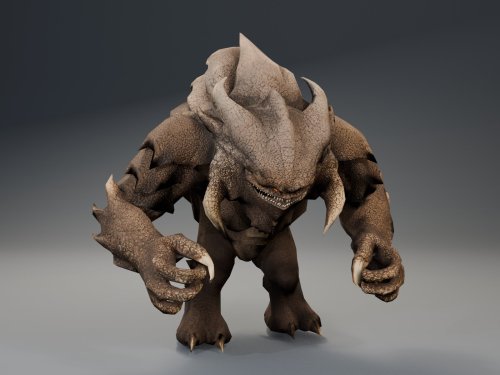 Sorry about the error with the installer! I forgot to add FileExists=1 to te changes.ini .... So weird that exists. Updating the mod again right now to fix some bugs with scripted interactions. I tested all of the scripted appearances of the Terentatek and it works well now
 -
 Thanks Shay! I'm working on a better armors mod that will add AAA quality outfits to the game to replace all the current armors in the game, and I'm working with @SAO on a Dathomir expansion mod coming soon!
 -
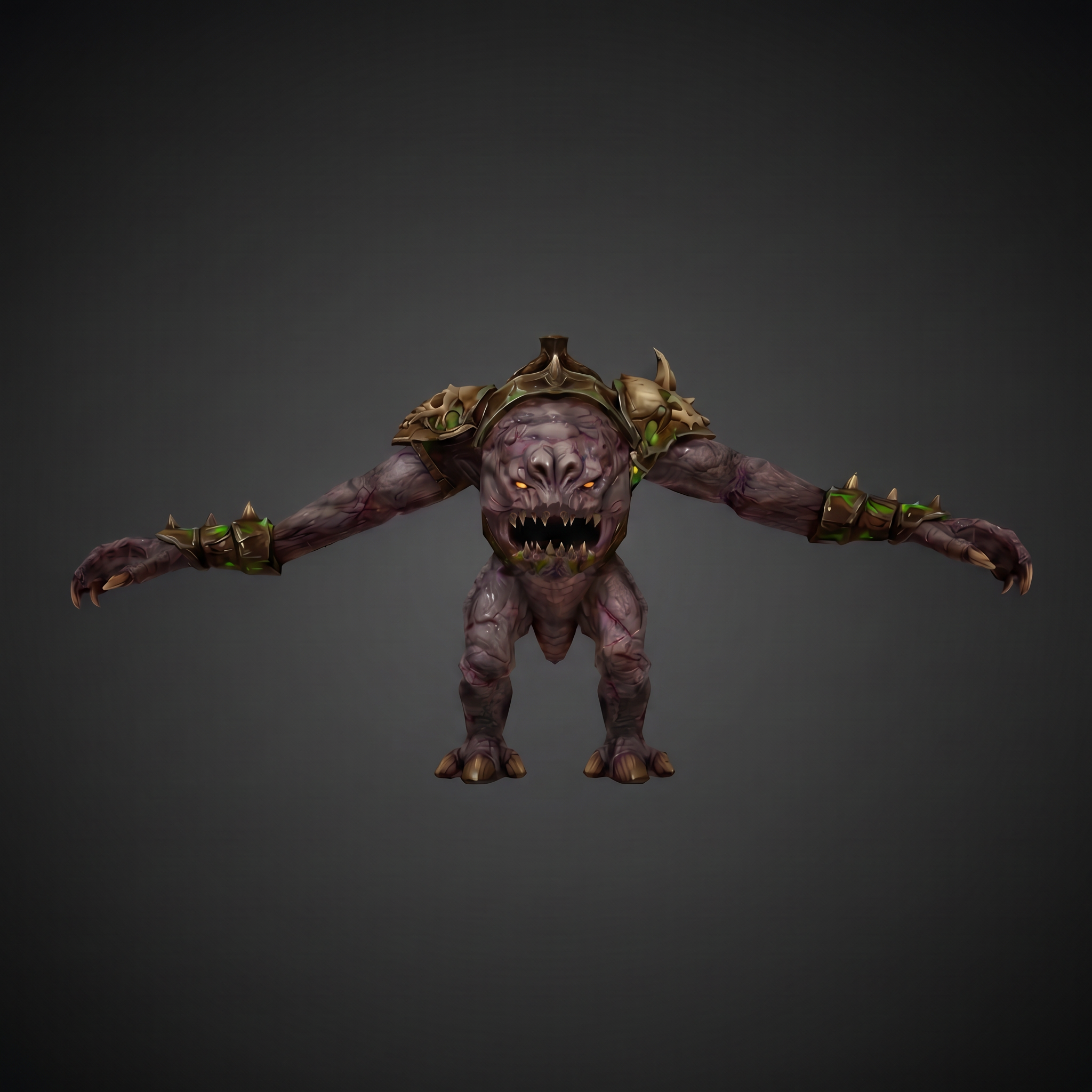
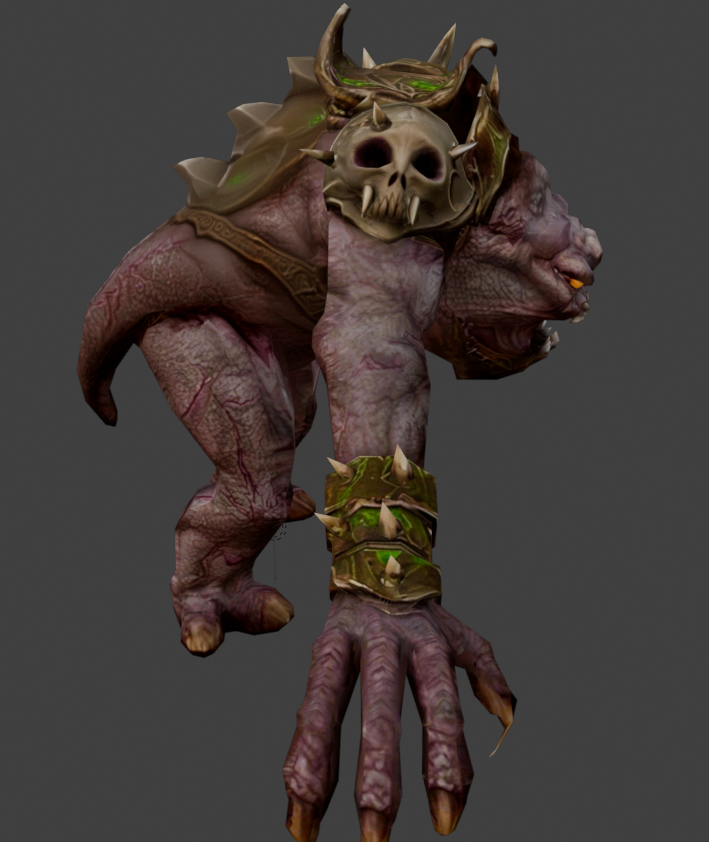
View File Basilisk War Droid Bring a new Basilisk to the invasion of Onderon. Watch it wake in the Dxun hangar, storm Iziz in a replacement cinematic, and join the landing-zone battle as an allied war droid. FEATURES • Custom Basilisk model with an animated hangar reveal and boarding ramp. • Replacement invasion cinematic covering space approach, atmospheric entry, anti-aircraft fire and a heavy landing. • An allied Basilisk that fights alongside the player in Iziz. • Shoulder turbolasers, heavy claw attacks, a shockwave slam and an airborne rapid-fire nose-gun barrage. • Custom combat effects and sound. • One replacement Basilisk loading screen. REQUIREMENTS AND COMPATIBILITY Requires Windows x64 and a supported Steam Aspyr version of KOTOR II. Run the included compatibility check before installing. Other storefronts and executable versions are not currently supported. Tested on clean Steam game data and an installation of the KOTOR II Full Build: https://kotor.neocities.org/modding/mod_builds/k2/full Install after your chosen mod build. Compatibility does not cover every optional mod selection. The English Queen Talia invasion route is tested; the Vaklu route has not been qualified. The installer merges shared tables and story resources, preserves native party selection, and leaves saves and Steam Cloud settings unchanged. It replaces OndMov07.bik and the load_510OND/load_511OND loading screens. See COMPATIBILITY.md for supported executable hashes, conflicts and testing limitations. INSTALLATION 1. Close KOTOR II. 2. Extract the entire archive into a folder outside your game directory. Keep all included folders together. 3. Run Install Basilisk.exe and select the folder containing swkotor2.exe. 4. Click Check compatibility, review the result, then Install Basilisk. 5. Keep Steam running and launch the game using BasiliskLauncher.exe in your game folder. 6. Load a save from before Zuka’s invasion reveal and before first entering the Iziz invasion module. Required runtime components are bundled. No separate Python or .NET installation or manual patch download is needed. This package uses its own merge installer. Do not copy the payload into Override or install it through TSLPatcher. UNINSTALL Close the game, run Install Basilisk.exe, select the same game folder and choose Restore pre-install files. Keep the BasiliskInstaller backup folder. Restoration will stop if another mod has subsequently changed a file, protecting those later changes. Return to a save made before installation. CREDITS ShaolinGhost — project, direction, playtesting and release. Lane — KotOR Patch Manager. PyKotor contributors — resource tooling. Obsidian Entertainment, LucasArts and Aspyr — KOTOR II and original game resources. The Force Unleashed Wii Basilisk encounter — design and animation reference. Full third-party notices and installer/runtime sources are included. This is an unofficial, free fan modification. Screenshots may show unrelated character, environment and interface mods that are not included. Submitter ShaolinGhost Submitted 09/28/2026 Category Mods TSLRCM Compatible Yes AI DISCLOSURE & FEEDBACK I use AI often in my workflows to assist with creating my mods, including handling monotonous and repetitive tasks. You should assume that anything I post has had AI assistance in some way. As I stated in my Dathomir WIP post, I expect discussion of my projects to remain professional and focused on the actual artwork, performance, and gameplay. Constructive criticism that helps improve the art or gameplay is welcome. Derogatory statements about AI will be ignored. I am here to improve the finished product, and I will not change my workflow to accommodate personal objections to AI.
-
Version 1.0.1
58 downloads
AI DISCLOSURE & FEEDBACK I use AI often in my workflows to assist with creating my mods, including handling monotonous and repetitive tasks. You should assume that anything I post has had AI assistance in some way. As I stated in my Dathomir WIP post, I expect discussion of my projects to remain professional and focused on the actual artwork, performance, and gameplay. Constructive criticism that helps improve the art or gameplay is welcome. Derogatory statements about AI will be ignored. I am here to improve the finished product, and I will not change my workflow to accommodate personal objections to AI. Bring a new Basilisk to the invasion of Onderon. Watch it wake in the Dxun hangar, storm Iziz in a replacement cinematic, and join the landing-zone battle as an allied war droid. FEATURES • Custom Basilisk model with an animated hangar reveal and boarding ramp. • Replacement invasion cinematic covering space approach, atmospheric entry, anti-aircraft fire and a heavy landing. • An allied Basilisk that fights alongside the player in Iziz. • Shoulder turbolasers, heavy claw attacks, a shockwave slam and an airborne rapid-fire nose-gun barrage. • Custom combat effects and sound. • One replacement Basilisk loading screen. REQUIREMENTS AND COMPATIBILITY Requires Windows x64 and a supported Steam Aspyr version of KOTOR II. Run the included compatibility check before installing. Other storefronts and executable versions are not currently supported. Tested on clean Steam game data and an installation of the KOTOR II Full Build: https://kotor.neocities.org/modding/mod_builds/k2/full Install after your chosen mod build. Compatibility does not cover every optional mod selection. The English Queen Talia invasion route is tested; the Vaklu route has not been qualified. The installer merges shared tables and story resources, preserves native party selection, and leaves saves and Steam Cloud settings unchanged. It replaces OndMov07.bik and the load_510OND/load_511OND loading screens. See COMPATIBILITY.md for supported executable hashes, conflicts and testing limitations. INSTALLATION 1. Close KOTOR II. 2. Extract the entire archive into a folder outside your game directory. Keep all included folders together. 3. Run Install Basilisk.exe and select the folder containing swkotor2.exe. 4. Click Check compatibility, review the result, then Install Basilisk. 5. Keep Steam running and launch the game using BasiliskLauncher.exe in your game folder. 6. Load a save from before Zuka’s invasion reveal and before first entering the Iziz invasion module. Required runtime components are bundled. No separate Python or .NET installation or manual patch download is needed. This package uses its own merge installer. Do not copy the payload into Override or install it through TSLPatcher. UNINSTALL Close the game, run Install Basilisk.exe, select the same game folder and choose Restore pre-install files. Keep the BasiliskInstaller backup folder. Restoration will stop if another mod has subsequently changed a file, protecting those later changes. Return to a save made before installation. CREDITS ShaolinGhost — project, direction, playtesting and release. Lane — KotOR Patch Manager. PyKotor contributors — resource tooling. Obsidian Entertainment, LucasArts and Aspyr — KOTOR II and original game resources. The Force Unleashed Wii Basilisk encounter — design and animation reference. Full third-party notices and installer/runtime sources are included. This is an unofficial, free fan modification. Screenshots may show unrelated character, environment and interface mods that are not included.- 2 comments
-
- 11
-
-

-
View File HQ Terentatek Replacement HQ Terentatek Replacement — KOTOR I Version 1.0.0 by ShaolinGhost Bring a new look and movement set to KOTOR I’s Terentateks. This replacement pairs a custom creature model and 4K textures with converted Star Wars: The Old Republic animations, including claw-slashing attacks, idle and movement cycles, damage reactions, death and roar motions. The replacement covers every creature using the original Terentatek appearance throughout the base game, including Kashyyyk, Korriban and scripted transformations. Existing encounter scripts, quests, statistics, loot and native soundset assignments are preserved. Campaign roars occur when the original game scripts or animation system request them. Requirements KOTOR I for PC. No additional mods, runtime DLLs, custom launcher or executable patches are required. TSLPatcher is included for Windows installation. The 4096 × 4096 textures require additional graphics memory. Installation Close the game and extract the entire ZIP into its own folder outside the game directory. Run TSLPatcher.exe, select Install Mod, and choose the KOTOR I folder containing swkotor.exe. Do not select Override. Wait for installation to finish and check the log for errors. Keep the installer and its backup folder. The installer merges the Terentatek appearance settings into an existing appearance.2da and preserves unrelated changes. Do not manually copy the supplied appearance.2da into Override. A new game is not required for this appearance replacement; restart the game after installing. Compatibility Install after other appearance-table mods. Mods that replace the same Terentatek appearance or the same model and texture resources conflict. Creatures assigned a separate appearance by another mod are outside this replacement’s scope. K1R compatibility has not been tested; the required compatibility field is therefore marked No. This release contains no test maps, test creatures, saves or plot scripts. The gallery includes four Blender model renders showing the front, profile, claw attack and roar, plus one in-game screenshot from the development test area. Render lighting differs from in-game lighting. Uninstallation Restore the files from this installation’s backup folder. Remove files created by the installer only when no previous version was backed up. See README.txt for the complete file list and appearance.2da instructions. Uninstall in reverse installation order to avoid discarding later mods’ table changes. Credits ShaolinGhost — custom creature model, textures and mod release. BioWare / Electronic Arts — SWTOR skeleton and animation source assets, converted for KOTOR I. BioWare / LucasArts — KOTOR I and its creature sounds. stoffe and Fair Strides — TSLPatcher. MDLOps contributors, the Blender project and the KOTOR modding community. Permissions Please contact ShaolinGhost on Deadly Stream before redistributing or using the custom model and textures in another release. Rights to original game assets remain with their respective owners. This is a free, unofficial modification and is not made, distributed or supported by BioWare, Electronic Arts, LucasArts, Lucasfilm or Disney. Submitter ShaolinGhost Submitted 09/07/2026 Category Mods K1R Compatible Yes AI DISCLOSURE & FEEDBACK I use AI often in my workflows to assist with creating my mods, including handling monotonous and repetitive tasks. You should assume that anything I post has had AI assistance in some way. As I stated in my Dathomir WIP post, I expect discussion of my projects to remain professional and focused on the actual artwork, performance, and gameplay. Constructive criticism that helps improve the art or gameplay is welcome. Derogatory statements about AI will be ignored. I am here to improve the finished product, and I will not change my workflow to accommodate personal objections to AI.
-
Version 1.0.2
100 downloads
AI DISCLOSURE & FEEDBACK I use AI often in my workflows to assist with creating my mods, including handling monotonous and repetitive tasks. You should assume that anything I post has had AI assistance in some way. As I stated in my Dathomir WIP post, I expect discussion of my projects to remain professional and focused on the actual artwork, performance, and gameplay. Constructive criticism that helps improve the art or gameplay is welcome. Derogatory statements about AI will be ignored. I am here to improve the finished product, and I will not change my workflow to accommodate personal objections to AI. HQ Terentatek Replacement — KOTOR I Version 1.0.0 by ShaolinGhost Bring a new look and movement set to KOTOR I’s Terentateks. This replacement pairs a custom creature model and 4K textures with converted Star Wars: The Old Republic animations, including claw-slashing attacks, idle and movement cycles, damage reactions, death and roar motions. The replacement covers every creature using the original Terentatek appearance throughout the base game, including Kashyyyk, Korriban and scripted transformations. Existing encounter scripts, quests, statistics, loot and native soundset assignments are preserved. Campaign roars occur when the original game scripts or animation system request them. Requirements KOTOR I for PC. No additional mods, runtime DLLs, custom launcher or executable patches are required. TSLPatcher is included for Windows installation. The 4096 × 4096 textures require additional graphics memory. Installation Close the game and extract the entire ZIP into its own folder outside the game directory. Run TSLPatcher.exe, select Install Mod, and choose the KOTOR I folder containing swkotor.exe. Do not select Override. Wait for installation to finish and check the log for errors. Keep the installer and its backup folder. The installer merges the Terentatek appearance settings into an existing appearance.2da and preserves unrelated changes. Do not manually copy the supplied appearance.2da into Override. A new game is not required for this appearance replacement; restart the game after installing. Compatibility Install after other appearance-table mods. Mods that replace the same Terentatek appearance or the same model and texture resources conflict. Creatures assigned a separate appearance by another mod are outside this replacement’s scope. K1R compatibility has not been tested; the required compatibility field is therefore marked No. This release contains no test maps, test creatures, saves or plot scripts. The gallery includes four Blender model renders showing the front, profile, claw attack and roar, plus one in-game screenshot from the development test area. Render lighting differs from in-game lighting. Uninstallation Restore the files from this installation’s backup folder. Remove files created by the installer only when no previous version was backed up. See README.txt for the complete file list and appearance.2da instructions. Uninstall in reverse installation order to avoid discarding later mods’ table changes. Credits ShaolinGhost — custom creature model, textures and mod release. BioWare / Electronic Arts — SWTOR skeleton and animation source assets, converted for KOTOR I. BioWare / LucasArts — KOTOR I and its creature sounds. stoffe and Fair Strides — TSLPatcher. MDLOps contributors, the Blender project and the KOTOR modding community. Permissions Please contact ShaolinGhost on Deadly Stream before redistributing or using the custom model and textures in another release. Rights to original game assets remain with their respective owners. This is a free, unofficial modification and is not made, distributed or supported by BioWare, Electronic Arts, LucasArts, Lucasfilm or Disney.- 4 comments
-
- 8
-
-

-

-

-
- terentatek
- creature
- (and 3 more)
-
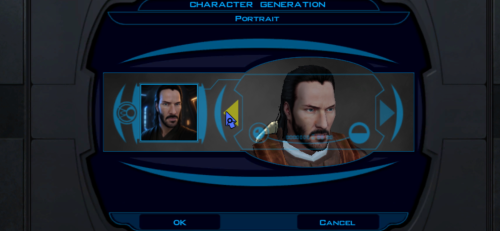
View File Keanu Reeves Inspired Player Head (K1) This mod adds a fully selectable male player head inspired by Keanu Reeves to Star Wars: Knights of the Old Republic. FEATURES • Custom high-detail head model with corrected in-game UVs and opaque 2048x2048 textures. • Neutral, light-side, and progressive dark-side head textures that change with alignment. • Matching alignment-aware cinematic portraits for character creation, the party interface, and the HUD. • KOTOR I-native facial animation support: blinking, eye movement, lip sync/phonemes, and expressions. • Rebuilt mouth articulation that opens through the natural upper/lower lip gap. • Repositioned teeth and a fully enclosed, dark oral cavity that prevents see-through gaps from frontal, oblique, side, and reclined camera angles. • Corrected neck and jaw shading across the welded source-model boundary. • Long hair configured for KOTOR I's native danglymesh simulation. • Merge-safe TSLPatcher installation for heads.2da, appearance.2da, and portraits.2da, including the installer info document. • No executable patch is required. INSTALLATION 1. Extract the archive outside your game folder. 2. Close KOTOR I. 3. Run TSLPatcher.exe and select the folder containing swkotor.exe if asked. 4. Start a new game and select the new portrait during male character creation. Install after major restoration or community-patch packages. Do not copy the tslpatchdata folder directly into Override. See the included README for complete compatibility and uninstall information. COMPATIBILITY This release is for KOTOR I only. It uses TSLPatcher and unique resource names, and is designed to coexist with K1R and other merge-safe mods. Install this mod after K1R or other large content packages. CREDITS • ShaolinGhost — concept, source asset, direction, testing, and release. • Ghost Studio — KOTOR head conversion, facial rigging, native-hair setup, packaging, and verification workflow. • BioWare and LucasArts — KOTOR I and its original PMHA04 animation/rig foundation. • Stoffe — TSLPatcher. PERMISSIONS You may make personal edits. Do not re-upload, redistribute, or include this mod in another public release without ShaolinGhost's permission. DeadlyStream staff retain the maintenance rights described in the site's upload terms. DISCLAIMER This is a non-commercial fan modification. It is not affiliated with or endorsed by Keanu Reeves, Lucasfilm, Disney, Electronic Arts, BioWare, or any other rights holder. Use at your own risk and keep backups of modded files. Version: 1.1.1 Game: Knights of the Old Republic Contains ported content from another game: No Submitter ShaolinGhost Submitted 08/10/2026 Category Skins K1R Compatible Yes AI DISCLOSURE & FEEDBACK I use AI often in my workflows to assist with creating my mods, including handling monotonous and repetitive tasks. You should assume that anything I post has had AI assistance in some way. As I stated in my Dathomir WIP post, I expect discussion of my projects to remain professional and focused on the actual artwork, performance, and gameplay. Constructive criticism that helps improve the art or gameplay is welcome. Derogatory statements about AI will be ignored. I am here to improve the finished product, and I will not change my workflow to accommodate personal objections to AI.
-
- 1
-
-
- kotor 1
- player head
- (and 4 more)
-
Version 1.1.1
107 downloads
AI DISCLOSURE & FEEDBACK I use AI often in my workflows to assist with creating my mods, including handling monotonous and repetitive tasks. You should assume that anything I post has had AI assistance in some way. As I stated in my Dathomir WIP post, I expect discussion of my projects to remain professional and focused on the actual artwork, performance, and gameplay. Constructive criticism that helps improve the art or gameplay is welcome. Derogatory statements about AI will be ignored. I am here to improve the finished product, and I will not change my workflow to accommodate personal objections to AI. This mod adds a fully selectable male player head inspired by Keanu Reeves to Star Wars: Knights of the Old Republic. FEATURES • Custom high-detail head model with corrected in-game UVs and opaque 2048x2048 textures. • Neutral, light-side, and progressive dark-side head textures that change with alignment. • Matching alignment-aware cinematic portraits for character creation, the party interface, and the HUD. • KOTOR I-native facial animation support: blinking, eye movement, lip sync/phonemes, and expressions. • Rebuilt mouth articulation that opens through the natural upper/lower lip gap. • Repositioned teeth and a fully enclosed, dark oral cavity that prevents see-through gaps from frontal, oblique, side, and reclined camera angles. • Corrected neck and jaw shading across the welded source-model boundary. • Long hair configured for KOTOR I's native danglymesh simulation. • Merge-safe TSLPatcher installation for heads.2da, appearance.2da, and portraits.2da, including the installer info document. • No executable patch is required. INSTALLATION 1. Extract the archive outside your game folder. 2. Close KOTOR I. 3. Run TSLPatcher.exe and select the folder containing swkotor.exe if asked. 4. Start a new game and select the new portrait during male character creation. Install after major restoration or community-patch packages. Do not copy the tslpatchdata folder directly into Override. See the included README for complete compatibility and uninstall information. COMPATIBILITY This release is for KOTOR I only. It uses TSLPatcher and unique resource names, and is designed to coexist with K1R and other merge-safe mods. Install this mod after K1R or other large content packages. CREDITS • ShaolinGhost — concept, source asset, direction, testing, and release. • Ghost Studio — KOTOR head conversion, facial rigging, native-hair setup, packaging, and verification workflow. • BioWare and LucasArts — KOTOR I and its original PMHA04 animation/rig foundation. • Stoffe — TSLPatcher. PERMISSIONS You may make personal edits. Do not re-upload, redistribute, or include this mod in another public release without ShaolinGhost's permission. DeadlyStream staff retain the maintenance rights described in the site's upload terms. DISCLAIMER This is a non-commercial fan modification. It is not affiliated with or endorsed by Keanu Reeves, Lucasfilm, Disney, Electronic Arts, BioWare, or any other rights holder. Use at your own risk and keep backups of modded files. Version: 1.1.1 Game: Knights of the Old Republic Contains ported content from another game: No- 2 comments
-
- 1
-
-
- kotor 1
- player head
- (and 4 more)
-
https://github.com/CrispyW0nton/Kotor-3D-Model-Converter/tree/qt-ghostrigger Development Update: GhostRigger Has Taken a Big Step Forward Hey everyone, I wanted to post an update on GhostRigger because the project has been moving fast lately. The short version: GhostRigger is still very much a WIP, but it has grown from a basic model viewer / importer concept into a much more serious KotOR development toolkit. A lot of recent work has focused on making the tool feel less like a loose utility and more like professional game-dev software for working with Odyssey/Aurora assets. Major Recent Progress GhostRigger now has much stronger support for: Loading and browsing KotOR 1 and KotOR 2 game assets directly from the game directory Rendering MDL/MDX models in a modern Qt viewport Texture handling improvements, including fixes for wrapping/clamping issues on module and character textures Better module/area model categorization and labeling Improved viewport controls, including transform/gizmo work Measurement tools for inspecting models and scene scale A new lighting system inspired by the Aurora/Odyssey render pipeline Experimental lightmap baking tools Better module rendering, including ongoing work around baked lightmaps MCP tooling for automated inspection, validation, and asset transfer workflows Continued work on the Character Builder pipeline One big area of research recently has been KotOR’s “mesh objects as bones” system. KotOR does not use a modern armature system like Blender, Unity, or Unreal. Instead, the named MDL node hierarchy itself is the skeleton, and many _g meshes are both visible geometry and animation bones. That changes how the Character Builder needs to work. The “Build Skeleton” step is being reworked around this native KotOR logic instead of trying to force modern FBX armature assumptions onto the game. Character Builder Direction The Character Builder is being reshaped around a clearer workflow: Choose a base KotOR model/skeleton Load the custom mesh Align the mesh to the KotOR skeleton Assign/build the KotOR node hierarchy correctly Assign or preview animations through the supermodel chain Preview heads, weapons, equipment, and attachments Export a game-ready MDL/MDX There is still work to do here. I do not want to pretend this is launch-ready yet. The goal is not just “can it import a model,” but “can a KotOR modder actually use this smoothly to get a model in-game without fighting the tool.” That means the rigging, preview, animation assignment, texture handling, and export flow all need to feel reliable. Huge Thanks to LordVader I also want to give a major shoutout to LordVaderCW, who has been contributing a lot of important work through his fork. Recent collaboration from LordVader has brought in substantial improvements, including: A new Aurora-style lighting system A new transform gizmo system Measurement tooling Experimental lightmap baker work Lightmap/rendering patches Fixes around rendering artifacts, including Windows-specific GPU issues General cleanup and modernization across the Qt branch This collaboration has been extremely helpful. A lot of the recent progress is coming from comparing approaches, merging work, testing real KotOR assets, and trying to make sure GhostRigger behaves like a proper KotOR tool rather than just a generic model viewer. Current Focus Right now the main priorities are: Making module rendering more accurate Improving lightmap and texture correctness Continuing the Character Builder rework around native KotOR skeleton logic Making the viewport/gizmo workflow smoother Building a real animation and equipment preview system Making sure exported assets are structurally valid for K1 and K2 The big question I keep coming back to is: would this actually help a KotOR modder get a custom model into the game faster and with fewer headaches? That is the standard I am aiming for. Thanks again to everyone who has been following the project, and especially to LordVader for the recent collaboration. There is still a lot to do, but GhostRigger is becoming much closer to the kind of full game-dev toolkit I originally wanted to build for KotOR.
-
AI DISCLOSURE & FEEDBACK I use AI often in my workflows to assist with creating my mods, including handling monotonous and repetitive tasks. You should assume that anything I post has had AI assistance in some way. As I stated in my Dathomir WIP post, I expect discussion of my projects to remain professional and focused on the actual artwork, performance, and gameplay. Constructive criticism that helps improve the art or gameplay is welcome. Derogatory statements about AI will be ignored. I am here to improve the finished product, and I will not change my workflow to accommodate personal objections to AI. Hey everyone! I'm ShaolinGhost, a second-year Game Design student at AAU finishing my bachelor's degree and moving onto my Masters this year. I'm working on both of these tools as part of my thesis project, and I'm super excited to share what I've been building. Why I'm Making This KotOR isn't just my favorite game. It literally shaped how I see video games and the world. I played it when I was a kid, and it's stuck with me ever since. That's the whole reason I want to do this: give modders and game devs a toolkit that actually feels like real game development software. Right now, modding KotOR is awesome, but the tools are spread all over the place. You bounce between different programs, learn different interfaces, and it's honestly kind of a pain. I want to fix that. My goal is to bring KotOR modding and the game itself to Unity with a professional-grade modding kit. Two tools that work together perfectly: GhostRigger-K1-K2 — Your all-in-one 3D model editor (import/export, rigging, texturing, the whole pipeline) GhostScripter-K1-K2 — Your IDE for writing quests, dialogues, scripts, and managing everything else Both tools are built to feel like actual game development software based purely off of my experience using things like RizomUV, Zbrush, Maya, Topogun, Acurig, UnrealEngine etc. clean dark theme, intuitive layouts, everything in one place. What GhostRigger Can Do Browse and load any KotOR model directly from your game files Real-time 3D viewport with orbit, pan, zoom, and wireframe view Import your own models from OBJ or FBX (sculpt in ZBrush/Maya, bring it in) Auto-rigging to KotOR skeleton templates Manual Rigging in the tool supported Export back to KotOR format, compile, and test in seconds Handle all your textures (TGA → TPC conversion, UV viewing, the works) Basically: Sculpt your stuff outside, import it clean, and let GhostRigger handle the KotOR technical stuff. What GhostScripter Can Do Script Editor — Write NWScript with full syntax highlighting, auto-complete, and a built-in function reference Dialogue Editor — Build dialogue trees visually with a node-based graph (way easier than text editors) Quest Builder — Templates that scaffold out quests automatically with the right variable names and structure 2DA Manager — Edit spreadsheets like globalcat.2da without pain One-Click Export — Push your mod straight to the override folder or package it as an ERF It all connects together. You can even rig models in GhostRigger, and GhostScripter will automatically pull them in. What I'm Looking For I want to make sure these tools actually solve real problems for modders. So I'm opening this up for feedback: For GhostRigger: What features would make rigging faster for you? Are there things you wish you could do that other tools make hard? What about the workflow? Does the architecture I stated so far feel natural? For GhostScripter: Should I add a visual quest state editor, or is the current form good? Would a script dependency checker (find broken references) be useful? What about integrating a decompiler so you can edit existing mods? Any other QoL features you'd want in an IDE? Drop your thoughts in the replies! I'm building this for the community, and I want to make sure it's something you'll actually use. Timeline & Release Right now, both tools are functional and I'm actively testing them. Once I've verified that all the core features work smoothly and reliably, I'll release them for public use and testing. I want to make sure they're stable and solid before I put them in your hands. I'll keep you posted on progress, and when they're ready, you'll be the first to know!


