



th3w1zard1
-
Posts
72 -
Joined
-
Last visited
-
Days Won
9
Content Type
Profiles
Forums
Blogs
Forum & Tracker Requests
Downloads
Gallery
Store
Events
Posts posted by th3w1zard1
-
-
Big preservation win for the KotOR modding community today.
Several long-dormant classic tools are officially no longer abandonware and will now be maintained under the OpenKotOR umbrella.
These utilities have been part of the foundation of KotOR modding for years, and having active stewardship again means bug fixes, modernization, long-term preservation, and future quality-of-life improvements are finally back on the table.
Huge thanks to @Fair Strides for helping make this possible and for entrusting the community with the source and continued maintenance.
Official new repository homes:
- TSLPatcher ← (yes you are reading this correctly)
- ChangeEdit ← (yes, your eyes are NOT deceiving you!)
- ERFEdit
- JRLEditor
- TalkEd
- SSFEdit
This is one of those moments that quietly changes the future of the ecosystem.
More information:- OpenKotOR is dedicated to keeping source code and legacy applications maintained to allow anyone and everyone to start building and creating quickly. A lot of the old communities are fragmented and much of the information is difficult to find/understand without a community. Many of us are frustrated with this, and have created a community where we can just get stuff done without a plethora of outdated archaic rules making it seem like the average subreddit arguing with various Reddit mods.
If you head over to https://discord.gg/jxR7hzHmsD, you’ll find an active hub of modern KotOR tooling and development. The community is building full replacements for many of the classic utilities -- including a brand‑new 3D map builder, an opinionated MDL viewer/animator/extractor, and even a complete game engine rewrite capable of running KotOR directly in your browser.
On the modding side, major projects like Sleheyron, Rhen Var, and expanded work on M4‑78EP are deep in testing, iteration, and refinement. The server is a great place to follow progress, report issues, and see what the next generation of KotOR modding looks like as it takes shape.
There’s a lot happening, and it’s all moving fast. New people are joining every day, many doing things that could only be *dreamed* of in previous years.Imagine if we beat Disney to a remake, or if our community non-profit passion turns out BETTER than what the game developers intended.
All of this work lives under the broader OpenKotOR community, which you can join here:
Everyone has a say in this community, regardless of how long you've been around, who you are, or what your current understanding is. This is a completely decentralized community. Please feel free to openly share your creativity and curiosity or just grab some popcorn and watch some agentic engineers poop out some ai spaghetti. It's all quite fun.
If you’re curious, want to contribute, or just enjoy seeing the game pushed into new territory, you’ll fit right in.
-
 2
2
-
Sorry if this is the wrong place to post. What on earth is the exact font and size and color and style used by the first game?
If anyone knows it would be appreciated 🙏 thank you
-
NCSDecomp is my attempt at replacing DeNCS with a modern alternative.
-
1
-
-
Please see the official GitHub repo to get support and find updates: https://github.com/OpenKotOR/DeNCS
DeNCS - Turn Your Compiled KOTOR Scripts Back Into Readable Code!
Ever wanted to see what's inside those compiled .ncs script files from KOTOR? Or maybe you found a mod with scripts you want to understand or modify? DeNCS can take those compiled script files and turn them back into readable source code that you can actually understand and edit!
What does it do?
Simply put, DeNCS converts compiled KOTOR scripts (.ncs files) back into source code (.nss files). It's like having a translator that converts the game's internal script format back into human-readable code. Works with both KOTOR 1 and KOTOR 2!
How to use:
There are two ways to use DeNCS - a simple graphical program (GUI) or command-line tools. Most users will want the GUI version!
Option 1: The Easy Way (GUI - Recommended!)
1. Download the DeNCS folder
2. Double-click DeNCS.exe (Windows) or DeNCS.app (Mac)
3. That's it! No Java installation needed - everything is included!Once it opens:
- Drag and drop any .ncs file onto the window to decompile it
- Or use File → Open to browse for files
- The decompiled code will appear with syntax highlighting (color-coded keywords, functions, etc.)
- You can edit the code right there if you want
- Press Ctrl+S (or Cmd+S on Mac) to save your changes
- Open multiple files at once - each gets its own tab
The program supports both KOTOR 1 and 2 (configurable in the settings) and attempts to unify most nwnnsscomp.exe variants, but has mainly been tested with kotorscript and ktool's variants.
Option 2: Command Line (For Advanced Users)
If you prefer using the command line or want to automate tasks:
Windows:
.\DeNCSCLI.exe -i "script.ncs" -o "script.nss" --k2Mac/Linux:
./DeNCSCLI -i "script.ncs" -o "script.nss" --k2This reads script.ncs and creates script.nss with the decompiled code. Use --k1 for KOTOR 1 scripts, or --k2 for KOTOR 2 scripts.
Decompile an entire folder:
.\DeNCSCli.exe -i "scripts_folder" -r --k2 -O "output_folder"This processes all .ncs files in the folder (including subfolders) and saves the results to your output folder.
Features:
- Works with both KOTOR 1 and KOTOR 2/TSL scripts
- Beautiful graphical interface with syntax highlighting
- Edit decompiled scripts and compile them back
- Round-trip verification - see if your edited code compiles correctly
- Batch process entire folders of scripts at once
- View bytecode if you're curious about the low-level details
- Self-contained - no Java installation needed!
- Cross-platform - works on Windows, Mac, and Linux
What can you do with it?
- Decompile .ncs files to see the original source code
- Understand how game scripts work
- Edit scripts and recompile them for mods
- Analyze scripts from your favorite mods
- Batch process entire script folders quickly
Troubleshooting:
"Error: nwscript file not found"
- Make sure you haven't deleted or moved the tools folder that came with the download
- The program should find everything automatically, but if you get this error, check that the tools folder is in the same directory as the executable
"Program won't start" (Windows)
- Windows might be blocking it. Right-click DeNCS.exe → Properties → Check "Unblock" → Apply
- Try running as Administrator if you get permission errors
"Program won't start" (Mac)
- You may need to allow the app in System Preferences → Security & Privacy
- Right-click the app and select "Open" the first time
"Program won't start" (Linux)
- Make sure the executable has permission to run:
-
Make sure the executable has permission to run:
chmod +x DeNCSCli/DeNCSCli
For more help:
- Run .\DeNCSCLI.exe --help (Windows) or ./DeNCSCLI --help (Mac/Linux) to see all available options
- Check the included README files for detailed documentation
Source code and more info:
https://github.com/bolabaden
https://bolabaden.orgCredits:
Original Developers (The Foundation):
- JdNoa - Created the original script decompiler engine
- Dashus - Created the original GUI
These developers did the hard foundational work that made this tool possible. The original DeNCS was an internal tool used by TSLRP (The Sith Lords Restoration Project) and was released to the public "as is" with no warranty.
Current Maintainer:
- th3w1zard1 - Complete rewrite and modernization
- You! if you like! just head to https://github.com/OpenKotOR/DeNCS and start contributing.
This version represents a near-complete rewrite and modernization of the original DeNCS tool. While based on the original developers' foundational work, the current version has been extensively revamped with a new GUI, modernized codebase, cross-platform support, and many new features. The core decompilation concepts from the original work remain, but the implementation has been significantly rewritten for modern development practices.
License:
This software is provided under the Business Source License 1.1 (BSL 1.1). See LICENSE.txt in the download for full license information.
Enjoy decompiling! 🎮✨
-
3
-
 4
4
-
You're trying to install a mod that's modifying files in Modules (ERF/RIM/MOD) but are rendered completely ignored due to a higher priority file that exists in your Override folder. Check if the mod you're installing is compatible with whatever you already have installed.
-
I've been doing heavy development on a new version of the Holocron Toolset. This is a comprehensive and significant refactor and partial rewrite.
Version v4.0.0 is now available for beta testing. Anyone wishing to try it may run one of the commands below depending on your OS, which will always launch the latest version retroactively:
**Windows (PowerShell)**
```pwsh
powershell -ExecutionPolicy ByPass -c "irm https://astral.sh/uv/install.ps1 | iex"; uvx holocrontoolset
```**Linux / macOS (bash/zsh)**
```bash
curl -LsSf https://astral.sh/uv/install.sh | sh && uvx holocrontoolset
```cPlease post bugs in the kotor toolset's official discord: https://discord.gg/34QZKtThkU. Here you will also find our announcements, be able to post suggestions to recommend new features, and stay up to date with announcements.
Source code as always will be available on <https://github.com/th3w1zard1/PyKotor>. Bugs may be posted here as well.
If you prefer KOTOR tool or other options for comprehensive parsers and editors I suppose you may ignore this post completely and enjoy your day as normal. Otherwise suggestions, feature requests, and bug reports are appreciated to be able to further improvement of these modding tools for all. Thanks.
-
1
-
 2
2
-
-
Obligatory mention of https://github.com/LaurieWired/GhidraMCP
Regardless of how much skill one may have with reverse engineering, ghidra, familiarity with assembly, etc, the model context protocol server’s tools can just breeze through most tasks exponentially faster than a human using human-in-loop NLP
Follow instructions to setup, attach to `swkotor.exe` and start prompting.
Edit: use cautiously, obviously. Has saved me countless hours personally.
> * A note about Kotor 1 Steam: While this reverse engineering effort targeted the GoG release of KotOR 1, the Steam version has MANY similarities; often times having identical memory addresses for most functions. Any Patch made for the GoG version can be pretty reasonably ported to Steam with a little bit of effort.
Might be worth creating func signatures that work for both versions, and potentially include the second game, for more universal targeting (rather than absolute hardcoded memory addresses).
Though it’s interesting to know the first game differs slightly between gog and steam. I wonder why that would ever be? It’s not like steam version has any api integration (steam_api.dll)
-
On 8/12/2025 at 9:26 AM, Orest said:
There is problem occured when this tool finished, so I replaced old elements to new ones with additional "_UKRAINIAN" (because I chosed to translate into ukrainian). But then I saw that this tool made maybe identical elements that differ in the number of “additional words, for ecxample "tat_m18ab_UKRAINIAN.rim ; tat_m18ab_UKRAINIAN_UKRAINIAN.rim ; tat_m18ab_UKRAINIAN_UKRAINIAN_UKRAINIAN.rim" and so on. So I have a question - what I must to do and how to rename this elements without repeats? Help me, please!
Yeah the tool will rename any file and simply add a suffix referring to the language at the end. <original file name>_<language>.ext. So when you run it twice you will receive <original file name (which now has _<language> in it)_<language>.ext
This is not the most polished tool in the world. You'll need to rename them to the original file name.
if you're on Windows I recommend https://www.advancedrenamer.com/ -
@TrappedDean the relevant logs from your post (not fully complete)
[2024-09-14 20:40:26] [Error]
Name: Movie-Style Rakatan Holograms
Instruction #1: 'Extract'
Issue: Missing Required Archives: [<<modDirectory>>\[K1]_Movie-Style_Rakatan_Holograms_v*.7z]
[2024-09-14 20:40:26] [Error]
Name: Dark-Side Ending Cutscene Enhancement
Instruction #1: 'Extract'
Issue: Missing Required Archives: [<<modDirectory>>\[K1]_Dark_Side_Ending_Cutscene_Enhancement_v*.7z]
[2024-09-14 20:40:26] [Error]
Name: Elder Droid Unique VO
Instruction #1: 'Extract'
Issue: Missing Required Archives: [<<modDirectory>>\[K1]_Legends_-_Elder_Droids_Unique_VO_v*.7z]
[2024-09-14 20:40:26] [Error]
Name: Ajunta Pall's Swords Revamped
Instruction #1: 'Extract'
Issue: Missing Required Archives: [<<modDirectory>>\Ajunta*s Swords.7z]
[2024-09-14 20:40:26] [Error]
Name: Ajunta Pall's Blade
Instruction #1: 'Extract'
Issue: Missing Required Archives: [<<modDirectory>>\[K1]_Legends_Ajunta_Pall's_Blade_v*.7z]
[2024-09-14 20:40:26] [Error]
Name: JC's Mandalorian Armor
Instruction #1: 'Extract'
Issue: Missing Required Archives: [<<modDirectory>>\JC's Mandalorian Armor for K1 v*.zip]
[2024-09-14 20:40:26] [Error]
Name: Weapon Base Stats Rebalance
Instruction #1: 'Extract'
Issue: Missing Required Archives: [<<modDirectory>>\Weapon Base Stats Re-balance K1.rar]
[2024-09-14 20:40:26] [Error]
Name: Gaffi Stick Improvement
Instruction #1: 'Extract'
Issue: Missing Required Archives: [<<modDirectory>>\Gaffi Stick Improvement.zip]
[2024-09-14 20:40:26] [Error]
Name: Quarterstaff Replacement Pack
Instruction #1: 'Extract'
Issue: Missing Required Archives: [<<modDirectory>>\QSRPK1.7z]
[2024-09-14 20:40:26] [Error]
Name: Dantooine Training Lightsabers
Instruction #1: 'Extract'
Issue: Missing Required Archives: [<<modDirectory>>\DantTrainingLS*.zip]
[2024-09-14 20:40:26] [Error]
Name: Logical Datapads
Instruction #1: 'Extract'
Issue: Missing Required Archives: [<<modDirectory>>\Logical Datapads.7z]
[2024-09-14 20:40:26] [Error]
Name: Realistic Visual Effects
Instruction #1: 'Extract'
Issue: Missing Required Archives: [<<modDirectory>>\visual_effects_k1.7z]
[2024-09-14 20:40:26] [Error]
Name: NPC Alignment Fix
Instruction #1: 'Extract'
Issue: Missing Required Archives: [<<modDirectory>>\NPC_Alignment_Fix*.rar]
[2024-09-14 20:40:26] [Error]
Name: Carth Onasi and Male PC Romance
Instruction #1: 'Extract'
Issue: Missing Required Archives: [<<modDirectory>>\Carth Onasi and Male PC Romance.7z]
[2024-09-14 20:40:26] [Error]
Name: JC's Romance Enhancement: Pan-Galactic Flirting for K1
Instruction #1: 'Extract'
Issue: Missing Required Archives: [<<modDirectory>>\JC's Romance Enhancement - Pan-Galactic Flirting for K1 v*.zip]
[2024-09-14 20:40:26] [Error]
Name: JC's Romance Enhancement: Biromantic Bastila for K1
Instruction #1: 'Extract'
Issue: Missing Required Archives: [<<modDirectory>>\JC's Romance Enhancement - Biromantic Bastila v*.zip]
[2024-09-14 20:40:26] [Error]
Name: Ultimate Character Overhaul Patches
Instruction #1: 'Extract'
Issue: Missing Required Archives: [<<modDirectory>>\JC's Minor Fixes - Compatibility Patch*.rar]
[2024-09-14 20:40:26] [Error]
Name: Ultimate Character Overhaul Patches
Instruction #3: 'Extract'
Issue: Missing Required Archives: [<<modDirectory>>\KOTOR 1 Community Patch - Compatibility Patch*.rar]
[2024-09-14 20:40:26] [Error]
Name: Ultimate Character Overhaul Patches
Instruction #5: 'Extract'
Issue: Missing Required Archives: [<<modDirectory>>\Republic Soldier's New Shade - Compatibility Patch*.rar]
[2024-09-14 20:40:26] [Error]
Name: Ultimate Character Overhaul Patches
Instruction #7: 'Extract'
Issue: Missing Required Archives: [<<modDirectory>>\Miscellaneous Compatibility Patches*.rar]
[2024-09-14 20:40:26] [Error]
Name: Ultimate Character Overhaul Patches
Instruction #11: 'Extract'
Issue: Missing Required Archives: [<<modDirectory>>\Better Twi'lek Male Heads - Compatibility Patch*.rar]
[2024-09-14 20:40:26] [Error]
Name: Ultimate Character Overhaul Patches
Instruction #13: 'Extract'
Issue: Missing Required Archives: [<<modDirectory>>\JC's Mandalorian Armor - Compatibility Patch*.rar]
[2024-09-14 20:40:26] [Error] Some components failed to validate. Check the output/console window for details.
If you are seeing this as an end user you most likely need to whitelist KOTORModSync and HoloPatcher in your antivirus, or download the missing mods.
you are simply missing some archives. ensure you downloaded everything and you set the Mod Directory correctly. It seems a lot of your missing archives are compatibility-patch-related. Those are usually part of Ultimate Character Overhaul. Check that download page again and ensure you have the compatibility patches you need downloaded. If you aren't sure, just literally download anything and everything you see on these mod pages and let ModSync figure it out.
Broadly, when you are using ModSync, you should start by unchecking everything. Check one thing at a time only after verifying manually that you have the archive downloaded with the correct name. You can do a few at a time and press 'validate' so it'll be obvious which mods are having the issue.
Generally, it is not recommended to blindly install everything, while modsync makes it easier it is still important to determine if you actually want the functionality a certain mod is offering... in many cases you may not need/want it. ModSync fully supports picking and choosing the mods you want to install within the list, providing full modularity.
-
On 8/9/2024 at 12:41 AM, Sith Holocron said:
So I have the ZIP version but I now get this error. Suggestions?
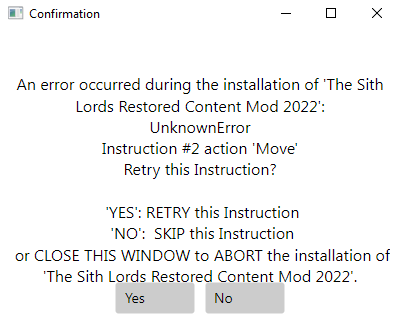
That messagebox should be impossible. There are pre-validators that run before an installation even starts to prevent issues such as that.
Given that instruction #2 is attempting to move
<<modDirectory>>/tslrcm_*/*
straight into the game folder, my best guess is you have a folder named 'tslrcm_something' that's empty in your mod directory. If your log files say 'newSourcePath' or something in the exception that would confirm. So the solution would be to cleanup any folders in your `mod directory` and ensure you have permission. Try running the built-in permission fixer tool. Alternatively, try running modsync as root, or as admin on windows (or vice versa if the error occurred with escalated privileges).
If that doesn't work you're looking at several bypass solutions:
The easiest would be to first install with the EXE, then run the install exactly as you did, and press the X in the upper right when the error pops up. Doing so should abort the install while still in the installation loop, which IIRC should then consider tslrcm an installed component. If by some chance you don't get the same error again (which again should be impossible: the installer is made to reproduce the same results every time), there are no functional game changes or stipulations caused by unzipping over prior tslrcm installs, since the EXE installer is just a glorified unzipper itself.
The other slightly more involved workaround would be modify the instructions.
1. Click TSLRCM on the lefthand side of the app.
2. Click 'raw edit' tab.
3. Delete everything that is below the following:
[[thisMod]]
Guid = "d2bf7bbb-4757-4418-96bf-a9772a36a262"
Name = "The Sith Lords Restored Content Mod 2022"
Author = "zbyl2, DarthStoney, Hassat Hunter & VarsityPuppet"
Category = "Essential"
Description = "The whole reason why you would mod KOTOR 2, the legendary mod that includes bugfixes, restored content, and altered scenes to return the game to what it was meant to be. This mod isn't just essential--it's mandatory."
Directions = "Executable. Recall that M4-78 is incompatible with this build; do not use it alongside TSLRCM! Remember also that the Workshop version of this or any other mod is NOT to be used!"
IsSelected = true
Language = ["All"]
ModLink = ["https://deadlystream.com/files/file/578-tsl-restored-content-mod/", "https://drive.google.com/drive/folders/156EqzmEESrxksm1f0cPl2tMUf-AOUt8Y?usp=sharing"]
[[thisMod.Instructions]]
Action = "Extract"
Overwrite = true
Source = ["<<modDirectory>>/tslrcm_*.zip"]
instruction #2 is the move action. So it, and everything under it will be deleted, leaving you with a singular 'extract'.
Why is it this convoluted/necessary and why is it not easy to skip a mod?
The whole point of the app is to guarantee that any user using the same options as another user are guaranteed to aggregate the exact same installation. ModSync uses identifiers to determine what's installed, to determine what all can and can't be installed, and it also affects the install order. If you were to deselect tslrcm, all the mods that rely on it would no longer be triggered.
If you pin some error logs here I can hopefully fix the bug for you and the next unfortunate soul. I am unable to reproduce the issue on my machine so it very well could be platform-specific.
-
On 7/31/2024 at 11:42 AM, Mayank90 said:
hey please help these are the only errors i cant figure out
[7/31/2024 10:06:30 PM] [Error]
[7/31/2024 10:06:30 PM] Exception: InvalidOperationException - Operation is not valid due to the current state of the object.
[7/31/2024 10:06:30 PM] Stack trace:
at SharpCompress.Common.SevenZip.ArchiveReader.ReadDatabase(IPasswordProvider pass)
at SharpCompress.Archives.SevenZip.SevenZipArchive.LoadFactory(Stream stream)
at SharpCompress.Archives.SevenZip.SevenZipArchive.LoadEntries(IEnumerable`1 volumes)
at SharpCompress.Archives.AbstractArchive`2..ctor(ArchiveType type, SourceStream srcStream)
at SharpCompress.Archives.SevenZip.SevenZipArchive.Open(Stream stream, ReaderOptions readerOptions)
at KOTORModSync.Core.ComponentValidation.IsPathInArchive(String relativePath, String archivePath)
at KOTORModSync.Core.ComponentValidation.IsSourcePathInArchives(String sourcePath, List`1 allArchives, Instruction instruction)
at KOTORModSync.Core.ComponentValidation.VerifyExtractPaths()
[7/31/2024 10:06:30 PM] [Error] Some components failed to validate. Check the output/console window for details.
If you are seeing this as an end user you most likely need to whitelist KOTORModSync and HoloPatcher in your antivirus, or download the missing mods.It's failing to pre-validate that the file in the archive being installed indeed exists in the archive. My guess is the archive you downloaded is corrupted/incorrect. Try running again with 'verbose' mode enabled, see if the logs have any more useful information.
On 7/21/2024 at 11:12 PM, Natharus87 said:Hey, looks like Senni Vek Restoration was updated and no longer works with the installer. Getting this error "Issue: Failed to find 'Senni Vek Restoration\Senni Vek Restoration\For Override\tat_senni.utc' in any archives!"
this is now fixed
On 7/19/2024 at 3:47 PM, Sith Holocron said:Hello @th3w1zard1. First time user of KOTORModSync here.
I've had a few issues that I've mostly been able to resolve on my own but one final one seems to remain. KOTORModSync isn't recognizing TSLRCM correctly.
At first I thought it may be something as simple as a missing underscore in the file name or the EXE file not being in a ZIP file but those attempted workarounds haven't succeeded. Would you helping an old man figure out what he's doing wrong? Hopefully the attached picture may give you a clue.
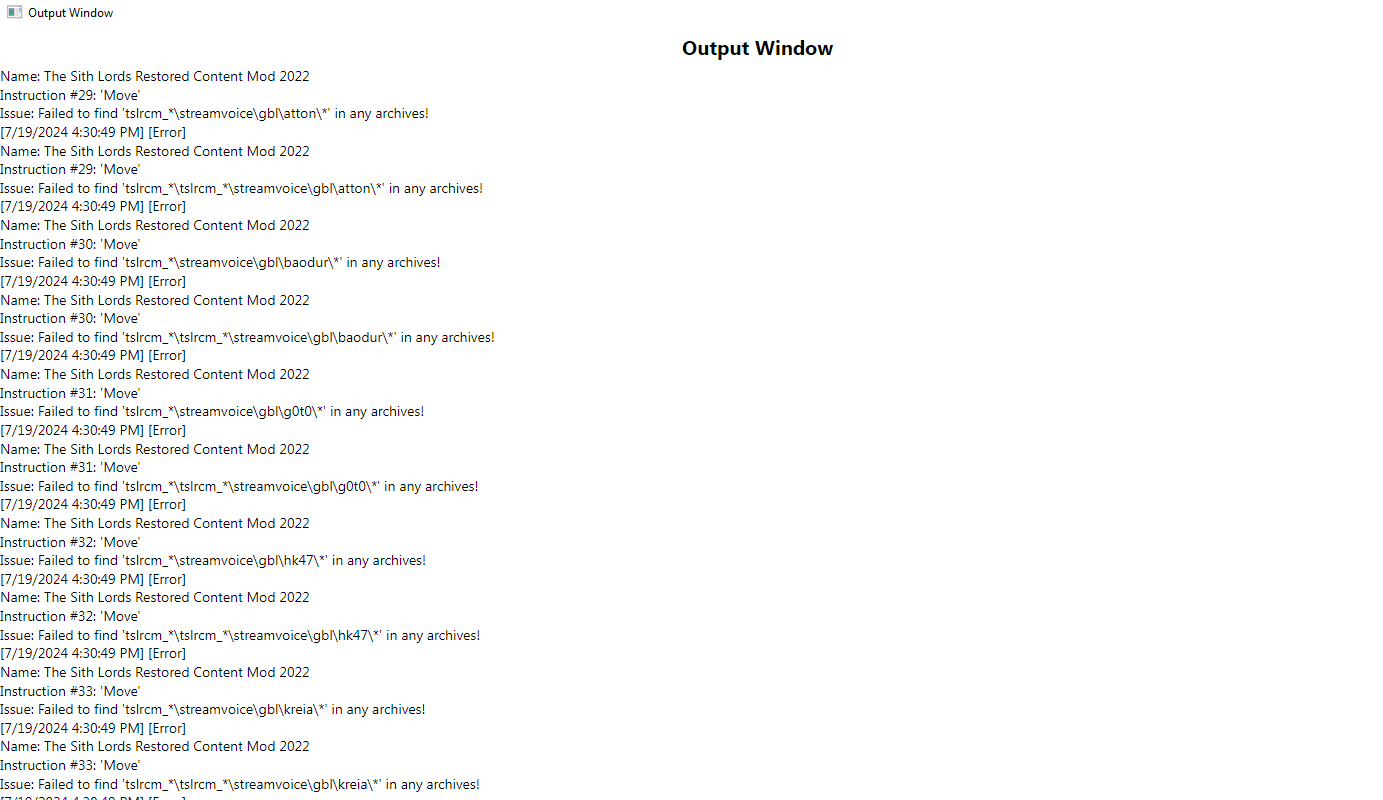
I was given permission to reupload as a .zip. You need to use the ZIP version of TSLRCM, The EXE version is NOT compatible.
You can find a link in the app itself, click on 'tslrcm' at the left side and the link is at the top of the Summary tab.
-
On 5/15/2024 at 9:47 AM, Constructour said:
Hey th3w1zard1, I'm having some issues successfully completing the Pre-install Validation step without errors because the tool cannot find two mods, specifically Scoundrel DS Underwear Fix.7z and Bastila Shan (clothing) HD.rar.
I've downloaded all of the mods from the Mod Build page, and they are all on the dowloaded mods directory I have pointed the tool to. However, it still cannot detect that the Scoundrel DS Underwear mod is there. I am not sure that the Bastila Shan HD mod is part of the build, as well.The output log from the Pre-Validation attempt:
[5/15/2024 10:37:12 AM] [Note] - No mod chosen: Select your mod directory first.
[5/15/2024 10:37:13 AM] Finding duplicate case-insensitive folders/files in the install destination...
[5/15/2024 10:37:13 AM] Checking for duplicate components...
[5/15/2024 10:37:13 AM] Ensuring both the mod directory and the install directory are writable...
[5/15/2024 10:37:13 AM] Validating individual components, this might take a while...
[5/15/2024 10:37:13 AM] [Error]
Name: Male Scoundrel Underwear Fix
Instruction #1: 'Extract'
Issue: Missing Required Archives: [<<modDirectory>>\Scoundrel DS Underwear Fix.7z]
[5/15/2024 10:37:13 AM] [Error]
Name: Bastila Shan HD
Instruction #1: 'Extract'
Issue: Missing Required Archives: [<<modDirectory>>\Bastila Shan HD (clothing).rar]
[5/15/2024 10:37:13 AM] [Error] Some components failed to validate. Check the output/console window for details.
If you are seeing this as an end user you most likely need to whitelist KOTORModSync and HoloPatcher in your antivirus, or download the missing mods.
Is the instruction file up to date, perhaps? And as these are the only two missing mods, could I install anyway and play without them?zThank you for your help.
Edit for more info: Looking at the mod that the mod build calls for, I think the .toml is calling for the wrong mod. It's calling for Male Scoundrel Underwear Fix by Stellar Exile instead of Scoundrel Trousers by DarkBirdie.
Edit for yet more info: I figured out how to use the the entries in the loaded .toml to find the missing mods and add them and I am now getting no errors. I also added the Scoundrel Trousers mod manually. Nonetheless, I believe there is a dysync between the KOTOR1_SPOILER_FREE.toml file and the current list on Neocities.Oops, you're 100% correct. I had the wrong scoundrel mod in there compared to neocities. Has been fixed on the main page.
-
On 12/19/2022 at 8:17 PM, Leilukin said:
TSLRCM doesn't package the 702KOR module into a .MOD file because it will break cutscenes, though no one is able to figure out why exactly does that happen. 401DXN is another module that TSLRCM doesn't package into a MOD file.
I have made two mods (Darth Sion and Male Exile Mod and Lonna Vash Mod for TSLRCM) that affect the 702KOR and are installed by injecting or patching files in its _dlg.erf and _s.rim, and they work fine.
What files are you trying to inject into the 702KOR module?
Posting in case someone comes along with the same question...
The reason they break cutscenes has been solved. It was not the game's fault, rather the tools modders have been using to pack .MOD's in the past.
Creating the `702KOR.mod` with Holocron Toolset for instance makes the whole thing completely playable without issue. Presumably the same with 401DXN.
-
Creating tools is my specialty. Let me know if you're finding some task in this project incredibly tedious, that a specialized tool could address. Would love to help out.
-
1
-
-
1 hour ago, offthegridmorty said:
Any order is fine. K2 FPs doesn’t add battle meditation so they shouldn’t conflict.
Thanks, was about 99% sure that was the case after checking `changes.ini` but wanted to triple check.
Cheers! Thank you for making this!
-
If using your K2 force powers in K1, do I install this before or after, or does it not matter?
Couldn't find any information on the readme's about it.
-
EDIT: All of this is fixed.
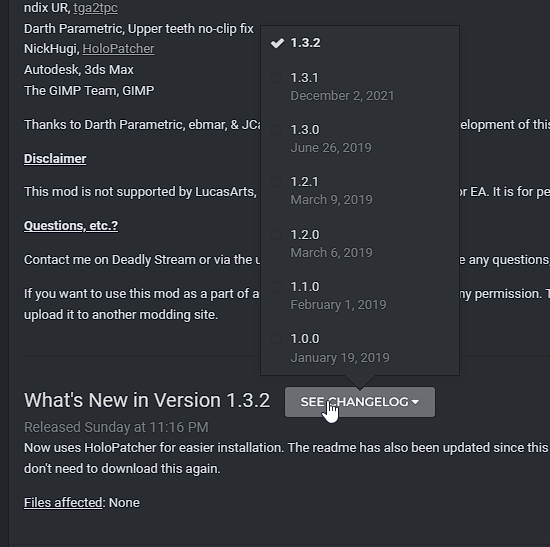
I won't have time to update the instructions and do tests but you can download the previous version it's looking for, just press this button on the DS page. v1.3.1 is what you want. Looks like @Ashton Scorpius updated their mod to use my latest update of HoloPatcher. From what I can tell no content changes were made.As for the dm_qrts yeah it looks like I accidentally used the archive from the full build. Both should be the same thing, since you aren't interacting with the archive outside of KOTORModSync there shouldn't be any spoilers but otherwise just try not to read the main DS page when downloading it.
Sorry I couldn't provide a direct fix at the moment but I hope this at least gets your install going if you did want those two mods.
-
1
-
-
@Guysabosssome mods have both a patch and the mod itself. Make sure you have everything it's telling you you need, the archive file names were up to date last I checked. Stuff like TSL Twilek heads also have compatibility patches for the UCO with similar names that you also need.
if all of that sounds too daunting, just unselect the ones that are erroring. You should ideally only be selecting the ones you want anyway, it's unlikely you'll want every single mod in that list.
-
There is an alien that drops off the Gizka on your ship when you arrive on Tatooine. Despite how annoying this is, the game doesn't give you an option to kill him. A simple dialog option that starts combat, and some extra dialog nodes from him to express disbelief/apologetic tone would be all this idea needs

-
On 3/8/2024 at 6:16 PM, JediNxf7 said:
i am having this issue 9 years later and it's enraging. what i don't understand is, I've finished this game before, with TSLRCM, and not had a broken game at malachor. i don't know why it's happening. I don't even get a cut scene - i get to thr fourth console,they claim the mass shadow generator is optional, but the "notes" log still says i have found the third and have one to go.
Are you running any other mods?
-
On 3/5/2024 at 12:17 PM, backagain said:
Is this project dead?
No. Look at the project website and repo to see its latest updates.
-
On 3/5/2024 at 11:52 AM, backagain said:
Is this project dead?
No, look at the recent commits to the repo..
-
After spending 5 minutes on this issue (so take this with a grain of salt) I've determined there is no .MOD issue (at least with 702KOR). The issue you guys were experiencing is a bug in KOTOR Tool or ERFEdit or whatever tool you used to create the .mod.
Using Holocron Toolset to create the .mod worked fine. I've tested the whole module with one of @Leilukin's light side saves, start->finish, no sequence breaks.
Probably the same problem in 401DXN
-
1
-
-
Can you open a terminal and execute:
find "~/Library/Application Support/Steam/steamapps/common/Knights of the Old Republic II/KOTOR2.app" > ~/tree_result_k2.txt && open ~/tree_result_k2.txtand post the results? This'll show me the long-awaited directory structure for the second game.
For the first game:
find "~/Library/Application Support/Steam/steamapps/common/swkotor/Knights of the Old Republic.app" > ~/tree_result_k1.txt && open ~/tree_result_k1.txtthere's also the mac store version of the games, after someone comes along with that information, every known version will be supported.
RESOURCE:KOTORModSync
in Mod Releases
Posted
For updates, please check in on GitHub or preferably Discord: https://discord.gg/qfKG3yfeZ5