

Leaderboard



Popular Content
Showing content with the highest reputation on 09/15/2026 in Files
-
Version 1.1.0
30 downloads
Easily manage, install, and revert loose-file mods. Features: Opens a mod as the zip, 7z or rar it downloaded as, or as a folder you already unpacked. No unpacking first. Works out which files are actually game content. Readmes, screenshots and packaging are left behind, and a mod shipping alternate versions of the same file asks you to pick one. Every install is recorded and can be taken back later. Uninstall leaves a file alone if something has changed it since, so it will not step on a patcher mod's work or on a later mod's. Finds duplicates already sitting in your Override. A name capitalised two ways, or one texture shipped as both a TPC and a TGA. Only one of each is ever loaded, and the game picks it arbitrarily. Shows what every layer of the game holds for a given file, so you can see a loose file quietly shadowing a copy inside a module archive. Finds your installation on its own. Steam, GOG and retail, on Windows, Linux and macOS, for both KotOR 1 and KotOR 2. If you play on Linux or a Steam Deck, this fixes something quiet Mod builds are ordered lists, and later mods are meant to overwrite parts of earlier ones. On Windows that happens by itself, because the filesystem does not care whether a file is called `Appearance.2da` or `appearance.2da`. On Linux it does care. Both files end up in Override, the game loads whichever one it reaches first, and the overwrite prompt the build guide told you to expect never appears. Your install order silently did not happen. This installs by name with a common lowercase filename, so the overwrite you meant is the one you get. What it does not do (yet) TSLPatcher mods. Those do not copy files into place. They merge rows into 2DA files that are already there, add entries to the talk table and write inside module archives. This recognises them and says so instead of half-installing them. Keep using HoloPatcher for those. (for now) Tested against The loose-file mods from the community build lists, and a full modded install. Additionally tested on Linux by @Leilukin and on macOS by @FTD Thanks for your help testing! Requirements The window fits a 1280x800 screen, so it works on a Steam Deck without too much squeezing. On Windows: Windows 10+ 64-bit On macOS: macOS 10.12+ for Intel Macs and 11.0+ for Apple Silicon Macs On Linux: Any recent Linux distro with glibc 2.35+ About Rakata Rakata is a clean-room Rust workspace for reading, writing and validating KotOR game data, written from scratch against notes taken from the engine rather than from anybody else's code. This installer is one tool built on top of it. It is free and open-source under GPL-3.0, and the source along with the format documentation is at https://codeberg.org/Synchro/rakata LLM Disclosure This project made use of an LLM during development, in the following capacities: Brainstorming: exploring possible approaches and design directions Decompilation assistance: help interpreting reverse-engineered code Code comments: refining and clarifying existing comments Skeletons and fixes: generating initial code scaffolding and minor fixes. All LLM-assisted output was modified and reviewed by a human before being committed.1 point -
Version 1.0.0
124 downloads
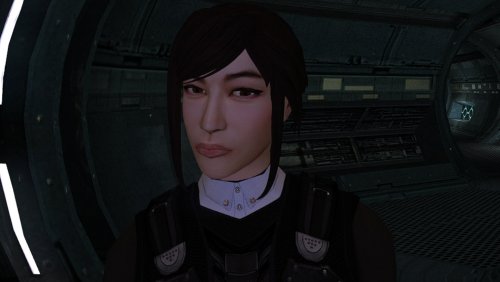
The mod replaces the PFHA05 model and textures. To Install 1. Download: PFHA05 2. Copy all files to the Knights of the Old republic's Override folder. (Example location - C:\Program Files (x86)\Steam\steamapps\common\swkotor\Override) 3. When/if prompted to overwrite files, press okay. 4. If you like the mod; leave a comment or endorse! (It would be much appreciated) Made with love.1 point -
.thumb.png.f28748a2e0f97c4bd2e46a90e24ee84e.png)
Version 1.1.0
923 downloads
A Mod for Star Wars Knights of The Old Republic Author: N-DReW25 1.0.1 Release Date: 25.05.2024 Installation: Please install the K1 Community Patch FIRST before this mod! No exceptions! Once you click on the HoloPatcher.exe, you'll be given a few install options. 1) Main mod: Installs the actual mod. 2) NPC Diversity Patch: If you're using the NPC Diversity Pack mod, you WILL have to install this option AFTER the main mod. 3) RC-K1CP Addon: RC-K1CP restored an Ithorian Miner to Anchorhead, this mod is OPTIONAL but if you want to use it you HAVE to have RC-K1CP installed BEFORE installing Czerka Redux. 4) Business Attire Addon: This option expands the Rodians modified by JC's Czerka: Business Attire for K1, this mod is OPTIONAL but if you want to use it you HAVE to have JC's Czerka: Business Attire for K1 installed BEFORE installing Czerka Redux. 5) Women of Czerka: Adds female Czerka Employees where possible. Completely optional but must be installed AFTER the main mod. Description: Czerka Redux is a union of various Czerka related textures into a single mod which aims to enhance the Czerka Corporation in Kotor 1. The Czerka Muscle Suit, Czerka Technician and Mining Suits from BOSSR have been added with the latter two being given to the Miner and Technician NPCs of Kotor. For any of my other mods which edits the Czerka Miners, those mods are compatible with Czerka Redux... meaning players who use Duros: Armed & Ready are able to use Czerka Redux and have the Duros Miners visibly wear BOSSR Czerka Mining Suits. The Czerka Combat Suit in RedRob41's Modder's Resource has also been added to the majority of Czerka's Security personnel. All the new Czerka items can be found and obtained in normal gameplay. The NPC textures from the K1 Enhancement Project have also been added, giving new meaning to the Czerka NPCs and their in-game profession. The green Czerka Officer texture from the Czerka Commander has been repurposed as a standard Czerka Officer profession skin whilst former Czerka Commanders now use armor. The male Czerka texture from JC's Fashion Line B: Commoner Clothing has been added for male Czerka NPCs and was used to convert new female Czerka clothing from K1EP into a new male variant exclusive to Czerka Redux. You'll also see new NPC variants from Czerka themed battle droids to Czerka Protocol Droids using B4-D4's texture. This mod also provides addons for other Czerka related mod, if you have JC's Czerka: Business Attire for K1 installed you can install the optional Business Attire Addon and get unique textures for JC's Rodians. If you use RC-K1CP, you can also install the RC-K1CP Addon to give the restored Ithorian Miner a new Business Attire inspired appearance. And of course, female Czerka NPCs can be added via the Women of Czerka option which uses DarthParametric's Female Czerka Officer's Uniform and has custom AI generated VO. Known Bugs: This mod shouldn't have any bugs but if there are please report them to me on Deadlystream. Incompatibilities: To be added! Permissions: Do NOT claim credit for this mod and do not use my assets from this mod without my permission. BOSSR assets are free to use as confirmed by SilverEdge9. RedRob41's Czerka Combat Suit textures are free to use as they are a modder's resource. K1 Enhancement Pack assets are free to use as they are a modder's resource. JC's Czerka: Business Attire for K1 is free to use as long as you credit JCarter426. DarthParametric's Female Czerka Officer's Uniform is free to use as it is a modder's resource. JC's Fashion Line B: Commoner Clothing cannot be used without permission from JCarter426. Thanks to: SilverEdge9: For BOSSR Czerka Assets! RedRob41: For the Combat Suit Modder's Resource! SpaceAlex: For the K1EP Czerka Assets! JCarter426: For granting me permission to use the male Czerka commoner texture from JC's Fashion Line B and for making Czerka Business Attire! DarthParametric: For making the Female Czerka Officer's Uniform modder's resource! ElevenLabs Website: For the custom AI VO service! Bioware: For such an amazing game! Fred Tetra: For Kotor Tool! th3w1zard1: For HoloPatcher! Everyone who downloads the mod! Legal: THIS MODIFICATION IS NOT SUPPORTED BY BIOWARE/OBSIDIAN ENTERTAINMENT, LUCASARTS, DISNEY OR ANY LICENSERS/SPONSORS OF THE MENTIONED COMPANIES. USE OF THIS FILE IS AT YOUR OWN RISK AND THE ABOVE-MENTIONED COMPANIES OR THE AUTHOR IS NOT RESPONSIBLE FOR ANY DAMAGE CAUSED TO YOUR COMPUTER FOR THE USAGE OF THIS FILE.1 point -
![More information about "[K1] Swoop platform model repairs"](https://deadlystream.com/downloads/screens/monthly_2025_04/370802232_Sanstitre1.thumb.jpg.da452fd1dbb89c2b1cd7762f60385ead.jpg)
Version 1.6
5,760 downloads
Swoop platform models repairs =============== By ZobiZob ------------------ Description There are notoriously some problems with most of the levels geometry, models and textures. They are not ultra noticeable, but once you see it, you can't unsee it. As i am working on a custom module using the swoop platform geometry, i decided to fix some of these problems, and also add numerous details like venting effects, animated light and distant swoop riders with upscaled textures for their bikes + different colors for riders. The full pack also displays your swoop in the module. Fixed music changes from 1.5 with version 1.6. Installation 3 options, either the full pack with the swoop you use during the race displayed, no swoop bike displayed and also an option without the doors. 1) Use the holopatcher.exe included and you're ready to go. If you're not satisfied with an option or the other, you can always come back and reinstall the desired option. Known Bugs and Incompatibilities Everything should be fine. If you replace the m03af.git file after installing the doors that i added in the distance will disappear. The upscaled textures only affect the swoop bikers and won't change the textures for Niktos/swoopgang creatures. Permissions You are free to incorporate this into any of your work without asking, just credit me and shiningredHD for the upscaled textures (swoop riders, swoop bikes). Acknowledgements All materials and copyrights belong to LucasArts, and Bioware. Upscaled textures from ShiningRedHD. I own none of the materials, and I'm not making any money out of this mod. This mod is not to be distributed for profit, either.1 point -
![More information about "[K1] K2 swoops to K1"](https://deadlystream.com/downloads/screens/monthly_2025_04/swoop1.thumb.jpg.4f3de38f4f76729d2dab6fbab9857034.jpg)
Version 1.0.0
6,034 downloads
Swoops from K2 to K1 =============== By ZobiZob ------------------ Description A small mod that changes your swoop model while racing. Either you keep the vanilla model, and it only adds a shield effect when you take damage (extracted from K2), or you can completely replace the vanilla K1 model with the one from K2 and all its animations. You have the choice between the 3 skins that there are in TSL (Classic, black, beige). There is a folder with the screenshots to see the K2 model and the different skins. Installation 1) Use Holopatcher.exe and choose one of the installation option. If you are not satisfied, you can restart the launcher and chose another option. Known Bugs and Incompatibilities Everything should be fine as long as you do not replace the model file from the swoop with something else of course. The model on the ebon hawk will still be the vanilla one. Permissions You are free to incorporate this into any of your work without asking, just credit me. Acknowledgements All materials and copyrights belong to LucasArts, Obsidian and Bioware. This mod is not to be distributed for profit, either.1 point -
Version 1.0.0
150 downloads
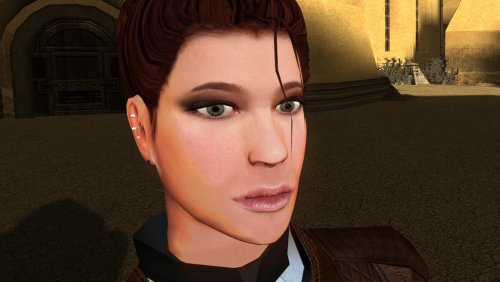
The mod replaces the PFHC02 model and textures. To Install 1. Download: PFHC02 2. Copy all files to the Knights of the Old republic's Override folder. (Example location - C:\Program Files (x86)\Steam\steamapps\common\swkotor\Override) 3. When/if prompted to overwrite files, press okay. 4. If you like the mod; leave a comment or endorse! (It would be much appreciated) Made with love.1 point -
Version 1.0.0
155 downloads
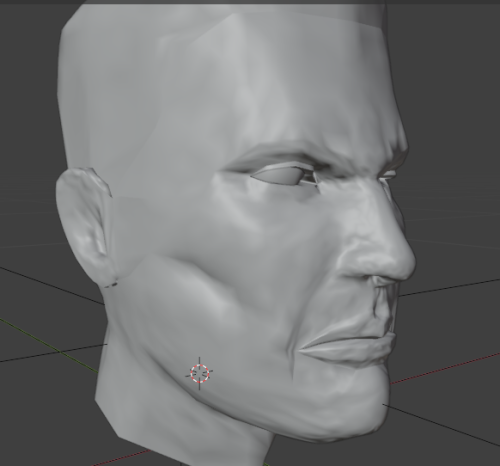
I remeshed Canderous and retextured him i inspired myself with this artwork. I uploaded 2 versions of my textures. one more like the original textures and the other more like the image. I did not remade him AS the image but i was inspired.1 point -
Version 1.5.1
3,620 downloads
KMRP - KOTOR MODERN RESTORATION PATCH Any resolution, properly scaled UI, controller support and engine fixes for KOTOR 1 Any resolution | 800x600 to 8K | 4:3 | 16:10 | 16:9 | 21:9 | 32:9 | Windows, macOS and Linux ━━━━━━━━━━━━━━━━━━━━━━━━━━━━━━━━━━━━━━━━ HOTFIX 1.5.1 A hotfix for 1.5.0, for Windows and for Linux with Proton. If you play on Linux or SteamOS you need this version: 1.5.0 does not start there. Run the 1.5.1 installer over your existing install; there is no need to restore first. The macOS version is not affected and stays at 1.5.0. Linux and SteamOS. The game starts again under Proton. SteamOS is tested and working. Mods in Override always win. Load screen mods, texture mods and custom fonts work again. In 1.5.0 they were ignored whenever KMRP had a file of the same name. Translations. Their own fonts are used, with all their letters, at the right size. Tested with the Polish translation. Controller. Changing the resolution in the game no longer ends it, A plays the selected card in Pazaak, and movement no longer stutters with PadForge, DS4Windows and similar tools. Installer on Linux. It finds your Steam game by itself, and Restore Original completes. Temp folder. KMRP no longer leaves 177 MB behind at every start. Windows 7. The "ordinal 40 not found in Cabinet.dll" error is removed. On Linux and SteamOS, set KOTOR's controller layout in Steam to Gamepad. Otherwise the game gets no controller. The installer reminds you. ━━━━━━━━━━━━━━━━━━━━━━━━━━━━━━━━━━━━━━━━ WHAT IS KMRP? Vanilla KOTOR was built around fixed pixel sizes and interface layouts designed for resolutions such as 640x480. On modern displays this causes tiny text, overlapping list entries, undersized icons, broken map scaling and other interface problems. KMRP fixes these problems in the game engine itself. One installer, one click, and one click to undo everything. It changes how the game looks, fits and controls, and nothing about its story, quests or balance. ━━━━━━━━━━━━━━━━━━━━━━━━━━━━━━━━━━━━━━━━ WHAT IS NEW IN 1.5 No resolution to choose. The game starts at your display's own resolution. Its Screen Resolution setting lists every size and refresh rate your display supports, and a change takes effect at once, with no restart and no patching again. Controller support, built in. A controller works on every screen, with the right button pictures for your pad (Xbox or PlayStation), rumble and a Controller Layout screen. Xbox-style HUD. Modelled on the console version. On by default, can be switched off. Above 60 frames per second. An option installs D3M0's High FPS Fixes, switched on by itself above 60 Hz. macOS. The Steam game, on Intel and Apple Silicon Macs, with its own installer. swkotor.exe is no longer rewritten. On Windows the changes are applied in memory each time the game starts, through KOTOR Patch Manager's runtime. ━━━━━━━━━━━━━━━━━━━━━━━━━━━━━━━━━━━━━━━━ WHAT IT FIXES Readable text with properly scaled list rows Inventory, Abilities and Store icons and rows scale correctly Item stack counts remain visible with larger fonts, in the inventory and in shops Popups and check boxes grow with the screen Long item description crash fixed, along with several rare crashes Area map fills its frame, fog of war covers the complete map, markers scale and are clicked where you see them HUD minimap follows your character Movies play at the game's resolution, with no switch to 640x480, and are not cropped on wide screens HD art: higher-quality portraits, item icons and menu art Every shape from 4:3 to 32:9 is covered, from 800x600 up to 8K: 66 common resolutions have menus built for them, and any other size gets menus fitted to it. ━━━━━━━━━━━━━━━━━━━━━━━━━━━━━━━━━━━━━━━━ PLATFORMS Windows: the Steam, GOG and disc 1.03 versions. The installer checks the game's file before doing anything and refuses any other build. macOS: the Steam game, on Intel and Apple Silicon Macs. The macOS version stays at 1.5.0. Linux: the Windows installer through Proton. SteamOS is tested and working with 1.5.1. No Steam Deck itself was tested. ━━━━━━━━━━━━━━━━━━━━━━━━━━━━━━━━━━━━━━━━ INSTALLATION Install other content mods (K1CP, K1R and so on) first. Start the game once so its settings file exists. Run the KMRP installer and press Start Patching. There is no resolution to pick. To undo everything, run it again and press Restore Original. Linux and SteamOS: run the installer with protontricks-launch --appid 32370, then set KOTOR's controller layout in Steam to Gamepad. If you use KOTOR Patch Manager, KMRP's two patches are listed there and other patches can be added beside them. ━━━━━━━━━━━━━━━━━━━━━━━━━━━━━━━━━━━━━━━━ INSTALLER OPTIONS Controller support, and with it the Xbox-style HUD High FPS Fix (D3M0's High FPS Fixes) HD item icons Map-note corrections (Derslok) Driver compatibility for lighting, fog and shadows on modern graphics cards (Synchro) ━━━━━━━━━━━━━━━━━━━━━━━━━━━━━━━━━━━━━━━━ COMPATIBILITY KMRP 1.0 was tested with KOTOR 1 Community Patch 1.10.0 and KOTOR 1 Restoration 1.2. KMRP 1.5.1 was tested with KOTOR 1 Community Patch 1.10.0 and with the Polish translation. Since 1.5.1, files that other mods put in the Override folder always win over KMRP's. ━━━━━━━━━━━━━━━━━━━━━━━━━━━━━━━━━━━━━━━━ CREDITS ndix UR: KOTOR High Resolution Menus 1.5 Synchro: K1 Modern Driver Compatibility 1.2.0, and published area-map research Derslok: K1 Area Map Fixes D3M0: High FPS Fixes Lane Dibello and the KOTOR Patch Manager project: the runtime KMRP's patches run on MadDerp: Party Portraits JackInTheBox: KOTOR 1 HD Icon Pack 1.0 RaymanGT: HD menu and UI asset set Xelu: Free Controller & Key Prompts Bundled work is included with its authors' permission or under its licence. Full notices are in the repository. ━━━━━━━━━━━━━━━━━━━━━━━━━━━━━━━━━━━━━━━━ SOURCE AND CHANGELOG github.com/RayesDiyab/KMRP-KOTOR-Modern-Restoration-Patch Licence: GPL-3.0. Unofficial; you must own the game.0 points
.thumb.png.d8b108d1620cfd7d697f7271e60714db.png)