
Leaderboard



Popular Content
Showing content with the highest reputation on 09/09/2026 in Files
-
Version 1.6
4,882 downloads
KMRP - KOTOR MODERN RESTORATION PATCH 1.6 Any resolution, properly scaled UI, text and HUD sizes of your choice, controller support and engine fixes for KOTOR 1 Any resolution | 800x600 to 8K | 4:3 | 16:10 | 16:9 | 21:9 | 32:9 | Windows, macOS and Linux ━━━━━━━━━━━━━━━━━━━━━━━━━━━━━━━━━━━━━━━━ NEW IN 1.6 The biggest update since 1.0, for Windows, Linux and macOS. Over 1.5 or 1.5.1, run the installer and press Upgrade: it keeps your settings, and there is no need to restore first. The original Xbox controls. LB pauses, RB switches party member, the triggers change target, X queues, Y flourishes, B disengages, and Start opens the menus where you left them. Every button can be remapped. Pazaak, swoop racing and the gun turret with a controller, as on the Xbox. Text Size and Font. Four text sizes in Graphics Options, and HD Font, the game's own font redrawn sharp, as the new default. Original Font, and Modded Font for fonts in your Override folder, are there too. HUD Size and Icon Size. Every part of both HUDs, and feat, power and skill icons, larger or smaller. Live Adaptive Layout. 73 of the game's 85 menu layouts are laid out as the game runs, a mod's included, so GUI mods are no longer forced to 640x480. Mods keep their changes. A mod's copy of a file KMRP also changes keeps both, and the mod wins where they disagree. No menu flashing on NVIDIA, and Windows Auto HDR and RTX HDR keep working. Movies and Alt-Tab. 16:9 movies on ultrawide screens, no screen reset after a movie, and Alt-Tab in full screen comes back at once. A 57 MiB installer instead of 140, every resolution ready before the first start, and Apply New Settings to change an option without installing again. A native Linux installer, and the Mac version updated to 1.6, now for the Mac App Store game as well. Marked Empty Containers by ShaeMyName, on by default. The full list is in the changelog on GitHub. ━━━━━━━━━━━━━━━━━━━━━━━━━━━━━━━━━━━━━━━━ WHAT IS KMRP? Vanilla KOTOR was built around fixed pixel sizes and interface layouts designed for resolutions such as 640x480. On modern displays this causes tiny text, overlapping list entries, undersized icons, broken map scaling and other interface problems. KMRP fixes these problems in the game engine itself. One installer, one click, and one click to undo everything. It changes how the game looks, fits and controls, and nothing about its story, quests or balance. ━━━━━━━━━━━━━━━━━━━━━━━━━━━━━━━━━━━━━━━━ SINCE 1.5 No resolution to choose. The game starts at your display's own resolution. Its Screen Resolution setting lists every size and refresh rate your display supports, and a change takes effect at once, with no restart and no patching again. Controller support, built in. A controller works on every screen, with the right button pictures for your pad (Xbox, PlayStation, Switch or Steam Deck), rumble and a Controller Layout screen. Xbox-style HUD. Modelled on the console version. On by default, can be switched off. Above 60 frames per second. An option installs D3M0's High FPS Fixes, switched on by itself above 60 Hz. swkotor.exe is not rewritten. On Windows the changes are applied in memory each time the game starts, through KOTOR Patch Manager's runtime. ━━━━━━━━━━━━━━━━━━━━━━━━━━━━━━━━━━━━━━━━ WHAT IT FIXES Every shape from 4:3 to 32:9 is covered, from 800x600 up to 8K: 66 common resolutions have menus built for them, and any other size gets menus fitted to it. ━━━━━━━━━━━━━━━━━━━━━━━━━━━━━━━━━━━━━━━━ PLATFORMS Windows: the Steam, GOG and disc 1.03 versions. The installer checks the game's file before doing anything and refuses any other build. Linux: a native installer (AppImage) for the game under Proton, or the Windows installer through Protontricks. SteamOS is tested and working. No Steam Deck itself was tested. macOS: the Steam game and the Mac App Store game, on Intel and Apple Silicon Macs, with its own installer. The Linux and macOS installers are on the GitHub release page. ━━━━━━━━━━━━━━━━━━━━━━━━━━━━━━━━━━━━━━━━ INSTALLATION Install other content mods (K1CP, K1R and so on) first. Start the game once so its settings file exists. Run the KMRP installer and press Start Patching (Upgrade over an older KMRP). There is no resolution to pick. To change an option later, change it in Advanced Settings and press Apply New Settings. To undo everything, run it again and press Restore Original. Linux and SteamOS: run the AppImage, or the Windows installer with protontricks-launch --appid 32370, then set KOTOR's controller layout in Steam to Gamepad. Otherwise the game gets no controller. KOTOR Patch Manager: KMRP's two patches are listed there, and other patches can be added beside them. ━━━━━━━━━━━━━━━━━━━━━━━━━━━━━━━━━━━━━━━━ INSTALLER OPTIONS Controller support, and with it the Xbox-style HUD High FPS Fix (D3M0's High FPS Fixes) HD item icons Map-note corrections (Derslok) Marked Empty Containers (ShaeMyName) Driver compatibility for lighting, fog and shadows on modern graphics cards (Synchro's K1 Modern Driver Compatibility 2.0.1) ━━━━━━━━━━━━━━━━━━━━━━━━━━━━━━━━━━━━━━━━ COMPATIBILITY KMRP 1.0 was tested with KOTOR 1 Community Patch 1.10.0 and KOTOR 1 Restoration 1.2. KMRP 1.5.1 was tested with KOTOR 1 Community Patch 1.10.0 and with the Polish translation. Files that other mods put in the Override folder always win over KMRP's. Since 1.6, a mod's menus are laid out for your screen like the game's, and a mod's copy of a file KMRP also changes keeps both sets of changes. ━━━━━━━━━━━━━━━━━━━━━━━━━━━━━━━━━━━━━━━━ CREDITS Bundled work is included with its authors' permission or under its licence. Full notices are in the repository. ━━━━━━━━━━━━━━━━━━━━━━━━━━━━━━━━━━━━━━━━ SOURCE AND CHANGELOG github.com/RayesDiyab/KMRP-KOTOR-Modern-Restoration-Patch Licence: GPL-3.0. Unofficial; you must own the game.1 point -

Version 1.6
54,144 downloads
=PartySwap= A KNIGHTS OF THE OLD REPUBLIC II: THE SITH LORDS MODIFICATION ORIGINAL AUTHOR: DarthTyren (darthtyren@gmail.com) CURRENT MAINTAINER: Leilukin LATEST VERSION: 1.6 FILE NAME: PartySwap 1.6.7z CONTACT: E-mail to Leilukin at contact@leilukin.com, or message to Leilukin on Deadly Stream 1. DESCRIPTION: This mod allows the player to recruit both Handmaiden and Disciple in the same playthrough regardless of the player character's gender. If you install the “PartySwap Item” add-on of this mod, when Disciple joins your party on Dantooine, a usable item named PartySwap will be added to your inventory, and will appear in the shield item slot of the quick bar. You can use this PartySwap item to add or remove Handmaiden from your current party, including replacing any member of your current party with Handmaiden, as long as you are able to choose your party at that point of the game. This item was created to work around the limitations of not being able to select Handmaiden from the party selection screen after Disciple joins your party and takes Handmaiden’s slot in the party selection screen. However, Handmaiden remains part of the Ebon Hawk crew, and you can still talk to Handmaiden. Alternatively, you can choose to install the “Full Party Select” patch from KotOR Patch Manager (KPM), which expands the number of slots displayed in the party selection screen, and thus allows you to add Handmaiden to your current party, or remove her from your current party, without needing to install the “PartySwap Item” add-on and use the PartySwap item. For the PartySwap mod to take effect, you must install this mod before you leave the secret academy on Telos, where Handmaiden joins your party. For the “PartySwap Item” add-on to take effect, you must install the add-on before Discple joins your party on Dantooine. NOTE: Since July 2023, the original mod author DarthTyren has officially handed over the management and development of this mod to Leilukin, due to DarthTyren's departure from the KotOR modding scene. Therefore, if you have questions about or encountered any issues with this mod, Leilukin is the one to contact for. 2. INSTALLATION: First and foremost, make sure you have The Sith Lords Restored Content Mod (TSLRCM) installed, since TSLRCM is REQUIRED for this mod to work. After downloading this mod, extract the mod’s 7z file to anywhere you like, as long as it is not within the KotOR 2 directory. Run the PartySwap Installer.exe installer located inside the extracted folder. Choose the “Main Installation” option, select your KotOR 2 game folder as your KotOR 2 directory path, click the “Install” button and let the installer do its job. If you also have M4-78 Enhancement Project (M4-78EP) installed, when PartySwap is getting installed, you may receive a warning that a resource located at the 650jedi.dlg file in your Override folder is shadowing this mod's changes in modules\650dan.mod. This is to be expected. Regardless, if you have M4-78EP installed, you need to install this mod’s compatibility patch for M4-78EP. FOR REGULAR TSLRCM USERS: Choose the installation option you want, and select your KotOR 2 game folder as your KotOR 2 directory path, click the “Install” button and let the installer do its job. FOR STEAM WORKSHOP USERS: If you have subscribed to The Sith Lords Restored Content Mod (TSLRCM) from the Steam Workshop, for your KotOR directory path, you must choose TSLRCM's Steam Workshop folder, NOT the main KOTOR 2 directory. The directory of the Steam Workshop version of TSLRCM is \Steam\SteamApps\Workshop\content\208580\485537937, while the directory of the TSLRCM + M4-78EP combined Steam Workshop mod is \Steam\SteamApps\Workshop\content\208580\1402798020. Note that PartySwap will NOT be added to the Steam Workshop. Reading this on why it is NOT recommended to use the Steam Workshop for modding the KotOR games: PARTYSWAP ITEM ADD-ON OR FULL PARTY SELECT PATCH: To keep being able to add Handmaiden to your current party after Disciple joins your party, you have two options: Install the “PartySwap Item” add-on from this mod: After installing the main part of this PartySwap mod, select “ADD-ON: PartySwap Item” from the install option drop-down of PartySwap Installer.exe, and click the “Install” button. If you choose to install this add-on, you must install the add-on before Disciple joins your party on Dantooine to be able to receive the PartySwap item. Install the “Full Party Select” patch from KotOR Patch Manager (KPM): (Note that it does not matter if you apply the Full Party Select patch before or after installing this PartySwap mod) Download and install KotOR Patch Manager. Extract the downloaded archive, then run KpatchLauncher from the “bin” sub-folder. If you are on Windows, it is recommended to check "Use library proxy" under the "Options" menu at the top bar, otherwise you may need to launch KotOR 2 through KPM for the KPM patches to take effect. This step is not required if you are on macOS or Linux. In the KPM window, set the "Game" path to target your KotOR 2 game’s folder that contains your KotOR 2 game executable (such as swkotor2.exe), and the "Patches" path to target KPM’s “patches” sub-folder. Select and apply the “Full Party Select” patch. Go to KPM’s “patch” sub-folder, then the “FullPartySelect additional files” sub-folder, and put the partyselect_p.gui file into your game’s Override folder. When you install this mod, two new folders named "backup" and “uninstall” will be created by the installer in the same folder as the installer. Do not delete the folders or any of the files within the folder if you are planning on uninstalling this mod. COMPATIBILITY PATCHES: This mod also provides compatibility patches for the following mods: M4-78 Enhancement Project (M4-78EP) danil-ch's Kreia's Fall Cutscene (In-Game) deathdisco’s Coruscant Jedi Temple Go to the “Compatibility Patches” folder included in this mod, read the READ ME file within the sub-folder and follow the instructions to make PartySwap compatible with these mods. Note: The "Source" folder includes the source of the script used by this mod for modders' reference. Ignore the "Source" folder if you only want to install and play this mod. 3. UNINSTALLATION: Run PartySwap Installer.exe. rom the “Tools” drop-down menu, select “Uninstall Mod / Restore Backup”, then confirm to uninstall the mod. If you have also installed the PartySwap Item add-on, it will uninstall the add-on first. After uninstalling the add-on, you need to select Yes to delete the most recent backup folder, then select “Uninstall Mod / Restore Backup” from the drop-down menu again to uninstall the main part of the mod. 4. KNOWN ISSUES: None currently known. If you find any bugs or issues, please report them by posting on PartySwap’s download page or support thread on the Deadly Stream forums, or contact Leilukin directly. 5. MOD COMPATIBILITY: Apart from The Sith Lords Restored Content Mod (TSLRCM), which is required for this mod to work, any mod that edits Kreia's endgame dialog (904kreia.dlg) or Zuka's dialog on Dxun (zuka.dlg) is incompatible with this mod, unless they merge in installation. In that case, you must install PartySwap first. This mod is not compatible with any other mod that involves putting the holorec.dlg file in the Override folder. If you want to use this mod, make sure you DO NOT have holorec.dlg in your Override folder, or Handmaiden will not be able to join your party when you play a female character! This mod provides compatibility patches for M4-78 Enhancement Project (M4-78EP), danil-ch's Kreia's Fall Cutscene (In-Game) and deathdisco’s Coruscant Jedi Temple. This mod is compatible with KOTOR 2 Community Patch. This mod is compatible with all Leilukin’s mods for KotOR 2, including the romance mods, as long as you follow the instructions from Leilukin’s mod. If you want to use danil-ch and Darth Hayze’s Extended Enclave, downloading and installing a separate compatibility patch is required to make PartySwap compatible with Extended Enclave. If you use Leilukin’s Handmaiden and Female Exile – Disciple and Male Exile Romance, you need to use the patch included in that mod. Otherwise, go to this page for a standalone compatibility patch: https://deadlystream.com/files/file/1304-partyswap-and-extended-enclave-compatibility-patch/ This mod is compatible with WildKarrde’s TSL Expanded Ending, as long as you install PartySwap first before installing TSL Expanded Ending. 6. PERMISSION: You may modify this mod for personal use or show this mod in screenshots. However, please do not redistribute or re-host this mod. Do not release your mods containing assets from this mod without permission. 7. CREDITS: Fair Strides — Can almost take credit for half the mod getting done, by helping with scripts, understanding Waypoints and TSLPatcher, etc. Thank you! Thanks to the wonderful modding community at Holowan Labs/DeadlyStream for helping with the problems faced with the development of this mod. Special thanks to VarsityPuppet, for teaching about #include scripts and how this mod does not need to bother with them. Sith Holocron — Thanks for the aid with VO splicing! Snigaroo — For testing and reporting bugs, including the game breaking bug surrounding Disciple's endgame dialog, suggesting improvements to the mechanics of the PartySwap item, as well as transferring the ownership of this mod file to Leilukin on Deadly Stream. OpenKotOR — For developing and maintaining HoloPatcher as an alternative to TSLPatcher to make installing and uninstalling this mod faster. danil-ch — For giving permission to create compatibility patch for Kreia’s Fall Cutscene (in-game) JCarter426 — For developing SithCodec for modding audio files of the KotOR games THIS MODIFICATION IS NOT SUPPORTED BY BIOWARE/OBSIDIAN ENTERTAINMENT OR LUCASARTS OR ANY LICENSERS/SPONSORS OF THE MENTIONED COMPANIES. USE THIS FILE AT YOUR OWN RISK AND NEITHER THE ABOVE MENTIONED COMPANIES NOR THE AUTHOR IS RESPONSIBLE FOR ANY DAMAGE CAUSED TO YOUR COMPUTER FOR THE USAGE OF THIS FILE.1 point -
Version 1.0.2
144 downloads
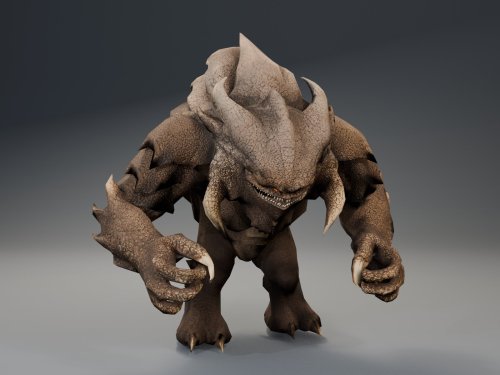
AI DISCLOSURE & FEEDBACK I use AI often in my workflows to assist with creating my mods, including handling monotonous and repetitive tasks. You should assume that anything I post has had AI assistance in some way. As I stated in my Dathomir WIP post, I expect discussion of my projects to remain professional and focused on the actual artwork, performance, and gameplay. Constructive criticism that helps improve the art or gameplay is welcome. Derogatory statements about AI will be ignored. I am here to improve the finished product, and I will not change my workflow to accommodate personal objections to AI. HQ Terentatek Replacement — KOTOR I Version 1.0.0 by ShaolinGhost Bring a new look and movement set to KOTOR I’s Terentateks. This replacement pairs a custom creature model and 4K textures with converted Star Wars: The Old Republic animations, including claw-slashing attacks, idle and movement cycles, damage reactions, death and roar motions. The replacement covers every creature using the original Terentatek appearance throughout the base game, including Kashyyyk, Korriban and scripted transformations. Existing encounter scripts, quests, statistics, loot and native soundset assignments are preserved. Campaign roars occur when the original game scripts or animation system request them. Requirements KOTOR I for PC. No additional mods, runtime DLLs, custom launcher or executable patches are required. TSLPatcher is included for Windows installation. The 4096 × 4096 textures require additional graphics memory. Installation Close the game and extract the entire ZIP into its own folder outside the game directory. Run TSLPatcher.exe, select Install Mod, and choose the KOTOR I folder containing swkotor.exe. Do not select Override. Wait for installation to finish and check the log for errors. Keep the installer and its backup folder. The installer merges the Terentatek appearance settings into an existing appearance.2da and preserves unrelated changes. Do not manually copy the supplied appearance.2da into Override. A new game is not required for this appearance replacement; restart the game after installing. Compatibility Install after other appearance-table mods. Mods that replace the same Terentatek appearance or the same model and texture resources conflict. Creatures assigned a separate appearance by another mod are outside this replacement’s scope. K1R compatibility has not been tested; the required compatibility field is therefore marked No. This release contains no test maps, test creatures, saves or plot scripts. The gallery includes four Blender model renders showing the front, profile, claw attack and roar, plus one in-game screenshot from the development test area. Render lighting differs from in-game lighting. Uninstallation Restore the files from this installation’s backup folder. Remove files created by the installer only when no previous version was backed up. See README.txt for the complete file list and appearance.2da instructions. Uninstall in reverse installation order to avoid discarding later mods’ table changes. Credits ShaolinGhost — custom creature model, textures and mod release. BioWare / Electronic Arts — SWTOR skeleton and animation source assets, converted for KOTOR I. BioWare / LucasArts — KOTOR I and its creature sounds. stoffe and Fair Strides — TSLPatcher. MDLOps contributors, the Blender project and the KOTOR modding community. Permissions Please contact ShaolinGhost on Deadly Stream before redistributing or using the custom model and textures in another release. Rights to original game assets remain with their respective owners. This is a free, unofficial modification and is not made, distributed or supported by BioWare, Electronic Arts, LucasArts, Lucasfilm or Disney.1 point -
Version 1.0.0
138 downloads
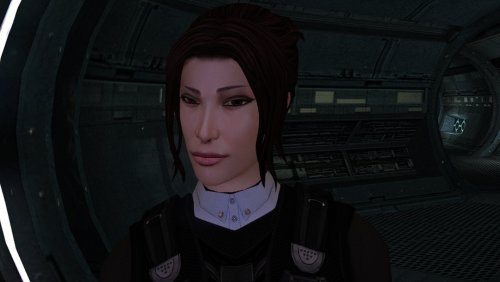
The mod replaces the PFHA04 model and textures. To Install 1. Download: PFHA04 2. Copy all files to the Knights of the Old republic's Override folder. (Example location - C:\Program Files (x86)\Steam\steamapps\common\swkotor\Override) 3. When/if prompted to overwrite files, press okay. 4. If you like the mod; leave a comment or endorse! (It would be much appreciated) Made with love.1 point -
Version 1.0.0
117 downloads
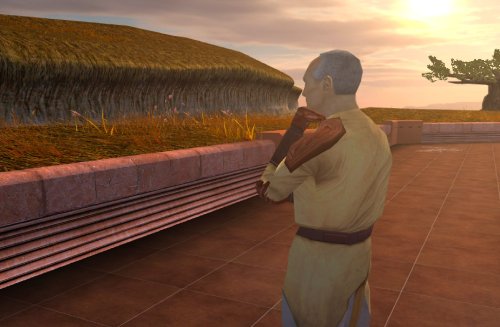
Despawns Nemo once you cleanse the grove. DESCRIPTION After returning to the Enclave from cleansing the grove, the Council gives you a mission to investigate the nearby ruins, telling you they already sent a Jedi to investigate and fear the worst since he hasn’t returned. This Jedi turns out to be Nemo, but since the game doesn’t despawn Nemo from the courtyard until after this conversation, you’ll literally pass him on your way into the Enclave. Apparently the whole time they were awaiting his return he was standing outside reflecting on the beauty of nature, before suddenly remembering he was supposed to be doing something and sprinting over to the ruins. This mod fixes the issue so Nemo will no longer be outside the Enclave once you have cleansed the grove. INSTALLATION Move the file from “to override” to your override folder. UNINSTALLATION Remove k_pdan_14a_area.ncs from your override folder. COMPATIBILITY Compatible the KOTOR 1 Community Patch, which this mod forwards the script changes from. Not compatible with other mods that edit the script k_pdan_14a_area.ncs, though I’m not aware of any. PERMISSIONS You may use this mod however, but any redistribution or modification should include the source script, maintaining the comment headers and credit to K1CP. CREDITS offthegridmorty JC, DarthParametric - K1CP source script for k_pdan_14a_area1 point -
125 downloads
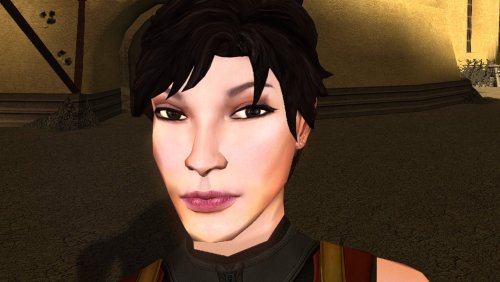
The mod replaces the PFHA03 model and textures. Thanks to DarthParametric, without him this mod would not have seen the light of day. To Install 1. Download: PFHA03 2. Copy all files to the Knights of the Old republic's Override folder. (Example location - C:\Program Files (x86)\Steam\steamapps\common\swkotor\Override) 3. When/if prompted to overwrite files, press okay. 4. If you like the mod; leave a comment or endorse! (It would be much appreciated) Made with love.1 point -
Version 1.0.0
26 downloads
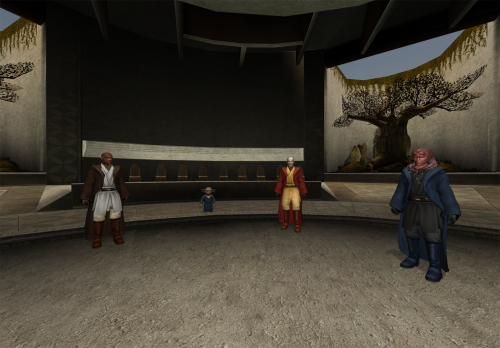
I make my deadly stream debut with this retexture. As soon as I saw the K1 Movie-Style Jedi Master Robes by N-DReW25 I fell in love because a mod I loved in TSL was finally put into K1. Download it here: However recently I had the thought of "what if I made the robes to look like the Red Brown and Blue robes from JC's Fashion Line I: Cloaked Jedi Robes for K1 1.4 which you can also download here if you want that mod instead: it turned out to be quite successful. I used the white and black robes from the OG movie style robes mod by DeadMan and made new textures from the red blue and qel Droma Robes which I will upload separately Initially I made it just for myself but I decided to share it on Deadly Stream for others to enjoy, I hope you like my first mod. INSTALLATION: Step 1: you must install the original mod by N-DReW25 for this mod to work properly which also requires JC's Jedi robes mod I have left the links for both mods above the installation. Step 2: to install this retexture, first you must look through the names of all files from this mod, then delete all .tpc files with the same name as all files in this mods folder as this mod's files are in .tga format and tpc files appear first in Kotor, meaning if you just put this mods files in the Override, the mod would not work because the .tpc files are still in the Override folder (I would have just made the mod files .tpc files but this is my first mod and I don't know how to do that im a complete noob) Once you have put the retexture files in the override and deleted the .tpc files with the same name you are good to go enjoy my first mod and let me know if you come across any bugs. -Sebastian the Blue Bird0 points -
Version 1.0.0
79 downloads
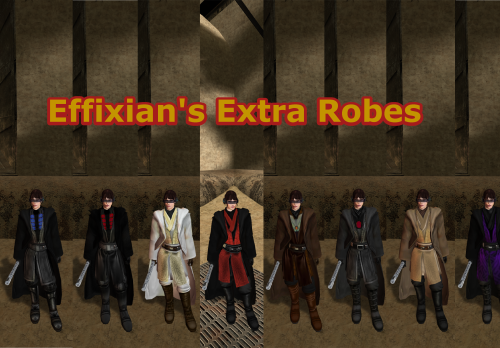
Upon finding Effixian's Extra JC's Jedi Robes mod, I instantly fell in love as I loved all the designs and it added new robes to Kotor, as this game was very much lacking in terms of unique robes unlike TSL, However I also loved the K1 Movie style Jedi Robes by N-DReW25, and wanted to use both mods ,but no patches existed to make the two mods compatible, so I pulled a Thanos and decided to do it myself which led me to making this mod. All these textures were made by me, with the help of other textures for the K2 movie style robes mod by Deadman. I hope you enjoy this mod. INSTALLATION: 1. you must install JC's Jedi robes mod by JCarter426 for this to work properly: 2. you have to install the K1 Movie style Master robes by N-DReW25: 3. then install Effixian's Extra Robes mod by Effix: 4. then finally drop the files for this mod into the Override folder, Replace any files if prompted. CREDITS: Thanks to: DeadMan for making the OG TSL mod JCarter426 for his Cloaked Jedi robes mod N-DReW25 for his master robes mod for K1 Effix for his Extra Robes mod Dark Hope for allowing me to use her Electromesh texture for this mod Hope you enjoy this mod -SebastianTheBlueBird0 points -
Version 1.0.0
21 downloads
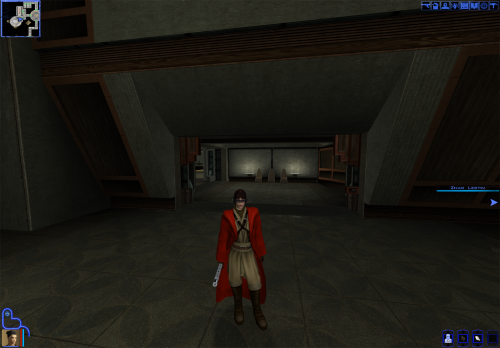
similar to my Red-Brown-Blue retexture for K1 Movie-Style Jedi Master Robes by N-DReW25, this mod changes the look of the Qel Droma Robes for Kotor 1 utilizing Effixian's Qel-Droma Robes Reskin for JC's Cloaked Jedi Robes 1.0.2. INSTALLATION 1. you must install JC's Cloaked Jedi Robes for everything to work properly: 2. install the same Qel Droma robes mod by Effixian: 3. then install the Movie Style Master Robes mod by N-DReW25: and finally you can then install this mod to Properly install this mod, delete all mods with the names starting with PFBI05 and PMBI05 in the Master Robes mod folder because they are in tpc format and this mod is in .tga format meaning it won't work while the .tpc files are in you're override folder. Hope you enjoy this mod -Sebastian The Blue Bird.0 points