

Leaderboard




Popular Content
Showing content with the highest reputation on 08/31/2026 in Files
-
Version 1.0.0
58 downloads
A Mod for Star Wars Knights of The Old Republic II Author: N-DReW25 1.0 Release Date: 30.08.2026 Installation: Please install the Revenge of Revan mod FIRST before this mod! No exceptions! To install the "Alt Corellia City Reskin" and/or the "TOR Corellia Skybox" addon simply open their folders, copy their files to the Override folder, and overwrite the pre-existing files. The "Coruscant Skybox Pack" comes in two versions, the "Demo Coruscant Skybox" and the "Vanilla Coruscant Skybox" - you can only install one. Pick the one you want to install and open its folder, copy their files to the Override folder, and overwrite the pre-existing files. The "Party Clothes" addon is installed via a HoloPatcher. If you want to use this, you must install the "Episode One & a Half" addon BEFORE you install Party Clothes. Once that is installed, just click on the INSTALL.exe, add your Kotor II file directory, click install, and the addon shall be installed. To install "Episode One & a Half", you must do the following: 1) Copy the "dialog.tlk" file and paste it into your "Knights of the Old Republic II" folder, overwriting the previous one. 2) Open the "For Override" folder, press Cntrl + A on your keyboard to select the files, copy them all into your Override folder, and overwrite the pre-existing files. 3) Open the "For Modules" folder, press Cntrl + A on your keyboard to select the files, copy them all into your Modules folder, and overwrite the pre-existing files. 4) Open the "For StreamMusic" folder, press Cntrl + A on your keyboard to select the files, copy them all into your StreamMusic folder, and overwrite the pre-existing files. 5) Open the "For StreamSounds" folder, press Cntrl + A on your keyboard to select the files, copy them all into your StreamSounds folder, and overwrite the pre-existing files. 6) Open the "For StreamVoice" folder, press Cntrl + A on your keyboard to select the files, copy them all into your StreamVoice folder, and overwrite the pre-existing files. Consult the "Changelog.txt" for a full list of features added in this patch. Description: The ROR Addon Pack is a mod pack for the Revenge of Revan mod (ROR) which contains features for the ROR mod which either got rejected from the main mod, are experimental in nature but could be used by players, or are preview features for an upcoming Episode release. As of right now, the pack contains the following addons: Episode One & a Half: This addon contains all of the bug fixes and new content for Episode One that's going to be added in the Episode Two release. Consider this addon a "public beta" before it is added to the main ROR mod as part of Episode Two. Just so that you know, Episode Two will contain the bug fixes/new content for Episode One's Corellia and add the planet Nar Shaddaa to continue the story from where Episode One left off. Episode One & a Half shall be removed from the addon pack once Episode Two releases and will probably be replaced with Episode Two & a Half, Episode Three & a Half etc at later dates. Release 1.0 currently has new content for the opening of the mod up until the Player reports the Tyrena Station Security Recordings to Bao-Dur. A future update shall include improved content for the Esbek Hotel up until the very end of the mod. Main Changelog: Item Specific Changelog: Party Clothes: Similar to Atton and Mira in Kotor II, this addon adds unique clothing that only Uldir and Drayen can wear. Drayen's armor slot will become locked (similar to Mandalore in Kotor II), however, his clothing has very good stats for the early game meaning you won't want to replace it anyway. In future updates, clothing shall be added to future party members when they are added. TOR Corellia Skybox: Replaces the ROR skybox with the Corellia skybox from The Old Republic MMO. Coruscant Skybox Pack: Contains alternative skyboxes for Coruscant. Right now only the ROR Demo Coruscant Skybox and the Vanilla Coruscant Skybox are available. Alt Corellia City Reskin: This is a WIP addon that replaces the current Corellia textures. These may, or may not, be added to the main mod at some point. It is also possible that different textures may be added to the mod instead of these. As these are a WIP there may be textural anomalies in certain parts of the mod. Known Bugs: This mod shouldn't have any bugs but if there are please report them to me on Deadlystream. Incompatibilities: To be added! Permissions: Assets from this mod may not be used without explicit permission from the authors. Voice Actors: JC2: B8-C2. Sith Holocron: HoloNet News Droid [Coruscant and Corellia]. Thanks to: Logan: Beginning the restoration effort for K1! ROR's Main Dev Team: For developing the original K1R mod! Contributors of the Main ROR mod: For contributing to Episode One's release. AxConsortium70: Extensive beta testing, to the point that they fixed some of the more illusive bugs they discovered! Jonathan7: Assets from Force Fashion II, a mod already in ROR, have been modified and included in this pack for the Episode One & a Half addon. RedRob41: Assets from ROR Episode One have been modified and included in this pack for the Episode One & a Half addon! 90SK: Armor and Mask assets from his mods have been added into this pack for the Episode One & a Half addon! SilverEdge9: More assets from BOSSR have been modified and included in this pack for the Episode One & a Half addon! Flammenwerfer: Their mod "The Sith Mask" has been used in this pack for the Episode One & a Half addon. The readme of their mod on NexusMods gives modders free permission to use this asset as long as credit is given to them! ScrierOne: Their mod "Sith Mask Reskin" has been used in this pack for the Episode One & a Half addon. Their NexusMods page states that modders have permission to use this asset! Vurt: For making the Hutt textures in his "Vurt's KotOR Visual Resurgence" mod, these textures were used as a base for ROR's Hutts! Elayerfawkes45: For making the Hutt textures in his "Hutt remesh and retextured with bumps" mod, these textures were used as a base for ROR's Hutts! Detran: For making the Hutt textures in his Detran's Hutts" mod, these textures were used as a base for ROR's Hutts! Sith Holocron: Voice filters for B8-C2, the HoloNet News Droids, and a Royal Guard NPC! Leilukin: Assets from their mod "Missing K1 Party Member Ports for TSL [Modder's Resource]" has been used in this pack for the Episode One & a Half addon. It is a Modder's Resource! Doc Valentine: Creator of the ROR Demo Coruscant Skybox which has become an addon of this pack! Scorchlicious: For fetching the TOR Corellian Skybox for the pack! ElevenLabs Website: For the custom AI VO service! Bioware: For such an amazing game! Obsidian: For such an amazing sequel! Fred Tetra: For Kotor Tool! Cortisol: For Holocron Toolset! Everyone who downloads the mod! Legal: THIS MODIFICATION IS NOT SUPPORTED BY BIOWARE/OBSIDIAN ENTERTAINMENT, LUCASARTS, DISNEY OR ANY LICENSERS/SPONSORS OF THE MENTIONED COMPANIES. USE OF THIS FILE IS AT YOUR OWN RISK AND THE ABOVE-MENTIONED COMPANIES OR THE AUTHOR IS NOT RESPONSIBLE FOR ANY DAMAGE CAUSED TO YOUR COMPUTER FOR THE USAGE OF THIS FILE.1 point -

Version 3.0.0
1,028 downloads
Description: A tiny mod for KotOR 1 that gives the player the option to avoid becoming a Jedi and remain a Soldier, Scout, or Scoundrel for the entire game. It adds two new replies towards the end of the second conversation with the Jedi Council. As you can see from the screenshot, the new replies start with "[Refuse Jedi Training]", so there should be no confusion as to what they do or which ones they are. If you choose not to be a Jedi, that conversation leads directly into the "corruption in the grove" quest, skipping over several parts of the Jedi training quest. Scripts are included to enable cross-classing as a non-Jedi. So, for example, a Scout can cross-class as a Soldier, etc. The option to cross-class as a non-Jedi is given through subtitles at the end of that second conversation with the Council. To avoid cross-classing as a non-Jedi, simply choose "No" when asked if you want to cross-class. Note that there is no second opportunity to cross-class or become a Jedi. If you change your mind later or you misclick, you'll have to reload or use a save editor. If you're wondering why anyone would want to do this, some people might want to do a "challenge run" without lightsabers or Force powers. Others might want to roleplay a trooper, smuggler, or bounty hunter-type character who refuses to use the Force. If you're wondering how this might be explained from a story standpoint, considering that the PC is regularly referred to as Padawan or Jedi, my explanation is that the PC is a "nominal Jedi". The PC is Force Sensitive and the Council considers them a (stubborn, uncooperative, foolish, and possibly evil) member of the Jedi Order, but the PC refuses to cultivate their Force abilities (in any obvious way), to wear robes, or to use lightsabers. Other than the Council and a few others who insist on treating the PC as a Jedi because they "should be a Jedi", NPCs are playing along. Or they don't know any better. They encounter a Force Sensitive or someone who seems like a Jedi, and assume that they must be one. File Index: dan13_vandar.dlg dan13_zhar.dlg A bunch of custom scripts Installation: Open the I Don't Want to Be a Jedi 3.0 archive and extract the loose .dlg files and .ncs scripts into your Override folder. Ignore the "Source Scripts" folder. Uninstallation: Remove the .dlg files found in the archive from your Override folder. The scripts won't do anything without the .dlg files, so you can leave them or delete them. Credits: Fred Tetra for KotOR Tool Fair Strides for DLG Editor Dotalink for the cross-classing as a non-Jedi idea Bioware for making KotOR in the first place1 point -
Version 1.0.0
684 downloads
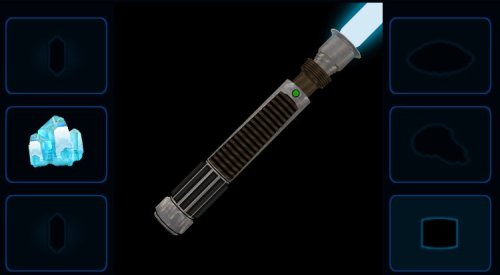
Default Hilt Replacement Mod 2025 ---------------------- Author Kaidon Jorn, December-March 2025/2026 DHRM 2025 Changes: ---------------------------------- Blade models and planes are set to the correct Z position. New blue double-bladed model made from original blue single bladed model. New (old) models for red single and double bladed. Green single bladed made into new green double bladed. Yellow single and double model textures touched up. Purple models reskinned. New orange single bladed made from orange double bladed. New viridian single bladed made from viridian double bladed. New silver single and double bladed models made from (very old) yellow double bladed model. New cyan double bladed model made from cyan single bladed model. Bronze models textures touched up. Otherwise no change. Short saber model remapped and reskinned. Made new icons for all models. Purple blade is now violet instead of amethyst. This mod will replace all of the default game's lightsaber hilt models and adds new 3D blade models and textures - courtesy of Crazy34 and his crazy awesome modder's resource. I have, of course, tweaked his blade textures again to my own preferences and increased the ambient lighting glows by 0.2 on all single and double bladed lightsabers (short stayed the same). In this version I've removed most of my old hilt models and replaced them with ones that may have never been released before, but if I didn't replace the entire model then I remapped and reskinned that previously existing model. All saber icons have been remade to be consistent with my SLM2024 icon backgrounds (I know I said I wouldn't, but to heck with that). Much thanks to Crazy34 for use of his new 3D blade models and textures and thank you to Deadly Stream for hosting all my mods. To install run the .exe and choose the location of the game (not the override itself). To uninstall take them all back out.1 point -
Version 1.0.0
262 downloads
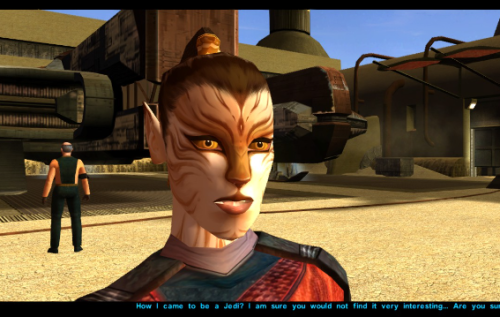
Just a personal mod made public after a few requests on reddit. Let me know if you have any issues. Completely re-textured Juhani's face to unbald her and give her a more cat-like appearance. Made a few edits to her model in blender to make her chin smaller and flatten her nose to reflect the more feline re-texture. Install Drop all three files into your Override folder and enjoy Uninstall Just delete the files in Override, shouldn't be any issues.0 points -
Version 1.0b
77 downloads
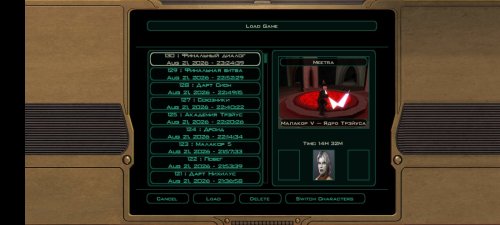
DS female + m4-78 saves. So good saves, but on m4 78 I little use save editor cuz it's bugged and annoyed planet lmao. Good playing! TSLRCM: M4 78 EP:https://deadlystream.com/files/file/277-m4-78-enhancement-project/0 points
