

Jump to content

6 Screenshots

About This File

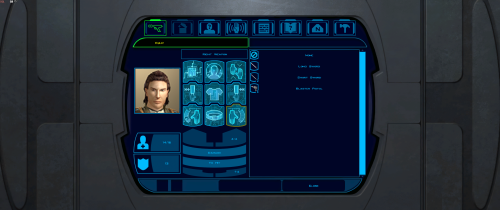
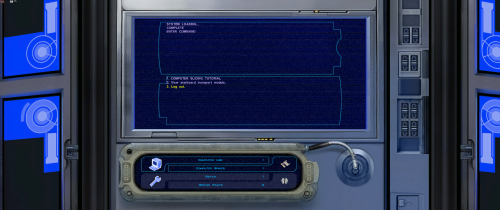
Expands supported resolutions and scales all Menus/HUD.

Install
- Use with Kotor Patch Manager: https://github.com/LaneDibello/Kotor-Patch-Manager
- Download and extract Scaled Kotor patches to Patch Manager's 'patches' folder.
- Editable K1 Executable or GOG version required
- Download and copy HD UI Menu Pack textures to override directory
- Copy Scaled Kotor textures to override directory, overwrite if asked.
- Apply all "Scaled" patches with patch manager and then click launch.
- Alt Tab Patch and Movie Patch are recommended.
- Change resolution in game
- please report any bugs

Recommended
- K1 Modern Driver Compatibility Patch

Source: https://github.com/J0-o/ScaledKotorWidescreenPatch

Roadmap:
- trace and upscale the font to a higher resolution to improve clarity at resolutions above 1080p
- adjust margins in items lists
- increase default feat icon size

Edited by J


What's New in Version 1.2.3   See changelog

Released

- ScaledKotor.ini added to control the scaling
- HD map grid and icons
- more HD menu icons

  • Like 3
  • Influence Gained 1
  • Light Side Points 1

User Feedback

Recommended Comments

J

Posted (edited)

21 hours ago, JasonRyder said:

What are the differences between this mod and KMRP- KOTOR Modern Restoration Patch?


I don't know much about the execution of the KMRP mod. There's details on it's github page.
Scaled Kotor was developed with a few goals in mind:
1) Scaling to any resolution while maintaining the menus aspect ratio and not stretching any UI assets.
2) compatibility with Kotor Patch Manger and it's rapidly growing patch ecosystem
3) HD UI assets that preserve the original aesthetic. This includes the expanded menu borders, icons, backgrounds, and hud.

This a large project(much larger than I expected) that I am still updating. The current focus is new icons.

Edited by J

Join the conversation

You can post now and register later. If you have an account, sign in now to post with your account.

Guest
Add a comment...

×   Pasted as rich text.   Paste as plain text instead

  Only 75 emoji are allowed.

×   Your link has been automatically embedded.   Display as a link instead

×   Your previous content has been restored.   Clear editor

×   You cannot paste images directly. Upload or insert images from URL.

×
×
  • Create New...

Important Information

By using this site, you agree to our Guidelines.
