
Jump to content

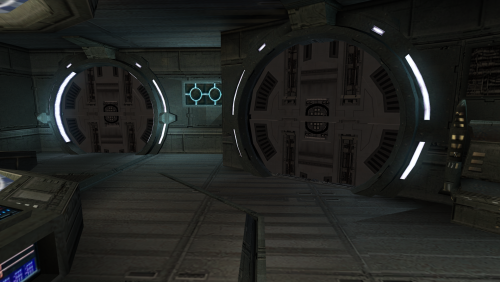
1 Screenshot

About This File

This mod adds interior doors to the Ebon Hawk, ported from the prologue in KotOR II.

Each door has a trigger set around it which will cause it to open/close automatically as you approach/move away from it.

Only the main ebo_m12aa are has the doors added in. The Ebon Hawk stunt modules where the Dodonna cutscenes etc take place remain unaffected.

This mod will not work with saved games in which you have already entered the Ebon Hawk, as module data is stored within saves. You will need to use a save from before you obtain the Ebon Hawk or a start a new game for the changes to apply.

Installation

Run the included installer and the mod will install itself.

Bugs

No “bugs” as such to speak of, but there can be a little bit of funkiness during cutscenes/scripted NPC actions such as Sasha and Lur Arka Sulas leaving the ship.

They will get a bit confused and turn on the spot in front of each door they pass whilst the door opens.

The only way around this would be to go in and change the scripts for each “cutscene”, but I don’t personally feel it’s necessary.


What's New in Version 1.0   See changelog

Released

No changelog available for this version.

  • Like 8
  • Thanks 1

User Feedback

Recommended Comments

StellarExile

Posted

I really like this idea! Do you know if it’s compatible with other mods that affect the Ebon Hawk interior like Parry Conversations?

SithNadd

Posted

On 7/3/2025 at 5:11 AM, StellarExile said:

I really like this idea! Do you know if it’s compatible with other mods that affect the Ebon Hawk interior like Parry Conversations?

It should be. The only changes this mod makes to any vanilla files is adding the doors and trigger entries to the .git file, everything else is completely untouched. :)

  • Thanks 1
CapitaineSpoque

Posted

Hi there! Super cool idea to add the triggers, i'll do something similar for the security pannel i've implemented in the Hawk.

Just a small feedback: I think you used male local strings for doors name, if i remember correctly using male strings will end up with the name not being shown with a female character, while using female strings will show the name whatever the gender.

Im 99% sure this is the case for items, Not sure tho for anything else like placeables or doors but it'd be worth it to check this out i think?

Gj for the mod!

SithNadd

Posted

On 7/11/2025 at 11:36 PM, CapitaineSpoque said:

Hi there! Super cool idea to add the triggers, i'll do something similar for the security pannel i've implemented in the Hawk.

Just a small feedback: I think you used male local strings for doors name, if i remember correctly using male strings will end up with the name not being shown with a female character, while using female strings will show the name whatever the gender.

Im 99% sure this is the case for items, Not sure tho for anything else like placeables or doors but it'd be worth it to check this out i think?

Gj for the mod!

That only applies if you're playing certain non-English version of the game which has both a dialog.tlk and dialogf.tlk file, from what I can gather. 

I'm using an English version with just the one .tlk file and it works perfectly:

IT4x4Q5e_t.png

  • Like 1
CapitaineSpoque

Posted

2 hours ago, SithNadd said:

That only applies if you're playing certain non-English version of the game which has both a dialog.tlk and dialogf.tlk file, from what I can gather. 

I'm using an English version with just the one .tlk file and it works perfectly:

IT4x4Q5e_t.png

Allright good to know :) 

Join the conversation

You can post now and register later. If you have an account, sign in now to post with your account.

Guest
Add a comment...

×   Pasted as rich text.   Paste as plain text instead

  Only 75 emoji are allowed.

×   Your link has been automatically embedded.   Display as a link instead

×   Your previous content has been restored.   Clear editor

×   You cannot paste images directly. Upload or insert images from URL.

×
×
  • Create New...

Important Information

By using this site, you agree to our Guidelines.
