







About This File
=Juhani Item Pack for TSL=
A KNIGHTS OF THE OLD REPUBLIC II: THE SITH LORDS MODIFICATION
AUTHOR: Leilukin
FILE NAME: Juhani Item Pack for TSL.7z
LATEST VERSION: 1.1
CONTACT: E-mail to contact@leilukin.com, or message to Leilukin on Deadly Stream
1. DESCRIPTION:
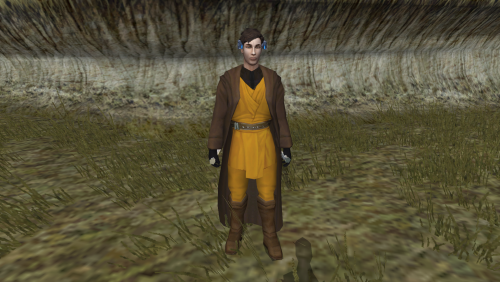
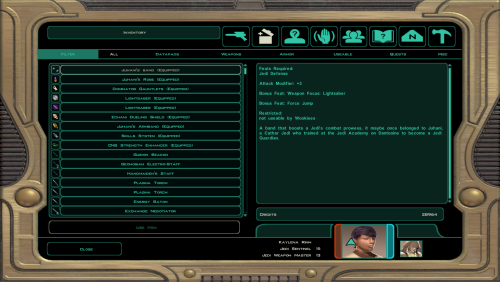
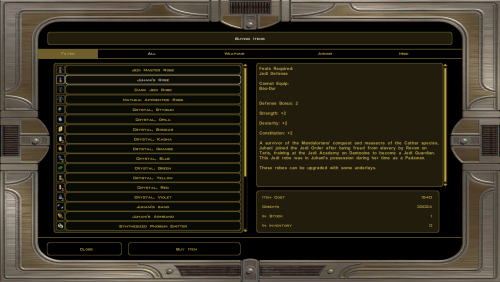
This mod adds a new Jedi robe, a new headband and a new armband to In KotOR II: TSL, named Juhani's Robe, Juhani's Armband and Juhani's Band, with item descriptions that indicate these items once belonged to Juhani.
I have also made unique inventory icons for Juhani's Robe and Armband, as well as a unique texture for Juhani's Robe. The properties of these items are chosen to reflect Juhani's Jedi Guardian class in the first KotOR game. In addition, Juhani's Robe can be upgraded with underlays.
These Juhani items can be purchased from Daralaa's store at the Dantooine Enclave Courtyard. Daralaa's store is chosen to be the location to obtain these items because Juhani was trained at the Jedi Academy on Dantooine, and Daralaa is a salvager who sells Jedi artifacts.
If you want to add the Juhani items manually via the cheat console or KotOR Savegame Editor, here are the item codes:
- llk_juharmband —— Juhani's Armband
- llk_juhband —— Juhani's Band
- llk_juhjedirob —— Juhani's Robe
The concept of this mod started with my frustration with the fact that Juhani is literally the only KotOR 1 party member whose existence never gets acknowledged in the entire TSL, even in cut content. Even among the KotOR 1 party members who do not appear in TSL, Jolee gets mentioned in a conversation with Handmaiden as well as a robe and a headband that are named after him, while Mission and Zaalbar are referenced in an unused item named Vao Armband. Therefore, I decided to make this mod to add custom items that reference Juhani.
2. INSTALLATION:
Extract the Juhani Item Pack for TSL.7z archive you downloaded to anywhere you like, as long as it is not within the KotOR 2 directory. Run Install.exe, point the installer to your KotOR directory, where swkotor2.exe is located, and let the installer do its job.
When you install this mod, two new folders named "backup" and “uninstall” will be created by the installer in the same folder as the installer. Do not delete the folders or any of the files within the folder if you are planning on uninstalling this mod.
***IMPORTANT NOTE FOR STEAM WORKSHOP USERS:***
If you have subscribed to the Steam Workshop version of TSLRCM, you must install this mod to TSLRCM's Steam Workshop folder instead of the main KOTOR 2 directory. The directory of the Steam Workshop version of TSLRCM is \Steam\SteamApps\Workshop\content\208580\485537937.
Note: The "Source" folder includes the source of the script used by this mod for modders' reference. Ignore the "Source" folder if you only want to install and play this mod.
3. UNINSTALLATION:
Run Install.exe and select your KotOR directory where you installed this mod. From the “Tools” drop-down menu, select “Uninstall Mod / Restore Backup”, then confirm to uninstall the mod.
4. KNOWN ISSUES:
None currently known. If you find any bugs or problems, please let me know.
5. MOD COMPATIBILITY:
This mod is compatible with The Sith Lords Restored Content Mod (TSLRCM).
Any other mod that modifies daraala.dlg, Daralaa's dialogue file, may conflict with this mod. I have set up the mod's installer to patch the dialogue file instead of hard replacing it to improve compatibility with other mods as much as possible. If you are using another mod that modifies Daralaa's dialogue, and that mod places Daralaa's dialogue in the Override folder, you need to install my mod after that mod.
This mod is not compatible with any other mod happens to use the same file names for the textures of the Jedi Robe (PFBI70 and PMBI70) and inventory icons for the Jedi Robe and the armband (ia_jedirobe_070 and ii_frarmbnds_070 respectively).
6. PERMISSION:
You may modify this mod for personal use or show this mod in screenshots.
You may use the custom llk_darastore script from this mod to make a compatibility patch with your mod, but do not claim the script as your own.
Do not use any of the custom items from this mod, including llk_juharmband, llk_juhband and llk_juhjedirobe, in your mod without my permission.
Do not upload this mod to Steam Workshop.
7. CREDITS:
OpenKotOR for Holocron Toolset and HoloPatcher
tk102 for DLG Editor
KobaltBlu for KotOR Scripting Tool
THIS MODIFICATION IS NOT SUPPORTED BY BIOWARE/OBSIDIAN ENTERTAINMENT OR LUCASARTS OR ANY LICENSERS/SPONSORS OF THE MENTIONED COMPANIES. USE THIS FILE AT YOUR OWN RISK AND NEITHER THE ABOVE MENTIONED COMPANIES NOR THE AUTHOR IS RESPONSIBLE FOR ANY DAMAGE CAUSED TO YOUR COMPUTER FOR THE USAGE OF THIS FILE.
Edited by Leilukin
What's New in Version 1.1.0 See changelog
Released
- Switch from TSLPatcher to HoloPatcher as the mod's installer.
- Improve compatibility with Steam's Linux port of TSL, by renaming mod files to lowercase.
