

Search the Community
Showing results for tags 'side'.
Found 4 results
-
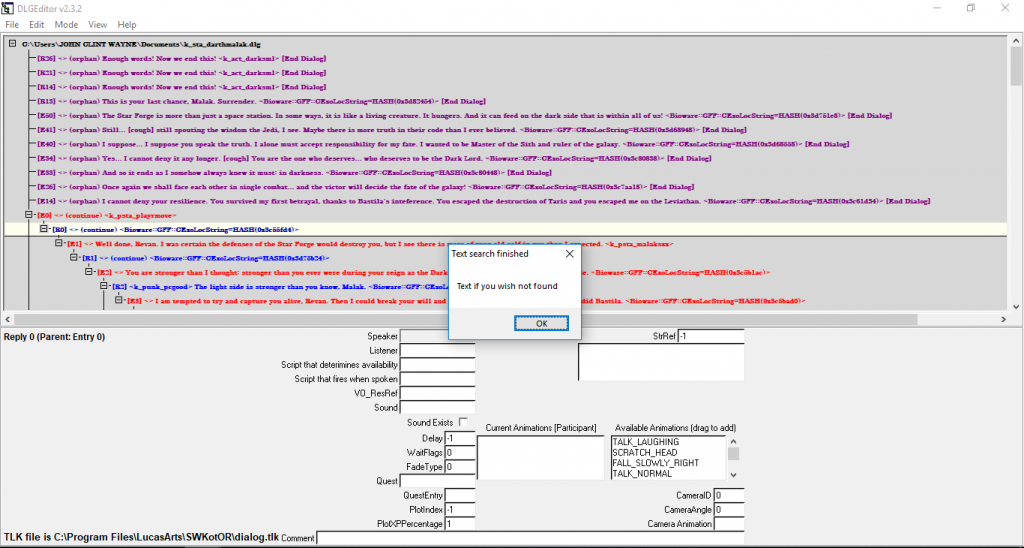
I am having trouble with some of the dialogue files for Star Wars: Knights Of The Old Republic, specifically: “k_sta_darthmalak”, at the moment. The problem is that some lines of text are not appearing in certain dialogue editors. The line that I am specifically looking for is: “I was saved from the darkness, Malak. You can be too, if you wish.”. As you can see in the enclosed image I could easily find that line when I used the Conversation Editor that is built into KOTOR Tool. But when I open it in the Dialogue Editor the line is not available even after I have opened all the options like show orphan lines. I have attached images of the Conversation Editor and Dialogue Editor with the “k_sta_darthmalak” file opened to show what I mean. I ask for help in getting ALL lines to show up. I want to edit dialogue with my own scripts as I am modding the game to extra enjoyment. I may be having the same problem with multiple dialogue files so I want to get it resolved so I can edit the files that I want. Thank you in advance.

-

Version 1.0
726 downloads
Description: I always hated the zombie looking dark side transitions that Kotor brought, and when Shem released his Movie Style Dark Side transition mod, I immediately downloaded it. However, DarthParametric released a skin of PMHH01 to look like Mullet Man from Kotor 1, and that is my favorite reskin. It did not include any movie style dark side transitions, so I decided to skin some myself. Original credit goes to DarthParametric for the awesome skin. Portraits are included, however they aren't the best, as I am still getting used to modding. Constructive criticism would be appreciated. Installation: Drop all files in the override folder of your KotOR 2 Directory. Bugs: None that I have seen, let me know if any do pop up. Notes: This does work with my PMHH01 fix, you may download both in whichever order you choose. -
As most know, I released a fix for PMHH01 and a reskin done by DarthParametric. Well I've decided to go beyond and reskin Dopak to look like Edward Kenway from Assassin's Creed IV. I also have more planned, keep you informed and tell me what you all think. This will include movie style dark side transitions.


-
 View File PMHH01 Reskin to Mullet Man with Movie Dark SIde Transitions Description: I always hated the zombie looking dark side transitions that Kotor brought, and when Shem released his Movie Style Dark Side transition mod, I immediately downloaded it. However, DarthParametric released a skin of PMHH01 to look like Mullet Man from Kotor 1, and that is my favorite reskin. It did not include any movie style dark side transitions, so I decided to skin some myself. Original credit goes to DarthParametric for the awesome skin. Portraits are included, however they aren't the best, as I am still getting used to modding. Constructive criticism would be appreciated. Installation: Drop all files in the override folder of your KotOR 2 Directory. Bugs: None that I have seen, let me know if any do pop up. Notes: This does work with my PMHH01 fix, you may download both in whichever order you choose. Submitter Squall Lionhart Submitted 07/05/2014 Category Skins TSLRCM Compatible Yes


