

Leaderboard



Popular Content
Showing content with the highest reputation on 11/07/2026 in Files
-

Version 1.0.2
15,617 downloads
=Trask Ulgo Without Tutorials= A KNIGHTS OF THE OLD REPUBLIC MODIFICATION AUTHOR: Leilukin FILE NAME: Trask Ulgo Without Tutorials.7z LATEST VERSION: 1.0.2 CONTACT: E-mail to contact@leilukin.com, or message to Leilukin on Deadly Stream 1. DESCRIPTION: This mod removes the tutorial elements from the game. For the Endar Spire, the removed in-game tutorial elements include: Trask Ulgo and Carth Onasi's tutorial dialogues on the Endar Spire The Security skill requirement to open the second door on the Endar Spire The requirement to equip a melee weapon to enter the bridge The levelling up requirement to exit the bridge The tutorials in the computer and droid repair screens In addition, this also removes the workbench tutorials on Taris, and the galaxy map tutorial on the Ebon Hawk. This mod is inspired by darthbdaman's Tutorial Remover mod. However, the key difference is my mod keeps Trask as your party member in the first area of the Endar Spire. My mod is made for players who do not wish to go through the tutorials again when replaying KotOR, but still wants Trask a party member to help them to fight through the first area of the Endar Spire. In order for this mod to take effect, you need to start a completely new game. For the best experience with this mod, it is also recommended to turn off the tutorial pop-ups in the setting menu. 2. INSTALLATION: Extract the Trask Ulgo Without Tutorials.7z file you downloaded to anywhere you like, as long as it is not within the KotOR directory. Run Install.exe, select your KotOR game folder as your KotOR directory path, click the “Install” button and let the installer do its job. If you have installed other mods, when you install my mod, you may receive warnings about the installer skipping at least one .mod file because it already exists in your Modules folder. Do not need to worry about those warnings, as it is just the way I set up the installer to ensure my mod will be installed properly if you are not using any other mods. When you install this mod, two new folders named "backup" and “uninstall” will be created by the installer in the same folder as the installer. Do not delete the folders or any of the files within the folder if you are planning on uninstalling this mod. The "Source" folder includes the source of the scripts used by this mod for modders' reference. Ignore the "Source" folder if you only want to install and play this mod. 3. UNINSTALLATION: Run Install.exe and select your KotOR directory where you installed this mod. From the “Tools” drop-down menu, select “Uninstall Mod / Restore Backup”, then confirm to uninstall the mod. 4. KNOWN ISSUES: None currently known. If you find any bugs or problems, please let me know. 5. MOD COMPATIBILITY: This mod is compatible with KOTOR 1 Community Patch (K1CP). I recommend installing my mod after K1CP. If you want to use KotOR 1 Restoration (K1R), you need to install this mod after K1R. This mod is compatible with Marius Fett's Carth's Republic Uniform and Flight Suit. This mod is compatible with Revanator's Custom Class Items. This mod is not compatible with darthbdaman's Tutorial Remover and Jedi From the Start. Any other mod that modifies Trask's dialogue will likely conflict with this mod. 6. PERMISSION: You may use assets from this mod as part of your mod, but you must credit me as the creator of these assets. 7. CREDITS: Fred Tetra for the KotOR Tool OpenKotOR for Holocron Toolset and HoloPatcher tk102 for DLG Editor Vriff for NeoDLG JdNoa for DeNCS KotOR Script Decompiler KobaltBlu for KotOR Scripting Tool THIS MODIFICATION IS NOT SUPPORTED BY BIOWARE/OBSIDIAN ENTERTAINMENT OR LUCASARTS OR ANY LICENSERS/SPONSORS OF THE MENTIONED COMPANIES. USE THIS FILE AT YOUR OWN RISK AND NEITHER THE ABOVE MENTIONED COMPANIES NOR THE AUTHOR IS RESPONSIBLE FOR ANY DAMAGE CAUSED TO YOUR COMPUTER FOR THE USAGE OF THIS FILE.1 point -
Version 1.0.0
260 downloads
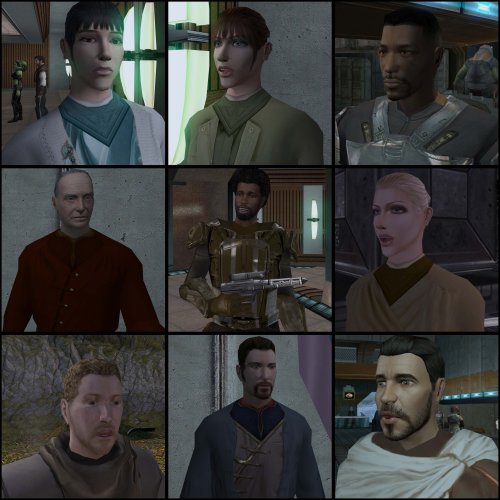
===================================================== [TSL] Lily's NPC Overhaul - HD Models & Added Diversity ===================================================== Mod for Knights of the Old Republic II - The Sith Lords Author: Lily File Name: NPC_Overhaul.zip Latest Version: 1.0 --- 1. DESCRIPTION: Tired of nearly every basic human NPC looking the same? This mod overhauls the human NPC (commoner) appearances in KotOR II. Heads: - Tweaks several of the models to adjust hair and fix some UV mapping. - 39 head textures are included, 35 reworked and 4 extra ones. They look much more distinct than the vanilla ones. - The heads are more evenly distributed across characters so, for example, 75% of white male heads were previously "white male 1" and now it should evenly by spread across all of the white male heads. - Ralon on Dantooine is given his unique appearance that I guess they made and forgot to give him... Clothing: - 11 updated clothing texture sets for the standard male and female commoner outfits. --- 2. INSTALLATION: Run Install.exe and select your KotOR 2 game directory. There are 2 installation options. - Heads: includes 39 updated heads with unique looks and gives human NPCs more unique appearances. - Clothing: includes 11 updated clothing textures for both male and female NPCs. These two options are independent and can be installed in either order, or separately. A "backup" folder is created by the installer in the same directory. Don't delete it if you plan to uninstall later. --- 3. UNINSTALLATION: Run Install.exe, select your KotOR 2 directory, and use the "Tools > uninstall/restore backup" option to revert all changes made by this mod. --- 4. KNOWN ISSUES: If you have already visited Dantooine, Ralon may not have his updated appearance. You should use a save from before arriving. If you find any bugs or problems, please report them. --- 5. MOD COMPATIBILITY: Should be compatible with all mods other than ones that also attempt to change commoner NPC appearances. Compatible with TSLRCM. Do not use the Steam Workshop for KotOR. It will almost certainly end with compatibility issues. --- 6. SUPPORT: My mods are free to use. You do not need to pay for them, but if you would like to say thanks, you can buy me a coffee! --- 7. PERMISSIONS: Please let me know if you plan on using any of the files in my mod for your own mod. The answer is "yes you may", but I would like to know what you are doing with it! Do not directly reupload this mod anywhere else. --- 8. THANKS: - Dark Hope - Uses assets from her various commoner head mods. MOST of the clothing uses Dark Hope's textures. Pretty much all credit for the clothing portion of this mod goes to her other than swapping her alternate textures into the additional slots that KotOR II uses! Thank you! https://deadlystream.com/profile/16561-dark-hope/content/?type=downloads_file&change_section=1 https://deadlystream.com/files/file/2516-npc-clothing-m/ https://deadlystream.com/files/file/2515-npc-clothing-f/ - Vurt - Some of the clothing textures - redrob41 - Original model fixes - Fred Tetra - KotOR Tool - Cortisol - Holocron Toolset & HoloPatcher - Fair Strides - TSLPatcher - seedhartha - KotOR Blender THIS MODIFICATION IS NOT SUPPORTED BY BIOWARE/OBSIDIAN ENTERTAINMENT OR LUCASARTS OR ANY LICENSORS/SPONSORS OF THE MENTIONED COMPANIES. USE THIS FILE AT YOUR OWN RISK.1 point -
Version 1.0.0
159 downloads
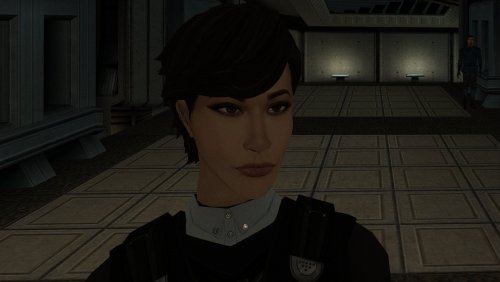
The mod replaces the PFHA01 model and textures. To Install 1. Download: PFHA01 2. Copy all files to the Knights of the Old republic's Override folder. (Example location - C:\Program Files (x86)\Steam\steamapps\common\swkotor\Override) 3. When/if prompted to overwrite files, press okay. 4. If you like the mod; leave a comment or endorse! (It would be much appreciated) Made with love.1 point -

Version 1.0.2
6,523 downloads
Revamped FX MOD AUTHOR: Olegkuz1997 FOR WHICH GAMES: For Star Wars Knights of the Old Republic 1-2 Description: It's a fairly simple pak retexture of some of the game's (most notable) visuals. Some of them just don't look good, and some of them look downright awkward, which of course is forgiven for the game's seniority. I did it for myself, but who if anyone needs it, take it. My personal goal was to update the quality of the effects without slipping into tastelessness and to keep them generally true to Bioware beautiful art design. The insides of the mod: 1. Sparks displayed during every combat action in the game look a more colorful (honeyed) and leave a small tracer as opposed to the pale yellow vanilla ones. 2. Lightning, Force Drain, Death Field now look a more colorful. The spell curve has been replaced and is now more broken. The spell textures on the bodies have been completely redrawn, as I was not entirely satisfied with the previous version. Instead of a uniform “web” entangling the entire victim, now a large lightning bolt breaks into dozens of small dancing discharges. DF and FD now improved with AI and edited manually - to avoid monotony in textures. 3. Grenade blast marks look similar to the original ones, but with improved resolution and transparency. 4. Smoke became blacker and thicker. 5. Explosions became more decent, but this is just AI upscaling, not new textures. Maybe it's because I almost never use plasma grenades. Also replaced the texture of the droid fire gimmicks. Not perfect, heh, but at least it's not out of place. 6. The texture of the burning bodies became more sympotic thanks to transparency and less like a ridiculous orange shield. 7. The effects of the “fire sword” (Master Power Attack etc) are less intrusive, but the original idea and visual distinction are preserved. 8. Also various little things like blaster bolts, campfire, ice, carbonite etc. Note: ---------------- In the “Optional” folder there are alternative texture options, namely: Spell outline without small lightning bolts in a circle, visually cleaner (fx_conjure). Less intense fire blast texture. Matter of taste. I've been told it's less irritating to the eyes. Textures of the starry sky and nebulas. Not exactly FX but because why not. That gets rid of the “checkerboard” arrangement of stars and has a deeper black tone. Opengl32.dll - shader that increases the effect of bloom. Throw it into swkotor folder. All the above screenshots were made using it. Installation: ---------------- Drop tga and tpc files in your game’s Override folder. To uninstall: ---------------- Take them out again.1 point -
Version 1.5.1
4,180 downloads
KMRP - KOTOR MODERN RESTORATION PATCH Any resolution, properly scaled UI, controller support and engine fixes for KOTOR 1 Any resolution | 800x600 to 8K | 4:3 | 16:10 | 16:9 | 21:9 | 32:9 | Windows, macOS and Linux ━━━━━━━━━━━━━━━━━━━━━━━━━━━━━━━━━━━━━━━━ HOTFIX 1.5.1 A hotfix for 1.5.0, for Windows and for Linux with Proton. If you play on Linux or SteamOS you need this version: 1.5.0 does not start there. Run the 1.5.1 installer over your existing install; there is no need to restore first. The macOS version is not affected and stays at 1.5.0. Linux and SteamOS. The game starts again under Proton. SteamOS is tested and working. Mods in Override always win. Load screen mods, texture mods and custom fonts work again. In 1.5.0 they were ignored whenever KMRP had a file of the same name. Translations. Their own fonts are used, with all their letters, at the right size. Tested with the Polish translation. Controller. Changing the resolution in the game no longer ends it, A plays the selected card in Pazaak, and movement no longer stutters with PadForge, DS4Windows and similar tools. Installer on Linux. It finds your Steam game by itself, and Restore Original completes. Temp folder. KMRP no longer leaves 177 MB behind at every start. Windows 7. The "ordinal 40 not found in Cabinet.dll" error is removed. On Linux and SteamOS, set KOTOR's controller layout in Steam to Gamepad. Otherwise the game gets no controller. The installer reminds you. ━━━━━━━━━━━━━━━━━━━━━━━━━━━━━━━━━━━━━━━━ WHAT IS KMRP? Vanilla KOTOR was built around fixed pixel sizes and interface layouts designed for resolutions such as 640x480. On modern displays this causes tiny text, overlapping list entries, undersized icons, broken map scaling and other interface problems. KMRP fixes these problems in the game engine itself. One installer, one click, and one click to undo everything. It changes how the game looks, fits and controls, and nothing about its story, quests or balance. ━━━━━━━━━━━━━━━━━━━━━━━━━━━━━━━━━━━━━━━━ WHAT IS NEW IN 1.5 No resolution to choose. The game starts at your display's own resolution. Its Screen Resolution setting lists every size and refresh rate your display supports, and a change takes effect at once, with no restart and no patching again. Controller support, built in. A controller works on every screen, with the right button pictures for your pad (Xbox or PlayStation), rumble and a Controller Layout screen. Xbox-style HUD. Modelled on the console version. On by default, can be switched off. Above 60 frames per second. An option installs D3M0's High FPS Fixes, switched on by itself above 60 Hz. macOS. The Steam game, on Intel and Apple Silicon Macs, with its own installer. swkotor.exe is no longer rewritten. On Windows the changes are applied in memory each time the game starts, through KOTOR Patch Manager's runtime. ━━━━━━━━━━━━━━━━━━━━━━━━━━━━━━━━━━━━━━━━ WHAT IT FIXES Readable text with properly scaled list rows Inventory, Abilities and Store icons and rows scale correctly Item stack counts remain visible with larger fonts, in the inventory and in shops Popups and check boxes grow with the screen Long item description crash fixed, along with several rare crashes Area map fills its frame, fog of war covers the complete map, markers scale and are clicked where you see them HUD minimap follows your character Movies play at the game's resolution, with no switch to 640x480, and are not cropped on wide screens HD art: higher-quality portraits, item icons and menu art Every shape from 4:3 to 32:9 is covered, from 800x600 up to 8K: 66 common resolutions have menus built for them, and any other size gets menus fitted to it. ━━━━━━━━━━━━━━━━━━━━━━━━━━━━━━━━━━━━━━━━ PLATFORMS Windows: the Steam, GOG and disc 1.03 versions. The installer checks the game's file before doing anything and refuses any other build. macOS: the Steam game, on Intel and Apple Silicon Macs. The macOS version stays at 1.5.0. Linux: the Windows installer through Proton. SteamOS is tested and working with 1.5.1. No Steam Deck itself was tested. ━━━━━━━━━━━━━━━━━━━━━━━━━━━━━━━━━━━━━━━━ INSTALLATION Install other content mods (K1CP, K1R and so on) first. Start the game once so its settings file exists. Run the KMRP installer and press Start Patching. There is no resolution to pick. To undo everything, run it again and press Restore Original. Linux and SteamOS: run the installer with protontricks-launch --appid 32370, then set KOTOR's controller layout in Steam to Gamepad. If you use KOTOR Patch Manager, KMRP's two patches are listed there and other patches can be added beside them. ━━━━━━━━━━━━━━━━━━━━━━━━━━━━━━━━━━━━━━━━ INSTALLER OPTIONS Controller support, and with it the Xbox-style HUD High FPS Fix (D3M0's High FPS Fixes) HD item icons Map-note corrections (Derslok) Driver compatibility for lighting, fog and shadows on modern graphics cards (Synchro) ━━━━━━━━━━━━━━━━━━━━━━━━━━━━━━━━━━━━━━━━ COMPATIBILITY KMRP 1.0 was tested with KOTOR 1 Community Patch 1.10.0 and KOTOR 1 Restoration 1.2. KMRP 1.5.1 was tested with KOTOR 1 Community Patch 1.10.0 and with the Polish translation. Since 1.5.1, files that other mods put in the Override folder always win over KMRP's. ━━━━━━━━━━━━━━━━━━━━━━━━━━━━━━━━━━━━━━━━ CREDITS ndix UR: KOTOR High Resolution Menus 1.5 Synchro: K1 Modern Driver Compatibility 1.2.0, and published area-map research Derslok: K1 Area Map Fixes D3M0: High FPS Fixes Lane Dibello and the KOTOR Patch Manager project: the runtime KMRP's patches run on MadDerp: Party Portraits JackInTheBox: KOTOR 1 HD Icon Pack 1.0 RaymanGT: HD menu and UI asset set Xelu: Free Controller & Key Prompts Bundled work is included with its authors' permission or under its licence. Full notices are in the repository. ━━━━━━━━━━━━━━━━━━━━━━━━━━━━━━━━━━━━━━━━ SOURCE AND CHANGELOG github.com/RayesDiyab/KMRP-KOTOR-Modern-Restoration-Patch Licence: GPL-3.0. Unofficial; you must own the game.0 points
